メインコンテンツにスキップ
OpenAI

2026年5月15日

製品

ChatGPT の新しい家計管理体験

読み込んでいます...

本日、米国の Pro ユーザー向けに、ChatGPT の新しい家計管理体験のプレビュー提供を開始します。これにより、口座を安全に接続し、お金の流れをダッシュボードで確認し、自分の家計状況に基づいた質問を ChatGPT にできるようになります。しかも、データの管理権は常にご自身にあります。まずは少人数へのプレビュー提供から始め、実際の利用から学び、体験を改善し、慎重に拡大していきます。

お金は、住む場所、下す決断、大切な人の支え方、思い描く未来など、人生のほぼあらゆる面に関わっています。しかし今の家計管理では、現状を把握するだけでも、口座、アプリ、カード、ローン、スプレッドシートをつなぎ合わせる必要があることが少なくありません。それでも、全体像を把握したり次に何をすべきか判断したりするのは難しいことがあります。

すでに多くの人が ChatGPT を活用しています毎月 2 億人以上が、予算管理、投資に関する質問、選択肢の比較、将来の目標計画などのために ChatGPT を利用(新しいウィンドウで開く)しています。GPT‑5.5 の最近の進歩により、個人のお金の管理でしばしば求められる、複雑で文脈に大きく左右される問いに対する ChatGPT の推論力がさらに向上しました。

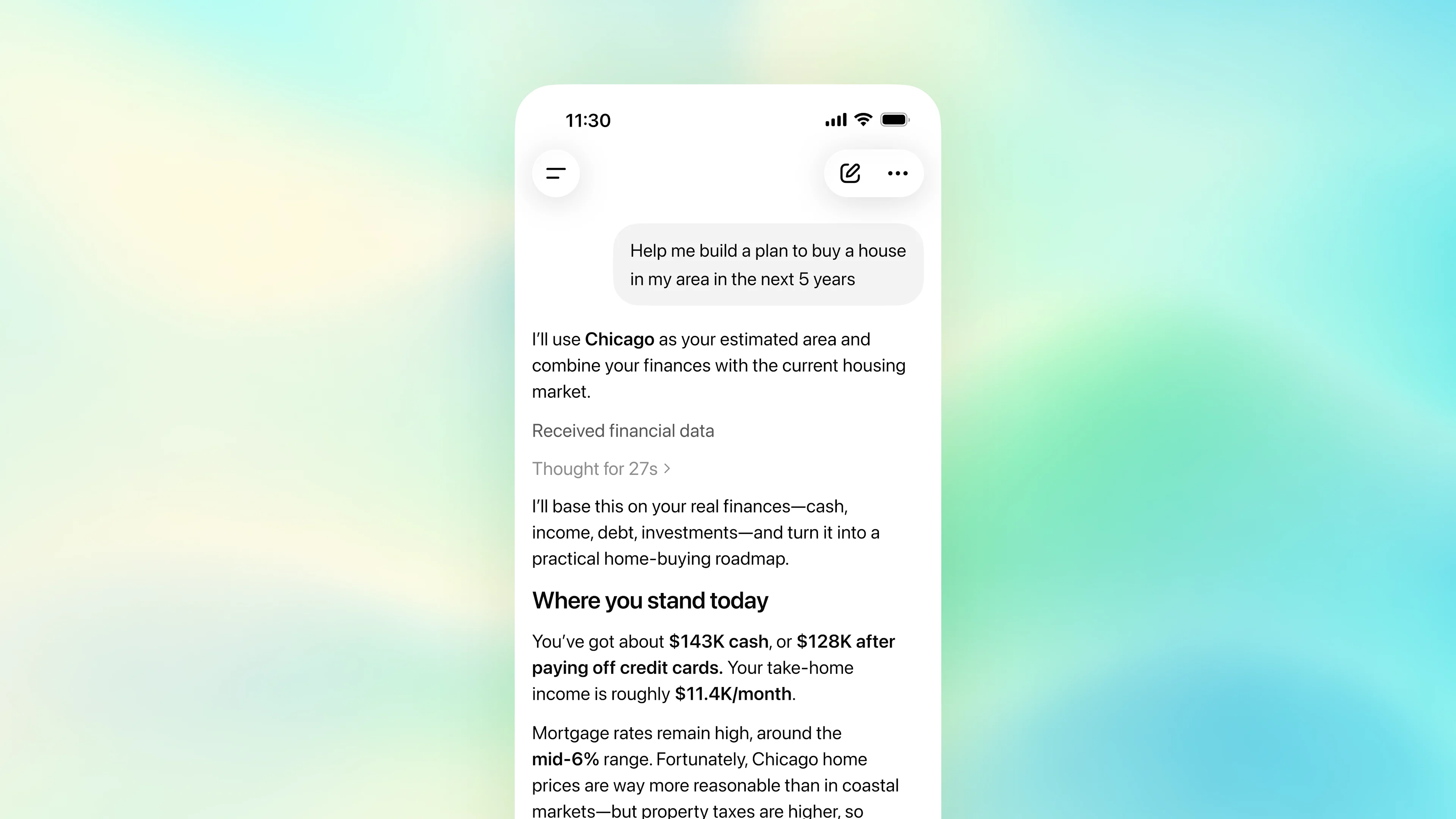
口座を接続すると、ChatGPT はその推論力を実際の家計状況や、目標・ライフスタイル・優先事項について共有された情報と組み合わせ、パターンの発見、トレードオフの理解、大きな意思決定の計画を、より状況に合った包括的な形で支援できます。たとえば、次のような質問ができます。

ユーザーの家計とシカゴの住宅市場データに基づいて5年間の住宅購入計画を作成する個人向け家計管理アシスタントを表示したモバイルアプリ

ChatGPT は、家計管理について情報を得て自信を持てるよう支援できますが、専門家による金融アドバイスに代わるものではありません。

本日より、米国の Pro ユーザー向けに、Web と iOS の ChatGPT で口座連携機能の提供を順次開始します。対応する金融機関は 12,000 以上です。まず初期利用から学び改善したうえで Plus に展開し、最終的にはすべての人が利用できることを目指します。

始め方

資産情報を接続する

始めるには、ChatGPT のサイドバーから Finances を開いて「Get started」(始める)を選ぶか、ChatGPT のどこからでも「@Finances、私の口座を連携して」と入力して会話を開始してください。 

その後、ChatGPT が Plaid を通じた安全な口座連携を案内します。Intuit のサポートも近日提供予定です。認証が完了すると、ChatGPT がデータの同期と分類を開始します。これには数分かかる場合があります。
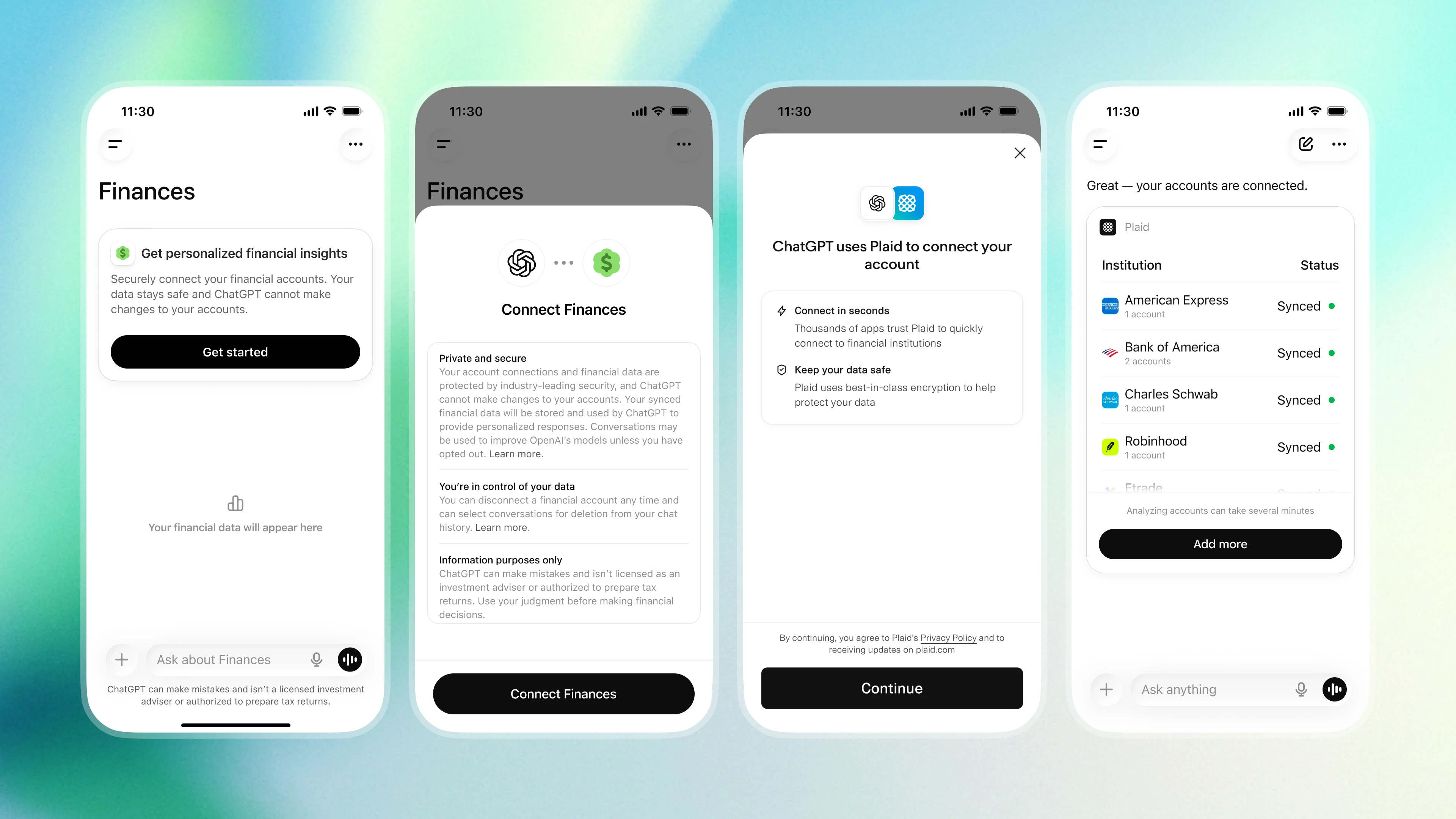
口座を ChatGPT に接続する流れを示す4つのモバイルアプリ画面

口座の同期が完了すると、ポートフォリオのパフォーマンス、支出、サブスク、今後の支払いなどを横断して最新状況を確認できるダッシュボードが表示されます。

接続した口座以外にも、住宅ローン、貯蓄目標、予定している大きな買い物など、家計管理に関する重要な文脈を共有できます。たとえば ChatGPT に「来年の初めに車を買うために貯金しています」や「親から借りたお金のうち、まだ[額]を返していません」と伝えられます。ChatGPT はその文脈を Finances のメモリに保存し、今後の会話に活用できます。

こうした幅広い文脈が、この機能をより役立つものにしています。各質問を切り離して扱うのではなく、ChatGPT は、口座、目標、すでに共有された情報を踏まえて、より状況に合った包括的なガイダンスを提供できます。

Finances に口座を連携しない場合

Help me come up with a plan to save a little bit more in the next few months.

Here’s a practical way to save a bit more over the next 2–3 months without making your life miserable.

1. Pick a specific target

Make the goal concrete and time-bound.

Examples:

  • “Save an extra $1,500 by August.”
  • “Build a one-month emergency cushion.”
  • “Save enough for travel / taxes / moving / investing.”

A vague goal like “spend less” usually fades quickly.

2. Focus on the 3 highest-impact categories

Most people don’t need to optimize everything. Usually 70–80% of extra savings comes from a few categories:

Food & delivery

Good targets:

  • Reduce takeout from 5x/week → 2x/week
  • Bring coffee/lunch a few days per week
  • Set a fixed “fun food” budget

Even a small reduction here can free up a few hundred dollars monthly.

Subscriptions & recurring charges

Look for:

  • Duplicate streaming/services
  • Annual plans you forgot about
  • Apps you rarely use
  • Higher-tier plans you don’t need

A 20-minute cleanup can permanently lower monthly burn.

Impulse spending

Instead of “don’t buy stuff,” use friction:

  • 48-hour rule for purchases over a set amount
  • Remove saved cards from shopping apps
  • Keep a running wishlist instead of instant purchases

This cuts emotional purchases without feeling restrictive.

3. Automate the saving immediately

The biggest difference-maker is usually automation.

Try:

  • Automatic transfer every payday
  • Separate high-yield savings account
  • Move the money before you see it

Even:

  • $75/week = ~$900 in 3 months
  • $150/week = ~$1,800 in 3 months

Small consistent transfers beat occasional big efforts.

4. Create one “low-spend default”

Don’t try to optimize every decision.

Examples:

  • Weeknights = home-cooked meals
  • One no-spend day per week
  • Fixed entertainment budget
  • Only one convenience purchase category at a time

Simple rules reduce decision fatigue.

5. Increase income slightly instead of only cutting

For a short-term savings push, earning a little extra is often easier psychologically than aggressive budgeting.

Ideas:

  • Sell unused gear/clothes/electronics
  • Freelance or consulting work
  • Small weekend project
  • Negotiate a recurring expense (insurance, internet, phone)

Even an extra few hundred dollars changes momentum fast.

6. Track only one number weekly

Avoid overcomplicated budgeting systems.

Every week, check:

“How much did my savings increase this week?”

That keeps attention on progress rather than guilt.

A realistic “light effort” version

If you want something sustainable and low-stress:

Monthly

  • Cut 2–3 subscriptions
  • Reduce dining out modestly
  • Auto-transfer savings on payday

Weekly

  • One no-spend day
  • One meal-prep session
  • Quick 5-minute money check-in

That alone can often create an extra few hundred dollars/month without dramatic lifestyle changes.

If you want, I can also help you build:

  • a lean 3-month savings plan,
  • a category-by-category budget,
  • or a “minimal pain” version based on your current spending habits.

Finances に口座を連携した場合

@Finances Help me come up with a plan to save a little bit more in the next few months.

I’ll look at recent spending, recurring charges, and cash-flow patterns, then turn that into a practical “save a little more” plan rather than a harsh budget.

カテゴリ別支出の節約計画

Here’s the plan I’d use for the next few months. May is still early, so I’m anchoring this mostly on February–April plus the May-to-date spending.

At a $110K salary, the goal is not to make life feel overly restricted. It’s to create more consistency across normal spending categories so saving happens before the month gets away from you.

Your biggest flexible spending levers recently are:

項目

2月1日〜5月9日の支出

示唆されること

食料品・日用品

約$2,150

通常範囲ですが、週ごとの目標を設けるとさらに引き締められます

買い物

約$1,250

特に Target・Amazon・衣料品の買い物は見直しの好機です

交通費

約$1,450

ガソリン、駐車場、配車サービス、車関連の費用がかさんでいます

外食・飲み物

約$1,620

完全にやめなくても十分に見直しやすい項目です

サブスク・請求

約$420

小さいですが、整理しやすい項目です

Target: save an extra $500–$750/month

I would not start by trying to eliminate every small pleasure. Your biggest wins are dining, shopping, transportation, and grocery pacing.

1. Dining: cap at $450/month

Dining has been one of the easiest places for spending to drift. I’d set a realistic cap of $450/month, which still leaves room for takeout, coffee, and a few meals out.

Expected savings: $150–$250/month.

Use a simple rule: pick 2–3 meals out per week, then default to groceries for the rest.

2. Shopping: cap at $300/month

Shopping is not extreme, but it’s the kind of category that can quietly turn into $500–$700 months through Amazon, Target, clothes, and household extras. I’d set a $300/month cap through August.

Expected savings: $150–$250/month.

Use a simple rule: anything over $75 waits 24 hours before buying.

3. Transportation: set a monthly ceiling

Between gas, parking, car maintenance, and occasional rideshare, transportation can become a bigger budget item than it feels in the moment. I’d set a $400/month transportation target, excluding true emergencies or required repairs.

Expected savings: $100–$200/month.

The rule I’d use: rideshare is for late nights, bad weather, carrying things, or when it saves 25+ minutes. Otherwise default to driving, walking, transit, or planning ahead.

4. Groceries: use a weekly target, not a strict diet

Groceries and household basics are necessary, so I wouldn’t treat this as “bad spending.” But I would set a weekly grocery target of about $125–$150 and try to avoid extra midweek convenience runs.

Expected savings: $100–$150/month.

5. Subscriptions: small cleanup only

The recurring charges are not where the big money is, but they’re still worth checking: streaming, apps, news, fitness, cloud storage, and memberships. Canceling one or two might save $20–$50/month. Useful, but not the main plan.

The monthly savings formula
For June–August:

改善項目

月間目標

外食上限

+$200

買い物上限

+$200

交通費上限

+$150

食料品費の見直し

+$125

サブスク整理

+$30

合計見込み

約$705/月

To make it stick, I’d automate $500/month to savings first. Then treat the extra $200–$250 as the stretch goal when dining, shopping, or transportation comes in lighter.

Best version of the plan: auto-save $500/month, cap dining at $450, cap shopping at $300, set a transportation ceiling, and use weekly grocery targets so the plan feels realistic instead of restrictive.

回答から行動へ。Intuit のようなエコシステムパートナーとともに

ChatGPT のビジョンは、質問に答えるだけでなく、ユーザーが家計管理を改善するための行動につなげられるよう支援することです。その実現に向けて、Intuit のような信頼できるエコシステムパートナーと取り組んでいます。たとえばユーザーは、クレジットカードのおすすめを受けるところから、承認される可能性の理解や申し込みの送信へ進んだり、株式売却の税務影響を尋ねるところから、信頼できる税額見積もりを得て、地域の税務専門家とのセッションを予約したりできます。これらは Intuit によって支えられ、すべて ChatGPT 内で完結します。

情報のプライバシーと安全性を守るために 

お金に関するデータは機微性が高いため、この体験はプライバシーを尊重し、ご自身で情報を管理できるよう設計されています。

口座を接続すると、ChatGPT は残高、取引、投資、負債にアクセスし、家計の可視化や質問への回答に役立てることができます。ただし、完全な口座番号を確認したり、口座に変更を加えたりすることはできません。 

接続された口座に関する会話には、ChatGPT 全体で選択しているものと同じモデル学習設定が適用されます。この設定は、「設定」 > 「データコントロール」(新しいウィンドウで開く)からいつでも変更できます。

情報の管理権は常にご自身にあります。

  • 口座の接続解除:口座は、「設定」 > 「アプリ」 > 「Finances」または Finances ページからいつでも接続解除できます。接続解除後、同期された口座データは 30 日以内に OpenAI のシステムから削除されます。口座の接続解除をしても ChatGPT の会話履歴内の家計情報には影響しませんが、個別の会話はいつでも削除できます。 
  • Finances メモリの削除:ChatGPT は、目標、返済義務、お金に関する状況など、共有された重要な詳細を記憶し、ChatGPT 全体での今後の家計に関する会話をより関連性が高くパーソナライズされたものにできます。これらは Finances メモリとして保存されます。これは、家計に関する今後の会話に活用される専用のメモリです。これらは Finances ページからいつでも確認または削除できます。 
  • 一時チャット:一時チャットを使用している間、ChatGPT は接続された口座にアクセスしません。一時チャットは履歴に表示されません。

ChatGPT アカウントの安全性をさらに高めるため、多要素認証(MFA)を有効にする(新しいウィンドウで開く)ことができます。これにより、不正アクセス防止に役立つ追加の保護層が加わります。

精度と品質を重視して設計・評価

連携した口座に基づく会話では、デフォルトで ChatGPT の最新リーズニングモデルである GPT‑5.5 Thinking が使われます。

お金に関する質問は、個人的で、複雑で、文脈への依存度が非常に高いものです。有用な回答を得るには、収入、支出、残高、負債、目標、タイミングを踏まえるだけでなく、不確実性や前提条件、追加情報が必要な場面についても明確に伝える必要があります。 

こうした場面で ChatGPT がどれだけ役立つかをよりよく理解するため、私たちは専門家と策定した基準に基づき、回答品質を総合的に評価できる社内ベンチマークを構築しました。この体験を評価し、難易度の高い家計管理タスクにおける ChatGPT の性能を採点するため、主要機関の 50 人超の金融専門家と協力しました。

GPT‑5.5 Thinking は、複雑な家計管理タスクで従来モデルを上回る性能を示しています。ChatGPT Pro で利用できる GPT‑5.5 Pro は、総合的に最も高い性能を達成しています。

* 難易度の高い家計管理タスク全体における家計管理ベンチマークスコアこれは、専門家による回答品質評価と回答精度を加重合成した指標で、数値が高いほど優れています。Finances のデフォルトモデルである GPT‑5.5 Thinking は、このベンチマーク全体で 100 点中 79 点を記録しました。GPT‑5.5 Pro は 100 点中 82.5 点でした。

このベンチマークにより進捗をより明確に測定できるようになり、今後も ChatGPT の複雑な家計管理タスクへの対応を継続的に改善していきます。

ChatGPT Pro コミュニティのテスターの声

「ChatGPT で口座を連携したことで、実際に続けられる現実的な月次計画で住宅ローンをどう返済するかを考える助けになりました。」
—Richard K.Sohn、PsyD、心理学者

著者

OpenAI