Présentation des agents d'espace de travail dans ChatGPT
Des agents dédiés aux équipes propulsés par Codex.
Workspace agents are now generally available in ChatGPT Business, Enterprise, and Edu, helping teams turn their knowledge, best practices, and repeatable workflows into shared agents that can move work forward across your tools.
For the current experience:
Aujourd'hui, nous vous présentons les agents d'espace de travail dans ChatGPT. Les équipes peuvent désormais créer des agents partagés capables de gérer des tâches complexes et des flux de travail de longue durée, tout en respectant les autorisations et les contrôles définis par leur organisation.
Les agents d'espace de travail sont une évolution des GPT. Propulsés par Codex, ils peuvent prendre en charge de nombreuses tâches que les équipes effectuent déjà au travail—de la préparation de rapports à l’écriture de code, en passant par la réponse aux messages. Ils s'exécutent dans le nuage, ce qui leur permet de continuer à fonctionner même lorsque vous ne travaillez pas. Ils sont également conçus pour être partagés au sein d’une organisation, afin que les équipes puissent créer un agent une seule fois, l’utiliser ensemble dans ChatGPT ou Slack, puis l’améliorer au fil du temps.
L’IA a déjà aidé les gens à travailler plus vite et par eux-mêmes. Mais, un grand nombre des flux de travail essentiels au sein d’une organisation, repose sur un contexte partagé, des relais et des décisions entre équipes. Les agents d’espace de travail sont conçus pour ce type de tâches : ils peuvent récupérer le contexte dans les bons systèmes, suivre les processus des équipes, demander des validations si nécessaire et faire avancer le travail d’un outil à l’autre. Par exemple, notre équipe commerciale chez OpenAI utilise un agent pour rassembler des informations issues de notes d’appels et de recherches sur les comptes, qualifier de nouveaux prospects et rédiger des courriels de suivi directement dans la boîte de réception d’un commercial. Cela aide les équipes commerciales à passer moins de temps à recouper les informations et plus de temps avec les clients.
Les agents d'espace de travail sont disponibles en aperçu de recherche pour les forfaits ChatGPT Business, Enterprise, Edu et Teachers. Pour démarrer, décrivez un flux de travail que votre équipe effectue souvent, et ChatGPT vous aidera à le transformer en agent de A à Z.
Note de l'éditeur : les GPT resteront disponibles pendant que les équipes testent les agents d’espace de travail dans leurs flux de travail. Bientôt, il sera facile de convertir des GPTs en agents d’espace de travail.
Création d’un agent d’espace de travail pour la revue de logiciels
Création d'un agent d'espace de travail pour acheminer les commentaires sur les produits
Création d’un agent d’espace de travail pour analyser les indicateurs
Création d'un agent d'espace de travail pour la prospection de clients potentiels
Création d'un agent d'espace de travail pour la gestion des risques liés aux tiers
Décrivez la tâche à accomplir ou joignez simplement un fichier. ChatGPT vous aide à le transformer en agent : définir les étapes, connecter les bons outils, ajouter des compétences et le tester jusqu'à ce qu'il fonctionne comme vous l'attendez.
Voici quelques agents qu'OpenAI a créés—et que votre équipe peut également créer :
Vérificateur de logiciels : examine les demandes de logiciels des employés, les compare aux outils et politiques approuvés, recommande les prochaines étapes et crée des demandes d'assistance TI si nécessaire.
Routeur de commentaires sur le produit : surveille Slack, les canaux d'assistance et les forums publics, puis transforme les commentaires en demandes d'assistance priorisées et en synthèses produit hebdomadaires.
Générateur de rapports hebdomadaires des indicateurs : extrait les données chaque vendredi, crée des graphiques, rédige la synthèse et partage un rapport avec l’équipe.
Agent de prospection des clients potentiels : recherche les clients potentiels entrants, les évalue selon votre grille de qualification, rédige des courriels de suivi personnalisés et met à jour votre CRM.
Responsable des risques liés aux tiers : recherche des fournisseurs, évalue des signaux comme l’exposition aux sanctions, la santé financière et le risque de réputation, et produit un rapport structuré.
Vous pouvez également démarrer rapidement avec des modèles(s'ouvre dans une nouvelle fenêtre) pour la finance, les ventes, le marketing et plus encore. Chacun est fourni avec des compétences intégrées et des outils suggérés, ce qui vous permet de configurer rapidement un agent et de le personnaliser par la suite.
Découvrez comment créer des agents d’espace de travail dans l’OpenAI Academy, et consultez plus de détails dans le Centre d’aide(s'ouvre dans une nouvelle fenêtre).
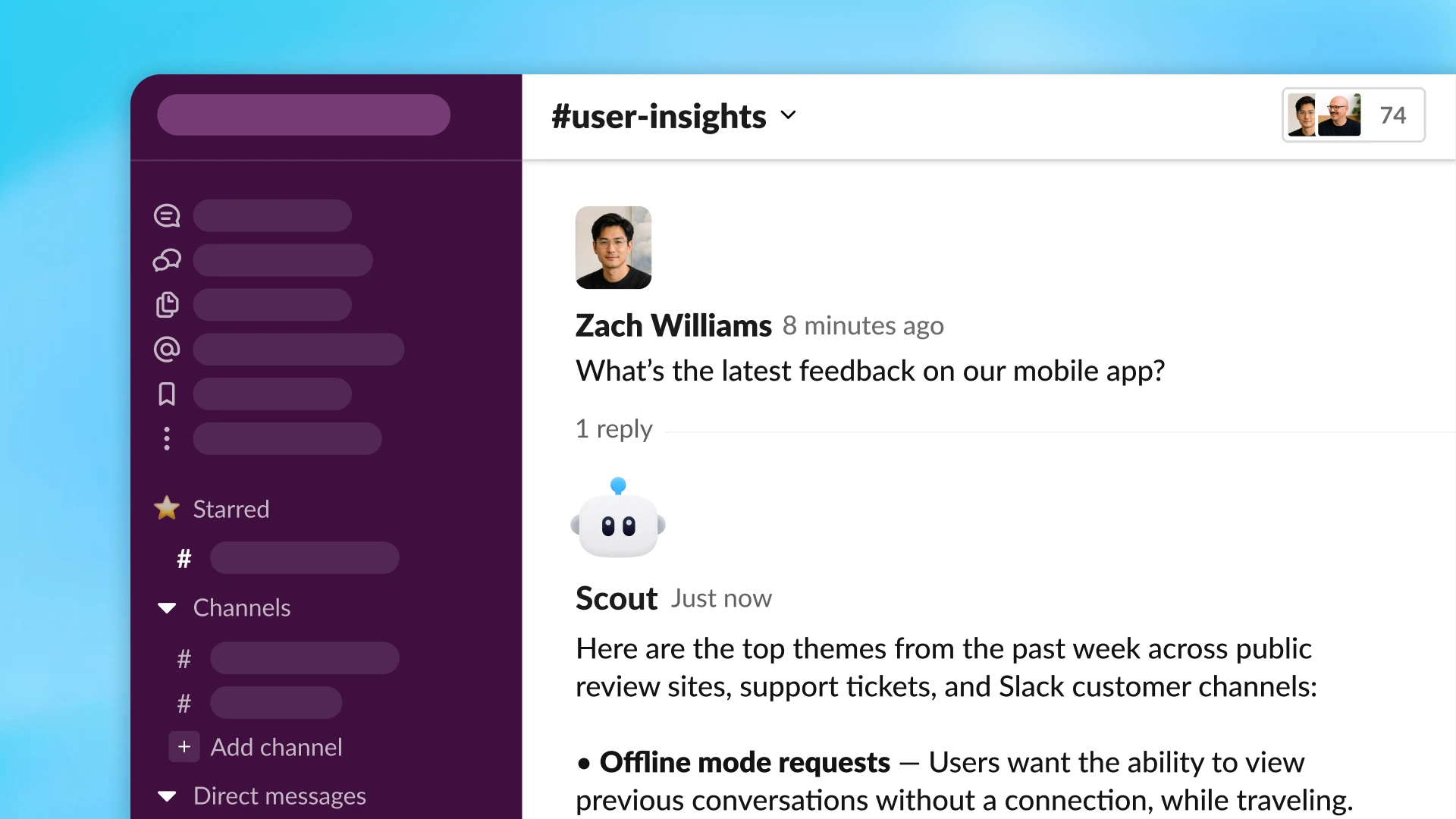
Les agents d’espace de travail peuvent récupérer du contexte et agir dans des dizaines d’outils.
Les agents sont propulsés par Codex dans le nuage, ce qui leur donne accès à un espace de travail pour les fichiers, le code, les outils et la mémoire. Les agents font plus que répondre à une invite : ils peuvent écrire ou exécuter du code, utiliser des applications connectées, se souvenir de ce qu'ils ont appris et poursuivre leur travail sur plusieurs étapes.
Les agents de l'espace de travail peuvent continuer à travailler même lorsque vous êtes absent. Vous pouvez les configurer pour qu'ils s'exécutent selon une planification, ou les déployer dans Slack afin qu'ils prennent en charge les demandes au fur et à mesure qu'elles arrivent. Par exemple, notre équipe produit a conçu un agent qui répond de manière proactive aux questions des employés dans les canaux Slack. L'agent répond clairement, inclut des liens vers la documentation pertinente et peut créer une demande d'assistance lorsqu'il détecte un nouveau problème. Cet agent aide les équipes à se débloquer plus rapidement, tout en veillant à ce qu'aucun suivi important ne passe entre les mailles des filets.
Aujourd'hui, les équipes peuvent interagir avec des agents dans ChatGPT et Slack, et d'autres interfaces seront bientôt disponibles. Les agents peuvent rejoindre les conversations et les flux de travail au sein des outils déjà utilisés, aidant les équipes à faire avancer le travail avec moins de coordination.
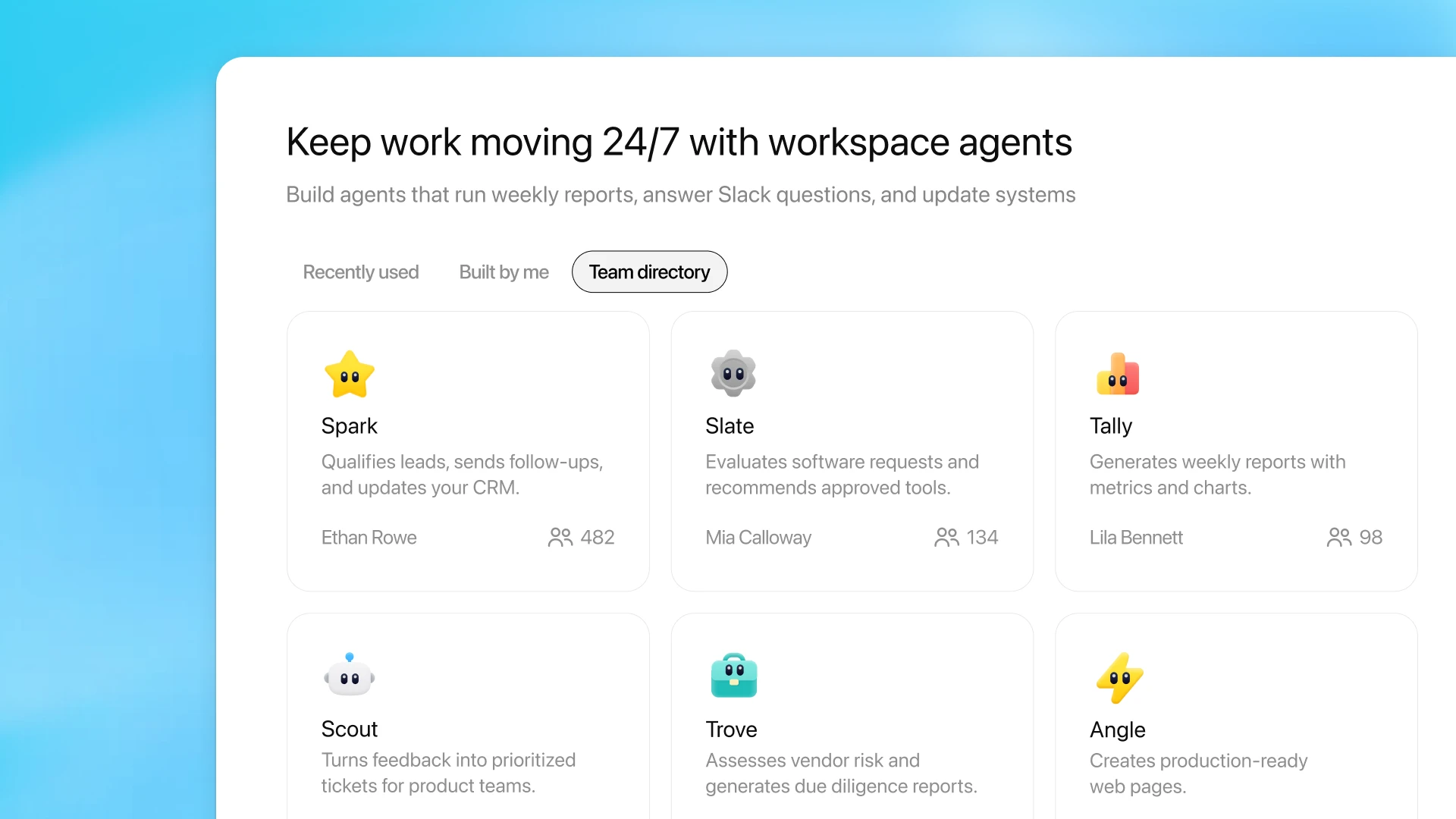
Gérez le partage et découvrez les agents d’espace de travail partagés par votre équipe depuis l’onglet Agents dans la barre latérale de ChatGPT.
Les connaissances sont souvent éparpillées entre les équipes et les systèmes. Les agents de l'espace de travail offrent aux équipes un moyen de transformer ces connaissances en un flux de travail réutilisable : un flux qui suit le bon processus, utilise les bons outils et peut être partagé dans toute l'organisation.
Par exemple, notre équipe comptable a créé un agent qui prépare des éléments clés de la clôture mensuelle, des écritures comptables aux rapprochements de bilan, jusqu’à l’analyse des écarts. Il effectue ces tâches en quelques minutes, génère des dossiers de travail avec les données sources et les totaux de contrôle nécessaires à la révision, tout en respectant les politiques internes. L’agent est disponible dans ChatGPT pour que toute l’équipe puisse l’utiliser, ou intégré aux canaux Slack afin que les équipes puissent lui poser des questions et collaborer autour de ses résultats.
Parce que les agents ont une mémoire et peuvent être guidés et corrigés au fil des conversations, ils s'améliorent à mesure que les équipes les utilisent. Au fil du temps, les agents deviennent un moyen concret de maintenir les connaissances de l'équipe à jour : créer une fois, améliorer à l'usage, puis partager ou dupliquer pour de nouveaux flux de travail.
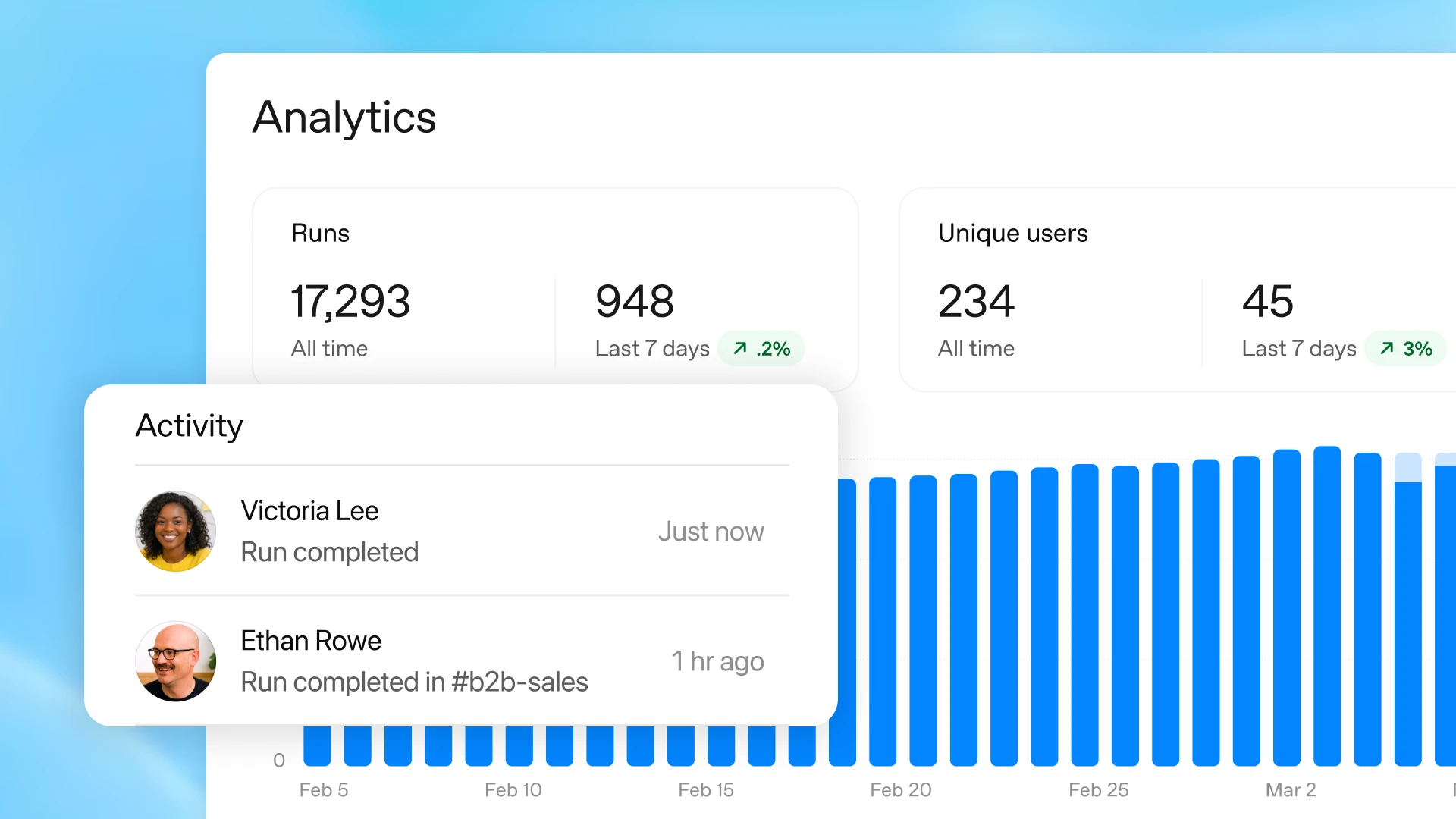
Consultez les analyses des agents actifs de votre espace de travail depuis le menu de l'éditeur.
Lorsque vous déléguez le travail à un agent, vous gardez le contrôle. Vous décidez quels outils et quelles données il peut utiliser, quelles actions il peut effectuer et à quel moment il a besoin d’une approbation. Pour les étapes sensibles, comme modifier une feuille de calcul, envoyer un courriel ou ajouter un événement au calendrier, vous pouvez exiger que l’agent demande votre autorisation avant de pouvoir poursuivre.
Une fois l’agent partagé, des analyses vous permettent de voir comment il est utilisé, notamment le nombre d’exécutions réalisées et le nombre d’utilisateurs.
Les agents d'espace de travail s'accompagnent de capacités de surveillance et de contrôle de niveau entreprise, afin que les administrateurs puissent protéger les données sensibles tout en offrant aux équipes un moyen sûr d'accélérer leur travail grâce à l'IA. Les administrateurs de ChatGPT Enterprise et Edu peuvent contrôler les outils connectés et les actions auxquels les groupes d'utilisateurs peuvent accéder. Les administrateurs peuvent également gérer les personnes autorisées à utiliser, créer et partager des agents. Des mesures de protection intégrées aident les agents à rester alignés sur vos instructions lorsqu'ils rencontrent du contenu externe trompeur, y compris des attaques par injection d’invite.
L’API Compliance(s'ouvre dans une nouvelle fenêtre) offre aux administrateurs une visibilité sur la configuration, les mises à jour et les exécutions de chaque agent, afin qu’ils puissent surveiller et encadrer la manière dont les agents sont créés et utilisés. Les administrateurs peuvent également suspendre des agents si nécessaire.
Bientôt, les administrateurs pourront également voir tous les agents créés au sein de leur organisation dans la console d’administration, y compris les modes d’utilisation et les sources de données connectées.
Les premières personnes ayant testé des agents d’espace de travail constatent déjà des résultats plus cohérents et gagnent du temps pour se consacrer à des tâches à plus forte valeur ajoutée.
Les agents d'espace de travail sont disponibles en aperçu de recherche pour les forfaits ChatGPT Business, Enterprise, Edu et Teachers. Pour les forfaits Enterprise et Edu, les administrateurs peuvent activer les agents via des contrôles basés sur les rôles.
Les agents de l’espace de travail seront gratuits jusqu’au 6 mai 2026, avec une tarification basée sur les crédits à compter de cette date.
Nous continuerons d’ajouter de nouvelles fonctionnalités dans les semaines à venir pour aider les équipes à accomplir davantage avec moins d’effort manuel. Cela inclut de nouveaux déclencheurs pour lancer automatiquement des tâches, des tableaux de bord améliorés pour comprendre et optimiser les performances, davantage de possibilités pour les agents d’agir via vos outils métiers, ainsi que la prise en charge des agents d’espace de travail dans l’application Codex.
Les équipes travaillent de façon optimale lorsque l’information est plus facile à trouver, les processus plus simples à suivre, et que l’aide est accessible directement dans le flux de travail. Les agents d’espace de travail constituent une première étape vers cet avenir : une IA qui s’intègre aux outils et aux échanges du quotidien, pour aider les équipes à passer moins de temps à se coordonner et plus de temps à créer, construire et prendre des décisions qui font avancer l’entreprise.