Passer au contenu principal
OpenAI

Une base plus solide pour la mémoire de ChatGPT

Améliorer la synthèse de la mémoire dans ChatGPT pour optimiser la fraîcheur, la continuité et la pertinence.

Chargement…

Aujourd’hui, nous commençons à déployer un système plus performant et évolutif pour synthétiser la mémoire, conçu pour relever les défis de désuétude, d’exactitude et d’évolutivité que nous observons lorsque la mémoire est appliquée à des centaines de millions d’utilisateurs et à des horizons de plusieurs années dans ChatGPT.

La mémoire aide ChatGPT à apprendre vos préférences, vos projets et vos contraintes, ce qui permet aux conversations futures de partir d’un contexte commun plutôt que de zéro.

Au cours des deux dernières années, la mémoire est devenue un élément essentiel de l’expérience ChatGPT, en aidant ChatGPT à mieux comprendre votre contexte afin de vous aider à atteindre des objectifs importants au fil du temps. C’est essentiel pour rendre ChatGPT plus utile : vous connaître, vous aider et en faire davantage pour vous.

Cette mise à jour est offerte dès aujourd’hui aux utilisateurs Plus et Pro aux États-Unis, et sera déployée dans d’autres pays ainsi qu’aux utilisateurs Free et Go au cours des prochaines semaines.

Comment la mémoire a évolué

La mémoire a d’abord été lancée en avril 2024 (aussi appelée mémoires enregistrés). La fonctionnalité vous permettait de demander à ChatGPT de se souvenir d’informations et de les réutiliser dans de futures conversations.
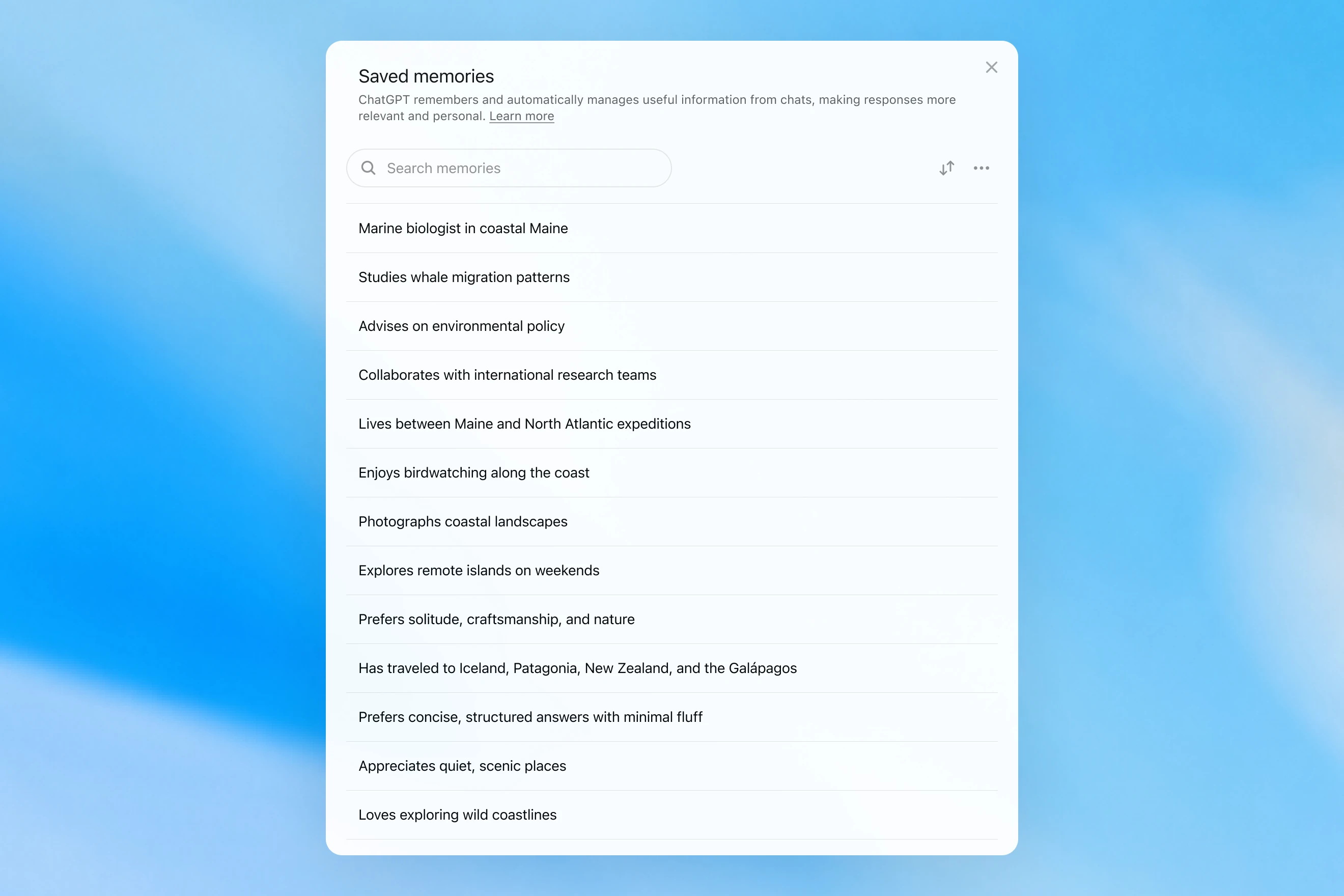
Saved memories modal showing a searchable list of personal details, including work, interests, travel, and response preferences.

Les mémoires enregistrées n’étaient écrites que pendant la conversation et s’appuyaient sur des signaux forts pour décider quand déclencher la mémoire, comme une instruction du type « souviens-toi que je voyage à Singapour en juillet ». En pratique, interagir avec ce système pouvait donner l’impression de parler à quelqu’un qui avait pris quelques notes, mais qui oubliait quand même tout ce qui n’était pas écrit. Les mémoires enregistrées ont aussi tendance à devenir désuètes avec le temps et finissent par être inexactes ou non pertinentes.

En avril 2025, nous avons mis à jour la mémoire de ChatGPT en donnant au modèle la capacité de consulter le contexte des conversations au-delà de la liste des mémoires enregistrées; pour ce faire, nous avons introduit la première version de dreaming, une méthode permettant à ChatGPT de gérer automatiquement les mémoires en arrière-plan en se référant à l’historique des conversations.
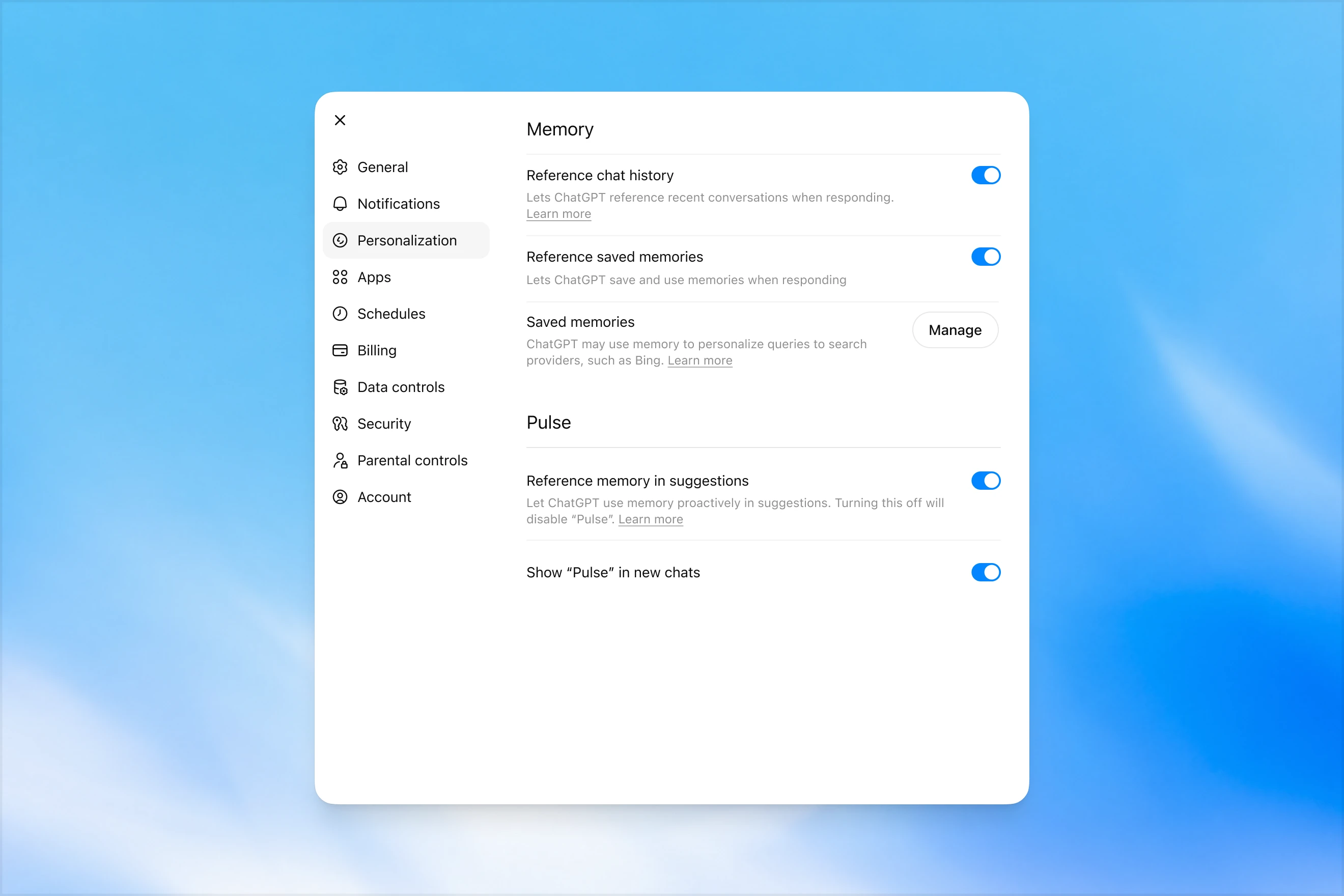
Memory settings page in ChatGPT showing options to reference chat history, use saved memories, manage saved memories, and enable Pulse memory suggestions.

Contrairement aux mémoires enregistrées, dreaming s’appuie sur un processus en arrière-plan qui permet à ChatGPT d’apprendre à partir de nombreuses conversations et de synthétiser l’état de la mémoire de ChatGPT afin de toujours fournir le contexte le plus récent et le plus pertinent à vos conversations. Dreaming permet aussi à la mémoire d’inclure plus facilement le contexte qui apparaît naturellement dans la conversation, sans dépendre de demandes explicites de se souvenir de quelque chose.

Au cours de la dernière année, dreaming a complété les mémoires enregistrées afin d'améliorer de manière spectaculaire la capacité de ChatGPT à personnaliser les réponses et à compenser la désuétude des mémoires enregistrées. Cependant, il n’a jamais suffi à lui seul en tant que système de mémoire autonome.

Aujourd’hui, nous lançons une architecture de mémoire nettement plus performante et plus efficace en ressources de calcul, bâtie sur dreaming.

Les mémoires synthétisées par dreaming peuvent être consultées au moyen d’un résumé rendu visible sur la page de résumé de la mémoire. À partir du résumé de la mémoire, vous pouvez rapidement voir les points saillants de ce que ChatGPT sait à votre sujet, ajouter ou mettre à jour des renseignements vous concernant et fournir des instructions sur les sujets que ChatGPT devrait aborder et à quel moment. Si vous voulez approfondir un sujet particulier, il vous suffit de discuter avec le modèle.
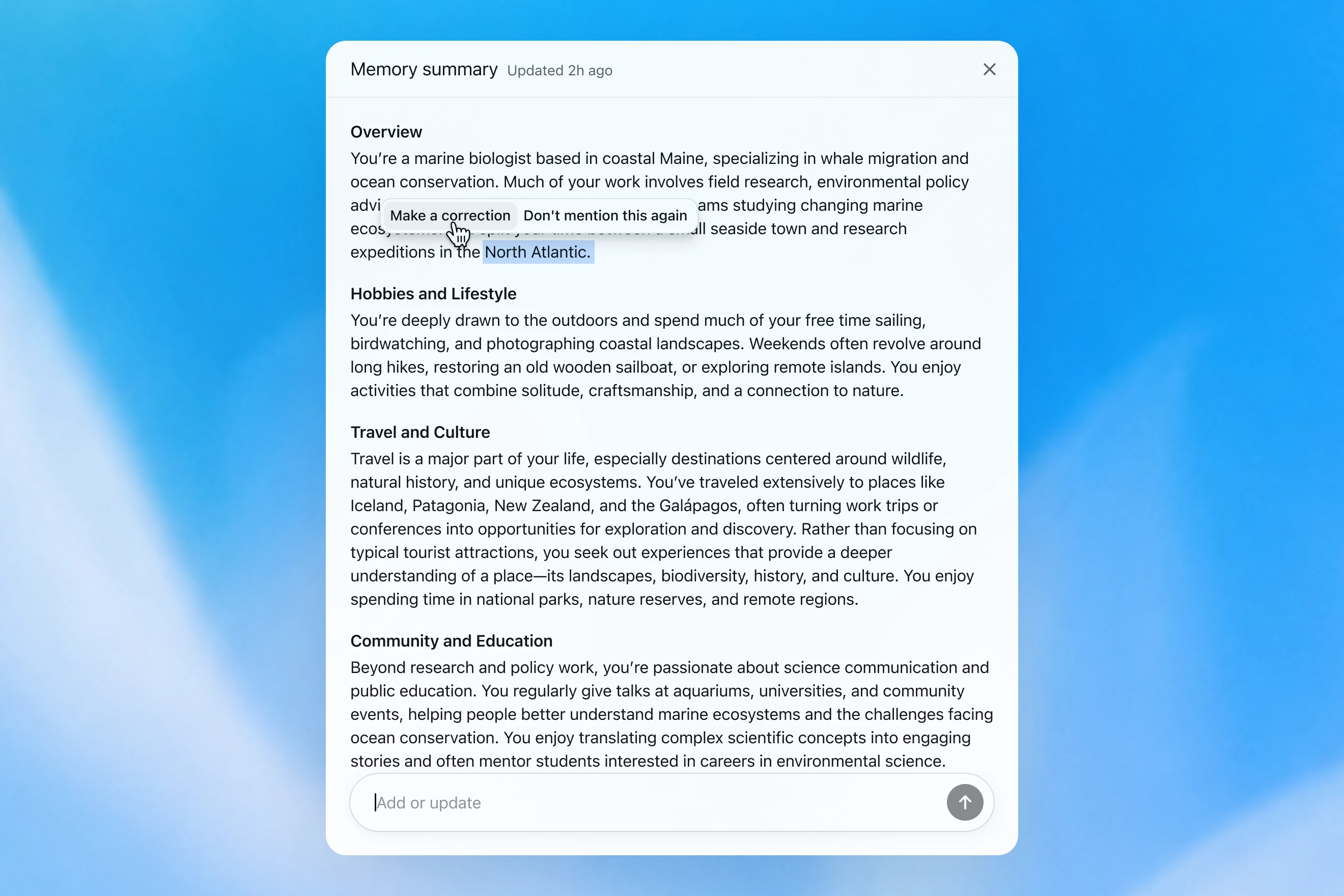
Memory summary modal showing a personalized overview of a user’s work, hobbies, travel interests, and community involvement, with options to correct or dismiss specific details.

Comment nous évaluons la mémoire

Lorsque nous réfléchissons à ce qui constitue une « bonne mémoire » dans ChatGPT, quelques éléments nous viennent à l’esprit :

  1. Conserver le contexte utile : Vous dites quelque chose à ChatGPT une seule fois, et il s’en souvient dans vos conversations suivantes.
  2. Respecter les préférences et les contraintes : Si vous décrivez une préférence (p. ex., vous êtes végétarien), ChatGPT devrait ensuite prendre des mesures cohérentes avec cette préférence.
  3. Rester à jour au fil du temps : La mémoire devrait tenir compte du passage du temps. Imaginez : « L’utilisateur planifie sa fête d’anniversaire pour samedi prochain »; éventuellement, dimanche arrive.

Nous pouvons évaluer comment la mémoire de ChatGPT Plus et Pro s’est améliorée au fil du temps par rapport à chacun des trois objectifs de mémoire ci-dessus. Nous le faisons pour chacun de ces cas :

  1. 2024 : mémoires enregistrées
  2. 2025 : mémoires enregistrées + Dreaming V0
  3. 2026 : Dreaming V3

Conservation du contexte

Lorsque vous commencez une nouvelle conversation avec ChatGPT, vous n’avez pas besoin de vous présenter de nouveau. ChatGPT peut vous faire gagner du temps et s’appuyer sur le contexte antérieur, surtout pour les projets complexes et de longue durée.

Par exemple, imaginez que vous utilisez ChatGPT pour magasiner du nouvel équipement photo compatible avec votre appareil actuel. Si vous avez déjà discuté de votre configuration photo avec ChatGPT, vous pouvez demander des produits compatibles avec « mon équipement photo » et obtenir des recommandations personnalisées qui répondent à vos besoins.

GPT-5.2 Instant

What would I need to buy to use TTL for my underwater photography setup?

To use TTL flash underwater, you need a compatible chain from camera → housing/trigger → cable → strobe. What you buy depends mostly on whether your setup uses fiber-optic TTL or electrical TTL.

Basic shopping checklist

  • TTL-capable underwater strobe
    Look for strobes that support your TTL type, such as Inon S-TTL, Sea & Sea DS-TTL, Ikelite DS TTL, or compatible Backscatter/Nauticam systems. TTL has to be supported by the strobe, not just the camera.
  • TTL trigger or TTL converter
    This is the key piece. It translates your camera’s flash metering into something the underwater strobe can understand. Examples include Nauticam optical TTL converters, Sea & Sea TTL converters, Backscatter Smart Control optical TTL triggers, or Ikelite DS Link TTL converters, depending on housing and camera brand. Backscatter notes that Nauticam optical TTL converters can work with fiber-optic-connected Inon and Sea & Sea TTL strobes, while Ikelite’s DS Link converters are made around Ikelite DS strobes and electrical sync setups. (Backscatter.com(s'ouvre dans une nouvelle fenêtre))
  • Connection cable
    For fiber optic TTL, buy one fiber optic cable per strobe. Ikelite’s fiber-optic guide says each strobe needs its own light path, converter/adapter, and cord. (Ikelite(s'ouvre dans une nouvelle fenêtre))
    For
    electrical TTL, buy the correct sync cord, such as Ikelite-style, Nikonos 5-pin, or housing-specific bulkhead cable.
  • Housing compatibility parts
    You may need a hot-shoe adapter, bulkhead, fiber optic window/adapter, or housing-specific TTL board. Many TTL triggers mount inside the housing on the camera hot shoe.
  • Strobe arms, clamps, tray, and mounting hardware
    TTL controls exposure, but you still need to physically mount and aim the strobes.
  • Batteries and spares
    Bring strobe batteries, trigger batteries if required, spare fiber optic cables or sync cord O-rings, and silicone grease for serviceable O-rings.

Which route should you choose?

Fiber optic TTL is usually easiest if your housing has optical ports or can use the camera’s pop-up flash/LED trigger. It is common with compact, mirrorless, Nauticam, Sea & Sea, AOI, and Olympus/OM TG-style setups.

Electrical TTL is often best if you use Ikelite DS strobes or an Ikelite-style housing/bulkhead. Ikelite says its DS Link TTL converters are faster and more reliable than fiber-optic TTL triggers, and they do not require batteries. (Backscatter.com(s'ouvre dans une nouvelle fenêtre))

The compatibility rule

You need all three to match:

camera brand/protocol + housing/trigger type + strobe TTL system

For example:

  • Sony camera + Nauticam housing + optical TTL trigger + Inon/Sea & Sea-compatible fiber optic strobe
  • Nikon/Canon/Sony camera + Ikelite housing/bulkhead + Ikelite DS Link TTL converter + Ikelite DS strobe
  • Compact camera with built-in flash + fiber optic cable + S-TTL/DS-TTL-capable strobe

So the practical answer is: buy a TTL-compatible strobe, the correct TTL trigger/converter for your camera and housing, and the right fiber optic or electrical sync cable. The exact part numbers depend on your camera, housing, and strobe model.

Le modèle produit une réponse générique qui laisse à l’utilisateur le soin d’effectuer lui-même des vérifications de compatibilité complexes.

GPT-5.3 Instant

What would I need to buy to use TTL for my underwater photography setup?

I’ll verify this against your actual setup: Sony A1 II in Nauticam NA-A1II, with Backscatter Mini Flash 3 and Inon Z-330 strobes. The key question is whether you want TTL with the Mini Flash 3, the Z-330s, or both.

For your setupSony A1 II + Nauticam NA-A1II + Backscatter Mini Flash 3 + Inon Z-330 — there are two different TTL paths:

Best buy for Mini Flash 3 TTL

Buy:

Backscatter Smart Control TTL LED Nauticam Flash Trigger for Sony
SKU: BS-TR-SN2

Backscatter lists it as custom-designed for Nauticam full-frame Sony housings, TTL-compatible with Mini Flash 3, and the NA-A1II housing page offers it as the “Backscatter Smart Control TTL Flash Trigger” option. (Backscatter.com(s'ouvre dans une nouvelle fenêtre))

You’d use normal optical fiber cables from the housing to the Mini Flash 3. On the MF-3, you’d use SC or SC Macro mode; Backscatter says SC / SC Macro are the TTL modes for Mini Flash 3, with SC Macro specifically tuned for close macro work. (Backscatter.com(s'ouvre dans une nouvelle fenêtre))

For Inon Z-330 TTL

For the Inon Z-330, the relevant unit is:

UW Technics 11075-HSS TTL Converter for Sony / Nauticam

UW Technics explicitly lists Inon Z-330 as a compatible TTL strobe and supports optical TTL output. (UWTechnics(s'ouvre dans une nouvelle fenêtre))

But I would not buy this for Mini Flash 3 TTL. Backscatter’s own UW Technics listing says Backscatter strobes are manual / HSS only on that converter, while the Backscatter Smart Control trigger is the one listed for Sony TTL with the Mini Flash 3. (Backscatter.com(s'ouvre dans une nouvelle fenêtre))

Practical recommendation

Since you shoot macro and have the Mini Flash 3, I’d buy the Backscatter Smart Control TTL LED Nauticam Flash Trigger for Sony — BS-TR-SN2.

The catch: there probably is no single trigger that gives true TTL for both the Mini Flash 3 and Inon Z-330 at the same time. The Backscatter trigger is the right TTL solution for the MF-3; the UW Technics converter is the right TTL solution for the Z-330. So choose based on which strobe you actually want TTL for.

For your use case, I’d prioritize Mini Flash 3 TTL / SC Macro and treat the Z-330s as manual when needed.

Le modèle se souvient de la configuration photo de l’utilisateur et recommande un produit compatible.

GPT‑5.2 Instant répond éventuellement à la question, mais, en tentant d’expliquer ses limites de sécurité, il commence par un long préambule sur ce qu’il ne peut pas faire. GPT‑5.3 Instant, en revanche, entre directement dans le vif du sujet.

Nous pouvons construire une évaluation à partir d’exemples semblables, où l’on demande au modèle de répondre à une invite qui exige de se rappeler des renseignements factuels sur l’utilisateur. Le modèle est ensuite récompensé s’il répond d’une manière qui utilise correctement le contexte pertinent. Dans cette évaluation, le nouveau système fondé sur le mode rêve améliore la capacité du modèle à se rappeler des faits pertinents.

Respect des préférences

La mémoire aide aussi ChatGPT à répondre d’une façon qui correspond mieux à vos préférences et à vos contraintes.

Imaginez que vous planifiez un voyage à Singapour. Deux mois avant votre voyage, vous demandez à ChatGPT de vous aider à préparer un itinéraire. ChatGPT sait déjà, grâce à des planifications de voyage passées, que vous aimez la photographie animalière, préférez les hôtels avec une climatisation puissante et préférez un souper tranquille à un bar bondé.

GPT-5.2 Instant
Help me plan a trip to Singapore. I'm going to be there for a work trip in July and will have a few days free at the end.

Great add-on city for a work trip: Singapore is compact, safe, excellent for solo exploring, and easy to do in 2–4 free days. July is hot and humid; expect daytime highs around 31–33°C / 88–91°F, warm nights, and sudden rain, so plan outdoor time early morning or after 5 p.m. and keep midday for museums, malls, cafés, or hotel downtime. Singapore’s official weather service notes typical daily highs of 31–33°C and lows of 23–25°C. (Singapore Weather Service(s'ouvre dans une nouvelle fenêtre))

memory-preferences-without

A strong 3-day plan

Day 1: Marina Bay, Gardens, and skyline

Start late afternoon at Marina Bay and walk the waterfront: Merlion Park, Helix Bridge, ArtScience Museum exterior, then into Gardens by the Bay. Book Cloud Forest, Flower Dome, and either the OCBC Skyway or Supertree Observatory if views matter to you. Gardens by the Bay lists Cloud Forest and Flower Dome as open daily 9 a.m.–9 p.m.; Supertree Observatory is also listed as 9 a.m.–9 p.m. with last admission at 8:30 p.m., but check maintenance closures before booking. (Gardens by the Bay(s'ouvre dans une nouvelle fenêtre))

Evening: stay for the Supertree light show area, then dinner at Lau Pa Sat for an easy first-night hawker experience near the CBD. It has 80+ stalls and local staples like satay, laksa, nasi lemak, bak kut teh, kaya toast, and char kway teow. (Laupasat(s'ouvre dans une nouvelle fenêtre))

Day 2: Culture neighborhoods and food

Morning: Chinatown. Visit Buddha Tooth Relic Temple, walk the shophouse streets, and eat at Maxwell Food Centre or Chinatown Complex Food Centre. Visit Singapore lists Maxwell, Chinatown Complex, Old Airport Road, Tiong Bahru Market, Newton, and others among popular hawker centres. (Visit Singapore(s'ouvre dans une nouvelle fenêtre))

Afternoon: Kampong Glam and Haji Lane for Sultan Mosque, murals, boutiques, and cafés. Then head to Little India around golden hour for temples, flower garlands, Tekka Centre, and dinner.

Evening: either cocktails around Ann Siang / Club Street, or keep it low-key with a night walk along the Singapore River: Boat Quay to Clarke Quay to Robertson Quay.

Day 3: Nature or beach day

Pick one based on your energy.

For nature: do Singapore Botanic Gardens early, then the National Orchid Garden, followed by lunch in Dempsey Hill or Tiong Bahru. This is the best “green Singapore” day without leaving the city.

For beach/resort mode: go to Sentosa. Choose the southern beaches, Fort Siloso Skywalk, or a beach club. I would skip trying to do every Sentosa attraction unless you love theme parks.

For local food focus: do Tiong Bahru Market for breakfast, National Gallery Singapore midday, then Old Airport Road Food Centre for dinner. The official events page also shows exhibitions and cultural events, so it is worth checking once your exact July dates are fixed. (Visit Singapore(s'ouvre dans une nouvelle fenêtre))

Best places to stay after the work part

Marina Bay / CBD is easiest if you want polished, walkable, skyline-heavy Singapore and minimal transit.

Chinatown / Telok Ayer / Tanjong Pagar is my top pick for a few free days: great food, MRT access, heritage streets, cocktail bars, and close to work districts.

Bugis / Kampong Glam is better if you want boutique hotels, cafés, street art, and a slightly more relaxed neighborhood feel.

Orchard is convenient for shopping and rainy-day malls, but less atmospheric.

What to book ahead

Book Gardens by the Bay conservatories/Skyway, any special restaurants, and possibly a cocktail bar. For hawker centres, do not over-plan; just go hungry, carry tissues or wet wipes, and be ready to share tables.

July packing notes

Bring breathable work clothes, comfortable walking shoes, a small umbrella, and a light layer for aggressive air-conditioning. I would also plan one “rain-flexible” indoor block each day, because showers can arrive suddenly even when the forecast looks fine.

My suggested balance: Day 1 Marina Bay/Gardens, Day 2 Chinatown–Kampong Glam–Little India, Day 3 Botanic Gardens or Sentosa. That gives you the Singapore highlights without turning your post-work break into another work project.

Le modèle produit une réponse générique plus touristique, qui n’aide pas à réserver un hôtel et ignore en grande partie les intérêts des personnes.

GPT-5.3 Instant
Help me plan a trip to Singapore. I'm going to be there for a work trip in July and will have a few days free at the end.

I’ll build this around your known constraints: a few free days after work, hot/humid July weather, wildlife/photography/nature bias, strong AC needs for sleep, and good but not overly social dining. I’ll verify current July logistics and then give a practical short itinerary rather than a generic Singapore list.

memory-preferences-with

Here’s how I’d structure it: 2–3 free days, mostly nature / wildlife / photography, with heat-managed mornings and AC breaks. July is hot and humid: Singapore’s July long-term stats are about 31.4°C / 88.5°F average daily max, 25.4°C / 77.7°F min, 146.6 mm rain, and 14 rain days, so outdoor plans should be early morning or evening, not midday. (National Environment Agency(s'ouvre dans une nouvelle fenêtre))

Best plan for 3 free days

Day 1 — Gardens by the Bay + Marina Bay, low-friction

Morning: Cloud Forest + Flower Dome. This is the obvious “touristy” pick, but it fits you well because it’s visually interesting, good for photography, and climate-controlled. Gardens by the Bay lists Cloud Forest and Flower Dome-type attractions running 9:00am–9:00pm, and Cloud Forest currently has the Jurassic World experience listed as ongoing. (Gardens by the Bay(s'ouvre dans une nouvelle fenêtre))

Late afternoon / evening: Supertree Grove + Borealis / light show. Gardens currently lists Borealis every Sat, Sun & Mon, 8:00–8:30pm at Supertree Grove, so try to align this with one of those nights. (Gardens by the Bay(s'ouvre dans une nouvelle fenêtre))

Dinner: do something easy nearby: Marina Bay / Tanjong Pagar / Telok Ayer. For you, I’d prioritize reservation-based restaurants with real tables over hawker centers on the first night, because you dislike cramped solo seating.

Day 2 — Mandai wildlife day

Morning to afternoon: Bird Paradise + River Wonders. Bird Paradise is probably the best fit photographically; River Wonders is less “wildlife photography” and more controlled exhibits, but it pairs well logistically. River Wonders is listed as daily 9:00am–6:00pm, last entry 5:00pm. (Mandai Wildlife Reserve(s'ouvre dans une nouvelle fenêtre))

Evening: Night Safari. This is the rare Singapore attraction that is genuinely better at night and avoids the worst heat. Night Safari is listed as daily 6:00pm–12:00am, last entry 11:15pm, with tram plus walking trails and over 900 nocturnal animals. (Mandai Wildlife Reserve(s'ouvre dans une nouvelle fenêtre))

This is a full day. I would not add Singapore Zoo unless you have 4 free days; Mandai can become exhausting fast.

Day 3 — Nature reserve / macro-ish walking + food

Early morning: Singapore Botanic Gardens or MacRitchie / Windsor Nature Park. For a few free days, Botanic Gardens is the safer pick: easier transport, less sweaty, better bailout options, and more consistent casual photography. MacRitchie / Windsor is better if you want more actual forest, but it is hotter, sweatier, and less predictable.

Midday: AC break.

Late afternoon: Joo Chiat / Katong or Chinatown / Telok Ayer for walking, architecture, coffee, and dinner. This gives you a different texture from Marina Bay without turning the day into a logistics project.

My ranking for you

  1. Cloud Forest / Gardens by the Bay — best combination of photogenic, iconic, heat-managed.
  2. Bird Paradise + Night Safari — best wildlife-focused day.
  3. Botanic Gardens early morning — best low-stress outdoor nature.
  4. Joo Chiat / Katong — best neighborhood walk.
  5. Hawker centers — worth doing, but not ideal for your seating preferences unless timed off-peak.

What I’d avoid or deprioritize

I would skip Sentosa unless you specifically want beach/resort stuff. I would also skip a packed “greatest hits” day of Merlion / Orchard / Little India / Chinatown / Clarke Quay; it’s inefficient and hot. For you, the trip will be better if each day has one strong anchor plus one easy evening plan.

Hotel / sleep note

Since this is a work trip, your hotel may be fixed. If you can choose or extend at the same hotel, the hard gate is still AC. Singapore hotels are generally AC-heavy, but your requirement is unusually strict.

One thing I need to make this concrete

Send the exact free dates and whether your work hotel is fixed. Then I’d turn this into a day-by-day plan with restaurant targets and a hotel/AC callout.

Le modèle produit une réponse personnalisée selon les intérêts de l’utilisateur ou de l'utilisatrice pour la photographie animalière, les soupers tranquilles et ses priorités lors de la réservation d’un hôtel.

GPT‑5.2 Instant répond éventuellement à la question, mais, en tentant d’expliquer ses limites de sécurité, il commence par un long préambule sur ce qu’il ne peut pas faire. GPT‑5.3 Instant, en revanche, entre directement dans le vif du sujet.

Les préférences peuvent prendre plusieurs formes :

  1. Des instructions sur la façon dont ChatGPT devrait répondre (« ne reparle plus de Stan »).
  2. Vos préférences ou contraintes personnelles (« je suis végétarien »)
  3. Des préférences implicites qui déterminent ce qui est pertinent pour vous (« j’habite près de San Francisco » → les options locales devraient être adaptées à cette région)

En développant le nouveau système de mémoire, nous avons amélioré la capacité de ChatGPT à appliquer les préférences pertinentes issues des conversations passées. En reprenant l’exemple « je suis végétarien » ci-dessus, nous pouvons évaluer si le modèle utilise correctement la mémoire pour proposer des options de repas adaptées aux végétariens lorsqu’un utilisateur végétarien demande des suggestions de préparation de repas.

Rester à jour au fil du temps

Le temps ne s’arrête pas quand votre conversation prend fin.

Les systèmes de mémoire traditionnels peuvent devenir désuets. Par exemple, vous dites à ChatGPT : « Je suis à Singapour et j’ai besoin d’une recommandation de restaurant pour ce soir. » Puis le temps passe, votre voyage se termine, et vous vous demandez pourquoi ChatGPT pense encore que vous êtes à Singapour.

Avec le mode rêve, les mémoires sont mises à jour automatiquement au fil du temps, ce qui permet à ChatGPT de réviser sa mémoire de « Vous allez à Singapour en juillet » à « Vous êtes allé à Singapour en juillet 2026 » lorsque le voyage se termine. Ainsi, lorsque vous êtes de retour à la maison, ChatGPT peut de nouveau fournir des recommandations adaptées à votre lieu de résidence et à votre fuseau horaire.

GPT-5.2 Instant

Help me find something for take-out tonight that's still open.

It’s about 5:19 AM Sunday in Singapore, so your safest take-out/delivery bets are 24-hour places.

Best bets right now:

  1. McDelivery / McDonald’s Singapore — easiest islandwide option; McDonald’s says McDelivery is available 24 hours, 7 days a week. Breakfast menu should be on now. (McDonald's Singapore(s'ouvre dans une nouvelle fenêtre))
  2. Srisun Express — good for prata, Indian Muslim food, local comfort food; their site says they’re halal-certified and open 24/7. (Sri Sun Express(s'ouvre dans une nouvelle fenêtre))
  3. 89.7 Supper Club — good if you’re near Changi Village or Geylang East; their outlets page says both locations are open 24 hours, 7 days a week. (89.7 Supper Club(s'ouvre dans une nouvelle fenêtre))
  4. 126 Dim Sum Wen Dao Shi — worth checking on GrabFood/foodpanda if you’re in the East; a 2025 guide says it runs till 5:30 AM on weekdays and round-the-clock on weekends. Since it’s Sunday morning, it may still be available. (Eatbook(s'ouvre dans une nouvelle fenêtre))
  5. Prata around Geylang / Serangoon / Bedok / Jalan Kayu — look in GrabFood or Google Maps for “prata open now”; guides list multiple 24-hour prata/supper spots, including Mufiz Prata Corner and RK Eating House. (Eatbook(s'ouvre dans une nouvelle fenêtre))

For the fastest path: open GrabFood / foodpanda / Deliveroo, set filter to Open now, then search “prata,” “McDonald’s,” “Srisun,” “89.7,” “dim sum,” or “nasi lemak.” If you tell me your neighborhood or nearest MRT, I’ll narrow it to specific nearby places.

Le modèle pense que la personne est encore à Singapour.

GPT-5.3 Instant

Help me find something for take-out tonight that's still open.

I’ll use Portola Valley / Ladera as the starting point and prioritize places that are plausibly open for takeout tonight, then narrow to low-friction options rather than a huge list.

For tonight, Saturday May 30, near Ladera / Portola Valley, I’d start here:

  1. Alpine Inn — safest casual pickup option. Open Saturday until 9:30 pm and has Order Takeout on its site. Good for burgers / tavern food. (Rossotti's Alpine Inn(s'ouvre dans une nouvelle fenêtre))
  2. Taverna Portola Valley — nearby at Ladera Country Shopper; open daily, Saturday dinner until 9:00 pm. Better if you want Greek / Mediterranean. (TAVERNA Portola Valley(s'ouvre dans une nouvelle fenêtre))
  3. Portola Bistro — also nearby; Saturday dinner until 9:30 pm. Good option for Italian / Mediterranean / pizza-ish dinner. (Portola Bistro -(s'ouvre dans une nouvelle fenêtre))
  4. Amigos Grill — Mexican, very close in Ladera Country Shopper. Official site says call to order at 650-851-3997; DoorDash / order.online lists pickup/delivery ordering until 8:40 pm. (Amigos Grill(s'ouvre dans une nouvelle fenêtre))
  5. State of Mind Slice House, Palo Alto — best fallback if you want pizza and can drive farther; Friday–Saturday hours are 11 am–10 pm. (State of Mind Slice House(s'ouvre dans une nouvelle fenêtre))

My pick: Alpine Inn for easiest local takeout, Taverna if you want something less heavy, State of Mind if it’s later and you want the most reliable post-9 pm option.

Le modèle fournit des réponses pertinentes pour le lieu de résidence de la personne.

GPT‑5.2 Instant répond éventuellement à la question, mais, en tentant d’expliquer ses limites de sécurité, il commence par un long préambule sur ce qu’il ne peut pas faire. GPT‑5.3 Instant, en revanche, entre directement dans le vif du sujet.

Dans nos évaluations de la mémoire, nous mesurons si ChatGPT peut répondre correctement à des invites où le passage du temps influe de façon importante sur la bonne réponse ou la bonne recommandation. Le mode rêve procure une amélioration importante dans ce domaine :

Une base plus évolutive pour l’avenir

Chez OpenAI, notre mission est de veiller à ce que l’intelligence artificielle générale profite à toute l’humanité.

Bien que la mémoire fondée sur le mode rêve soit offerte aux utilisateurs Plus et Pro depuis un certain temps, ce n’est que maintenant que nous sommes en mesure d’offrir aux utilisateurs Free une version qui répond à notre niveau de qualité et qui est pratique à déployer à grande échelle. Des améliorations récentes ont réduit d’environ 5 fois la puissance de calcul nécessaire pour offrir le mode rêve aux utilisateurs Free, ce qui permet de commencer à le déployer auprès d’eux au cours des prochaines semaines et d’augmenter la capacité de mémoire des utilisateurs Plus et Pro.

Pour la suite, le mode rêve nous offre maintenant une base de mémoire commune pour tous les utilisateurs. Cette mise à jour représente notre système de mémoire le plus performant à ce jour, et nous continuerons de l’améliorer.

Pour en savoir plus sur cette version et les contrôles utilisateur de la mémoire, consultez notre FAQ sur la mémoire(s'ouvre dans une nouvelle fenêtre).


Auteur

OpenAI