跳至主要内容
OpenAI

2025年5月16日

发布产品

Codex 简介

基于云的软件工程智能体,可并行处理多项任务,由 Codex-1 提供支持。 ChatGPT Pro、Team 和 Enterprise 用户即日起即可使用,Plus 用户也即将推出。

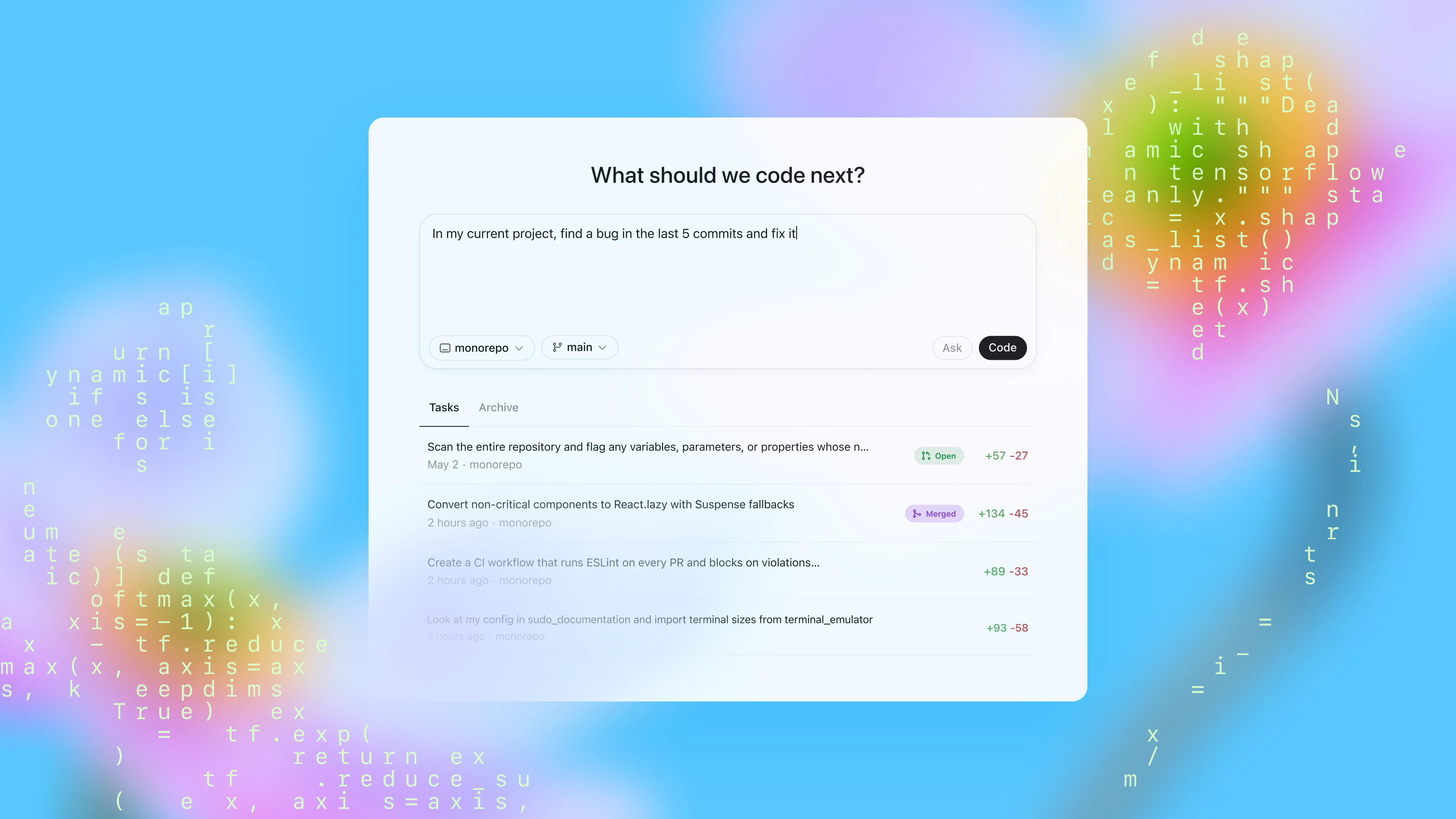
面板显示“我们下一步应该编写什么代码?”的提问,配有提示框、存储库/分支选择器和任务列表,整体以柔和的代码主题为背景。
正在加载…

2025 年 6 月 3 日更新:Codex 现已向 ChatGPT Plus 用户开放。我们还允许用户在任务执行过程中为 Codex 提供互联网访问权限。请参阅更改日志(在新窗口中打开)文档(在新窗口中打开)以获取更多详细信息。


今天,我们发布了 Codex 的研究预览版:这是一款基于云的软件工程智能体,可以并行处理多项任务。Codex 可以为您执行各种任务,如编写功能、回答有关代码库的问题、修复错误和提出拉取请求以供审核;每项任务都在自己的云沙箱环境中运行,并预装了您的存储库。

Codex 由针对软件工程优化的 OpenAI o3 版本 codex-1 提供支持。它通过在各种环境下对真实世界中的编码任务进行强化学习训练,生成的代码能够密切反映人类的风格和公关偏好,精确遵从指令,并能反复运行测试,直到获得通过的结果。我们今天开始向 ChatGPT Pro、Enterprise 和 Team 版用户推出 Codex,不久将支持 Plus 版和 Edu 版。

Codex 如何工作

今天,您可以通过 ChatGPT 的侧边栏访问 Codex,并通过输入提示和点击“写代码”来分配新的编码任务。如果您想向 Codex 提出有关您代码库的问题,请点击“问问题”。每项任务都会在一个预装了代码库的独立环境中独立处理。Codex 可以读取和编辑文件,也可以运行包括测试框架、代码检查工具及类型校验器在内的各类命令。完成任务通常需要 1 至 30 分钟,具体时间视复杂程度而定,您可以实时监控 Codex 的进度。

一旦 Codex 完成一项任务,它就会在其环境中提交更改。Codex 会通过引用终端日志和测试输出来提供可验证的行动证据,让您可以追踪任务完成过程中的每一步。然后,您可以查看结果、请求进一步修订、打开 GitHub 拉取请求,或直接将更改集成到本地环境中。在产品中,您可以配置 Codex 环境,使其尽可能与您的实际开发环境相匹配。

Codex 可由放置在存储库中的 AGENTS.md 文件提供指导。这些文本文件类似于 README.md,您可以在其中告知 Codex 如何浏览您的代码库、运行哪些命令进行测试,以及如何最好地遵守您项目的标准实践。与人类开发人员一样,Codex 智能体在获得已配置好的开发环境、可靠的测试设置和清晰的文档时也能发挥最佳性能。 

在编码评估和内部基准测试中,即使没有 AGENTS.md 文件或自定义基架,codex-1 也能显示出强大的性能。

不包括 23 个无法在我们的内部基础架构上运行的 SWE-Bench 验证样本。Codex-1 在最大上下文长度为 192k 令牌和中等“推理努力”的条件下进行了测试,这是目前产品中可用的设置。有关 o3 评估的详细信息,请参阅此处

我们的内部 SWE 任务基准是 OpenAI 内部 SWE 任务的真实世界集合。

构建安全可信的智能体

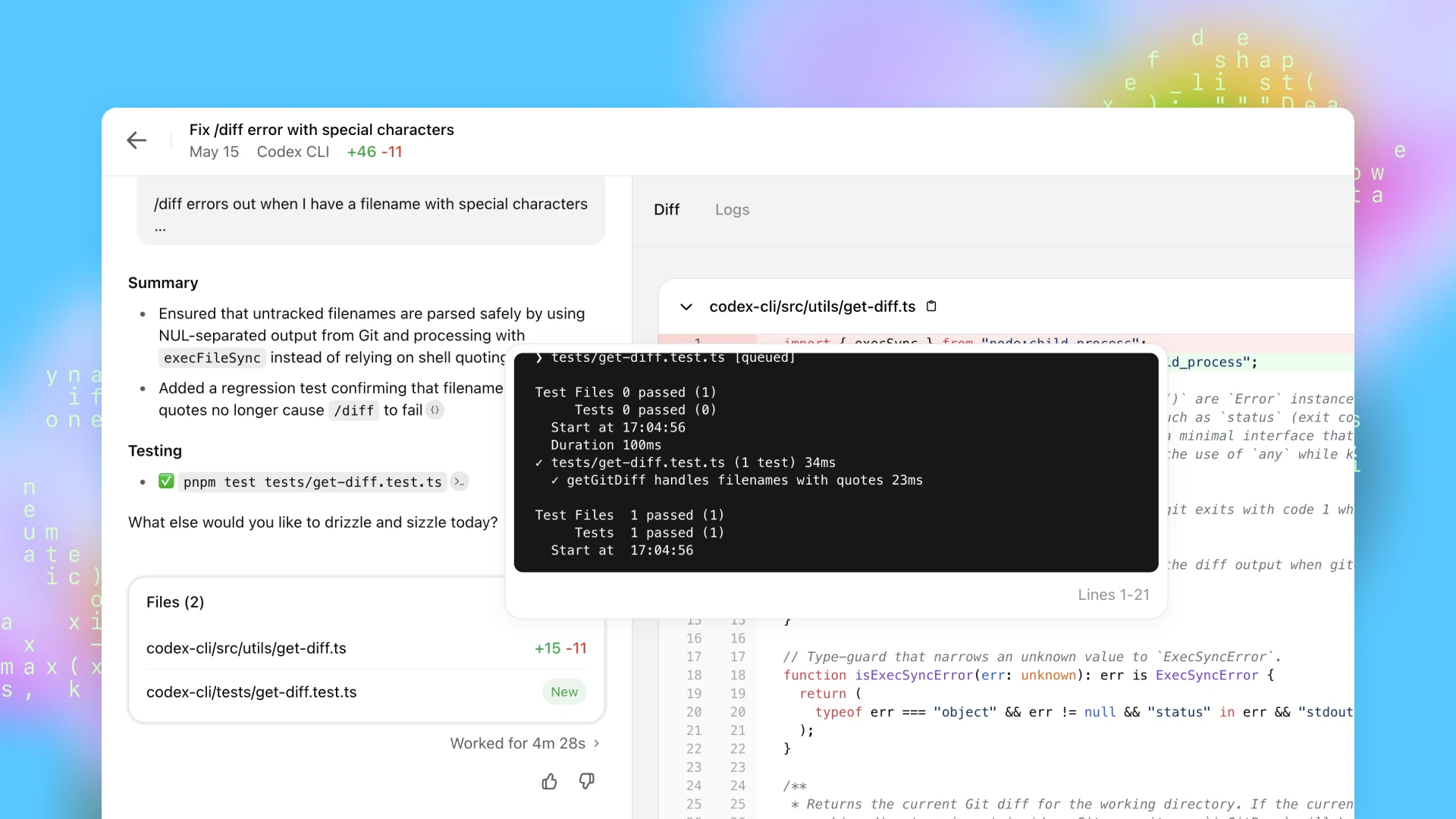
根据我们的迭代部署策略,我们将以研究预览版的形式发布 Codex。在设计 Codex 时,我们将安全性和透明度放在首位,这样用户就可以验证其输出结果——随着人工智能模型独立处理更复杂的编码任务以及安全考虑因素的不断发展,这种保障变得越来越重要。用户可以通过引用、终端日志和测试结果检查 Codex 的工作。当出现不确定或测试失败时,Codex 智能体会明确告知这些问题,使用户能够在知情的情况下决定如何继续。在集成和执行之前,用户仍需手动审核和验证所有智能体生成的代码。
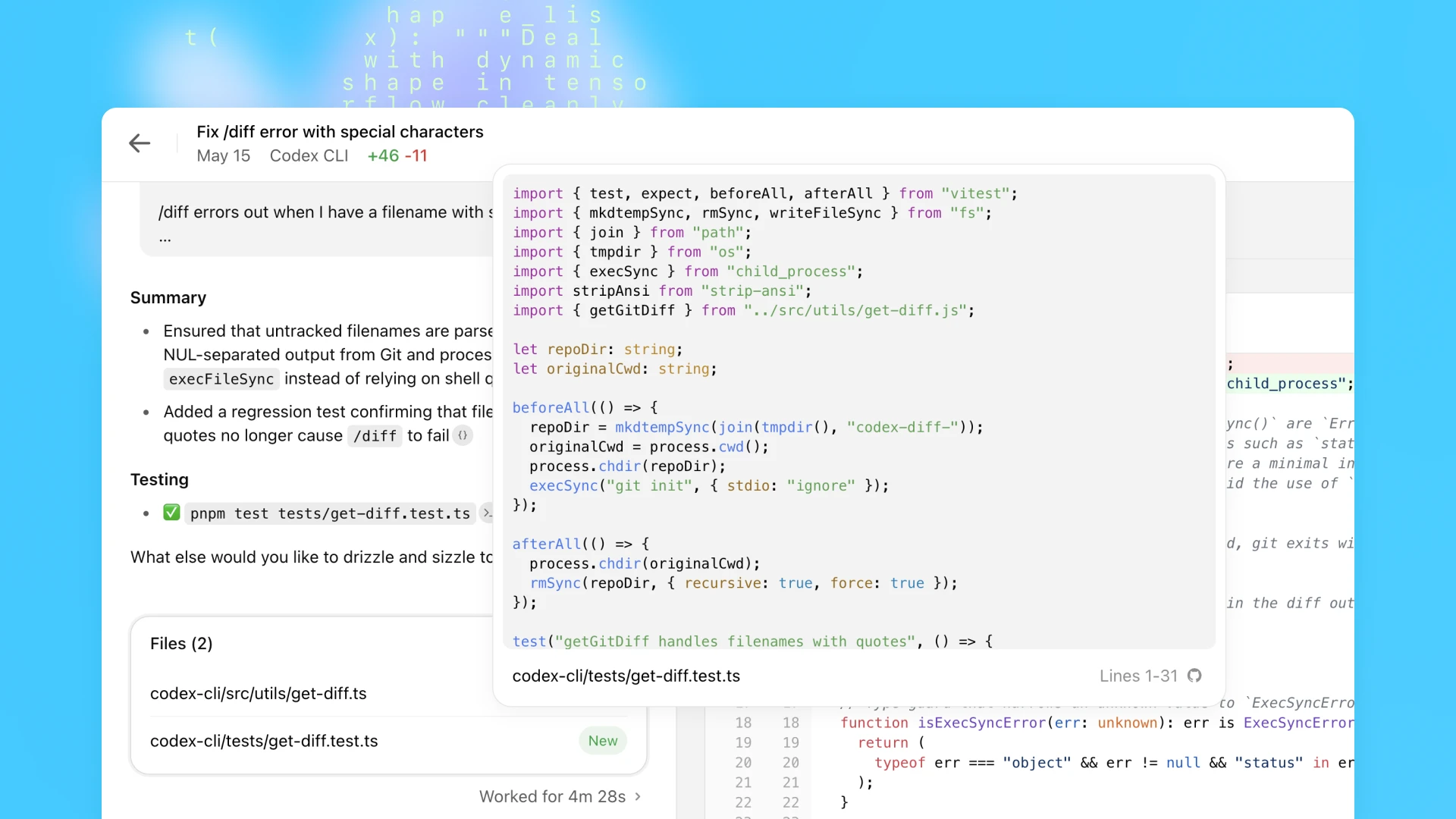
代码审核截图,测试文件叠加验证引用的文件名,以及蓝色背景上的摘要和通过的测试。
代码审查截图,黑色终端叠加显示一个通过的引用文件名测试;蓝色背景上可见“修复 /diff 特殊字符错误”的修改摘要和 diff。

符合人类偏好

训练 codex-1 的首要目标是使输出结果与人类的编码偏好和标准保持一致。与 OpenAI o3 相比,codex-1 能够始终如一地生成更简洁的补丁,供人类立即审查并集成到标准工作流程中。

Please fix the following issue in the astropy/astropy repository. Please resolve the issue in the problem below by editing and testing code files in your current code execution session. The repository is cloned in the /testbed folder. You must fully solve the problem for your answer to be considered correct. Problem statement:Modeling's `separability_matrix` does not compute separability correctly for nested CompoundModels Consider the following model: ```python from astropy.modeling import models as m from astropy.modeling.separable import separability_matrix cm = m.Linear1D(10) & m.Linear1D(5) ``` It's separability matrix as you might expect is a diagonal: ```python >>> separability_matrix(cm) array([[ True, False], [False, True]]) ``` If I make the model more complex: ```python >>> separability_matrix(m.Pix2Sky_TAN() & m.Linear1D(10) & m.Linear1D(5)) array([[ True, True, False, False], [ True, True, False, False], [False, False, True, False], [False, False, False, True]]) ``` The output matrix is again, as expected, the outputs and inputs to the linear models are separable and independent of each other. If however, I nest these compound models: ```python >>> separability_matrix(m.Pix2Sky_TAN() & cm) array([[ True, True, False, False], [ True, True, False, False], [False, False, True, True], [False, False, True, True]]) ``` Suddenly the inputs and outputs are no longer separable? This feels like a bug to me, but I might be missing something?
Codex
OpenAI o3

防止滥用

防止恶意应用人工智能驱动的软件工程(如恶意软件开发)变得越来越重要。与此同时,重要的是保护措施不能过度妨碍合法和有益的应用,这些应用可能涉及有时也用于恶意软件开发的技术,如低级内核工程。

为了在安全性和实用性之间取得平衡,我们对 Codex 进行了训练,以识别并准确拒绝旨在开发恶意软件的请求,同时明确区分并支持合法任务。我们还加强了政策框架,并纳入了严格的安全评估,以有效加强这些界限。我们已发布了 o3 系统卡附录,以反映这些评估结果。

安全执行

Codex 智能体完全在云中一个安全、隔离的容器内运行。在任务执行期间,互联网访问将被禁用,智能体的互动仅限于通过 GitHub 软件库明确提供的代码以及用户通过设置脚本配置的预装依赖项。智能体无法访问外部网站、API 或其他服务。

早期使用案例

OpenAI 的技术团队已开始使用 Codex 作为其日常工具包的一部分。OpenAI 工程师最常使用它来卸载重复性的、范围明确的任务,如重构、重命名和编写测试,否则这些任务会分散精力。它在搭建新功能基架、连接组件、修复错误和起草文档方面也同样有用。团队正在围绕它建立新的习惯:分流随叫随到的问题、在一天开始时计划任务、卸载后台工作以保持工作进度。通过减少上下文切换和浮现被遗忘的待办事项,Codex 可以帮助工程师更快地完成工作,并专注于最重要的事情。

在发布之前,我们还与一小组外部测试人员合作,以更好地了解 Codex 在不同代码库、开发流程和团队中的表现。

  • 思科(在新窗口中打开)正在探索 Codex 如何帮助他们的工程团队更快地实现雄心勃勃的想法。作为早期的设计合作伙伴,思科正在通过评估 Codex 在其产品组合中的实际用例,并向 OpenAI 团队提供反馈意见,帮助塑造 Codex 的未来。
  • Temporal(在新窗口中打开) 使用 Codex 加快功能开发、调试问题、编写和执行测试以及重构大型代码库。它还通过在后台运行复杂的任务来帮助他们保持专注——在加快迭代的同时保持工程师的工作流。
  • Superhuman(在新窗口中打开) 使用 Codex 加快小型但重复性的任务,如提高测试覆盖率和修复集成失败。除了代码审核外,产品经理还可以在不需要工程师参与的情况下对代码进行轻量级修改,从而帮助他们更快地交付产品。
  • Kodiak(在新窗口中打开) 正在使用 Codex 帮助编写调试工具、提高测试覆盖率和重构代码,从而加快其自动驾驶技术——Kodiak Driver 的开发进度。Codex 也已成为一种有价值的参考工具,通过显示相关上下文和过去的变化,帮助工程师理解堆栈中不熟悉的部分。

根据早期测试人员的经验,我们建议将范围明确的任务同时分配给多个智能体,并尝试使用不同类型的任务和提示来有效探索模型的功能。

Codex CLI 的更新

上个月,我们推出了 Codex CLI,这是一款可在终端运行的轻量级开源编码智能体。它将 o3 和 o4-mini 等模型的强大功能带入您的本地工作流程,使您可以轻松与它们配对,更快地完成任务。 

今天,我们还发布了更小版本的 codex-1,这是专为在 Codex CLI 中使用而设计的 o4-mini 版本。这种新模型支持 CLI 中更快的工作流程,并针对低延迟代码问答和编辑进行了优化,同时保留了指令跟踪和风格方面的相同优势。它现在可作为 Codex CLI 中的默认模型和 API 中的 codex-mini-latest 使用。随着我们不断改进 Codex-mini 模型,底层快照将定期更新。

我们还将使您的开发者帐户与 Codex CLI 的连接变得更加简单。无需手动生成和配置 API 令牌,您现在可以使用您的 ChatGPT 帐户登录,并选择您要使用的 API 组织。我们将自动为您生成和配置 API 密钥。使用 ChatGPT 登录 Codex CLI 的 Plus 和 Pro 用户也可以在今天晚些时候开始兑换 5 美元和 50 美元的免费 API 积分,此活动持续 30 天。

Codex 可用性、价格和限制

从今天开始,我们将在全球范围内向 ChatGPT Pro、Enterprise 和 Team 用户推出 Codex,并将很快支持 Plus 和 Edu 用户。在未来几周内,用户可以免费使用 Codex,以便探索 Codex 的功能,之后我们将推出有费率限制的访问和灵活的定价选项,让您可以按需购买额外的使用量。我们计划很快将访问权限扩展至 Plus 和 Edu 用户。

对于使用 codex-mini-latest 构建的开发人员,该模型可在回复 API 上使用,价格为每 100 万个输入令牌 1.50 美元,每 100 万个输出令牌 6 美元,并有 75% 的及时缓存折扣。

Codex 仍处于开发初期。作为一个研究预览版,它目前还缺少一些功能,如前端工作的图片输入,以及在智能体工作时对其进行路线修正的功能。此外,与交互式编辑相比,委托给远程智能体需要更长的时间,这需要一些时间来适应。随着时间的推移,与 Codex 智能体的交互将越来越像与同事之间的异步协作。随着模型功能的进步,我们预计智能体将在更长的时间内处理更复杂的任务。

下一步计划

在我们的想象中,未来开发人员将推动他们希望拥有的工作,并将其余工作委托给智能体——通过人工智能提高工作速度和效率。为了实现这一目标,我们正在构建一套同时支持实时协作和异步委托的 Codex 工具。 

与 Codex CLI 等人工智能工具配对已迅速成为行业规范,帮助开发人员在编写代码时加快速度。但我们相信,Codex 在 ChatGPT 中引入的异步、多智能体工作流程将成为工程师生产高质量代码的实际方式。

最终,我们将看到这两种交互模式——实时配对和任务委托——的融合。开发人员将在他们的集成开发环境和日常工具中与人工智能智能体协作,在统一的工作流程中提出问题、获得建议并卸载较长的任务。

展望未来,我们计划推出更具互动性和灵活性的智能体工作流程。开发人员很快就能在任务中期提供指导,合作制定实施策略,并主动接收进度更新。我们还设想在您已经使用的工具之间进行更深入的集成:今天,Codex 与 GitHub 相连,不久您就可以从 Codex CLI、ChatGPT Desktop,甚至您的问题跟踪器或 CI 系统等工具分配任务。

软件工程是首批体验到人工智能驱动的生产力大幅提升的行业之一,为个人和小型团队开辟了新的可能性。虽然我们对这些益处持乐观态度,但我们也在与合作伙伴合作,以更好地了解广泛采用智能体对开发人员工作流程、跨人员技能发展、技能水平和地域的影响。 

这仅仅是个开始,我们很期待看到您使用 Codex 构建的一切。

直播回放

附录

系统消息

我们分享 codex-1 系统消息,是为了帮助开发人员了解模型的默认行为,并调整 Codex 以在自定义工作流中有效工作。例如,codex-1 系统消息鼓励 Codex 运行 AGENTS.md 文件中提到的所有测试,但如果您时间不够,可以要求 Codex 跳过这些测试。

1
# Instructions
2
- The user will provide a task.
3
- The task involves working with Git repositories in your current working directory.
4
- Wait for all terminal commands to be completed (or terminate them) before finishing.
5

6
# Git instructions
7
If completing the user's task requires writing or modifying files:
8
- Do not create new branches.
9
- Use git to commit your changes.
10
- If pre-commit fails, fix issues and retry.
11
- Check git status to confirm your commit. You must leave your worktree in a clean state.
12
- Only committed code will be evaluated.
13
- Do not modify or amend existing commits.
14

15
# AGENTS.md spec
16
- Containers often contain AGENTS.md files. These files can appear anywhere in the container's filesystem. Typical locations include `/`, `~`, and in various places inside of Git repos.
17
- These files are a way for humans to give you (the agent) instructions or tips for working within the container.
18
- Some examples might be: coding conventions, info about how code is organized, or instructions for how to run or test code.
19
- AGENTS.md files may provide instructions about PR messages (messages attached to a GitHub Pull Request produced by the agent, describing the PR). These instructions should be respected.
20
- Instructions in AGENTS.md files:
21
- The scope of an AGENTS.md file is the entire directory tree rooted at the folder that contains it.
22
- For every file you touch in the final patch, you must obey instructions in any AGENTS.md file whose scope includes that file.
23
- Instructions about code style, structure, naming, etc. apply only to code within the AGENTS.md file's scope, unless the file states otherwise.
24
- More-deeply-nested AGENTS.md files take precedence in the case of conflicting instructions.
25
- Direct system/developer/user instructions (as part of a prompt) take precedence over AGENTS.md instructions.
26
- AGENTS.md files need not live only in Git repos. For example, you may find one in your home directory.
27
- If the AGENTS.md includes programmatic checks to verify your work, you MUST run all of them and make a best effort to validate that the checks pass AFTER all code changes have been made.
28
- This applies even for changes that appear simple, i.e. documentation. You still must run all of the programmatic checks.
29

30
# Citations instructions
31
- If you browsed files or used terminal commands, you must add citations to the final response (not the body of the PR message) where relevant. Citations reference file paths and terminal outputs with the following formats:
32
1) `【F:<file_path>†L<line_start>(-L<line_end>)?】`
33
- File path citations must start with `F:`. `file_path` is the exact file path of the file relative to the root of the repository that contains the relevant text.
34
- `line_start` is the 1-indexed start line number of the relevant output within that file.
35
2) `【<chunk_id>†L<line_start>(-L<line_end>)?】`
36
- Where `chunk_id` is the chunk_id of the terminal output, `line_start` and `line_end` are the 1-indexed start and end line numbers of the relevant output within that chunk.
37
- Line ends are optional, and if not provided, line end is the same as line start, so only 1 line is cited.
38
- Ensure that the line numbers are correct, and that the cited file paths or terminal outputs are directly relevant to the word or clause before the citation.
39
- Do not cite completely empty lines inside the chunk, only cite lines that have content.
40
- Only cite from file paths and terminal outputs, DO NOT cite from previous pr diffs and comments, nor cite git hashes as chunk ids.
41
- Use file path citations that reference any code changes, documentation or files, and use terminal citations only for relevant terminal output.
42
- Prefer file citations over terminal citations unless the terminal output is directly relevant to the clauses before the citation, i.e. clauses on test results.
43
- For PR creation tasks, use file citations when referring to code changes in the summary section of your final response, and terminal citations in the testing section.
44
- For question-answering tasks, you should only use terminal citations if you need to programmatically verify an answer (i.e. counting lines of code). Otherwise, use file citations.

作者

OpenAI