Bỏ qua nội dung chính
OpenAI

16 tháng 4, 2025

Bản phát hành

Suy nghĩ bằng hình ảnh

OpenAI o3 và o4-mini đại diện cho một bước đột phá quan trọng trong lĩnh vực nhận thức thị giác, thông qua khả năng suy luận bằng hình ảnh trong chuỗi tư duy của các mô hình này.

Đang tải…

OpenAI o3 và o4-mini là các mô hình suy luận hình ảnh mới nhất trong series o của chúng tôi. Lần đầu tiên, các mô hình của chúng tôi có thể tư duy bằng hình ảnh trong chuỗi tư duy—chứ không chỉ đơn thuần là nhìn thấy chúng.

Tương tự như mô hình OpenAI o1 trước đây, o3 và o4-mini được huấn luyện để suy nghĩ kỹ hơn trước khi trả lời—và sử dụng một chuỗi tư duy nội tại dài trước khi phản hồi người dùng. o3 và o4-mini tiếp tục mở rộng năng lực này bằng cách suy nghĩ với hình ảnh trong chuỗi tư duy của chúng. Điều này đạt được bằng cách chuyển đổi hình ảnh do người dùng tải lên bằng các công cụ, cho phép chúng cắt xén, phóng to, xoay, bên cạnh các kỹ thuật xử lý hình ảnh đơn giản khác. Quan trọng hơn, những năng lực này được tích hợp sẵn một cách tự nhiên mà không cần dựa vào các mô hình chuyên biệt riêng lẻ.

Trí tuệ thị giác nâng cao của ChatGPT sẽ giúp bạn giải quyết các vấn đề khó hơn bằng cách phân tích hình ảnh một cách kỹ lưỡng, chính xác và đáng tin cậy hơn bao giờ hết. Nó có thể kết hợp liền mạch khả năng suy luận nâng cao với các công cụ như tìm kiếm web và xử lý hình ảnh—tự động thu phóng, cắt xén, lật hoặc cải thiện chất lượng ảnh—để trích xuất thông tin chuyên sâu ngay cả từ những bức ảnh không hoàn hảo. Ví dụ: bạn có thể tải lên một bức ảnh chụp một tập các vấn đề về kinh tế để nhận được lời giải thích từng bước, hoặc chia sẻ ảnh chụp màn hình một lỗi lập trình để nhanh chóng có được bản phân tích nguyên nhân gốc rễ.

Cách tiếp cận này mở ra hướng đi mới cho việc mở rộng quy mô tính toán tại thời điểm thử nghiệm, kết hợp nhuần nhuyễn giữa suy luận hình ảnh và văn bản. Điều này được phản ánh qua hiệu suất hàng đầu trên các bài đánh giá đa phương thức, đánh dấu một bước tiến quan trọng hướng tới khả năng suy luận đa phương thức.

Suy luận hình ảnh trong thực tế

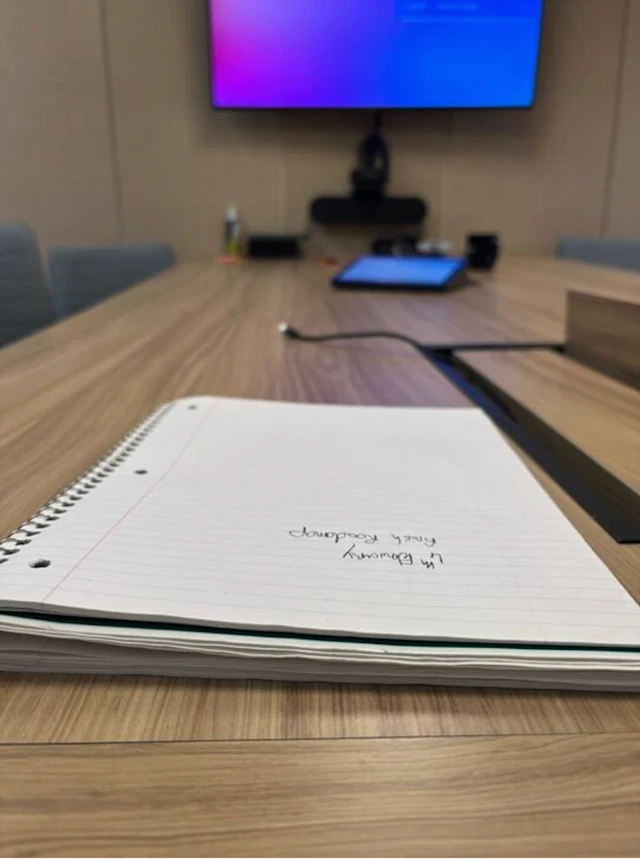
Tư duy bằng hình ảnh cho phép tương tác với ChatGPT dễ dàng hơn. Bạn có thể đặt câu hỏi bằng cách chụp một bức ảnh mà không cần lo lắng về vị trí của các vật thể—cho dù chữ bị ngược hay có nhiều vấn đề về mặt vật lý trong cùng một bức ảnh. Ngay cả khi các vật thể không rõ ràng ngay từ cái nhìn ban đầu, khả năng suy luận hình ảnh sẽ cho phép mô hình phóng to để nhìn rõ hơn.

Tất cả các ví dụ đều được hoàn thành bằng OpenAI o3.

o3-visual-reasoning-notebook

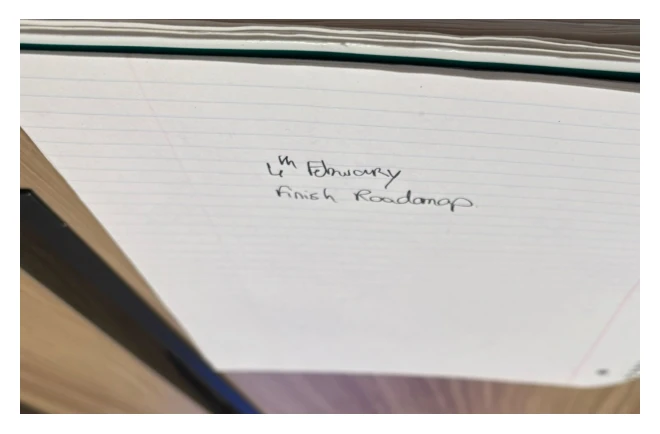
What is written on the notebook?

Suy luận về nội dung của sổ tay trong 20 giây

Analyzed image

o3-visual-reasoning-notebook1

Analyzed image

o3-visual-reasoning-notebook2
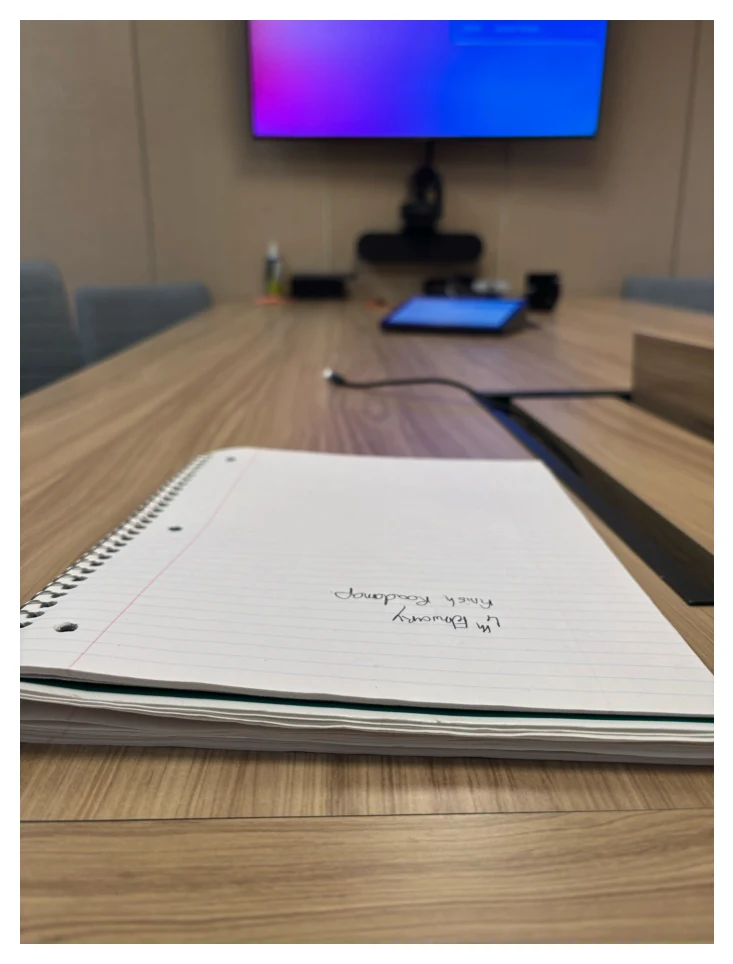
  • The user posted an image at /mnt/data/own_notebook.jpg and asked me to read what's written on it. I'll need to load the image so I can inspect the text. Once I view it, I realize the text is upside down, so I’ll rotate it so it's readable.
    From there, I can check what's written and share my findings clearly with the user.

Analyzed image

o3-visual-reasoning-notebook4
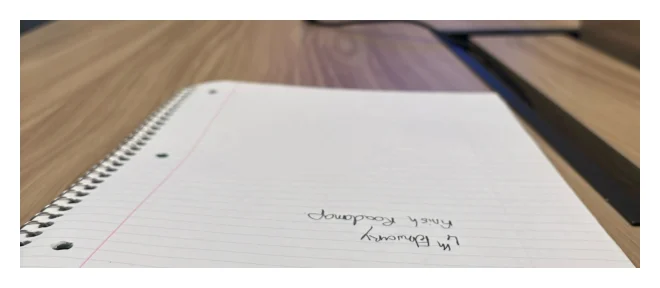
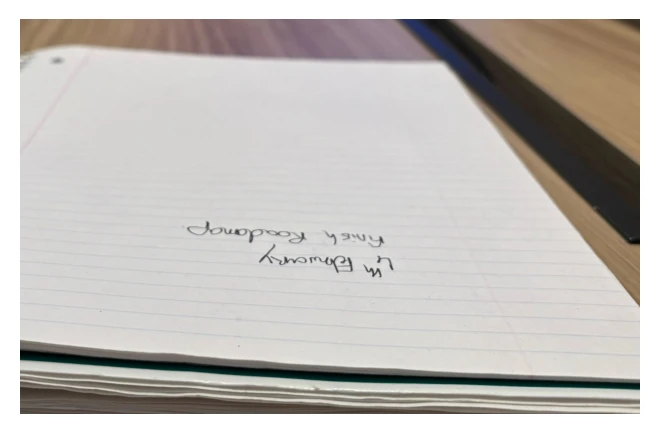
  • The user shared an image found at /mnt/data/own_notebook.jpg and asked me to read the text on it. I’ll load the image and zoom in to see the writing clearly. It turns out the text is upside down, so I’ll rotate it for easy reading. Afterward, I’ll crop the lower part of the image to focus on the relevant area, and rotate the cropped section to ensure the text is right side up.

Analyzed image

o3-visual-reasoning-notebook5

Done

It says: “4th February – finish roadmap.”

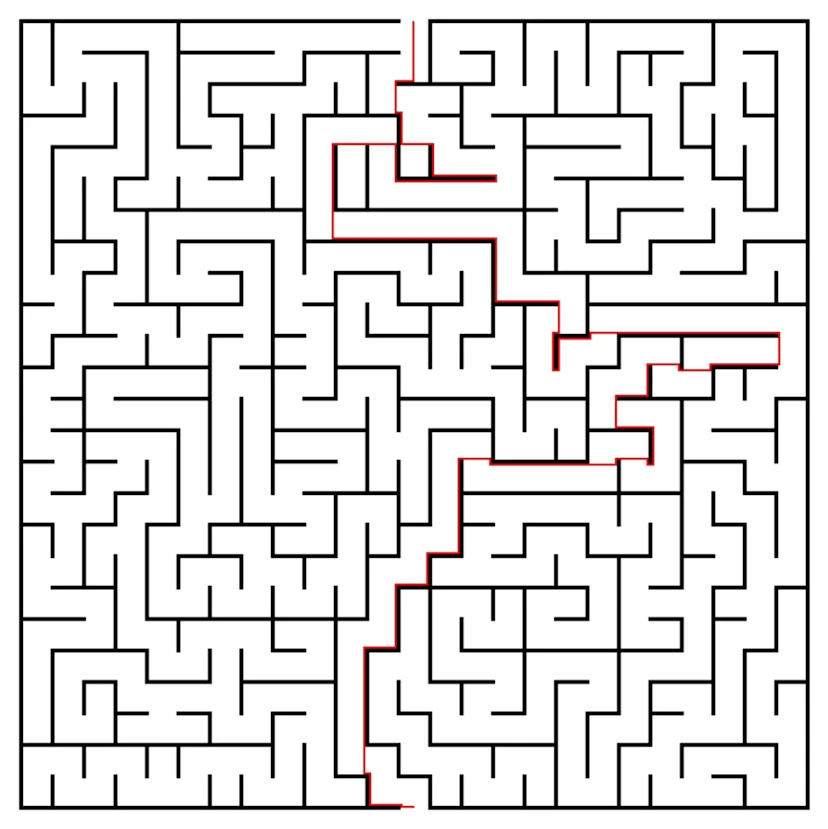
Các mô hình suy luận hình ảnh mới nhất của chúng tôi hoạt động song song với các công cụ khác như phân tích dữ liệu bằng Python, tìm kiếm web, tạo sinh ảnh để giải quyết các vấn đề phức tạp hơn một cách sáng tạo và hiệu quả, mang đến cho người dùng những trải nghiệm đầu tiên ở dạng tác nhân đa phương thức.

o3-visual-reasoning-maze

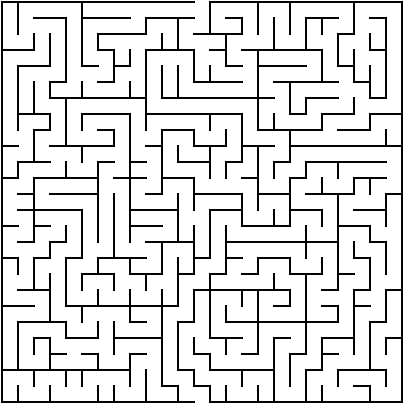
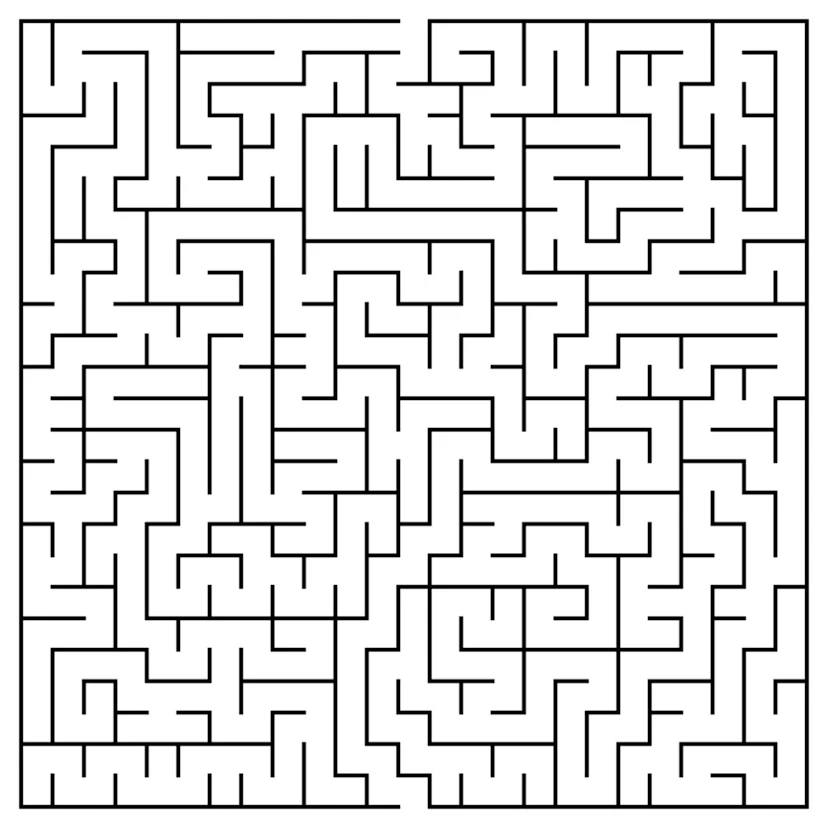
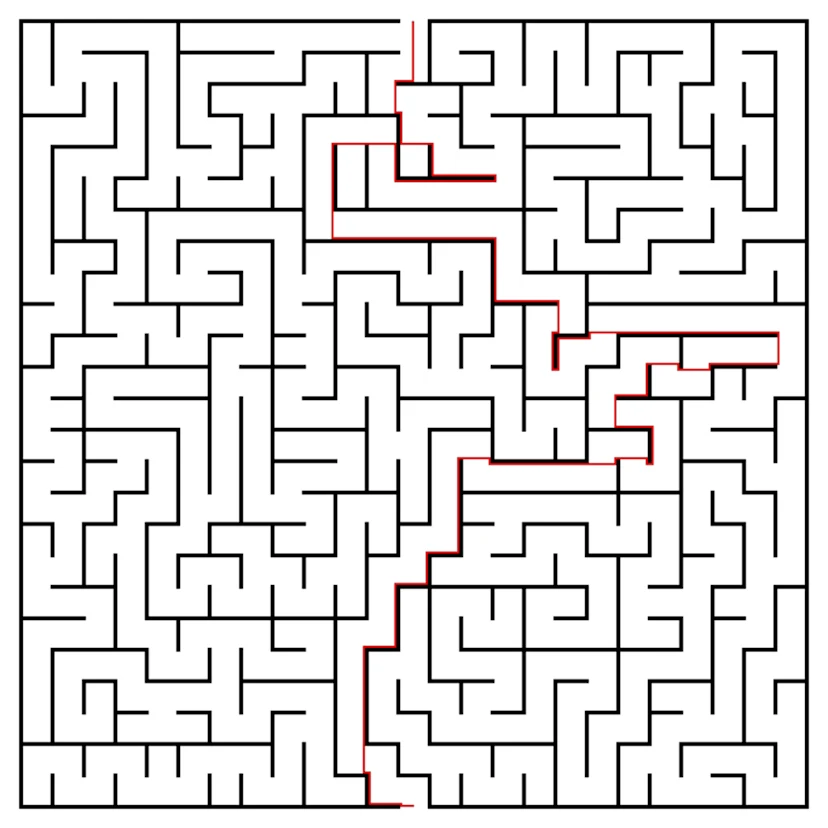
solve this maze and plot a path with red-colored line

Đã suy luận về giải pháp và đường đi mê cung trong 1 phút 44 giây

Analyzed image

o3-visual-reasoning-maze1
  • The user provided an image path, but I’ve yet to load it. First, I’ll need to load the image from the given path for analysis. Once that’s done, I can detect the maze path, potentially marked by black lines, and plot a red line to showcase it. The image is relatively small—404x
  • I’m thinking the start could be at the top left missing border piece, or maybe near the left border. To help figure this out, I’ll look at the first row pixels to find any white areas near the border. Since the maze walls are black on white, I’ll try a thresholding approach. To invert it, I’ll use a threshold value of 200, which would set white to 255 and black closer to 0. I’ll apply this threshold using the inverse method.
  • Okay, I initially thought I could approximate the maze start near the top-left opening. I applied some thresholding to detect white pixels but encountered an issue—nothing changed. It seems the image might have high noise. Oddly, when inspecting the grayscale, all pixel values are zero, which suggests the image is completely black. This doesn’t match what we saw earlier with Matplotlib, so I’ll delve deeper into how PIL loaded the image and inspect the underlying pixel array.

Analyzed

Python

1
print(imgcv.max(), imgcv.min(), imgcv.mean())

0 0 0.0

Analyzed

Python

1
import numpy as np
2
img_np = np.array(img)
3
print(img_np.shape, img_np.dtype, img_np.max(), img_np.min())

(404, 404, 4) uint8 255 0

It looks like the lines are black with a transparent background, but when PIL loads the image, it's showing a white background due to how it's handling the alpha channel. I’ll try converting the image to RGB, but the pixel values are still showing all zeros. This is odd, since the black lines should be visible. Hmm, earlier the display had a white background. Let me check the pixel values at coordinate (200, 200) to get a clearer picture.

Analyzed

Python

1
img_rgb = img.convert('RGB')
2
imgcv = cv2.cvtColor(np.array(img_rgb), cv2.COLOR_RGB2GRAY)
3
print(imgcv.max(), imgcv.min())

0 0

Analyzed

Python

1
print(img_np[200,200])

[0 0 0 0]

  • The image has black lines with a transparent background, but it appears white due to how PIL handled the alpha channel. When displayed earlier, I saw white areas, which were actually transparent areas shown on a white grid (the Matplotlib background color). So, the lines are black with the transparent spaces representing the open path. I'll need to treat these transparent areas as the open path when interpreting the maze. It’s essentially a black line maze on a clear canvas.
  • I see that the maze walls are black pixels, and the path is transparent with an alpha value of 0. I need to find the path from an open cell on one border to another on the opposite border. To do this, I'll create a binary matrix where the passable cells have an alpha of 0 and are not part of a line border. Now, I'll focus on processing the image channels to identify the path.

Analyzed

Python

1
alpha = img_np[:,:,3]
2
# passable pixel if alpha == 0 (transparent) else wall
3
passable = alpha == 0
4
# find openings along border
5
h,w = passable.shape
6
openings = []
7
# top row
8
for x in range(w):
9
if passable[0,x]:
10
openings.append((0,x))
11
# bottom row
12
for x in range(w):
13
if passable[h-1,x]:
14
openings.append((h-1,x))
15
# left col
16
for y in range(h):
17
if passable[y,0]:
18
openings.append((y,0))
19
# right col
20
for y in range(h):
21
if passable[y,w-1]:
22
openings.append((y,w-1))
23
len(openings)

1616

  • The walls are black, and the path is transparent (alpha 0). I need to find a way from the open cell at one border to the open cell at the opposite border. I’ll create a binary matrix where the passable cells are transparent (alpha 0). However, there are a lot of transparent cells, and the paths might not be clear due to line gaps. I plan to treat the lines as about 3 pixels thick. I'll try BFS/DFS to analyze the passable area from the starting point.
  • It seems the maze's border cells might connect to "air" outside the maze—this is the transparent area surrounding the maze. But the path is only open through legitimate openings in the border walls. Outside of these openings, the transparent background might merge with the outside area, making it harder to differentiate. I need to treat the inside walkway as enclosed by walls, ensuring it connects to the outside only at those openings, not through a continuous open background.
  • I’m thinking of dilating the walls by 3 pixels. This might cause openings smaller than 3 pixels to close, which could block the path. However, this might inadvertently seal parts of the interior walkway, leading to a disconnected path. So, I should try morphological closing—using a small kernel to dilate the walls—and then check for passable areas. This could help me manage the maze more effectively while keeping the path clear.

Analyzed

Python

1
# find pattern of vertical walls
2
# examine alpha channel row 0 lines to see thickness
3
unique_rows = np.unique(np.sum(~passable, axis=1))
4
unique_rows[:20]

array([ 0, 16, 20, 22, 24, 26, 28, 30, 32, 34, 94, 150, 178, 192, 206, 220, 234, 248, 276, 290])

Analyzed

Python

1
import cv2
2
# create wall mask (1 where wall)
3
wall = ~passable
4
# dilate walls by 3 px
5
kernel = np.ones((3,3), np.uint8)
6
wall_dil = cv2.dilate(wall.astype(np.uint8), kernel, iterations=3)
7
pass_dil = wall_dil==0
8
# label connected regions in pass_dil
9
num_labels, labels = cv2.connectedComponents(pass_dil.astype(np.uint8))
10
print(num_labels)
11

2

  • It might be easier to treat the entire transparent area outside the walls as open, and then use BFS starting from the top-left outside region. However, since the walkway is also transparent, using BFS would flood the inside walkway from the entrance openings. I think a better approach might be to switch to grid cells, considering the maze lines are about 4 pixels wide. Alternatively, I could use a shortest path algorithm on the pixel level, restricting movement to inside the maze’s bounding box to solve the path.
  • I’m considering dilating the walls by around 3 pixels. If there are openings smaller than that, they could seal, disconnecting the interior walkway from the outside. The interior walkway might also get blocked, causing the path to be cut off. To test this, I’ll try using a morphological operation where I dilate the walls with a small kernel and check for passable regions. If needed, I could increase the dilation to 5 pixels to see how it affects the maze structure.
  • One idea is to invert the walls and walkway

Analyzed

Python

1
wall_dil = cv2.dilate(wall.astype(np.uint8), kernel, iterations=5)
2
pass_dil = wall_dil==0
3
num_labels, labels = cv2.connectedComponents(pass_dil.astype(np.uint8))
4
print(num_labels)

2

  • I’m thinking of analyzing the top border, specifically between 0 and around 10 pixel rows. I could look for positions where the wall (alpha not zero) is absent and detect where the top border has an opening — essentially where all the rows for a specific x position have alpha equal to zero (transparent). That should allow me to identify where the walkway might begin at the top border.

Analyzed

Python

1
# find opening columns on top border vertical line: for each x where all first maybe 10 rows walls present?
2
open_cols_top = []
3
for x in range(w):
4
if np.all(alpha[0:10,x] == 0):
5
open_cols_top.append(x)
6
open_cols_top[:20], len(open_cols_top)

([0, 195, 196, 197, 198, 199, 200, 201, 202, 203, 204, 205, 206, 207, 208, 403], 16)

  • I'm considering dilating the walls by 3 pixels, but if the openings are smaller, they might seal the walkway. This could block the path. I'll try using morphological closing to see if dilating the walls with a small kernel helps. After dilation, the walkway might still be connected, so I’ll need to check border openings and spot any gaps on the rectangle's border. I'll also inspect a few initial pixels to determine wall thickness, which seems to be about 4 pixels.

Analyzed

Python

1
print(alpha[0,0:30])

[0 0 0 0 0 0 0 0 0 0 0 0 0 0 0 0 0 0 0 0 0 0 0 0 0 0 0 0 0 0]

Analyzed

Python

1
print(alpha[1,0:50])

[ 0 255 255 255 255 255 255 255 255 255 255 255 255 255 255 255 255 255 255 255 255 255 255 255 255 255 255 255 255 255 255 255 255 255 255 255 255 255 255 255 255 255 255 255 255 255 255 255 255 255]

  • The walls are drawn with black lines, and walkway openings are the gaps in these lines. I want to check the top border for missing walls, so I’ll inspect the first 10 rows for each column where the "alpha" value is zero, indicating no wall. It looks like there are 16 such columns, mostly near the edges. Some areas (like positions 195-208) probably represent real openings, while others (like positions 0 and 403) may be due to missing borders outside the maze. Now, I'll check row 1 for walls.
  • I’ll check row 1, where alpha equals 255, indicating pixels that are part of the walls. From this, I realize that the exterior walls are

Analyzed

Python

1
wall_rows = []
2
for y in range(h):
3
if np.mean(alpha[y,:]>0) > 0.5:
4
wall_rows.append(y)
5
# keep unique groups
6
rows=[]
7
prev=-10
8
for y in wall_rows:
9
if y-prev>2: rows.append(y)
10
prev=y
11
rows

[1, 17, 49, 97, 113, 145, 161, 177, 193, 209, 241, 257, 289, 305, 321, 337, 369, 401]

  • I checked alpha at row 1, and 255 indicates the presence of a wall. The border walls are likely located at row 1, row h-2, and certain columns. The outside region and walkway are alpha==0, but not within the border lines. The walkway seems enclosed by walls drawn at intervals, every 4 pixels. I’ll check horizontal wall positions, looking for rows with mostly 255-alpha values. I noticed a pattern, with gaps roughly every 16 pixels, though it’s not consistent due to vertical walls. I plan to compute the differences in these gaps.

Analyzed

Python

1
diffs = [j-i for i,j in zip(rows[:-1],rows[1:])]
2
diffs

[16, 32, 48, 16, 32, 16, 16, 16, 16, 32, 16, 32, 16, 16, 16, 32, 32]

  • I checked row 1 and observed that alpha 255 indicates a wall. The border walls may be at row 1 and row h-2, as well as certain columns. Outside the border area and the walkway both have alpha 0. It seems the walkway is enclosed by walls drawn at odd intervals. The grid cell width might be around 4 px. The horizontal wall positions appear roughly every 16 px, but the pattern isn't uniform due to vertical walls. I'll compute the differences for a clearer picture.
  • Okay, there are still many openings along row 1, but I think clusters around columns 195–208 might actually correspond to the real entrance. This span is about 14 px wide. The openings at 0 and 403 could be corners, so they might not be true entrances. It seems the real entrance is in the 195–208 range. Now, I’ll look at the left border to check for vertical openings, focusing on specific y values.

Analyzed

Python

1
openings_top = [x for x in range(w) if alpha[1,x]==0]
2
len(openings_top), openings_top[:20]

(16, [0, 195, 196, 197, 198, 199, 200, 201, 202, 203, 204, 205, 206, 207, 208, 403])

Analyzed

Python

1
openings_left = [y for y in range(h) if alpha[y,1]==0]
2
openings_left[:20], len(openings_left)

([0, 403], 2)

  • I’m thinking of using morphological thinning to simplify the walkway into a one-pixel width, then running BFS to find a path. I’ll need to separate the walkway region from the outside. A flood fill from the border can help mark the outside, leaving the walkway region, but I need the walkway. A simpler plan is to target specific openings for entrances and exits. I can detect these gaps at row 1 in the border, where openings might appear as alpha[1,x]==0. Let’s check that approach.
  • I plan to use morphological thinning to narrow the walkway down to a one-pixel width, then run BFS to find the best path. To separate the walkway region from the outside, I’ll flood-fill around the border where alpha==0 to mark the outside. Then, I can address gaps in the walkway with morphological closing. Instead of filling all gaps, I’ll focus on entrance/exit openings, which I can detect by finding regions where alpha[1,x] == 0. Let’s check row 1 for these openings.
  • Looking at row 1, there are many potential openings, but the clusters between 195-208 (about 14 px wide) seem to be the real entrance. The row's openings might just be where there’s no wall. The left border also has vertical gaps, and I see that the top-left corner is open. The right and bottom borders also have openings, so I think the entrance and exit are at the top and bottom of the maze. With these connections, the walkway is accessible through these openings, so flood filling isn't viable.
  • I’m trying to define the interior of the maze, focusing on the region between (2, h-3) for rows and (2, w-3) for columns. To set up the starting point, I’ll look for the first passable cell near the top opening, specifically looking between x=195 and x=208 in row 2. I’ll select the middle of that range, x=201, as my start point. For the end point, I’ll look for something similar near the bottom, around (h-3, 201).

Analyzed

Python

1
openings_right = [y for y in range(h) if alpha[y,w-2]==0]
2
openings_right[:20], len(openings_right)

([0, 403], 2)

Analyzed

Python

1
openings_bottom = [x for x in range(w) if alpha[h-2,x]==0]
2
openings_bottom[:20], len(openings_bottom)

([0, 195, 196, 197, 198, 199, 200, 201, 202, 203, 204, 205, 206, 207, 208, 403], 16)

Analyzed

Python

1
start=(2,201)
2
end=(401,201)
3
print(passable[start], passable[end])

True True

Analyzed

Python

1
from collections import deque
2
import numpy as np
3

4
# Define mask of valid passable inside region
5
valid = passable.copy()
6
# exclude row0,row h-1, col0,col w-1
7
valid[0,:]=False
8
valid[h-1,:]=False
9
valid[:,0]=False
10
valid[:,w-1]=False
11

12
start_pt=start
13
end_pt=end
14

15
prev = -np.ones((h,w,2), dtype=int)
16
visited = np.zeros((h,w), dtype=bool)
17
q=deque()
18
q.append(start_pt)
19
visited[start_pt]=True
20
found=False
21
dirs=[(1,0),(-1,0),(0,1),(0,-1)]
22
while q:
23
y,x=q.popleft()
24
if (y,x)==end_pt:
25
found=True
26
break
27
for dy,dx in dirs:
28
ny,nx=y+dy,x+dx
29
if 0<=ny<h and 0<=nx<w and valid[ny,nx] and not visited[ny,nx]:
30
visited[ny,nx]=True
31
prev[ny,nx]=[y,x]
32
q.append((ny,nx))
33
print(found)

True

  • I’ll start by selecting the starting and ending points as passable pixels near specific coordinates, using the average of the opening cluster for the start point. Then, I can compute the shortest path using BFS, restricting it to the interior region. After finding the path, I'll overlay it on the original image by drawing a red line. But to ensure the red line stands out, I’ll convert the image to RGBA and then display it for a clear view.

Analyzed

Python

1
# reconstruct path
2
path=[]
3
p=end_pt
4
while p!=(-1,-1):
5
path.append(p)
6
y,x=p
7
prev_y, prev_x = prev[y,x]
8
if prev_y==-1:
9
break
10
p=(prev_y, prev_x)
11
path = path[::-1]
12
len(path)

1144

Analyzed

Python

1
from PIL import ImageDraw
2
img_rgba = img.copy()
3
draw = ImageDraw.Draw(img_rgba)
4
for y,x in path:
5
draw.point((x,y), fill=(255,0,0,255))
6
# Save
7
img_rgba.save('/mnt/data/maze_solved.png')

Analyzed image

o3-visual-reasoning-maze4

Done

Matplotlib Chart

maze output

Here’s one possible solution path for your maze, traced in red.

Python

1
from PIL import Image, ImageDraw
2
import numpy as np
3
import cv2
4
import matplotlib.pyplot as plt
5
from collections import deque
6
# Load the original maze (walls are black, background is transparent)
7
maze_path = '/mnt/data/d19c14d3-e182-4dba-99dc-647e4f725536.png'
8
img = Image.open(maze_path)
9
alpha = np.array(img)[:, :, 3]
10
h, w = alpha.shape
11
passable = alpha == 0 # transparent pixels are walkable
12
# We determined the entrance & exit are roughly centered at the top & bottom openings
13
start = (2, 201)
14
end = (h - 3, 201)
15
# Breadth‑first search on walkable pixels (inside the border)
16
valid = passable.copy()
17
valid[0, :] = valid[-1, :] = valid[:, 0] = valid[:, -1] = False
18
prev = -np.ones((h, w, 2), dtype=int)
19
visited = np.zeros((h, w), bool)
20
q = deque([start])
21
visited[start] = True
22
dirs = [(1, 0), (-1, 0), (0, 1), (0, -1)]
23
while q:
24
y, x = q.popleft()
25
if (y, x) == end:
26
break
27
for dy, dx in dirs:
28
ny, nx = y + dy, x + dx
29
if 0 <= ny < h and 0 <= nx < w and valid[ny, nx] and not visited[ny, nx]:
30
visited[ny, nx] = True
31
prev[ny, nx] = (y, x)
32
q.append((ny, nx))
33
# Reconstruct the path
34
path = []
35
p = end
36
while (p != (-1, -1)):
37
path.append(p)
38
py, px = p
39
p = tuple(prev[py, px])
40
path.reverse()
41
# Draw the solution in red
42
solved = img.copy()
43
draw = ImageDraw.Draw(solved)
44
for y, x in path:
45
draw.point((x, y), fill=(255, 0, 0, 255))
46
# Show the solved maze
47
plt.figure(figsize=(6, 6))
48
plt.imshow(solved)
49
plt.axis('off')
50
plt.show()
51
# Save for download if the user wants it later
52
solved_path = '/mnt/data/maze_solved.png'
53
solved.save(solved_path)
54
print(f"Solved maze saved to {solved_path}")
55

Đánh giá hiệu suất

Để làm nổi bật sự cải tiến về khả năng suy luận hình ảnh so với các mô hình đa phương thức trước đây, chúng tôi đã thử nghiệm OpenAI o3 và o4-mini trên một loạt các bài thi thực tế của con người và các bài đánh giá về ML. Các mô hình suy luận hình ảnh mới này vượt trội đáng kể so với các phiên bản tiền nhiệm ở tất cả các tác vụ đa phương thức mà chúng tôi đã thử nghiệm.

Tất cả các mô hình đều được đánh giá ở cài đặt ‘nỗ lực suy luận’ cao—tương tự như các phiên bản ‘o4-mini-high’ trong ChatGPT.

Đặc biệt, việc suy nghĩ bằng hình ảnh—mà không cần dựa vào trình duyệt—mang lại những cải tiến đáng kể trên tất cả các bài đánh giá về nhận thức mà chúng tôi đã đánh giá. Các mô hình của chúng tôi thiết lập hiệu suất tiên tiến nhất ở khía cạnh: trả lời câu hỏi STEM (MMMU, MathVista), đọc và suy luận biểu đồ (CharXiv), các nguyên tắc nhận thức cơ bản (VLMs are Blind), và tìm kiếm bằng hình ảnh (V*). Trên V*, phương pháp suy luận hình ảnh của chúng tôi đạt độ chính xác 95,7%, về cơ bản đã giải quyết được bài đánh giá này.

Những giới hạn và kế hoạch tiếp theo

Việc suy nghĩ bằng hình ảnh hiện có những giới hạn sau:

  • Chuỗi suy luận quá dài: Các mô hình có thể thực hiện các lệnh gọi công cụ và các bước xử lý hình ảnh thừa thãi hoặc không cần thiết, dẫn đến chuỗi tư duy quá dài.
  • Lỗi nhận thức: Các mô hình vẫn có thể mắc những lỗi nhận thức cơ bản. Ngay cả khi các lệnh gọi công cụ thúc đẩy quá trình suy luận một cách chính xác, việc diễn giải sai hình ảnh vẫn có thể dẫn đến câu trả lời cuối cùng không chính xác.
  • Độ tin cậy: Các mô hình có thể thử những quy trình suy luận hình ảnh khác nhau trong nhiều lần thử giải quyết vấn đề, và một số quy trình đó có thể dẫn đến kết quả sai.

OpenAI o3 và o4-mini đã thúc đẩy đáng kể các năng lực suy luận hình ảnh tiên tiến nhất, đại diện cho một bước tiến quan trọng hướng tới khả năng suy luận đa phương thức ở phạm vi rộng hơn. Các mô hình này mang lại độ chính xác tốt nhất trong các tác vụ nhận thức thị giác, cho phép giải quyết những câu hỏi mà trước đây nằm ngoài khả năng.

Chúng tôi đang liên tục tinh chỉnh năng lực suy luận bằng hình ảnh của các mô hình để súc tích hơn, bớt rườm rà và đáng tin cậy hơn. Chúng tôi rất hào hứng tiếp tục nghiên cứu về suy luận đa phương thức và mong muốn mọi người khám phá cách thức những cải tiến này có thể nâng cao công việc hàng ngày của họ.


Cập nhật ngày 16 tháng 4: kết quả của mô hình o3 trên Charxiv-r, Mathvista và vlmsareblind đã được cập nhật để phản ánh một thay đổi về lời nhắc hệ thống mà không có trong lần đánh giá ban đầu.

Tác giả

OpenAI

Contributors

Aditya Ramesh, Aidan Clark, Aleksandra Spyra, Alex Tachard Passos, Alexander Kirillov, Ali Kalami, Amy McDonald Sandjideh, Andrei Gheorghe, Andrew Gibiansky, Andrew Tulloch, Angela Baek, Anubha Srivastava, Avital Oliver, Behrooz Ghorbani, Ben Leimberger, Borys Minaiev, Bowen Cheng, Brandon McKinzie, Carpus Chang, Cary Hudson, Casey Chu, Charlotte Cole, Chen Shen, Dan Roberts, Dana Palmie, Daniel Kappler, David Medina, Edmund Wong, Eric Mitchell, Eric Ning, Freddie Sulit, Haiming Bao, Haitang Hu, Hongyu Ren, Hyeonwoo Noh, Jakub Pachocki, James Betker, James Qin, Jamie Kiros, Jason Ai, Jerry Tworek, Jessica Liang, Ji Lin, Jiahui Yu, Jianfeng Wang, Joseph Mo, Kenji Hata, Kevin King, Kristian Georgiev, Kshitij Gupta, Lauren Yang, Li Jing, Lin Yang, Linden Li, Mark Chen, Martin Li, Max Schwarzer, Mia Glaese, Michael Malek, Minnia Feng, Nacho Soto, Nat McAleese, Niko Felix, Peter Faiman, Prafulla Dhariwal, Rajkumar Samuel, Rapha Gontijo Lopes, Ravi Teja Mullapudi, Reiichiro Nakano, Rennie Song, Ricky Xu, Sam Altman, Sean Fitzgerald, Shengjia Zhao, Shengli Hu, Shuchao Bi, Spencer Papay, Szi-chieh Yu, Wenda Zhou, Yang Lu, Yara Khakbaz, Yunxing Dai, Zhishuai Zhang