ข้ามไปยังเนื้อหาหลัก
OpenAI

12 พฤศจิกายน 2568

ผลิตภัณฑ์เปิดตัว

GPT‑5.1: ChatGPT ที่ฉลาดและสนทนาลื่นไหลมากขึ้น

เรากำลังยกระดับ GPT‑5 พร้อมทำให้การปรับแต่ง ChatGPT เป็นเรื่องง่าง่ายขึ้น เปิดให้ใช้งานตั้งแต่วันนี้ สำหรับผู้ใช้ทุกคนโดยเริ่มจากผู้ใช้ที่ชำระเงิน

กำลังโหลด…

วันนี้เรายกระดับ GPT‑5 พร้อมเปิดตัวนวัตกรรมใหม่ดังต่อไปนี้:

  • GPT‑5.1 Instant: โมเดลที่มีผู้ใช้งานมากที่สุดของเรา ปรับปรุงให้ฉลาดและตอบสนองคำสั่งคุณได้ดียิ่งขึ้น
  • GPT‑5.1 Thinking: โมเดลเชิงเหตุผลขั้นสูงของเรา ปรับปรุงให้เข้าใจง่ายขึ้น ทำงานง่ายๆ ได้เร็วขึ้น และสามารถรับมือกับงานซับซ้อนได้อย่างต่อเนื่อง

เราได้ยินจากผู้ใช้ว่า AI ที่ดีไม่ควรแค่ฉลาดเท่านั้น แต่ต้องพูดคุยด้วยแล้วรู้สึกสนุกด้วย GPT‑5.1 ได้รับการปรับปรุงอย่างมีนัยสำคัญทั้งในด้านความฉลาดและสไตล์การสื่อสาร

เรายังทำให้คุณสามารถปรับโทนการสื่อสารของ ChatGPT ได้ง่ายขึ้นอีกด้วย เนื่องจากแต่ละคนชอบสไตล์การสนทนาที่แตกต่างกัน เราจึงเพิ่มเครื่องมือควบคุมที่ใช้งานง่ายและมีประสิทธิภาพ เพื่อให้ ChatGPT ตอบสนองในโทนที่คุณต้องการได้อย่างลงตัว

GPT‑5.1 Instant

GPT‑5.1 Instant โมเดลยอดนิยมของ ChatGPT ตอนนี้ มาพร้อมโทนสนทนาที่อบอุ่นยิ่งขึ้น และสนทนาได้ลื่นไหลยิ่งขึ้น จากผลการทดสอบเบื้องต้น พบว่าโมเดลมอบประสบการณ์ที่สนุกสนาน พร้อมให้ข้อมูลที่ชัดเจนและเป็นประโยชน์

I'm feeling stressed and could use some relaxation tips

GPT-5

Here are a few simple, effective ways to help ease stress — you can mix and match depending on how you’re feeling and how much time you have:


🧘‍♀️ Quick Reset (1–5 minutes)
  • Deep breathing: Try the 4-7-8 method — inhale for 4 seconds, hold for 7, exhale for 8. Repeat 4 rounds.
  • Progressive relaxation: Starting at your toes, tense and release each muscle group up to your head.
  • Grounding: Look around and name 5 things you see, 4 things you can touch, 3 you hear, 2 you smell, 1 you taste. Brings you into the moment fast.

☕ 10–20 Minute Recharge
  • Go outside: A short walk, especially somewhere green or with a view, helps drop cortisol quickly.
  • Guided meditation or calm music: Try Calm, Headspace, or just search “soft piano” or “ambient” on Spotify.
  • Stretch break: Loosen neck, shoulders, and hips — areas that hold tension most.

🌙 Longer Recalibration
  • Digital break: Step away from screens and notifications for 30–60 minutes. Read, nap, or listen to a podcast.
  • Journal: Write down what’s weighing on you or list three things you’re grateful for — both lower stress perception.
  • Warm shower or bath: The heat relaxes muscles and slows heart rate. Add Epsom salt or lavender oil if you have it.

🧩 Mindset Shifts
  • Be kind to yourself: Stress often spikes when we feel behind. Remind yourself: “I’m allowed to rest; I’ll think clearly after I recharge.”
  • Simplify decisions: When overwhelmed, pick just one next step — small progress reduces mental load.

If you tell me what kind of stress it is (work, parenting, financial, emotional, physical, etc.), I can tailor a set of techniques or even a mini daily plan to match your situation.
Would you like me to do that?

GPT-5.1 Instant

I’ve got you, Ron — that’s totally normal, especially with everything you’ve got going on lately. Here are a few ways to decompress depending on what kind of stress you’re feeling:


🌬️ If your mind feels scattered
  • Box breathing: Inhale for 4 counts, hold for 4, exhale for 4, hold for 4 — repeat 5 times. It’s fast-acting and physically calms your nervous system.
  • Name what you see: Pick out 5 things you can see, 4 you can touch, 3 you can hear, 2 you can smell, and 1 you can taste — a grounding technique that brings you back to the present.

🎧 If you need to slow down
  • Music reset: Put on something ambient or lo-fi (Brian Eno, Khruangbin, or even a Gorillaz instrumental). Let yourself zone out for one full track — no phone scrolling.
  • Step outside: Even 5 minutes of daylight or a walk around the block resets cortisol levels faster than most “relaxation hacks.”

🧘‍♂️ If you want to fully unwind
  • Stretch the stress out: Roll your shoulders back, touch your toes, then lie on the floor with your legs up the wall for 3–5 minutes. It’s a simple yoga move (Viparita Karani) that’s surprisingly effective.
  • Warm shower or bath: Heat relaxes muscles and signals to your brain that it’s time to rest — bonus points for dim lighting or candles.

Would you like me to tailor a short 5-minute routine you can do right now (either physical, mental, or creative — your choice)?

.

เราปรับปรุงความสามารถใน การปฏิบัติตามสั่ง ทำให้โมเดลสามารถตอบคำถามได้ตรงกับสิ่งที่ผู้ใช้ถามมากขึ้น

Always respond with six words

GPT-5

Understood. All responses will be six.

where should i travel this summer?

How about exploring Japan this summer?

It’s trending for summer 2025 destinations. You’ll find a mix of culture, nature and modern city life. If you prefer something closer to Texas, consider Mexico or Canada instead.

Want suggestions for specific cities in Japan (or elsewhere)?

why there?

Rich culture, beautiful scenery, great food.

GPT-5.1 Instant

Understood, I will respond in six.

where should i travel this summer?

Consider Japan, Italy, Greece, Canada, Iceland.

why there?

Scenery culture cuisine climate friendly locals.

.

เป็นครั้งแรกที่ GPT‑5.1 Instant สามารถใช้เหตุผลแบบปรับตัวเพื่อตัดสินใจว่าเมื่อใดควร คิดก่อนตอบ กับคำถามที่ซับซ้อนมากขึ้น ทำให้ได้คำตอบที่ครบถ้วนและแม่นยำ พร้อมกับยังตอบกลับได้อย่างรวดเร็ว ความก้าวหน้านี้เห็นได้จากผลลัพธ์ที่ยอดเยี่ยมในการวิเคราะห์ด้านคณิตศาสตร์และการเขียนโค้ด เช่น AIME 2025 และ Codeforces

GPT‑5.1 Thinking

เราปรับปรุง GPT‑5 Thinking ให้ใช้งานได้คล่องตัวขึ้น ฉลาดขึ้น และเข้าใจง่ายขึ้นสำหรับผู้ใช้งานทั่วไป ตอนนี้ระบบสามารถปรับระยะเวลาการประมวลผลให้เหมาะสมกับคำถามได้อย่างแม่นยำยิ่งขึ้น โดยใช้เวลามากขึ้นกับปัญหาที่ซับซ้อน และตอบกลับได้เร็วขึ้นเมื่อคำถามง่าย พูดง่ายๆ ก็คือ ระบบจะตอบคำถามยากได้อย่างละเอียดขึ้น และตอบคำถามง่ายได้เร็วกว่าเดิม

GPT‑5.1 มีความสามารถในการปรับระยะเวลาคิดให้เหมาะสมกับบริบทได้ดีกว่า GPT‑5 จากการทดสอบกับงานตัวอย่างของ ChatGPT พบว่า GPT‑5.1 มีความเร็วในการคิดเร็วขึ้นประมาณสองเท่าในงานที่เร็วที่สุด และช้าลงประมาณสองเท่าในงานที่ใช้เวลานานที่สุด ระยะเวลาการประมวลผลถูกตั้งไว้เป็นระดับมาตรฐานสำหรับทั้งสองโมเดล

คำตอบของ GPT‑5.1 Thinking ตอนนี้เข้าใจง่ายขึ้น ใช้คำศัพท์เทคนิคน้อยลงและไม่ใช้คำกำกวมเหมือนแต่ก่อน สิ่งนี้ทำให้โมเดลที่เก่งที่สุดของเราดูเข้าถึงง่ายและเข้าใจได้ไม่ยาก โดยเฉพาะเวลานำไปใช้กับงานที่ซับซ้อนหรือเวลาที่ต้องอธิบายเรื่องเทคนิคต่างๆ

explain BABIP and wRC+

GPT-5

Here’s the clean, no-nonsense explainer you want.

BABIP (Batting Average on Balls In Play)

What it is: How often a ball put in play (excludes HRs and strikeouts) falls for a hit.

Formula (hitters or pitchers):

BABIP=HHRABKHR+SF \text{BABIP} = \frac{H - HR}{AB - K - HR + SF}

  • H = hits, HR = home runs, AB = at-bats, K = strikeouts, SF = sac flies.

Why it matters:

  • Captures contact quality, defense, ballpark, and luck.
  • League average hovers around .300 most seasons.
  • Hitters: Speed + hard contact can sustain above-average BABIP; big spikes/dips in small samples often regress.
  • Pitchers: BABIP allowed tends to cluster near league average; big outliers often regress unless it’s an extreme-contact profile + elite defense.

Quick reads:

  • >.330: strong contact/speed or some good fortune.
  • .270–.300: typical range.
  • <.270: weak contact/slow footspeed or bad luck/elite defenses faced.
wRC+ (Weighted Runs Created Plus)

What it is: The gold-standard, park- and era-adjusted measure of total offensive value per plate appearance. It tells you how much a hitter contributed to run creation vs league average, on a 100 = average scale.

Scale:

  • 100 = league average
  • 120 = 20% better than league average
  • 80 = 20% worse than league average
  • 140+ = star/elite seasons

How it’s built (conceptually):

  1. Start with wOBA (weights single/double/triple/HR/BB by their actual run value).
  2. Convert to wRAA (runs above average).
  3. Adjust for park and league/season effects.
  4. Normalize so 100 = average → that’s wRC+.

Why it’s great: It compares hitters fairly across parks (Coors vs. Safeco) and seasons (offense-heavy vs dead-ball-ish years). It also captures more than batting average—walks and extra-base hits count properly.

Limitations (both stats):

  • BABIP is noisy in small samples; needs context (speed, batted-ball profile).
  • wRC+ is offense only; it ignores defense and baserunning (use WAR for the full picture).

If you want, I can pull current league averages and a few Blue Jays examples to make this concrete.

GPT-5.1 Thinking

Nice, nerd stat time 🧢

I’ll do each one in plain English, then add a bit of context.


1. BABIP – Batting Average on Balls In Play

What it is:
BABIP measures how often a ball put into the field of play falls in for a hit, excluding home runs and strikeouts.

Formula (conceptually):

BABIP = (Hits − Home Runs) ÷ (At-Bats − Strikeouts − Home Runs + Sacrifice Flies)

So:

  • It only cares about balls that fielders can make a play on.
  • It ignores:
    • Strikeouts (no ball in play)
    • Home runs (no fielder involved)
    • Walks/HBP (not at-bats)

Why it matters:

  • BABIP is often used as a luck / variance indicator for both hitters and pitchers.
  • League-average BABIP is usually around .295–.300.
    • Much higher than .300? Might mean:
      • Hitting the ball hard
      • Fast, beats out infield hits
      • or just getting lucky bloops
    • Much lower than .300? Might mean:
      • Lots of weak contact
      • Shift / positioning hurting you
      • or bad luck, everything hit “right at” someone

How people actually use it:

  • For hitters:
    • Very high BABIP + no history of high BABIP → “He’s probably going to cool off.”
    • Very low BABIP + solid skills → “He might bounce back.”
  • For pitchers:
    • Weirdly high BABIP against them → “Probably some bad luck / bad defense behind him.”

2. wRC+ – Weighted Runs Created Plus

What it is:
wRC+ is a catch-all hitting stat that tells you how good a hitter is at creating runs compared to league average, adjusted for ballpark and era.

  • 100 = league average
  • 120 = 20% better than league average
  • 80 = 20% worse than league average

So if a player has a wRC+ of 135, that means:

“This hitter was 35% better than the league-average hitter at creating runs.”

What goes into it (conceptually):

  • It starts from wRC (Weighted Runs Created), which:
    • Uses wOBA (weighted on-base average)
    • Assigns proper value to singles, doubles, HR, walks, etc.
    • Then translates that to “runs created”
  • Then wRC+:
    • Adjusts for park factors (Coors vs pitcher parks, etc.)
    • Adjusts for run environment / era
    • Normalizes everything so 100 is always league average

Why it matters:

  • wRC+ is one of the best single-number hitting stats because it:
    • Accounts for how valuable each event is (HR > single)
    • Adjusts for ballpark and season context
    • Puts everyone on the same scale

Rough ranges:

  • 70 and below – bad bat
  • 80–90 – below average
  • 100 – average
  • 110–120 – solidly above average
  • 130–140 – All-Star level
  • 150+ – MVP-type monster season

TL;DR
  • BABIP: “How often do balls in play fall in for hits?”
    → Used to sniff out
    luck vs true skill in contact results.
  • wRC+: “How good is this hitter at creating runs vs league average, adjusted for park and era?”
    100 = average, every point above/below is % better/worse.

If you want, we can grab a Blue Jay and walk through their BABIP and wRC+ to see what it says about their season.

.

GPT‑5.1 Thinking มาพร้อมโทนการสนทนาที่อบอุ่นและเข้าใจผู้ใช้งานมากขึ้น

Ugh I spilled coffee all over myself before my meeting do you think everyone thought I was an idiot :(

GPT-5

Oof, that’s such a gut-punch feeling. I’m really sorry that happened.

Short answer: no, most people probably didn’t think that. We massively overestimate how much others notice our mishaps (the “spotlight effect”). Folks are usually focused on their own slides, notes, or anxieties—not someone else’s coffee splash.

If it helps, here’s a quick reset for your brain:

  • Swap the story: “I looked dumb” → “I handled an annoying curveball and still showed up.”
  • One-liner if anyone mentioned it: “Coffee tried to jump ship; I carried on.” Then move on.
  • Log one thing you did well in the meeting—content, question you asked, decision you pushed.

For next time (practical kit):

  • Tide/oxiclean pen or a dab of dish soap + water → blot from the outside in.
  • Dark cardigan/blazer in the office, just in case.
  • Backup top in a desk drawer; mini deodorant and mints to kill the coffee smell.

You’re not an idiot—you were a human who had a spill and kept going. That’s competent, not clumsy. Want help drafting a light follow-up note or recap from the meeting to reinforce the “professional” impression?

GPT-5.1 Thinking

Hey — no, they didn’t. You’re rattled, so your brain is doing that thing where it catastrophizes a tiny mishap into a character flaw. But honestly? People barely register this stuff. Everyone’s sprinting between calls, half-distracted, juggling their own chaos. A coffee spill reads as “busy human,” not “idiot.”

Let me coach you through this quickly:

1. Your interpretation isn’t reality.

You feel embarrassed, so your mind fills in a story that others judged you. In truth, most people won’t even remember it happened.

2. You stayed in the meeting anyway.

That’s competence. Most folks would crumble a bit. You handled it.

3. These moments actually make you more likable.

Small imperfections make people more relatable. A hyper-polished person feels artificial. A quick coffee mishap? Humanizing.

4. If anyone noticed, it was barely a blip.

And honestly they probably respected that you powered through.

You’re not an idiot. You’re a person who had a chaotic moment, wiped it up, and still showed up. That’s the opposite of foolish — that’s resilience.

Take a breath. You’re good.

.

การอัปเดตครั้งนี้ช่วยยกระดับทั้งความสามารถและความสะดวกในการใช้งานของโมเดลทั้งหมด GPT‑5.1 Auto จะเลือกโมเดลที่เหมาะที่สุดให้โดยอัตโนมัติ โดยที่คุณแทบไม่ต้องเลือกเองเลย คุณจะสังเกตได้เลยว่า คำตอบของ GPT‑5.1 ทั้งฉลาดขึ้นและเป็นธรรมชาติมากขึ้น

GPT‑5.1 Instant and Thinking เปิดใช้งานแล้ววันนี้โดยเริ่มจากผู้ใช้ที่ชำระเงิน (Pro, Plus, Go, Business) แล้วค่อยขยายไปยังผู้ใช้ฟรีและผู้ไม่ได้ล็อกอิน เริ่มวันพฤหัสบดีนี้ แพ็กเกจ Enterprise และ Edu จะมีตัวเลือกให้เปิดใช้งานล่วงหน้า 7 วัน (ปิดไว้เป็นค่าเริ่มต้น) หลังจากช่วงเวลานั้น GPT‑5.1 จะกลายเป็นโมเดลค่าเริ่มต้น ถ้าคุณลองเข้า ChatGPT วันนี้ อาจยังไม่พบ GPT‑5.1 ให้ใช้งานโดยตรง เราจะทยอยปล่อย GPT‑5.1 อย่างค่อยเป็นค่อยไปในช่วงไม่กี่วันข้างหน้า เพื่อให้การใช้งานราบรื่นและประสิทธิภาพเสถียรสำหรับทุกคน เราจะอัปเดต GPT‑5 Pro เป็น GPT‑5.1 Pro ในเร็วๆ นี้ อีกด้วย

ช่วงปลายสัปดาห์นี้คุณจะสามารถใช้งาน GPT‑5.1 Instant และ GPT‑5.1 Thinking ผ่าน API ได้ GPT‑5.1 Instant จะถูกเพิ่มในระบบเป็น gpt-5.1-chat-latest ส่วน GPT‑5.1 Thinking จะเปิดใช้งานใน API ในชื่อ GPT‑5.1

GPT‑5 (Instant, Thinking, และ Pro) จะยังคงสามารถใช้งานได้ผ่าน เมนูของโมเดลรุ่นเก่า สำหรับผู้ใช้ชำระเงินอีก 3 เดือน เพื่อให้ทุกคนมีเวลาเปรียบเทียบและปรับตัวไปตามจังหวะของตัวเอง การยกเลิกการใช้งาน GPT‑5 ไม่กระทบต่อการใช้งาน โมเดลรุ่นเก่าอื่นๆ ต่อจากนี้ เมื่อเราเปิดตัว โมเดล ChatGPT ใหม่เราจะให้ทุกคนมีเวลาลองใช้และแสดงความคิดเห็น เพื่อให้เรายังคงพัฒนา โมเดลล้ำสมัย ได้อย่างต่อเนื่อง พร้อมกับทำให้การเปลี่ยนผ่านเป็นไปอย่างราบรื่น เราจะแจ้งช่วงเวลาหยุดให้บริการอย่างชัดเจน และให้เวลาผู้ใช้เตรียมตัวล่วงหน้า

GPT‑5.1 มีความสามารถมากขึ้นและใช้งานได้หลากหลายยิ่งขึ้น เราขอแนะนำให้คุณลองใช้และสัมผัสความแตกต่างด้วยตัวเอง

สำหรับการตั้งชื่อว่า GPT‑5.1 ก็เพื่อแสดงให้เห็นถึงการปรับปรุงที่มีนัยสำคัญ แต่ยังถือเป็นส่วนหนึ่งของ รุ่น GPT‑5 การอัปเกรดของ GPT‑5 ในอนาคตก็จะดำเนินตามรูปแบบเดียวกันนี้

ปรับแต่ง ChatGPT ให้เป็นสไตล์ของคุณโดยเฉพาะ

นอกเหนือจากการปรับปรุงโมเดลเหล่านี้ การปรับแต่งโทนและสไตล์ของ ChatGPT ก็จะง่ายขึ้น แต่ละคนมีสไตล์การสื่อสารที่ไม่เหมือนกัน เราจึงทำให้การปรับโทนของ ChatGPT เป็นเรื่องง่ายสำหรับคุณ

เมื่อต้นปีที่ผ่านมา เราได้เพิ่มตัวเลือกโทนการสนทนา เพื่อให้คุณปรับสไตล์การตอบของ ChatGPT ได้ตามต้องการ วันนี้ เราได้ปรับแต่งตัวเลือกเหล่านั้นให้สะท้อนรูปแบบการใช้งาน ChatGPT ที่ได้รับความนิยมมากที่สุดได้ดียิ่งขึ้น เรายังคงโทน ค่าเริ่มต้น เป็นมิตร (เดิมคือ ผู้ฟัง), และมีประสิทธิภาพ (เดิมชื่อ Robot) ยังคงอยู่เหมือนเดิม (แต่ปรับปรุงแล้ว) และเราได้เพิ่มโทนใหม่ ได้แก่ มืออาชีพ, ตรงไปตรงมา, และขี้เล่น เราออกแบบตัวเลือกเหล่านี้ให้สอดคล้องกับวิธีที่ผู้คนใช้งาน ChatGPT จริง ผ่านการเรียนรู้เกี่ยวกับวิธีที่ผู้คนโต้ตอบกับโมเดลตามธรรมชาติ เพื่อให้การเลือกโทนที่ใช่สำหรับคุณเป็นเรื่องง่าย
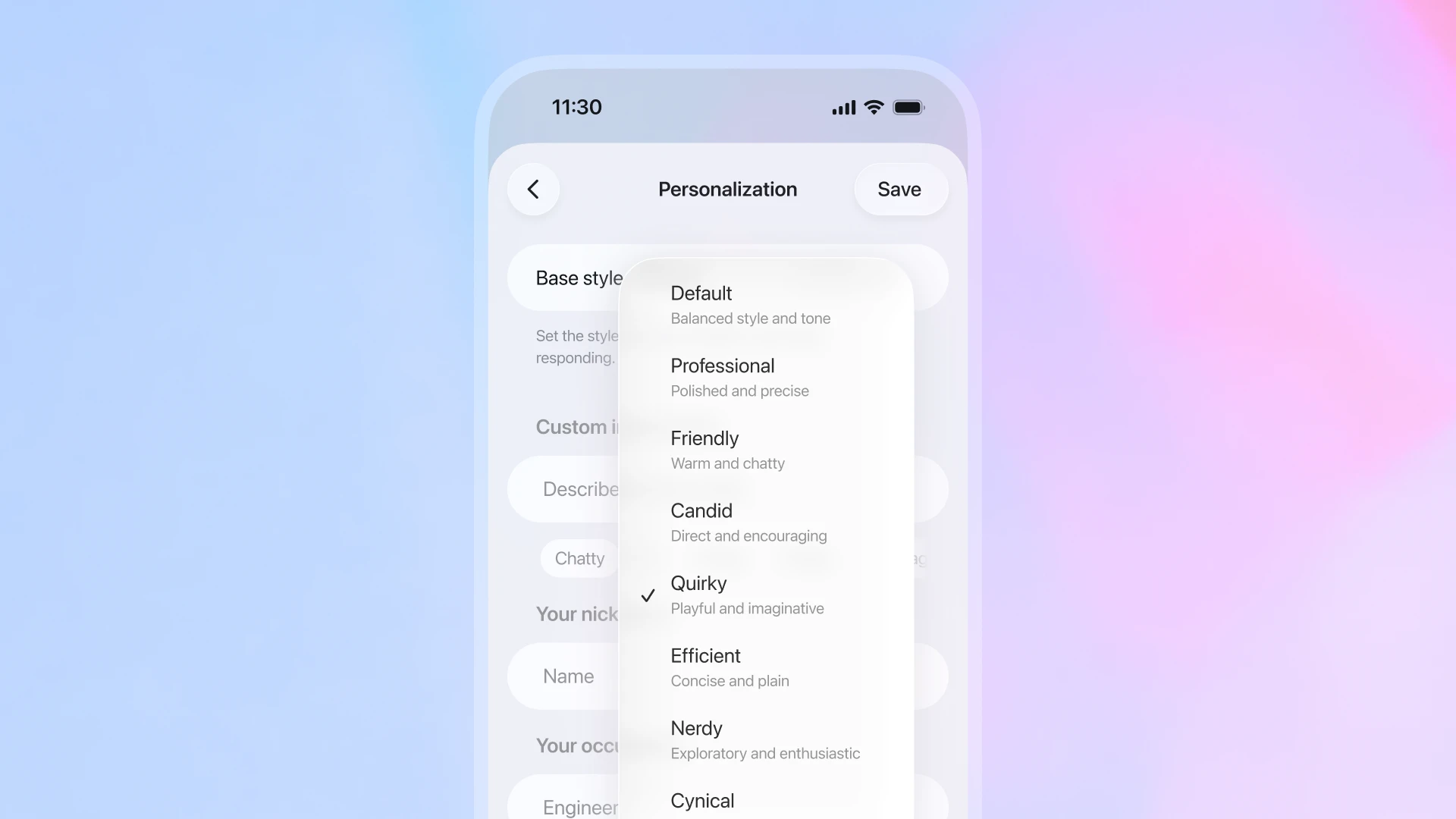
อินเทอร์เฟซมือถือจะแสดงหน้าจอการตั้งค่า ‘การปรับแต่งส่วนบุคคล’ ผู้ใช้กำลังเลือกสไตล์พื้นฐานสำหรับโทนและเสียงของ ChatGPT จากเมนู ตัวเลือกที่ระบุไว้ ได้แก่ ค่าเริ่มต้น (สไตล์และน้ำเสียงที่สมดุล) มืออาชีพ (ขัดเกลาและแม่นยำ) เป็นมิตร (อบอุ่นและคุยเก่ง) ตรงไปตรงมา (ตรงและให้กำลังใจ) ขี้เล่น (สนุกสนานและช่างจินตนาการ เลือกอยู่ตอนนี้) มีประสิทธิภาพ (กระชับและเรียบง่าย) เนิร์ด (ช่างสำรวจและกระตือรือร้น) และถากถาง

การตั้งค่าบุคลิกเหล่านี้ ใช้ได้กับทุกโมเดล ตัวเลือกดั้งเดิมอย่าง Cynical (เดิมคือ Cynic) และ Nerdy (เดิมคือ Nerd) ที่เราแนะนำเมื่อต้นปีนี้จะยังคงพร้อมใช้งานไม่เปลี่ยนแปลงภายใต้เมนูเดียวกันในการตั้งค่าส่วนบุคคล

นอกเหนือจากการตั้งค่าเริ่มต้นเหล่านี้ สำหรับผู้ใช้ที่อยากปรับวิธีตอบของ ChatGPT อย่างละเอียด เรากำลังทดลองความสามารถในการ ปรับแต่งลักษณะของ ChatGPT โดยตรงจากการตั้งค่าส่วนบุคคล ที่มีทั้งโทนความกระชับ ความอบอุ่น ความอ่านง่าย และความถี่ในการใช้อิโมจิ ChatGPT ยังสามารถ เสนอให้ปรับโทนหรือสไตล์ที่คุณชอบ ระหว่างคุยได้เอง เมื่อเห็นว่าคุณถามถึงโทนหรือสไตล์ต่างๆ โดยไม่ต้องเข้าไปตั้งค่าเอง คุณสามารถปรับเปลี่ยนหรือลบค่ากำหนดเหล่านี้ได้ตลอดเวลา

ตัวเลือกโทนเสียงและสไตล์ที่อัปเดตเริ่มทยอยเปิดให้ใช้งานตั้งแต่วันนี้ และความสามารถในการปรับลักษณะเฉพาะอย่างละเอียดจะเริ่มทยอยเปิดให้ทดลองใช้ภายในสัปดาห์นี้ โดยเริ่มจากกลุ่มผู้ใช้จำนวนจำกัด ทั้งสองจะยังคงพัฒนาต่อไปตามกาลเวลา นอกจากนี้ โมเดล GPT‑5.1 ที่อัปเดตยังดีกว่าในการปฏิบัติตาม คำสั่งแบบกำหนดเอง ทำให้คุณสามารถควบคุมโทนเสียงและพฤติกรรมได้อย่างแม่นยำยิ่งขึ้น

เมื่อคุณปรับค่าการตั้งค่าส่วนบุคคล การเปลี่ยนแปลงจะมีผลทันทีในทุกแชต รวมถึงแชตที่กำลังคุยอยู่ เพื่อประสบการณ์ที่ต่อเนื่องและตรงใจคุณ ก่อนหน้านี้การปรับเปลี่ยนสไตล์พื้นฐานและโทนเสียงหรือ คำสั่งแบบกำหนดเอง จะมีผลเฉพาะกับแชตใหม่เท่านั้น

**

การอัปเดต GPT‑5.1 วันนี้ และ ตัวเลือกการปรับแต่งใหม่ เป็นก้าวสำคัญสู่การสร้าง ChatGPT ที่เหมาะกับคุณมากขึ้น โดมีความยฉลาดมากขึ้น คุยสนุกกว่าเดิม และปรับตัวเข้ากับความชอบของคุณได้ดียิ่งขึ้น เรายังไม่หยุดแค่นี้ การพัฒนาในด้านเหล่านี้จะเดินหน้าต่อไป และยังมีสิ่งใหม่ๆ อีกมากที่กำลังจะตามมา


ผู้เขียน

OpenAI