ડેટા નક્કી કરે છે કે systems કેવી રીતે શીખે છે, products કેવી રીતે વિકસે છે અને companies કેવી રીતે નિર્ણયો લે છે. પરંતુ ઝડપથી, સાચા રીતે અને યોગ્ય context સાથે જવાબ મેળવવો ઘણીવાર જરૂર કરતાં વધુ મુશ્કેલ હોય છે. OpenAI scale થતાં આને સરળ બનાવવા માટે, અમે અમારો પોતાનો ખાસ in-house AI data agent બનાવ્યો, જે અમારી પોતાની platform પર explore કરે છે અને reason કરે છે.
અમારો એજન્ટ એક custom internal-only tool છે, બાહ્ય offering નથી, અને તે ખાસ OpenAI ના data, permissions અને workflows ને ધ્યાનમાં રાખીને બનાવાયો છે. અમે તેને કેવી રીતે બનાવ્યો અને ઉપયોગ કરીએ છીએ તે બતાવી રહ્યા છીએ જેથી AI અમારી teams ના દૈનિક કામમાં કેવી વાસ્તવિક અને અસરકારક રીતે મદદ કરી શકે તેના ઉદાહરણો સામે આવે. તેને બનાવવા અને ચલાવવા માટે અમે જે OpenAI tools વાપર્યા (Codex, our GPT‑5 ફ્લેગશિપ મોડેલ, Evals API(નવી વિન્ડોમાં ખૂલે છે), અને Embeddings API(નવી વિન્ડોમાં ખૂલે છે)) એ જ tools છે જે અમે સર્વત્ર developers માટે ઉપલબ્ધ કરાવીએ છીએ.
અમારો data એજન્ટ employees ને પ્રશ્નથી insight સુધી દિવસો નહીં પરંતુ મિનિટોમાં લઈ જાય છે. આથી ફક્ત અમારી data team જ નહીં, પરંતુ તમામ functions માટે data અને સૂક્ષ્મ analysis મેળવવાની અડચણ ઓછી થાય છે. આજે, OpenAI માં Engineering, Data Science, Go-To-Market, Finance અને Research teams ઉચ્ચ-અસરવાળા data પ્રશ્નોના જવાબ માટે એજન્ટ પર આધાર રાખે છે. ઉદાહરણ તરીકે, તે launches ને કેવી રીતે evaluate કરવી અને business health કેવી રીતે સમજવી તેમાં મદદ કરી શકે છે, અને તે પણ natural language ના સરળ format દ્વારા. એજન્ટ Codex-સંચાલિત table-level knowledge ને product અને organizational context સાથે જોડે છે. તેની સતત શીખતી મેમરી system નો અર્થ એ પણ છે કે તે દરેક turn સાથે સુધરતો જાય છે.
આ પોસ્ટમાં, અમે સમજાવીશું કે અમને ખાસ AI data એજન્ટની જરૂર કેમ પડી, તેના code-enriched data context અને self-learning ને શું ઉપયોગી બનાવે છે, અને રસ્તામાં અમે કયા પાઠ શીખ્યા.
OpenAI નું data platform Engineering, Product અને Research માં કામ કરતા 3.5k કરતાં વધુ internal users ને સેવા આપે છે અને 70k datasets માં ફેલાયેલા 600 petabytes કરતાં વધુ data ને આવરે છે. આવા કદ પર, સાચો table શોધવો જ analysis કરવાનો સૌથી વધુ સમય લેતો ભાગ બની શકે છે.
જેમ એક internal user એ કહ્યું:
“અમારી પાસે ઘણી tables છે જે એકબીજા જેવી લાગે છે, અને હું એ સમજવામાં ઘણો સમય ખર્ચું છું કે તે કેવી રીતે જુદી છે અને કઈ વાપરવી. કેટલીક logged-out users ને શામેલ કરે છે, કેટલીક નથી કરતી. કેટલીકમાં overlap થતા fields છે; શું શું છે તે સમજવું મુશ્કેલ છે.”
સાચા tables પસંદ કર્યા પછી પણ, સાચા results બનાવવું મુશ્કેલ હોઈ શકે છે. transformations અને filters યોગ્ય રીતે લાગુ થયા છે તે ખાતરી કરવા analysts ને table data અને table relationships પર reason કરવું પડે છે. many-to-many joins, filter pushdown errors અને unhandled nulls જેવી સામાન્ય failure modes શાંતિથી results ને અમાન્ય બનાવી શકે છે. OpenAI ના scale પર analysts એ SQL semantics અથવા query performance debug કરવામાં સમય બગાડવો ન જોઈએ: તેમનું ધ્યાન metrics વ્યાખ્યાયિત કરવા, assumptions validate કરવા અને data-driven નિર્ણયો લેવા પર હોવું જોઈએ.
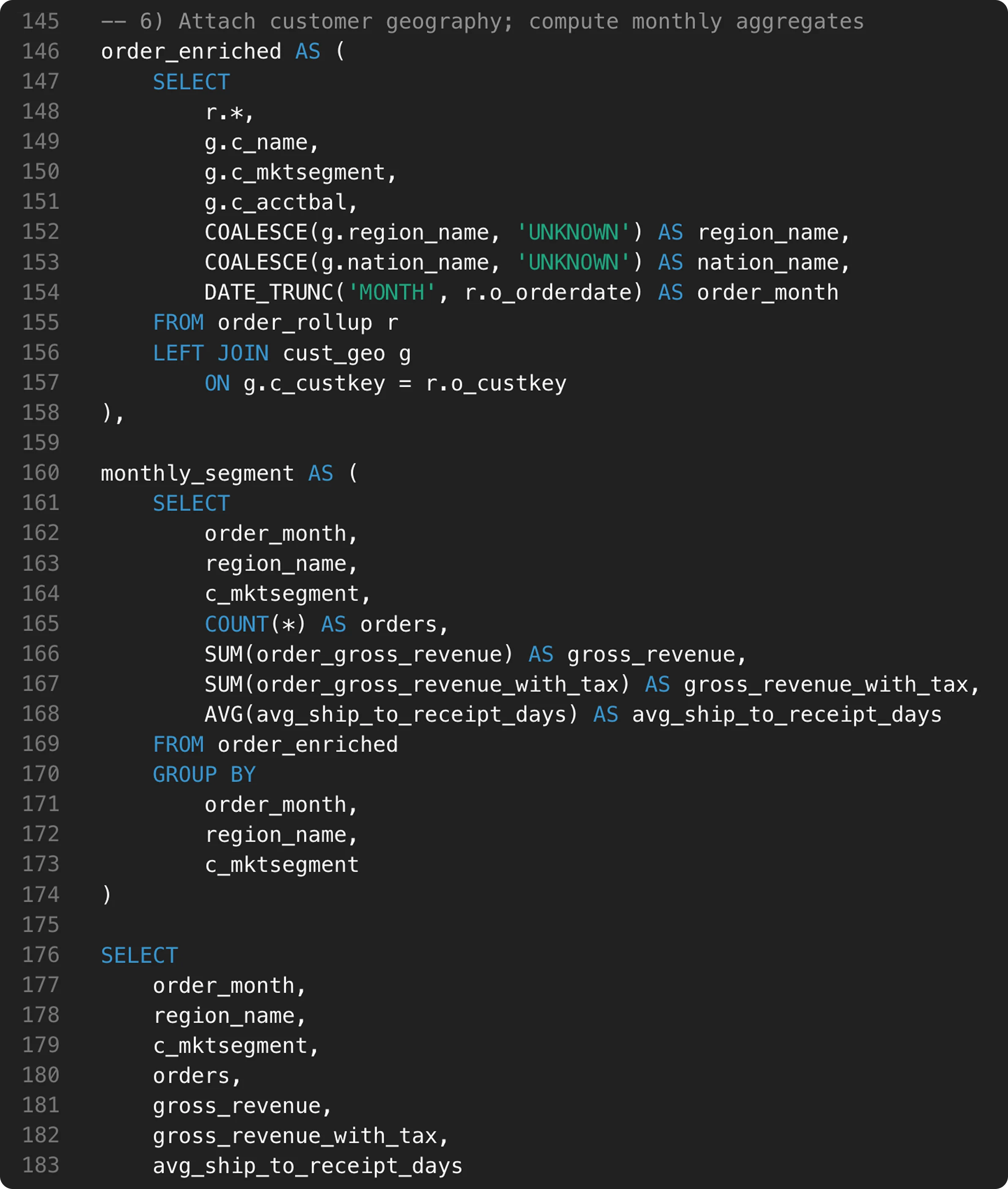
આ SQL statement 180+ lines લાંબું છે. આપણે સાચા tables join કરી રહ્યા છીએ અને સાચા columns query કરી રહ્યા છીએ કે નહીં તે જાણવું સરળ નથી.
ચાલો જોઈએ કે અમારો એજન્ટ શું છે, તે context કેવી રીતે curate કરે છે, અને તે પોતે કેવી રીતે સતત સુધરતો રહે છે.
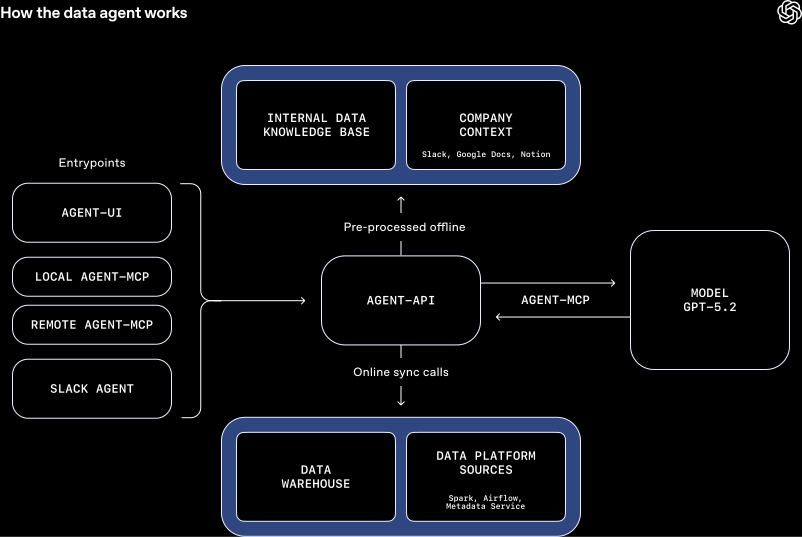
અમારો એજન્ટ GPT‑5.2 દ્વારા સંચાલિત છે અને OpenAI ના data platform પર reason કરવા માટે ડિઝાઇન કરાયો છે. employees જ્યાં પહેલેથી કામ કરે છે ત્યાં તે ઉપલબ્ધ છે: Slack એજન્ટ તરીકે, web interface દ્વારા, IDEs માં, MCP મારફતે Codex CLI માં(નવી વિન્ડોમાં ખૂલે છે), અને સીધા MCP connector દ્વારા OpenAI ની internal ChatGPT app માં(નવી વિન્ડોમાં ખૂલે છે).
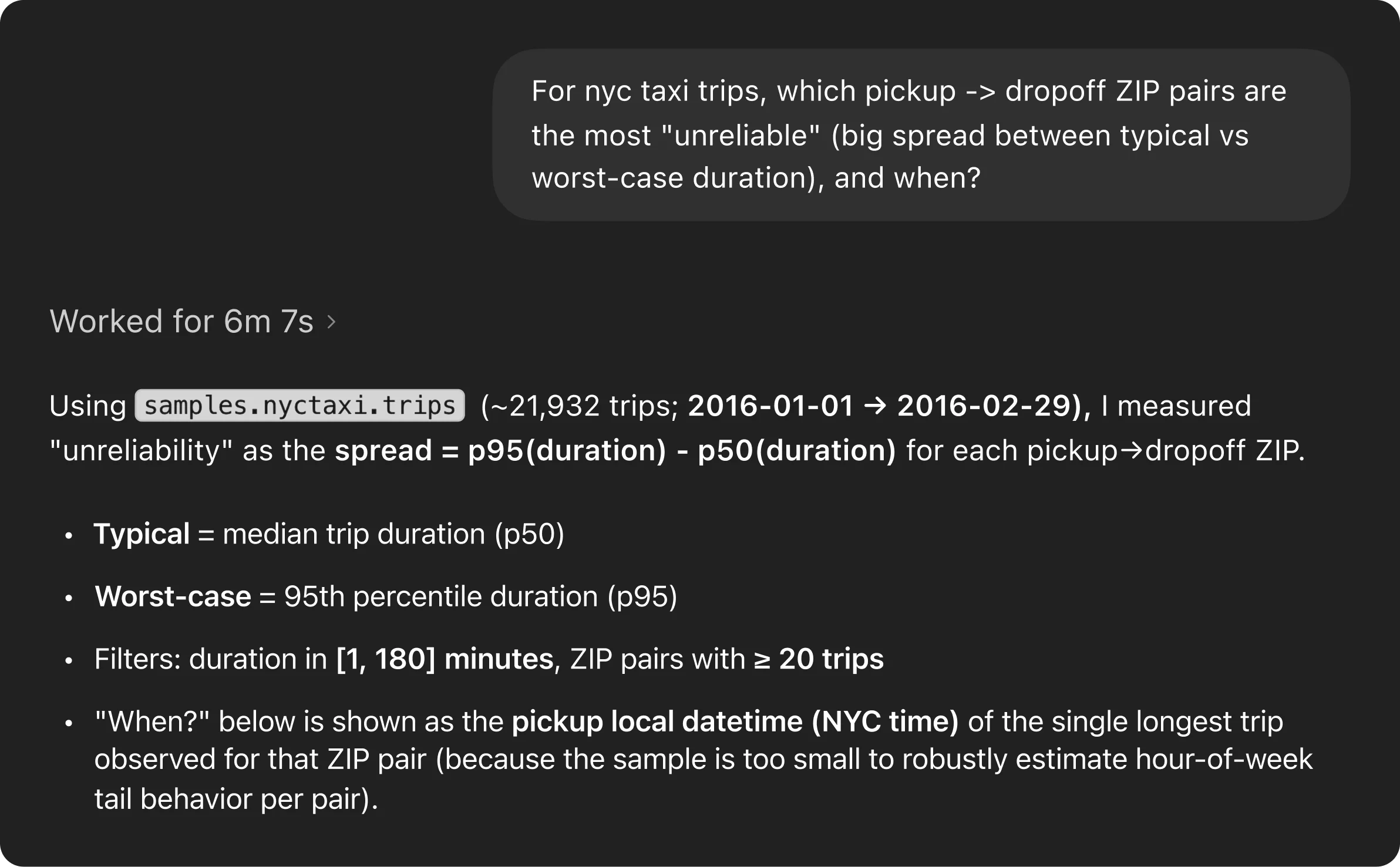
Users જટિલ, open-ended પ્રશ્નો પૂછે શકે છે, જે સામાન્ય રીતે manual exploration ના ઘણા rounds માંગે. આ example prompt લો, જે test data set નો ઉપયોગ કરે છે: “NYC taxi trips માટે, pickup-to-dropoff ZIP pairs માં સૌથી વધુ અવિશ્વસનીય કયા છે, જ્યાં typical અને worst-case travel times વચ્ચેનો gap સૌથી મોટો છે, અને એ variability ક્યારે થાય છે?”
એજન્ટ analysis ને end-to-end સંભાળે છે, પ્રશ્ન સમજવાથી લઈને data explore કરવા, queries ચલાવવા અને findings synthesize કરવા સુધી.
એજન્ટની સૌથી મોટી શક્તિઓમાંની એક એ છે કે તે સમસ્યાઓ પર કેવી રીતે reason કરે છે. નક્કી કરેલી script ને અનુસરવા કરતાં, એજન્ટ પોતાની પ્રગતિનું મૂલ્યાંકન કરે છે. જો intermediate result ખોટું લાગે, જેમ કે incorrect join અથવા filter ને કારણે zero rows મળે, તો એજન્ટ શું ખોટું ગયું તે તપાસે છે, પોતાનો અભિગમ સમાયોજિત કરે છે અને ફરી પ્રયાસ કરે છે. આ સમગ્ર પ્રક્રિયા દરમ્યાન, તે સંપૂર્ણ context જાળવે છે અને પગથિયાં વચ્ચે learnings આગળ લઈને જાય છે. આ closed-loop, self-learning process iteration ને user પાસેથી agent માં ખસેડે છે, જેના કારણે manual workflows કરતાં ઝડપી results અને સતત વધુ ગુણવત્તાવાળા analyses શક્ય બને છે.
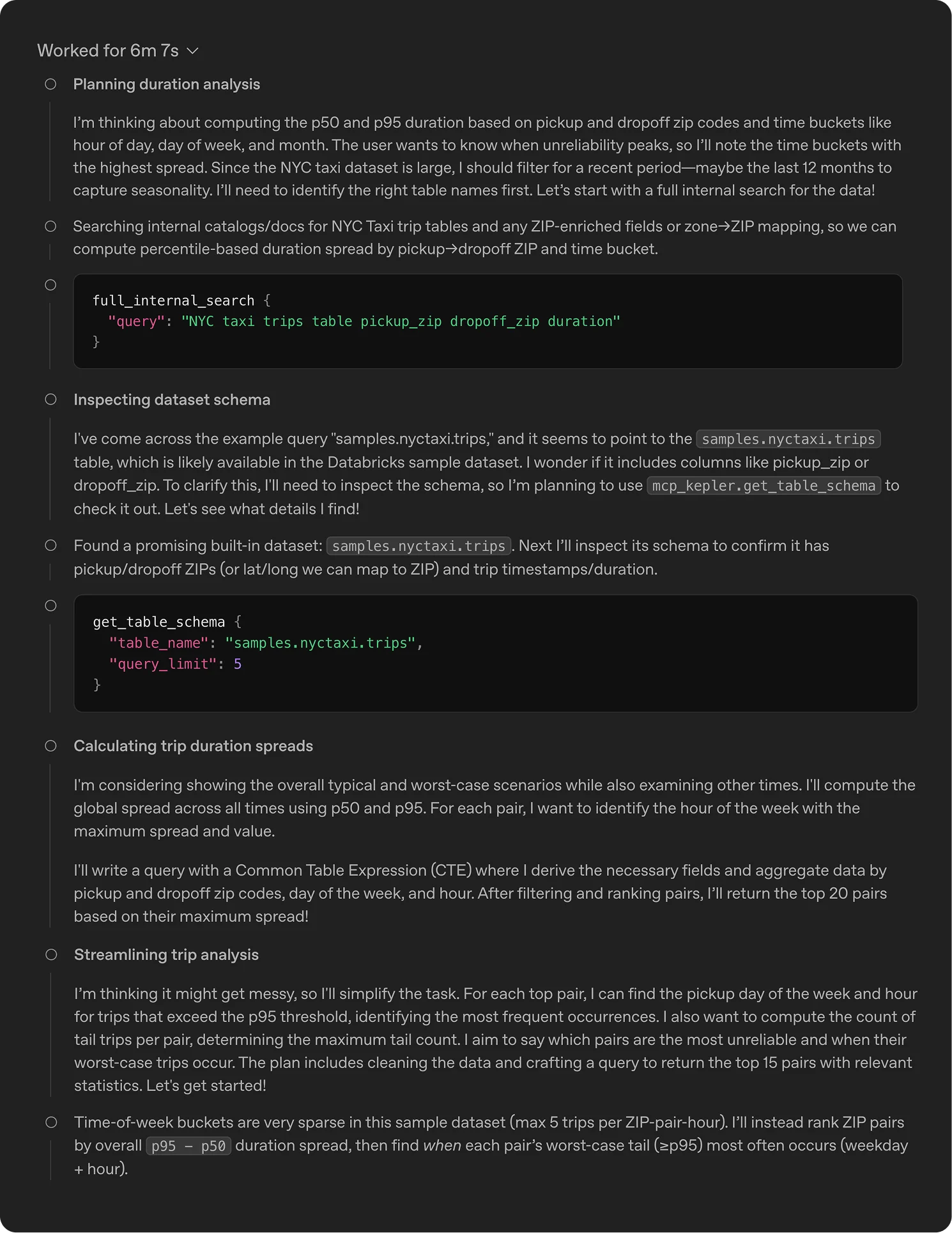
સૌથી અવિશ્વસનીય NYC taxi pickup–dropoff pairs ઓળખવા માટે એજન્ટનું રિઝનિંગ.
એજન્ટ સંપૂર્ણ analytics workflow આવરી લે છે: data શોધવું, SQL ચલાવવું, અને notebooks તથા reports પ્રકાશિત કરવું. તે company ની internal knowledge સમજે છે, બાહ્ય માહિતી માટે web search કરી શકે છે, અને learned usage તથા memory દ્વારા સમય સાથે સુધરે છે.
ઉચ્ચ ગુણવત્તાવાળા જવાબો સમૃદ્ધ, ચોક્કસ context પર આધાર રાખે છે. context વગર, મજબૂત models પણ ખોટા results બનાવી શકે છે, જેમ કે user counts નો ભારે ખોટો અંદાજ લગાવવો અથવા internal terminology નો ખોટો અર્થ કાઢવો.
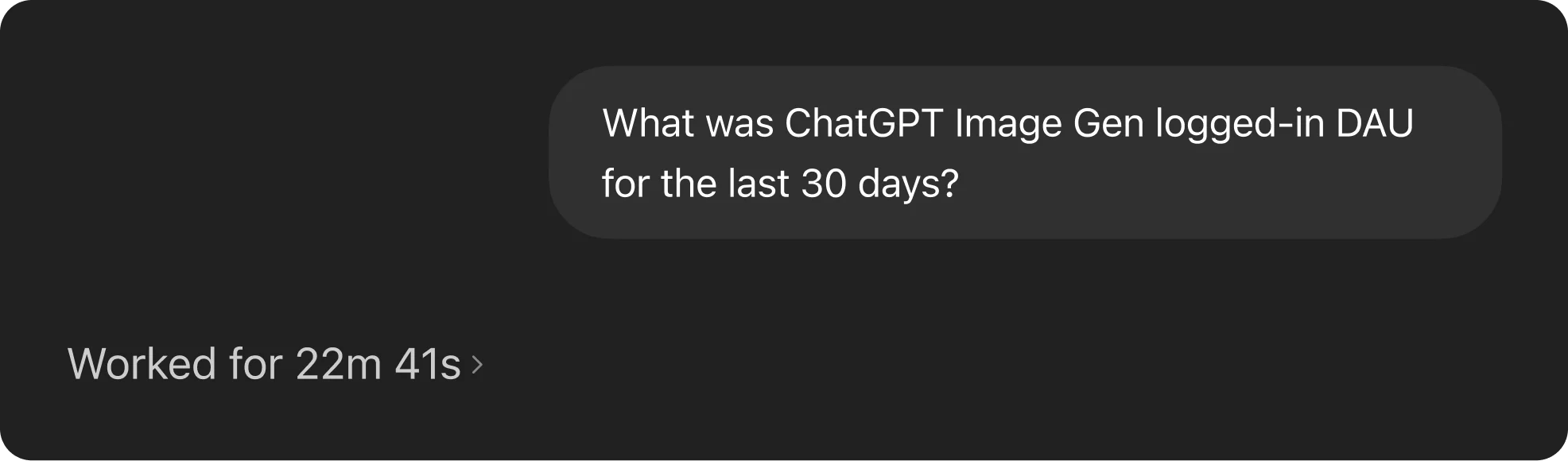
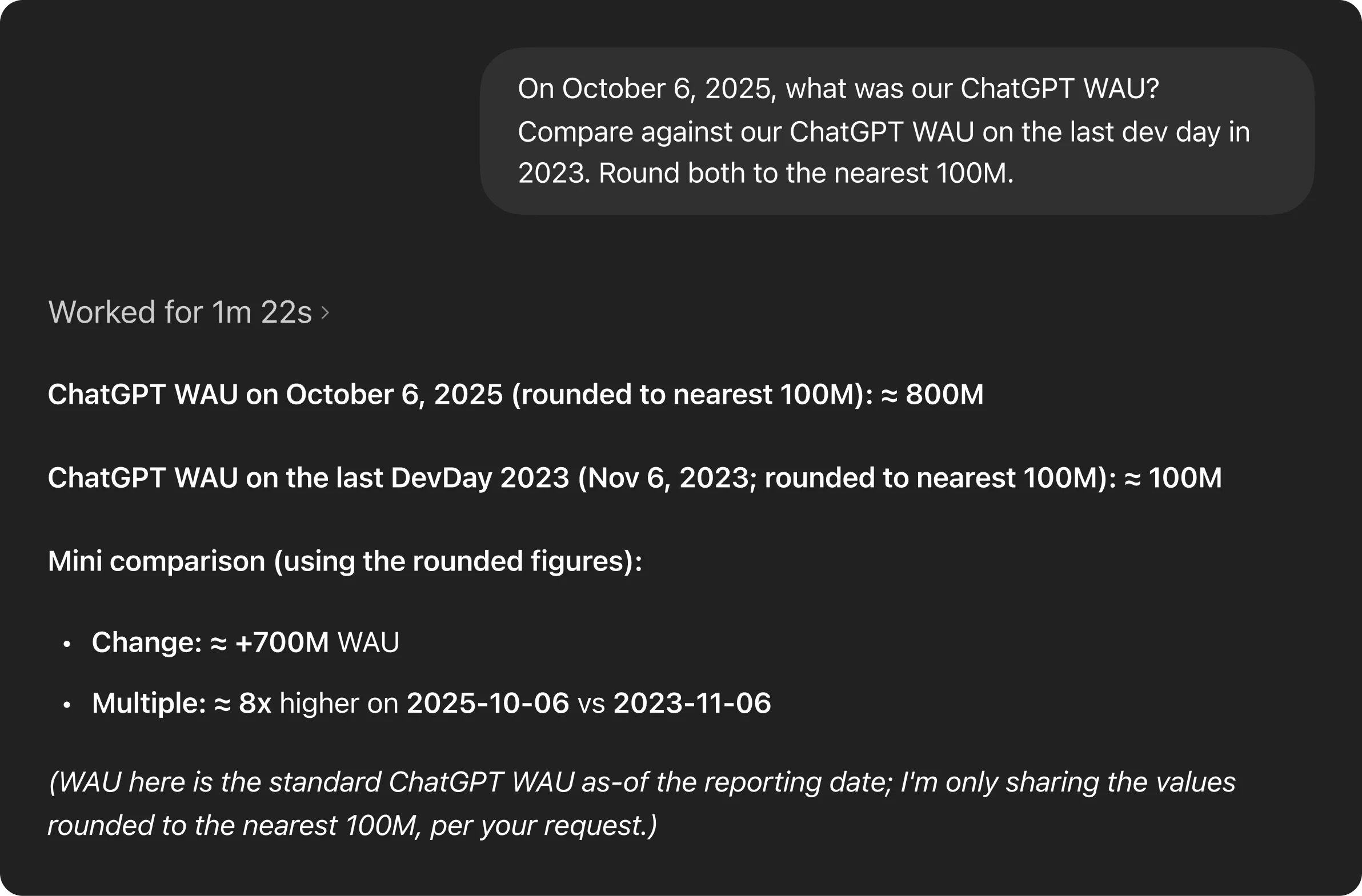
મેમરી વિના એજન્ટ, અસરકારક રીતે query કરવામાં અસમર્થ.
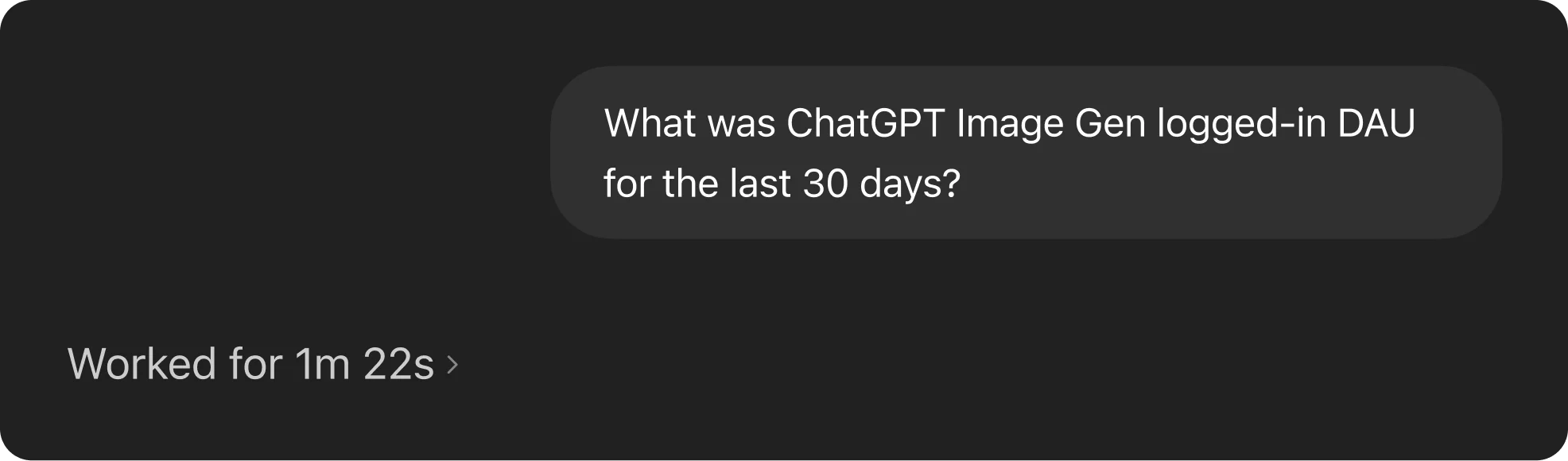
એજન્ટની મેમરી યોગ્ય ટેબલો શોધીને queries ને વધુ ઝડપી બનાવે છે.
આ failure modes ટાળવા માટે, એજન્ટને context ના અનેક સ્તરો આસપાસ બનાવવામાં આવ્યો છે, જે તેને OpenAI ના data અને institutional knowledge માં grounded રાખે છે.
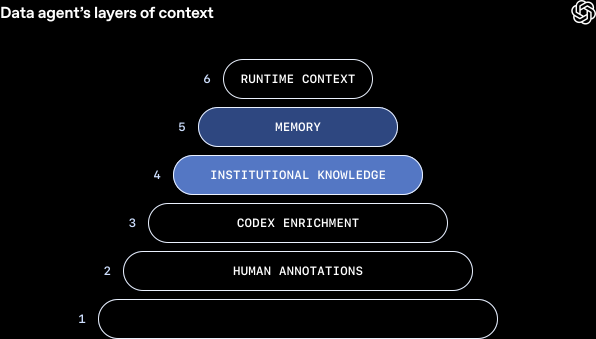
Metadata grounding: એજન્ટ SQL લખવા માટે schema metadata (column names અને data types) પર આધાર રાખે છે અને અલગ tables કેવી રીતે સંબંધિત છે તેનો context આપવા table lineage (જેમ કે upstream અને downstream table relationships) નો ઉપયોગ કરે છે.
Query inference: historical queries ingest કરવાથી એજન્ટ સમજે છે કે પોતાની queries કેવી રીતે લખવી અને કયા tables સામાન્ય રીતે સાથે joined થાય છે.
domain experts દ્વારા આપવામાં આવેલા tables અને columns ના curated descriptions, જે intent, semantics, business meaning અને જાણીતા caveats પકડે છે, જે schemas અથવા past queries માંથી સહેલાઈથી અનુમાનિત થતા નથી.
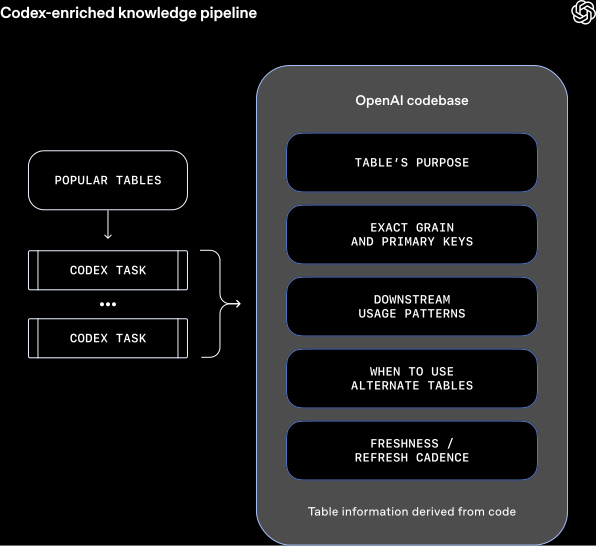
માત્ર metadata પૂરતું નથી. tables ને સાચે અલગ ઓળખવા માટે, તમને સમજવું પડે કે તે કેવી રીતે બનાવાયા અને ક્યાંથી આવ્યા.
table ની code-level definition કાઢીને, એજન્ટ data માં વાસ્તવમાં શું છે તેની વધુ ઊંડી સમજ બનાવે છે.
table માં શું સંગ્રહિત છે અને analytics event માંથી તે કેવી રીતે derive થાય છે તેની નાજુક વિગતો વધારાની માહિતી આપે છે. ઉદાહરણ તરીકે, તે values ની uniqueness, table data કેટલી વાર update થાય છે, data નો scope શું છે, જેમ કે table કેટલાક fields ને બહાર રાખે છે કે તેની granularity શું છે, વગેરે વિશે context આપી શકે છે.
આ enhanced usage context આપે છે કારણ કે તે બતાવે છે કે SQL ની બહાર Spark, Python અને અન્ય data systems માં table નો ઉપયોગ કેવી રીતે થાય છે.
આનો અર્થ એ છે કે એજન્ટ એવા tables વચ્ચે ભેદ કરી શકે છે જે દેખાવમાં સમાન લાગે છે પરંતુ મહત્વપૂર્ણ રીતે અલગ હોય છે. ઉદાહરણ તરીકે, તે કહી શકે છે કે કોઈ table માં ફક્ત first-party ChatGPT traffic જ છે કે નહીં. આ context આપમેળે refresh પણ થાય છે, જેથી manual maintenance વગર તે up to date રહે છે.
એજન્ટ Slack, Google Docs અને Notion ઍક્સેસ કરી શકે છે, જેમાં launches, reliability incidents, internal codenames અને tools, તેમજ key metrics માટે canonical definitions અને computation logic જેવી મહત્વપૂર્ણ company context હોય છે.
આ documents ingest, embed અને metadata તથા permissions સાથે store કરવામાં આવે છે. retrieval service runtime દરમિયાન access control અને caching સંભાળે છે, જેથી એજન્ટ આ માહિતી કાર્યક્ષમ અને સુરક્ષિત રીતે ખેંચી શકે.
જ્યારે એજન્ટને corrections આપવામાં આવે અથવા તે ચોક્કસ data પ્રશ્નો વિશેની નાજુક બાબતો શોધે, ત્યારે તે આ learnings ને આગળના સમય માટે save કરી શકે છે, જેથી તે પોતાના users સાથે સતત સુધરતો રહે.
પરિણામે, future answers વારંવાર એ જ સમસ્યાઓમાં અટવાવા કરતાં વધુ ચોક્કસ baseline થી શરૂ થાય છે.
મેમરીનો હેતુ એવા non-obvious corrections, filters અને constraints જાળવી રાખવાનો અને ફરી ઉપયોગ કરવાનો છે, જે data correctness માટે અતિ મહત્વપૂર્ણ છે પરંતુ માત્ર અન્ય સ્તરો પરથી અનુમાન કરવું મુશ્કેલ છે.
ઉદાહરણ તરીકે, એક કિસ્સામાં એજન્ટને ખબર નહોતી કે ચોક્કસ analytics experiment માટે filter કેવી રીતે કરવું. તે experiment gate માં વ્યાખ્યાયિત એક ખાસ string સામે match કરવા પર આધાર રાખતું હતું. અહીં મેમરી ખૂબ જ મહત્વપૂર્ણ હતી જેથી તે અસ્પષ્ટ string match કરવાનો પ્રયાસ કરવાની જગ્યાએ યોગ્ય રીતે filter કરી શકે.
જ્યારે તમે એજન્ટને correction આપો અથવા તે તમારી conversation માંથી કોઈ learning શોધે, ત્યારે તે તમને તે memory આગળના સમય માટે save કરવા prompt કરશે.
Memories ને users દ્વારા manually બનાવવામાં અને edit કરવામાં પણ આવી શકે છે.
Memories global અને personal સ્તરે scoped હોય છે, અને એજન્ટનું tooling તેને edit કરવું સરળ બનાવે છે.

જ્યારે કોઈ table માટે પૂર્વ context ન હોય અથવા હાલની માહિતી જૂની હોય, ત્યારે એજન્ટ table ને સીધી inspect અને query કરવા data warehouse પર live queries મોકલી શકે છે. આથી તે schemas validate કરી શકે છે, real-time માં data સમજી શકે છે અને તે મુજબ જવાબ આપી શકે છે.
એજન્ટ જરૂર મુજબ અન્ય Data Platform systems, metadata service, Airflow અને Spark સાથે પણ વાતચીત કરી શકે છે જેથી warehouse ની બહાર રહેલો વધુ વ્યાપક data context મેળવી શકાય.
We run a daily offline pipeline that aggregates table usage, human annotations, and Codex-derived enrichment into a single, normalized representation. This enriched context is then converted into embeddings using the OpenAI embeddings API(નવી વિન્ડોમાં ખૂલે છે) and stored for retrieval. At query time, the agent pulls only the most relevant embedded context via retrieval-augmented generation(નવી વિન્ડોમાં ખૂલે છે) (RAG) instead of scanning raw metadata or logs. This makes table understanding fast and scalable, even across tens of thousands of tables, while keeping runtime latency predictable and low. Runtime queries are issued to our data warehouse live as needed.
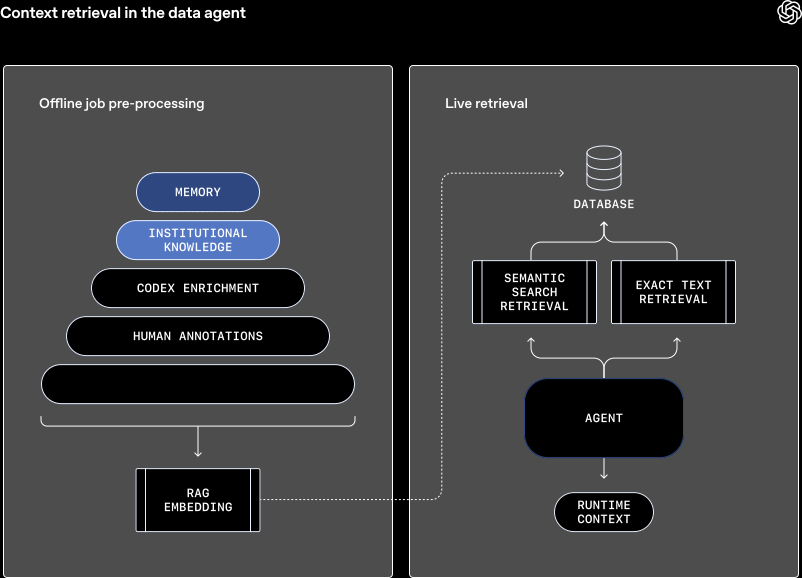
Together, these layers ensure the agent’s reasoning is grounded in OpenAI’s data, code, and institutional knowledge, dramatically reducing errors and improving answer quality.
One-shot answers work when the problem is clear, but most questions aren’t. More often, arriving at the correct result requires back-and-forth refinement and some course correction.
The agent is built to behave like a teammate you can reason with. It’s a conversational, always-on and handles both quick answers and iterative exploration.
It carries over complete context across turns, so users can ask follow-up questions, adjust their intent, or change direction without restating everything. If the agent starts heading down the wrong path, users can interrupt mid-analysis and redirect it, just like working with a human collaborator who listens instead of plowing ahead.
When instructions are unclear or incomplete, the agent proactively asks clarifying questions. If no response is provided, it applies sensible defaults to make progress. For example, if a user asks about business growth with no date range specified, it may assume the last seven or 30 days. These priors allow it to stay responsive and non-blocking while still converging on the right outcome.
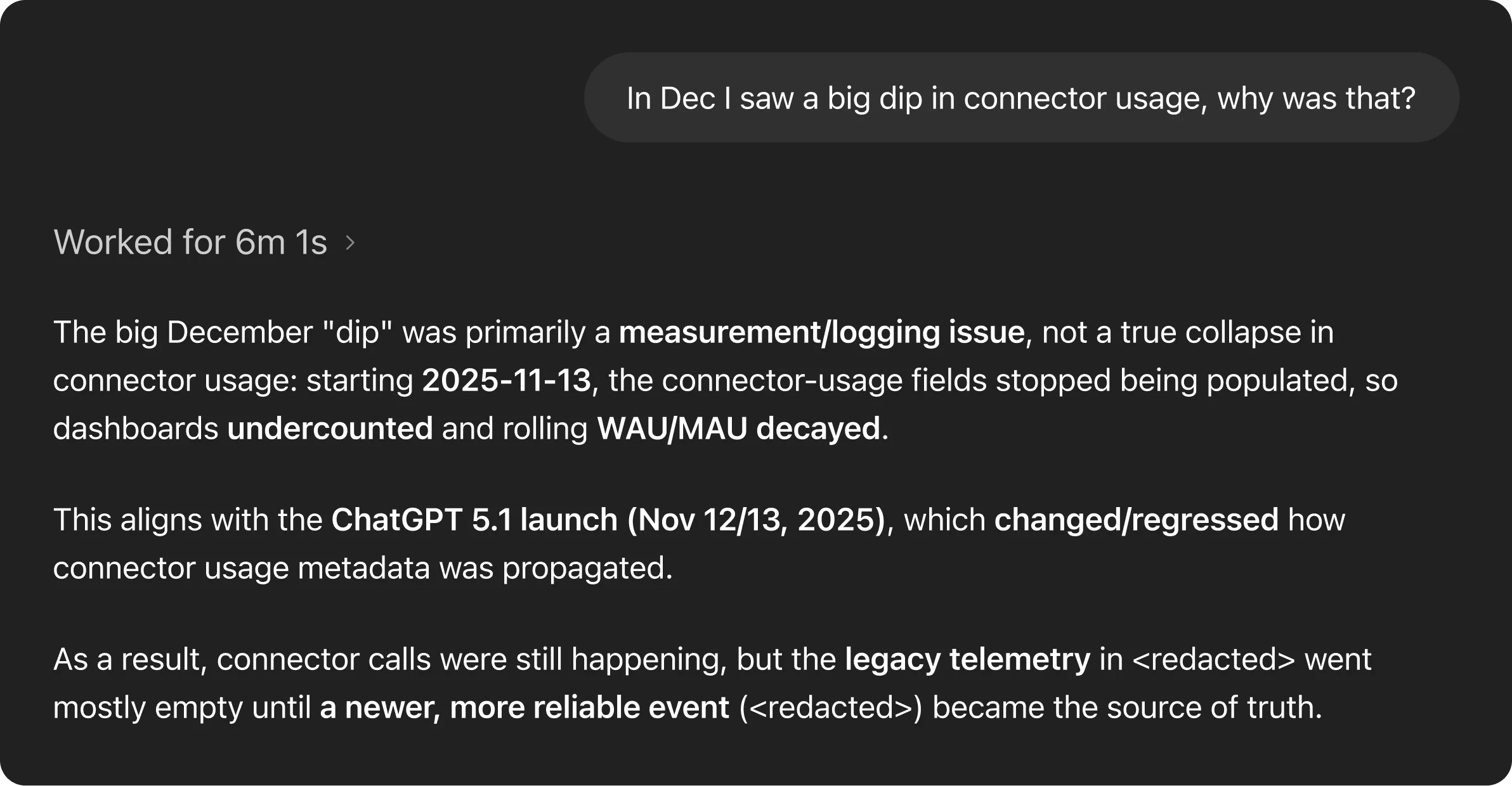
The result is an agent that works well both when you know exactly what you want (e.g., “Tell me about this table”) and just as strong when you’re exploring (e.g., “I’m seeing a dip here, can we break this down by customer type and timeframe?”).
After rollout, we observed that users frequently ran the same analyses for routine repetitive work. To expedite this, the agent's workflows package recurring analyses into reusable instruction sets. Examples include workflows for weekly business reports and table validations. By encoding context and best practices once, workflows streamline repeat analyses and ensure consistent results across users.

Building an always-on, evolving agent means quality can drift just as easily as it can improve. Without a tight feedback loop, regressions are inevitable and invisible. The only way to scale capability without breaking trust is through systematic evaluation.
In this section, we’ll discuss how we leverage OpenAI’s Evals API(નવી વિન્ડોમાં ખૂલે છે) to measure and protect the agent’s response quality.
Its Evals are built on curated sets of question-answer pairs. Each question targets an important metric or analytical pattern we care deeply about getting right, paired with a manually authored “golden” SQL query that produces the expected result. For each eval, we send the natural language question to its query-generation endpoint, execute the generated SQL, and compare the output against the result of the expected SQL.
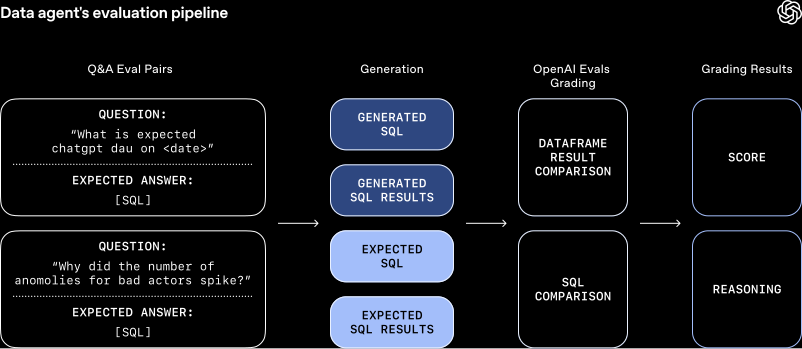
Evaluation doesn’t rely on naive string matching. Generated SQL can differ syntactically while still being correct, and result sets may include extra columns that don’t materially affect the answer. To account for this, we compare both the SQL and the resulting data, and feed these signals into OpenAI’s Evals grader. The grader produces a final score along with an explanation, capturing both correctness and acceptable variation.
These evals are like unit tests that run continuously during development to identify regressions as canaries in production; this allows us to catch issues early and confidently iterate as the agent's capabilities expand.
Our agent plugs directly into OpenAI’s existing security and access-control model. It operates purely as an interface layer, inheriting and enforcing the same permissions and guardrails that govern OpenAI’s data.
All of the agent’s access is strictly pass-through, meaning users can only query tables they already have permission to access. When access is missing, it flags this or falls back to alternative datasets the user is authorized to use.
Finally, it's built for transparency. Like any system, it can make mistakes. It exposes its reasoning process by summarizing assumptions and execution steps alongside each answer. When queries are executed, it links directly to the underlying results, allowing users to inspect raw data and verify every step of the analysis.
Building our agent from scratch surfaced practical lessons about how agents behave, where they struggle, and what actually makes them reliable at scale.
Early on, we exposed our full tool set to the agent, and quickly ran into problems with overlapping functionality. While this redundancy can be helpful for specific custom cases and is more obvious to a human when manually invoking, it’s confusing to agents. To reduce ambiguity and improve reliability, we restricted and consolidated certain tool calls.
We also discovered that highly prescriptive prompting degraded results. While many questions share a general analytical shape, the details vary enough that rigid instructions often pushed the agent down incorrect paths. By shifting to higher-level guidance and relying on GPT‑5’s reasoning to choose the appropriate execution path, the agent became more robust and produced better results.
Schemas and query history describe a table’s shape and usage, but its true meaning lives in the code that produces it. Pipeline logic captures assumptions, freshness guarantees, and business intent that never surface in SQL or metadata. By crawling the codebase with Codex, our agent understands how datasets are actually constructed and is able to better reason about what each table actually contains. It can answer “what’s in here” and “when can I use it” far more accurately than from warehouse signals alone.
We’re constantly working to improve our agent by increasing its ability to handle ambiguous questions, improving its reliability and accuracy with stronger validations, and integrating it more deeply into workflows. We believe it should blend naturally into how people already work, instead of functioning like a separate tool.
While our tooling will keep benefiting from underlying improvements in agent reasoning, validation, and self-correction, our team’s mission remains the same: seamlessly deliver fast, trustworthy data analysis across OpenAI’s data ecosystem.
લેખકો
આભારવિદિ
Data Productivity અને Data Science teams નો, તેમજ અમારા અનેક cross-functional users નો તેમના પ્રયોગ અને feedback માટે વિશેષ આભાર.