Bỏ qua nội dung chính
OpenAI

Nền tảng vững chắc hơn cho bộ nhớ ChatGPT

Cải thiện khả năng tổng hợp bộ nhớ trong ChatGPT để tối ưu hóa tính cập nhật, tính liên tục và độ liên quan.

Đang tải…

Hôm nay, chúng tôi bắt đầu triển khai một hệ thống tổng hợp bộ nhớ mạnh mẽ và có khả năng mở rộng tốt hơn. Hệ thống này được phát triển nhằm giải quyết các thách thức về tính lỗi thời, độ chính xác và khả năng mở rộng mà chúng tôi ghi nhận khi áp dụng tính năng bộ nhớ cho hàng trăm triệu người dùng và các khoảng thời gian kéo dài nhiều năm trong ChatGPT.

Bộ nhớ là yếu tố giúp ChatGPT học các sở thích, dự án và ràng buộc của bạn, cho phép các cuộc trò chuyện trong tương lai bắt đầu từ ngữ cảnh chung thay vì từ con số không.

Trong hai năm qua, bộ nhớ đã trở thành một phần quan trọng của trải nghiệm ChatGPT, giúp ChatGPT hiểu rõ hơn ngữ cảnh của bạn để có thể hỗ trợ bạn đạt được những mục tiêu có ý nghĩa theo thời gian. Điều này là cốt lõi để khiến ChatGPT hữu ích hơn: hiểu bạn, giúp bạn và làm được nhiều hơn cho bạn.

Bản cập nhật này hiện có sẵn cho người dùng Plus và Pro tại Hoa Kỳ từ hôm nay, và sẽ được triển khai tới nhiều quốc gia hơn cũng như người dùng Free và Go trong những tuần tới.

Bộ nhớ đã phát triển như thế nào

Bộ nhớ lần đầu ra mắt vào tháng 4 năm 2024 (còn được gọi là các ký ức đã lưu). Tính năng này cho phép bạn yêu cầu ChatGPT ghi nhớ thông tin và mang thông tin đó sang các cuộc trò chuyện trong tương lai.
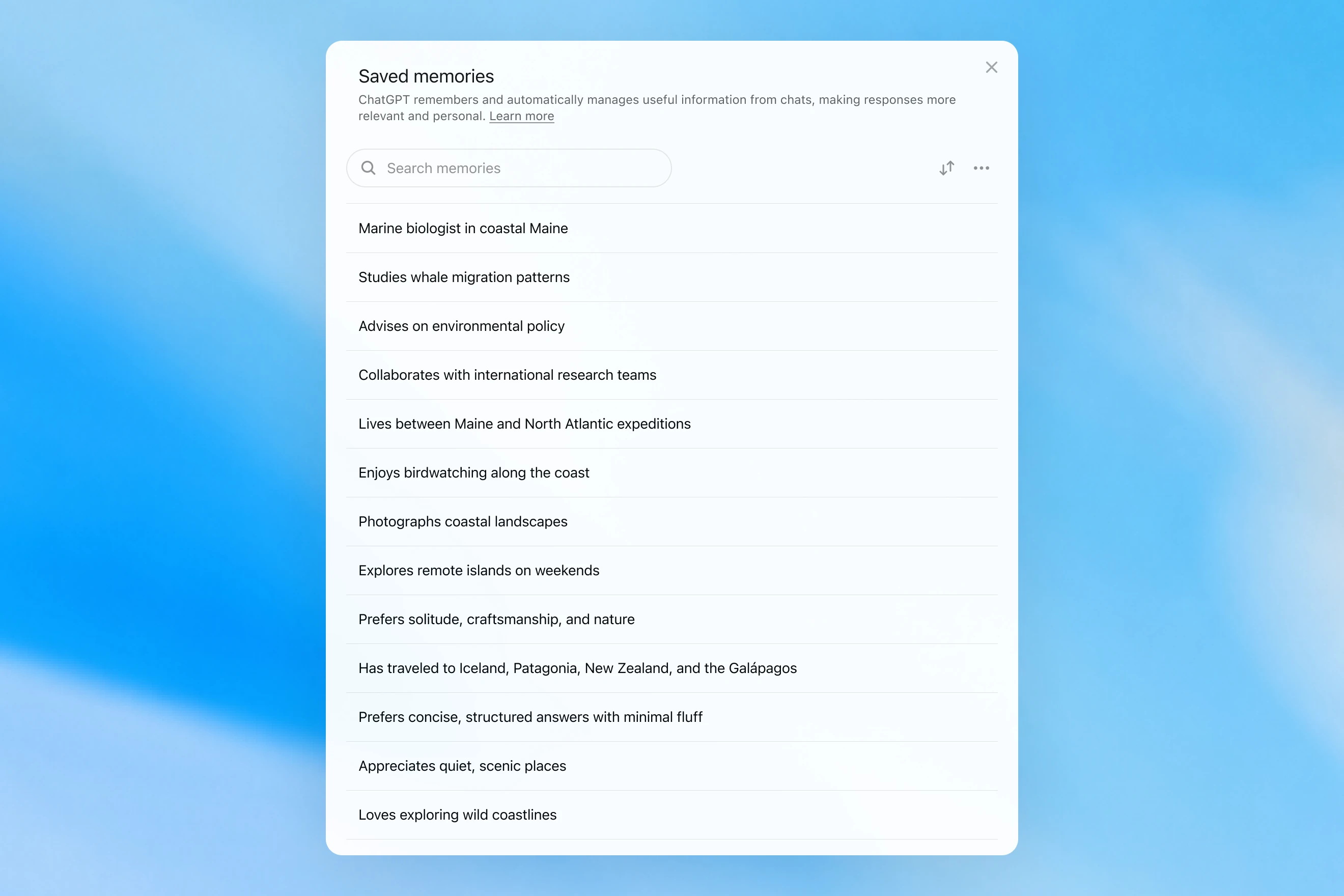
Saved memories modal showing a searchable list of personal details, including work, interests, travel, and response preferences.

Các ký ức đã lưu chỉ được ghi trong cuộc trò chuyện và dựa vào các tín hiệu mạnh để quyết định khi nào kích hoạt bộ nhớ, chẳng hạn như chỉ dẫn “hãy nhớ rằng tôi sẽ đi Singapore vào tháng 7”. Trên thực tế, việc tương tác với hệ thống này có thể giống như nói chuyện với một người có ghi vài ghi chú, nhưng vẫn quên mọi thứ không được viết ra. Các ký ức đã lưu cũng có xu hướng trở nên lỗi thời theo thời gian và cuối cùng trở nên không chính xác hoặc không còn liên quan.

Vào tháng 4 năm 2025, chúng tôi đã cập nhật tính năng bộ nhớ của ChatGPT bằng cách cung cấp cho mô hình khả năng tham chiếu bối cảnh trò chuyện nằm ngoài danh sách bộ nhớ đã lưu; điều này được thực hiện bằng cách giới thiệu phiên bản đầu tiên của dreaming (mơ)—một phương pháp để ChatGPT tự động chọn lọc bộ nhớ ở chế độ nền bằng cách tham chiếu lịch sử trò chuyện.
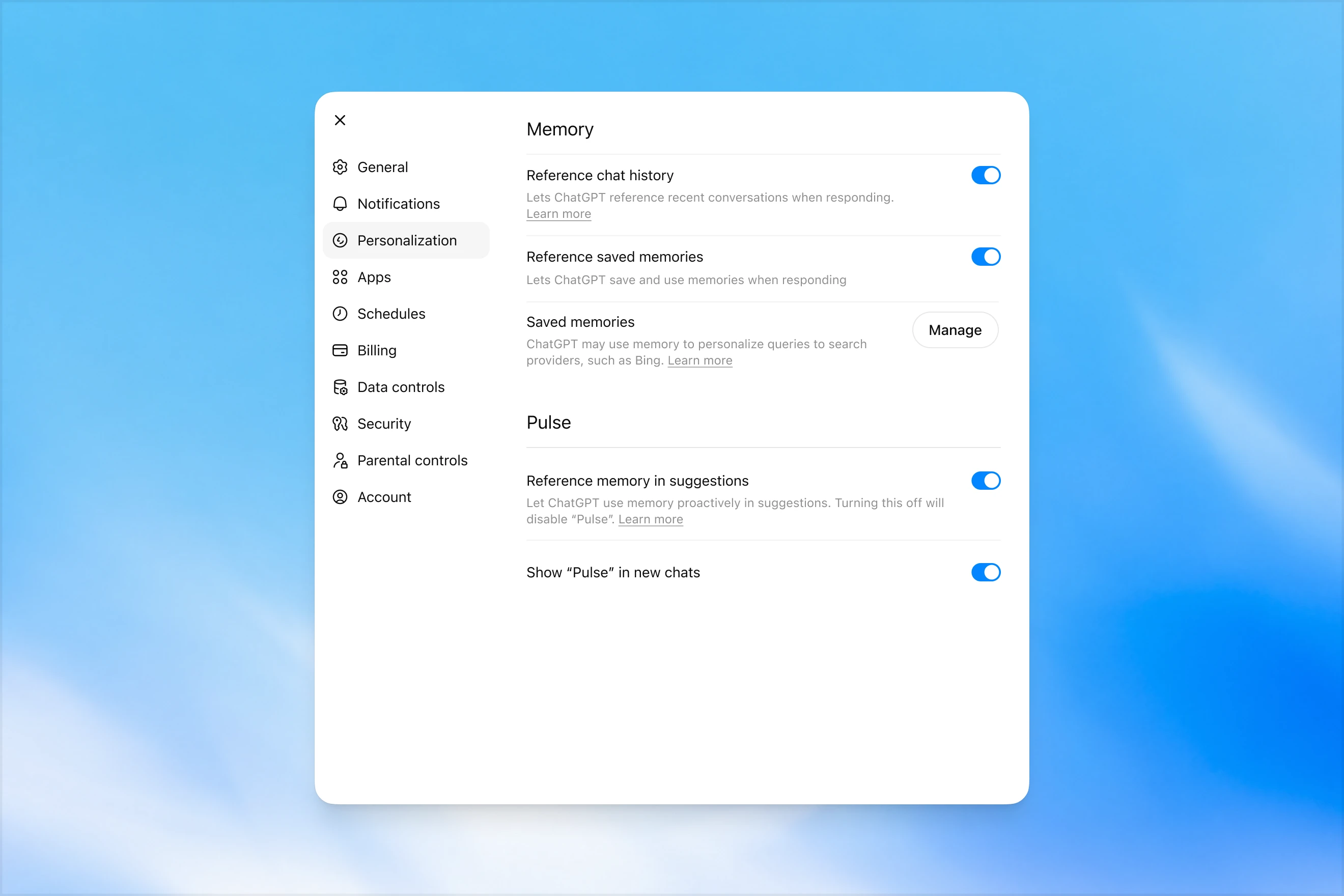
Memory settings page in ChatGPT showing options to reference chat history, use saved memories, manage saved memories, and enable Pulse memory suggestions.

Trái ngược với các bộ nhớ đã lưu, 'dreaming' tận dụng một quy trình chạy ngầm cho phép ChatGPT học hỏi từ nhiều cuộc trò chuyện khác nhau và tổng hợp trạng thái bộ nhớ của chính nó, từ đó luôn cung cấp bối cảnh mới nhất và phù hợp nhất cho các cuộc trò chuyện của bạn. 'Dreaming' cũng giúp bộ nhớ dễ dàng tiếp thu các bối cảnh diễn ra tự nhiên trong cuộc hội thoại mà không cần phụ thuộc vào các yêu cầu ghi nhớ rõ ràng.

Trong năm qua, 'dreaming' đã bổ sung cho các bộ nhớ đã lưu để tạo ra một bước tiến vượt bậc trong khả năng cá nhân hóa các câu trả lời của ChatGPT, đồng thời bù đắp cho tính lỗi thời của các bộ nhớ đã lưu trước đó. Tuy nhiên, về mặt lịch sử, bản thân nó chưa bao giờ là đủ nếu hoạt động như một hệ thống bộ nhớ độc lập.

Hôm nay, chúng tôi sẽ ra mắt một kiến trúc bộ nhớ mạnh mẽ hơn đáng kể và tối ưu hóa hiệu suất tính toán hơn, được xây dựng dựa trên nền tảng của dreaming.

Các ghi nhớ được dreaming tổng hợp có thể được xem lại thông qua phần tóm tắt hiển thị trên trang tóm tắt bộ nhớ. Từ phần tóm tắt bộ nhớ, bạn có thể nhanh chóng nắm được những điểm nổi bật về những gì ChatGPT biết về bạn, thêm hoặc cập nhật thông tin về bản thân, và cung cấp chỉ dẫn về những chủ đề ChatGPT nên nhắc đến cũng như thời điểm nhắc đến. Nếu bạn muốn tìm hiểu sâu hơn về một lĩnh vực cụ thể, chỉ cần trò chuyện với mô hình.
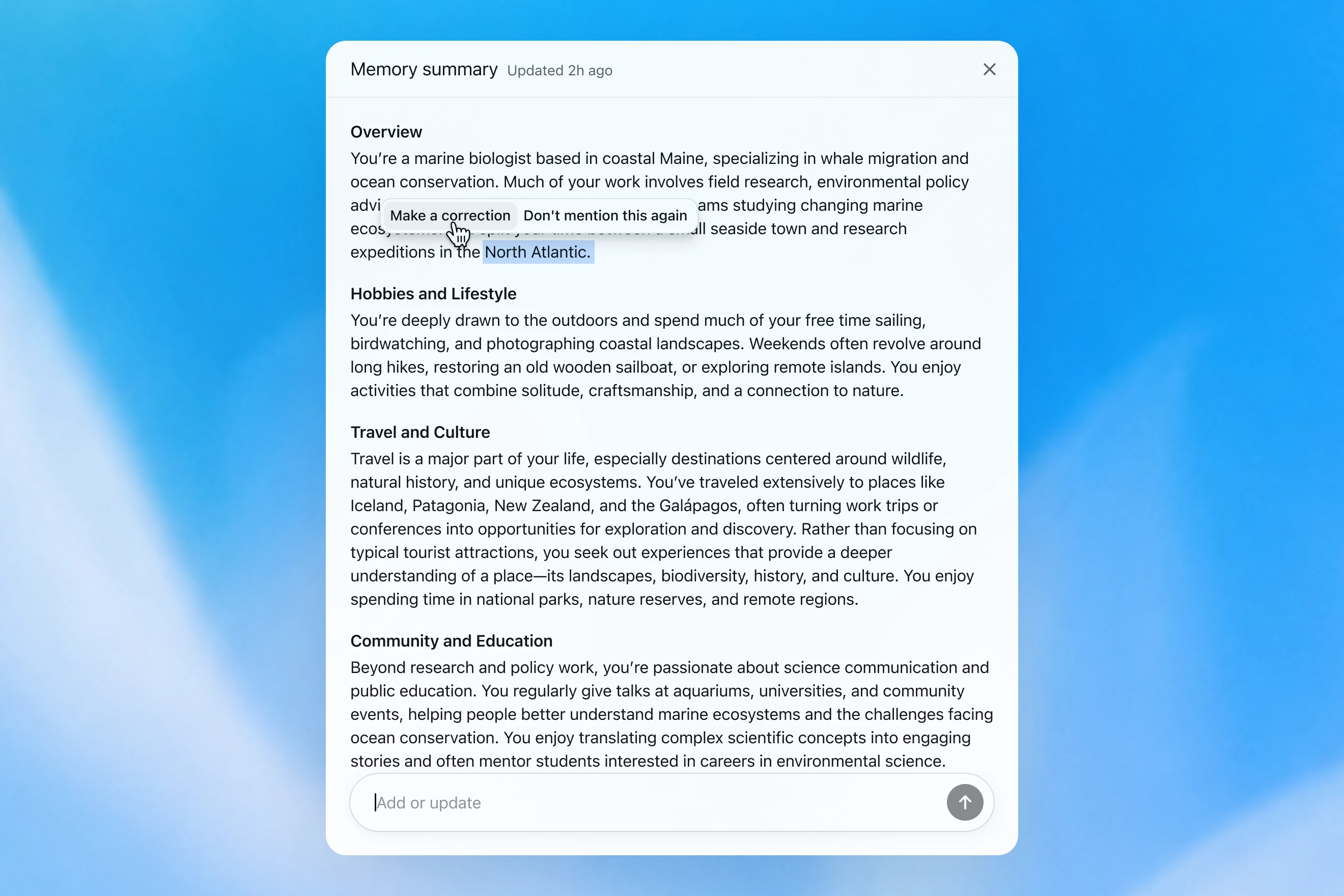
Memory summary modal showing a personalized overview of a user’s work, hobbies, travel interests, and community involvement, with options to correct or dismiss specific details.

Cách chúng tôi đánh giá bộ nhớ

Khi hình dung về một “bộ nhớ tốt” trong ChatGPT, chúng tôi nghĩ đến một vài điều:

  1. Duy trì ngữ cảnh hữu ích: Bạn nói với ChatGPT điều gì đó một lần, và ChatGPT ghi nhớ thông tin đó trong các cuộc trò chuyện sau này của bạn.
  2. Tuân theo sở thích và ràng buộc: Nếu bạn mô tả một sở thích (ví dụ: bạn ăn chay), thì ChatGPT nên thực hiện các hành động phù hợp với sở thích đó trong tương lai.
  3. Cập nhật theo thời gian: Bộ nhớ nên tính đến sự trôi qua của thời gian. Hãy tưởng tượng “Người dùng đang lên kế hoạch cho tiệc sinh nhật của họ vào thứ bảy tuần tới”; rồi cuối cùng, chủ nhật cũng đến.

Chúng tôi có thể đánh giá bộ nhớ của ChatGPT Plus và Pro đã cải thiện theo thời gian như thế nào đối với từng mục tiêu trong ba mục tiêu về bộ nhớ ở trên. Chúng tôi thực hiện việc này cho từng trường hợp sau:

  1. 2024: Các ghi nhớ đã lưu
  2. 2025: Các ghi nhớ đã lưu + Dreaming bản V0
  3. 2026: Dreaming bản V3

Duy trì ngữ cảnh

Khi bắt đầu một cuộc trò chuyện mới với ChatGPT, bạn không cần giới thiệu lại bản thân từ đầu. ChatGPT có thể giúp bạn tiết kiệm thời gian và xây dựng dựa trên ngữ cảnh trước đó, đặc biệt với các dự án phức tạp, kéo dài.

Ví dụ, hãy tưởng tượng bạn đang dùng ChatGPT để mua thiết bị máy ảnh mới tương thích với máy ảnh hiện tại của mình. Nếu trước đây bạn đã thảo luận với ChatGPT về bộ thiết bị máy ảnh của mình, bạn có thể hỏi về các sản phẩm tương thích với “bộ thiết bị nhiếp ảnh của tôi” và nhận được đề xuất được điều chỉnh theo nhu cầu của bạn.

GPT-5.2 Instant

What would I need to buy to use TTL for my underwater photography setup?

To use TTL flash underwater, you need a compatible chain from camera → housing/trigger → cable → strobe. What you buy depends mostly on whether your setup uses fiber-optic TTL or electrical TTL.

Basic shopping checklist

  • TTL-capable underwater strobe
    Look for strobes that support your TTL type, such as Inon S-TTL, Sea & Sea DS-TTL, Ikelite DS TTL, or compatible Backscatter/Nauticam systems. TTL has to be supported by the strobe, not just the camera.
  • TTL trigger or TTL converter
    This is the key piece. It translates your camera’s flash metering into something the underwater strobe can understand. Examples include Nauticam optical TTL converters, Sea & Sea TTL converters, Backscatter Smart Control optical TTL triggers, or Ikelite DS Link TTL converters, depending on housing and camera brand. Backscatter notes that Nauticam optical TTL converters can work with fiber-optic-connected Inon and Sea & Sea TTL strobes, while Ikelite’s DS Link converters are made around Ikelite DS strobes and electrical sync setups. (Backscatter.com(mở trong cửa sổ mới))
  • Connection cable
    For fiber optic TTL, buy one fiber optic cable per strobe. Ikelite’s fiber-optic guide says each strobe needs its own light path, converter/adapter, and cord. (Ikelite(mở trong cửa sổ mới))
    For
    electrical TTL, buy the correct sync cord, such as Ikelite-style, Nikonos 5-pin, or housing-specific bulkhead cable.
  • Housing compatibility parts
    You may need a hot-shoe adapter, bulkhead, fiber optic window/adapter, or housing-specific TTL board. Many TTL triggers mount inside the housing on the camera hot shoe.
  • Strobe arms, clamps, tray, and mounting hardware
    TTL controls exposure, but you still need to physically mount and aim the strobes.
  • Batteries and spares
    Bring strobe batteries, trigger batteries if required, spare fiber optic cables or sync cord O-rings, and silicone grease for serviceable O-rings.

Which route should you choose?

Fiber optic TTL is usually easiest if your housing has optical ports or can use the camera’s pop-up flash/LED trigger. It is common with compact, mirrorless, Nauticam, Sea & Sea, AOI, and Olympus/OM TG-style setups.

Electrical TTL is often best if you use Ikelite DS strobes or an Ikelite-style housing/bulkhead. Ikelite says its DS Link TTL converters are faster and more reliable than fiber-optic TTL triggers, and they do not require batteries. (Backscatter.com(mở trong cửa sổ mới))

The compatibility rule

You need all three to match:

camera brand/protocol + housing/trigger type + strobe TTL system

For example:

  • Sony camera + Nauticam housing + optical TTL trigger + Inon/Sea & Sea-compatible fiber optic strobe
  • Nikon/Canon/Sony camera + Ikelite housing/bulkhead + Ikelite DS Link TTL converter + Ikelite DS strobe
  • Compact camera with built-in flash + fiber optic cable + S-TTL/DS-TTL-capable strobe

So the practical answer is: buy a TTL-compatible strobe, the correct TTL trigger/converter for your camera and housing, and the right fiber optic or electrical sync cable. The exact part numbers depend on your camera, housing, and strobe model.

Mô hình tạo ra một phản hồi chung chung, khiến người dùng phải tự thực hiện các bước kiểm tra tương thích phức tạp.

GPT-5.3 Instant

What would I need to buy to use TTL for my underwater photography setup?

I’ll verify this against your actual setup: Sony A1 II in Nauticam NA-A1II, with Backscatter Mini Flash 3 and Inon Z-330 strobes. The key question is whether you want TTL with the Mini Flash 3, the Z-330s, or both.

For your setupSony A1 II + Nauticam NA-A1II + Backscatter Mini Flash 3 + Inon Z-330 — there are two different TTL paths:

Best buy for Mini Flash 3 TTL

Buy:

Backscatter Smart Control TTL LED Nauticam Flash Trigger for Sony
SKU: BS-TR-SN2

Backscatter lists it as custom-designed for Nauticam full-frame Sony housings, TTL-compatible with Mini Flash 3, and the NA-A1II housing page offers it as the “Backscatter Smart Control TTL Flash Trigger” option. (Backscatter.com(mở trong cửa sổ mới))

You’d use normal optical fiber cables from the housing to the Mini Flash 3. On the MF-3, you’d use SC or SC Macro mode; Backscatter says SC / SC Macro are the TTL modes for Mini Flash 3, with SC Macro specifically tuned for close macro work. (Backscatter.com(mở trong cửa sổ mới))

For Inon Z-330 TTL

For the Inon Z-330, the relevant unit is:

UW Technics 11075-HSS TTL Converter for Sony / Nauticam

UW Technics explicitly lists Inon Z-330 as a compatible TTL strobe and supports optical TTL output. (UWTechnics(mở trong cửa sổ mới))

But I would not buy this for Mini Flash 3 TTL. Backscatter’s own UW Technics listing says Backscatter strobes are manual / HSS only on that converter, while the Backscatter Smart Control trigger is the one listed for Sony TTL with the Mini Flash 3. (Backscatter.com(mở trong cửa sổ mới))

Practical recommendation

Since you shoot macro and have the Mini Flash 3, I’d buy the Backscatter Smart Control TTL LED Nauticam Flash Trigger for Sony — BS-TR-SN2.

The catch: there probably is no single trigger that gives true TTL for both the Mini Flash 3 and Inon Z-330 at the same time. The Backscatter trigger is the right TTL solution for the MF-3; the UW Technics converter is the right TTL solution for the Z-330. So choose based on which strobe you actually want TTL for.

For your use case, I’d prioritize Mini Flash 3 TTL / SC Macro and treat the Z-330s as manual when needed.

Mô hình nhớ bộ thiết bị máy ảnh của người dùng và đề xuất một sản phẩm tương thích.

GPT‑5.2 Instant cuối cùng cũng trả lời câu hỏi, nhưng trong nỗ lực giải thích các ranh giới an toàn của mình, lại mở đầu bằng một phần mở đầu dài dòng về những gì mô hình này không thể giúp ích. Mặt khác, GPT‑5.3 Instant đi thẳng vào câu trả lời.

Chúng tôi có thể xây dựng một bài đánh giá từ các ví dụ tương tự, trong đó mô hình được yêu cầu trả lời một câu lệnh đòi hỏi nó nhớ lại thông tin thực tế về người dùng. Sau đó, mô hình được thưởng nếu phản hồi theo cách sử dụng đúng ngữ cảnh liên quan. Trong đánh giá này, hệ thống mới dựa trên dreaming cải thiện được khả năng nhớ lại các sự kiện liên quan của mô hình .

Tuân theo sở thích

Bộ nhớ cũng giúp ChatGPT phản hồi theo những cách phù hợp hơn với sở thích và ràng buộc của bạn.

Hãy tưởng tượng bạn đang lên kế hoạch cho một chuyến đi Singapore. Hai tháng trước chuyến đi, bạn nhờ ChatGPT trợ giúp lập lịch trình. Từ việc lập kế hoạch du lịch trước đây, ChatGPT đã biết rằng bạn thích chụp ảnh động vật hoang dã, thích khách sạn có điều hòa mạnh và thích một bữa tối yên tĩnh hơn là một quán bar đông đúc.

GPT-5.2 Instant
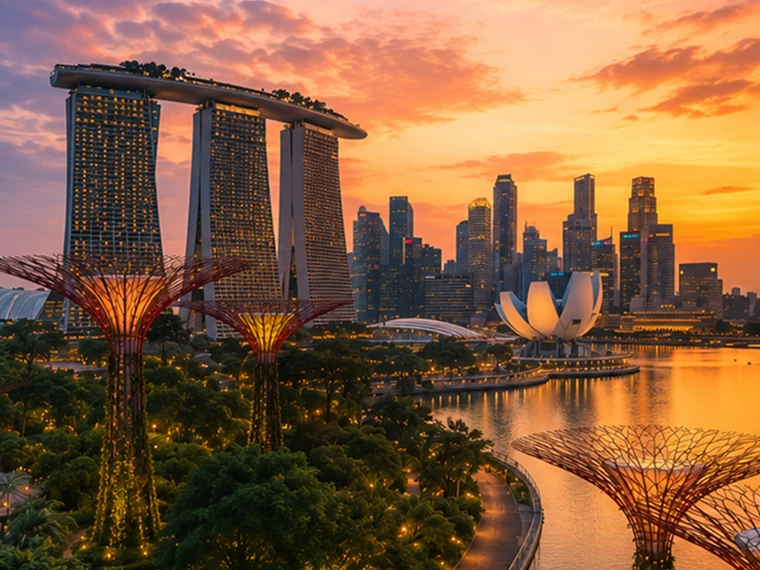
Help me plan a trip to Singapore. I'm going to be there for a work trip in July and will have a few days free at the end.

Great add-on city for a work trip: Singapore is compact, safe, excellent for solo exploring, and easy to do in 2–4 free days. July is hot and humid; expect daytime highs around 31–33°C / 88–91°F, warm nights, and sudden rain, so plan outdoor time early morning or after 5 p.m. and keep midday for museums, malls, cafés, or hotel downtime. Singapore’s official weather service notes typical daily highs of 31–33°C and lows of 23–25°C. (Singapore Weather Service(mở trong cửa sổ mới))

memory-preferences-without

A strong 3-day plan

Day 1: Marina Bay, Gardens, and skyline

Start late afternoon at Marina Bay and walk the waterfront: Merlion Park, Helix Bridge, ArtScience Museum exterior, then into Gardens by the Bay. Book Cloud Forest, Flower Dome, and either the OCBC Skyway or Supertree Observatory if views matter to you. Gardens by the Bay lists Cloud Forest and Flower Dome as open daily 9 a.m.–9 p.m.; Supertree Observatory is also listed as 9 a.m.–9 p.m. with last admission at 8:30 p.m., but check maintenance closures before booking. (Gardens by the Bay(mở trong cửa sổ mới))

Evening: stay for the Supertree light show area, then dinner at Lau Pa Sat for an easy first-night hawker experience near the CBD. It has 80+ stalls and local staples like satay, laksa, nasi lemak, bak kut teh, kaya toast, and char kway teow. (Laupasat(mở trong cửa sổ mới))

Day 2: Culture neighborhoods and food

Morning: Chinatown. Visit Buddha Tooth Relic Temple, walk the shophouse streets, and eat at Maxwell Food Centre or Chinatown Complex Food Centre. Visit Singapore lists Maxwell, Chinatown Complex, Old Airport Road, Tiong Bahru Market, Newton, and others among popular hawker centres. (Visit Singapore(mở trong cửa sổ mới))

Afternoon: Kampong Glam and Haji Lane for Sultan Mosque, murals, boutiques, and cafés. Then head to Little India around golden hour for temples, flower garlands, Tekka Centre, and dinner.

Evening: either cocktails around Ann Siang / Club Street, or keep it low-key with a night walk along the Singapore River: Boat Quay to Clarke Quay to Robertson Quay.

Day 3: Nature or beach day

Pick one based on your energy.

For nature: do Singapore Botanic Gardens early, then the National Orchid Garden, followed by lunch in Dempsey Hill or Tiong Bahru. This is the best “green Singapore” day without leaving the city.

For beach/resort mode: go to Sentosa. Choose the southern beaches, Fort Siloso Skywalk, or a beach club. I would skip trying to do every Sentosa attraction unless you love theme parks.

For local food focus: do Tiong Bahru Market for breakfast, National Gallery Singapore midday, then Old Airport Road Food Centre for dinner. The official events page also shows exhibitions and cultural events, so it is worth checking once your exact July dates are fixed. (Visit Singapore(mở trong cửa sổ mới))

Best places to stay after the work part

Marina Bay / CBD is easiest if you want polished, walkable, skyline-heavy Singapore and minimal transit.

Chinatown / Telok Ayer / Tanjong Pagar is my top pick for a few free days: great food, MRT access, heritage streets, cocktail bars, and close to work districts.

Bugis / Kampong Glam is better if you want boutique hotels, cafés, street art, and a slightly more relaxed neighborhood feel.

Orchard is convenient for shopping and rainy-day malls, but less atmospheric.

What to book ahead

Book Gardens by the Bay conservatories/Skyway, any special restaurants, and possibly a cocktail bar. For hawker centres, do not over-plan; just go hungry, carry tissues or wet wipes, and be ready to share tables.

July packing notes

Bring breathable work clothes, comfortable walking shoes, a small umbrella, and a light layer for aggressive air-conditioning. I would also plan one “rain-flexible” indoor block each day, because showers can arrive suddenly even when the forecast looks fine.

My suggested balance: Day 1 Marina Bay/Gardens, Day 2 Chinatown–Kampong Glam–Little India, Day 3 Botanic Gardens or Sentosa. That gives you the Singapore highlights without turning your post-work break into another work project.

Mô hình tạo ra một phản hồi chung chung, hợp với khách du lịch hơn, không giúp ích cho việc đặt khách sạn và phần lớn bỏ qua các sở thích của người dùng.

GPT-5.3 Instant
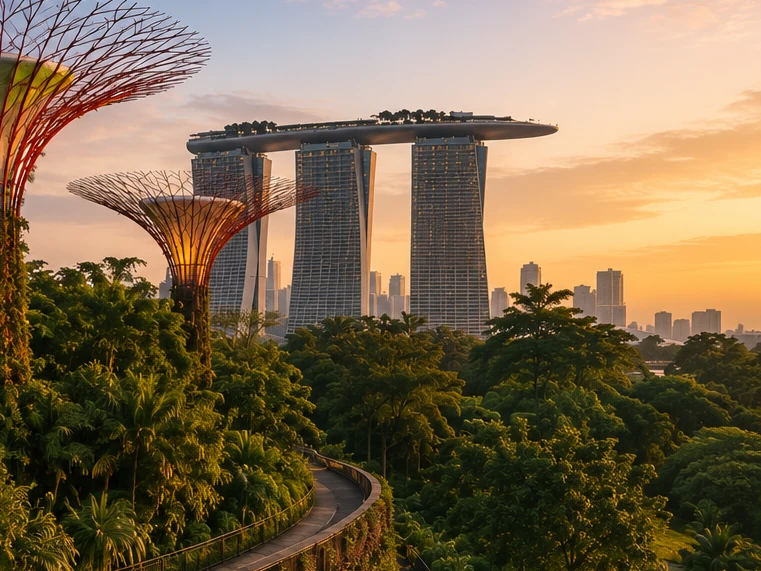
Help me plan a trip to Singapore. I'm going to be there for a work trip in July and will have a few days free at the end.

I’ll build this around your known constraints: a few free days after work, hot/humid July weather, wildlife/photography/nature bias, strong AC needs for sleep, and good but not overly social dining. I’ll verify current July logistics and then give a practical short itinerary rather than a generic Singapore list.

memory-preferences-with

Here’s how I’d structure it: 2–3 free days, mostly nature / wildlife / photography, with heat-managed mornings and AC breaks. July is hot and humid: Singapore’s July long-term stats are about 31.4°C / 88.5°F average daily max, 25.4°C / 77.7°F min, 146.6 mm rain, and 14 rain days, so outdoor plans should be early morning or evening, not midday. (National Environment Agency(mở trong cửa sổ mới))

Best plan for 3 free days

Day 1 — Gardens by the Bay + Marina Bay, low-friction

Morning: Cloud Forest + Flower Dome. This is the obvious “touristy” pick, but it fits you well because it’s visually interesting, good for photography, and climate-controlled. Gardens by the Bay lists Cloud Forest and Flower Dome-type attractions running 9:00am–9:00pm, and Cloud Forest currently has the Jurassic World experience listed as ongoing. (Gardens by the Bay(mở trong cửa sổ mới))

Late afternoon / evening: Supertree Grove + Borealis / light show. Gardens currently lists Borealis every Sat, Sun & Mon, 8:00–8:30pm at Supertree Grove, so try to align this with one of those nights. (Gardens by the Bay(mở trong cửa sổ mới))

Dinner: do something easy nearby: Marina Bay / Tanjong Pagar / Telok Ayer. For you, I’d prioritize reservation-based restaurants with real tables over hawker centers on the first night, because you dislike cramped solo seating.

Day 2 — Mandai wildlife day

Morning to afternoon: Bird Paradise + River Wonders. Bird Paradise is probably the best fit photographically; River Wonders is less “wildlife photography” and more controlled exhibits, but it pairs well logistically. River Wonders is listed as daily 9:00am–6:00pm, last entry 5:00pm. (Mandai Wildlife Reserve(mở trong cửa sổ mới))

Evening: Night Safari. This is the rare Singapore attraction that is genuinely better at night and avoids the worst heat. Night Safari is listed as daily 6:00pm–12:00am, last entry 11:15pm, with tram plus walking trails and over 900 nocturnal animals. (Mandai Wildlife Reserve(mở trong cửa sổ mới))

This is a full day. I would not add Singapore Zoo unless you have 4 free days; Mandai can become exhausting fast.

Day 3 — Nature reserve / macro-ish walking + food

Early morning: Singapore Botanic Gardens or MacRitchie / Windsor Nature Park. For a few free days, Botanic Gardens is the safer pick: easier transport, less sweaty, better bailout options, and more consistent casual photography. MacRitchie / Windsor is better if you want more actual forest, but it is hotter, sweatier, and less predictable.

Midday: AC break.

Late afternoon: Joo Chiat / Katong or Chinatown / Telok Ayer for walking, architecture, coffee, and dinner. This gives you a different texture from Marina Bay without turning the day into a logistics project.

My ranking for you

  1. Cloud Forest / Gardens by the Bay — best combination of photogenic, iconic, heat-managed.
  2. Bird Paradise + Night Safari — best wildlife-focused day.
  3. Botanic Gardens early morning — best low-stress outdoor nature.
  4. Joo Chiat / Katong — best neighborhood walk.
  5. Hawker centers — worth doing, but not ideal for your seating preferences unless timed off-peak.

What I’d avoid or deprioritize

I would skip Sentosa unless you specifically want beach/resort stuff. I would also skip a packed “greatest hits” day of Merlion / Orchard / Little India / Chinatown / Clarke Quay; it’s inefficient and hot. For you, the trip will be better if each day has one strong anchor plus one easy evening plan.

Hotel / sleep note

Since this is a work trip, your hotel may be fixed. If you can choose or extend at the same hotel, the hard gate is still AC. Singapore hotels are generally AC-heavy, but your requirement is unusually strict.

One thing I need to make this concrete

Send the exact free dates and whether your work hotel is fixed. Then I’d turn this into a day-by-day plan with restaurant targets and a hotel/AC callout.

Mô hình tạo ra một phản hồi được cá nhân hóa theo sở thích chụp ảnh động vật hoang dã, bữa tối yên tĩnh và các ưu tiên của người dùng khi đặt khách sạn.

GPT‑5.2 Instant cuối cùng cũng trả lời câu hỏi, nhưng trong nỗ lực giải thích các ranh giới an toàn của mình, lại mở đầu bằng một phần mở đầu dài dòng về những gì mô hình này không thể giúp ích. Mặt khác, GPT‑5.3 Instant đi thẳng vào câu trả lời.

Sở thích có thể có nhiều dạng:

  1. Hướng dẫn ChatGPT cách nên phản hồi (“đừng nhắc đến Stan nữa”).
  2. Sở thích hoặc ràng buộc cá nhân của bạn (“Tôi ăn chay”)
  3. Các sở thích ngầm định định hình điều gì liên quan đến bạn (“Tôi sống gần San Francisco” → các lựa chọn địa phương nên được điều chỉnh theo khu vực này)

Khi phát triển hệ thống bộ nhớ mới, chúng tôi đã cải thiện khả năng của ChatGPT trong việc áp dụng các sở thích liên quan từ những cuộc trò chuyện trước đây. Theo ví dụ “Tôi ăn chay” ở trên, chúng tôi có thể đánh giá liệu mô hình có tận dụng đúng bộ nhớ để đưa ra các lựa chọn ăn uống phù hợp với người ăn chay khi một người dùng ăn chay yêu cầu gợi ý chuẩn bị bữa ăn hay không.

Luôn chính xác theo thời gian

Thời gian không dừng lại khi cuộc trò chuyện của bạn kết thúc.

Các hệ thống bộ nhớ truyền thống có thể trở nên lỗi thời. Ví dụ, bạn nói với ChatGPT “Tôi đang ở Singapore và cần một gợi ý ăn tối cho tối nay”. Sau đó thời gian trôi qua, chuyến đi của bạn kết thúc, và bạn tự hỏi tại sao ChatGPT vẫn nghĩ bạn đang ở Singapore.

Với dreaming, ký ức được tự động cập nhật khi thời gian trôi qua, cho phép ChatGPT sửa đổi bộ nhớ từ “Bạn sẽ đi Singapore vào tháng 7” thành “Bạn đã đi Singapore vào tháng 7 năm 2026” khi chuyến đi kết thúc. Sau đó, khi bạn về nhà, ChatGPT lại có thể đưa ra các đề xuất được điều chỉnh theo địa điểm nhà ở và múi giờ của bạn.

GPT-5.2 Instant

Help me find something for take-out tonight that's still open.

It’s about 5:19 AM Sunday in Singapore, so your safest take-out/delivery bets are 24-hour places.

Best bets right now:

  1. McDelivery / McDonald’s Singapore — easiest islandwide option; McDonald’s says McDelivery is available 24 hours, 7 days a week. Breakfast menu should be on now. (McDonald's Singapore(mở trong cửa sổ mới))
  2. Srisun Express — good for prata, Indian Muslim food, local comfort food; their site says they’re halal-certified and open 24/7. (Sri Sun Express(mở trong cửa sổ mới))
  3. 89.7 Supper Club — good if you’re near Changi Village or Geylang East; their outlets page says both locations are open 24 hours, 7 days a week. (89.7 Supper Club(mở trong cửa sổ mới))
  4. 126 Dim Sum Wen Dao Shi — worth checking on GrabFood/foodpanda if you’re in the East; a 2025 guide says it runs till 5:30 AM on weekdays and round-the-clock on weekends. Since it’s Sunday morning, it may still be available. (Eatbook(mở trong cửa sổ mới))
  5. Prata around Geylang / Serangoon / Bedok / Jalan Kayu — look in GrabFood or Google Maps for “prata open now”; guides list multiple 24-hour prata/supper spots, including Mufiz Prata Corner and RK Eating House. (Eatbook(mở trong cửa sổ mới))

For the fastest path: open GrabFood / foodpanda / Deliveroo, set filter to Open now, then search “prata,” “McDonald’s,” “Srisun,” “89.7,” “dim sum,” or “nasi lemak.” If you tell me your neighborhood or nearest MRT, I’ll narrow it to specific nearby places.

Mô hình nghĩ rằng người dùng vẫn đang ở Singapore.

GPT-5.3 Instant

Help me find something for take-out tonight that's still open.

I’ll use Portola Valley / Ladera as the starting point and prioritize places that are plausibly open for takeout tonight, then narrow to low-friction options rather than a huge list.

For tonight, Saturday May 30, near Ladera / Portola Valley, I’d start here:

  1. Alpine Inn — safest casual pickup option. Open Saturday until 9:30 pm and has Order Takeout on its site. Good for burgers / tavern food. (Rossotti's Alpine Inn(mở trong cửa sổ mới))
  2. Taverna Portola Valley — nearby at Ladera Country Shopper; open daily, Saturday dinner until 9:00 pm. Better if you want Greek / Mediterranean. (TAVERNA Portola Valley(mở trong cửa sổ mới))
  3. Portola Bistro — also nearby; Saturday dinner until 9:30 pm. Good option for Italian / Mediterranean / pizza-ish dinner. (Portola Bistro -(mở trong cửa sổ mới))
  4. Amigos Grill — Mexican, very close in Ladera Country Shopper. Official site says call to order at 650-851-3997; DoorDash / order.online lists pickup/delivery ordering until 8:40 pm. (Amigos Grill(mở trong cửa sổ mới))
  5. State of Mind Slice House, Palo Alto — best fallback if you want pizza and can drive farther; Friday–Saturday hours are 11 am–10 pm. (State of Mind Slice House(mở trong cửa sổ mới))

My pick: Alpine Inn for easiest local takeout, Taverna if you want something less heavy, State of Mind if it’s later and you want the most reliable post-9 pm option.

Mô hình cung cấp các phản hồi liên quan đến địa điểm nhà riêng của người dùng.

GPT‑5.2 Instant cuối cùng cũng trả lời câu hỏi, nhưng trong nỗ lực giải thích các ranh giới an toàn của mình, lại mở đầu bằng một phần mở đầu dài dòng về những gì mô hình này không thể giúp ích. Mặt khác, GPT‑5.3 Instant đi thẳng vào câu trả lời.

Trong các đánh giá bộ nhớ của chúng tôi, chúng tôi đo lường liệu ChatGPT có thể phản hồi chính xác các câu lệnh mà sự trôi qua của thời gian ảnh hưởng đáng kể đến câu trả lời hoặc đề xuất đúng hay không. Dreaming mang lại sự cải thiện đáng kể trong lĩnh vực này:

Một nền tảng có khả năng mở rộng hơn cho tương lai

Tại OpenAI, sứ mệnh của chúng tôi là đảm bảo trí tuệ nhân tạo tổng hợp mang lại lợi ích cho toàn thể nhân loại.

Mặc dù bộ nhớ dựa trên dreaming đã có sẵn cho người dùng Plus và Pro trong một thời gian, chỉ đến nay chúng tôi mới có thể cung cấp cho người dùng Free một phiên bản đáp ứng tiêu chuẩn chất lượng của chúng tôi và thực tế để phục vụ ở quy mô lớn. Những cải tiến gần đây đã giảm khoảng 5 lần lượng điện toán cần thiết để phục vụ dreaming cho người dùng Free, giúp có thể bắt đầu triển khai dreaming cho người dùng Free trong những tuần tới và tăng dung lượng bộ nhớ cho người dùng Plus và Pro.

Nhìn về phía trước, dreaming hiện cung cấp cho chúng tôi một nền tảng bộ nhớ chung cho tất cả người dùng. Bản cập nhật này đại diện cho hệ thống bộ nhớ có năng lực nhất của chúng tôi từ trước đến nay, và chúng tôi sẽ tiếp tục cải thiện nó.

Để tìm hiểu thêm về bản phát hành này và các quyền kiểm soát bộ nhớ dành cho người dùng, hãy truy cập Câu hỏi thường gặp về Bộ nhớ(mở trong cửa sổ mới) của chúng tôi.


Tác giả

OpenAI