ข้ามไปยังเนื้อหาหลัก
OpenAI

รากฐานที่แข็งแกร่งยิ่งขึ้นสำหรับระบบความจำของ ChatGPT

เพิ่มประสิทธิภาพการสังเคราะห์ความจำใน ChatGPT ให้สดใหม่ ต่อเนื่อง และตรงประเด็นอยู่เสมอ

กำลังโหลด…

วันนี้เราเริ่มเปิดตัวระบบสังเคราะห์ความจำที่มีประสิทธิภาพและขยายขีดความสามารถได้ดียิ่งขึ้น ระบบนี้ช่วยแก้ปัญหาเรื่องข้อมูลที่ล้าสมัย ความถูกต้อง และข้อจำกัดในการขยายระบบที่เราพบเมื่อนำฟีเจอร์หน่วยความจำไปใช้กับผู้ใช้หลายร้อยล้านคนและรองรับข้อมูลย้อนหลังหลายปีใน ChatGPT

ระบบความจำคือสิ่งสำคัญที่ช่วยให้ ChatGPT เรียนรู้ความชอบ โปรเจกต์ และข้อจำกัดของคุณ ซึ่งช่วยให้การสนทนาในอนาคตสามารถเริ่มต้นต่อจากบริบทที่รับรู้ร่วมกันได้ทันที โดยไม่ต้องเริ่มนับหนึ่งใหม่ทุกครั้ง

ในช่วงสองปีที่ผ่านมาระบบความจำได้เติบโตจนกลายเป็นส่วนสำคัญในประสบการณ์การใช้งาน ChatGPT ซึ่งช่วยให้ ChatGPT เข้าใจบริบทของคุณได้ดียิ่งขึ้น ช่วยให้คุณบรรลุเป้าหมายที่มีความหมายได้อย่างต่อเนื่องในระยะยาว สิ่งนี้ถือเป็นหัวใจหลักในการเพิ่มประโยชน์ให้ ChatGPT ผ่านการทำความรู้จัก เข้าใจ และช่วยแบ่งเบาภาระงานต่างๆ ของคุณให้ดียิ่งขึ้น

การอัปเดตนี้พร้อมใช้งานสำหรับผู้ใช้ Plus และ Pro ในสหรัฐอเมริกาแล้วในวันนี้ และจะทยอยปล่อยให้กับประเทศอื่นๆ และผู้ใช้ Free และ Go ในอีกไม่กี่สัปดาห์ข้างหน้า

วิวัฒนาการของระบบความจำ

ระบบความจำเปิดตัวครั้งแรกในเดือนเมษายน 2567 (หรือที่รู้จักกันในชื่อ ความจำที่บันทึกไว้ หรือ Saved Memories) ฟีเจอร์นี้ช่วยให้คุณขอให้ ChatGPT จดจำข้อมูลและนำไปใช้ในการสนทนาครั้งต่อๆ ไปได้
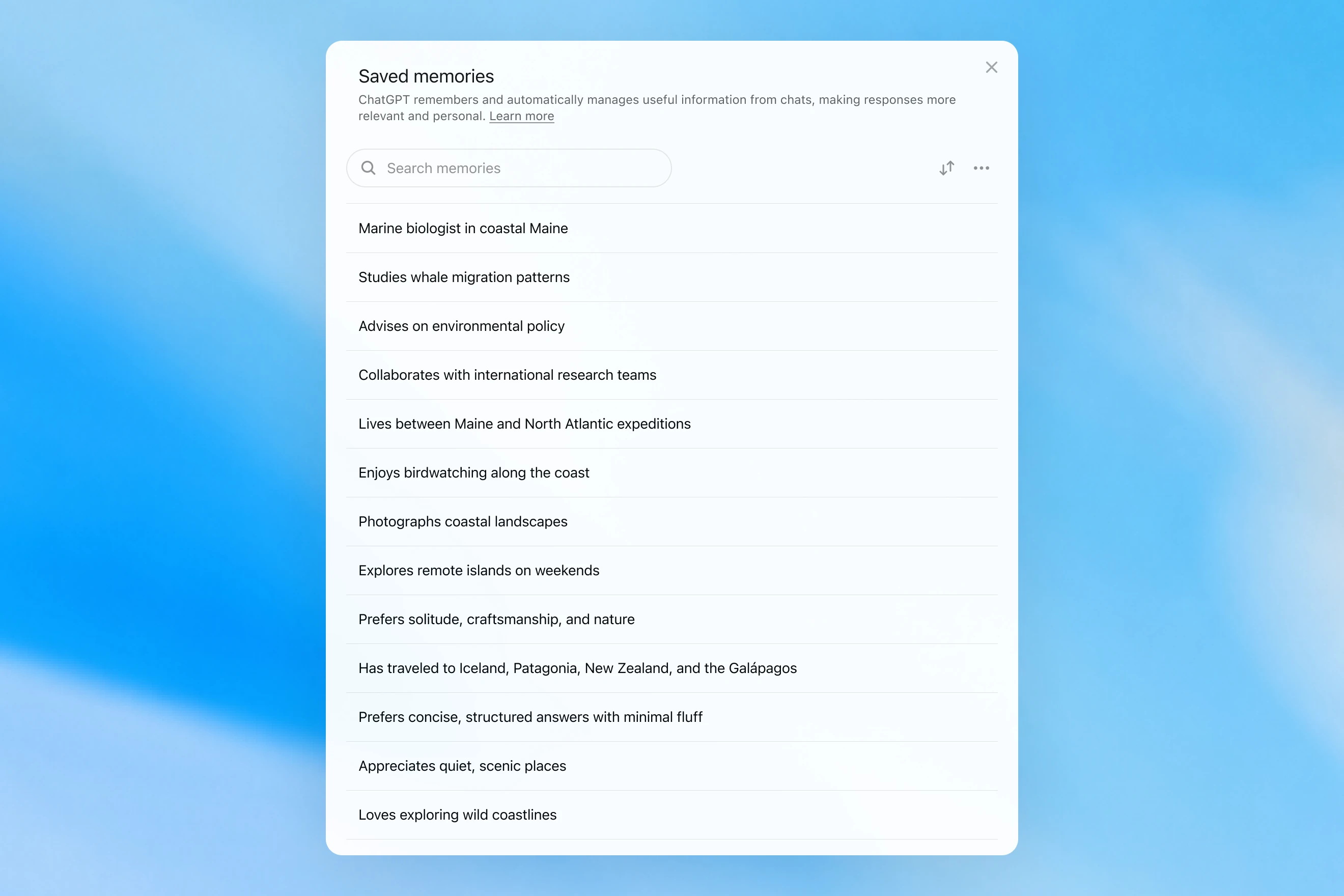
Saved memories modal showing a searchable list of personal details, including work, interests, travel, and response preferences.

ระบบจะเขียนข้อมูลลงในความจำระหว่างการสนทนาเท่านั้น และระบบจะอาศัยสัญญาณที่ชัดเจนเพื่อตัดสินใจว่าเมื่อใดควรเรียกใช้ความจำ เช่น คำสั่งที่ว่า "ช่วยจำไว้ว่าฉันกำลังจะเดินทางไปสิงคโปร์ในเดือนกรกฎาคม" ในทางปฏิบัติการโต้ตอบกับระบบนี้อาจให้ความรู้สึกเหมือนกำลังพูดคุยกับคนที่จดบันทึกมาบ้าง แต่ก็ยังลืมทุกอย่างที่ไม่ได้จดไว้ ความทรงจำที่บันทึกไว้มักจะเสื่อมลงตามกาลเวลาและในที่สุดก็จะกลายเป็นข้อมูลที่ไม่ถูกต้องหรือไม่เกี่ยวข้องอีกต่อไป

ในเดือนเมษายน 2568 เราได้อัปเดตระบบความจำของ ChatGPT โดยให้โมเดลสามารถอ้างอิงบริบทจากการแชตได้โดยไม่ต้องพึ่งพาเพียงแค่รายการความจำที่บันทึกไว้เท่านั้น เราทำสิ่งนี้ผ่านการเปิดตัวฟีเจอร์ Dreaming เวอร์ชันแรก ซึ่งเป็นวิธีที่ช่วยให้ ChatGPT คัดกรองความจำโดยอัตโนมัติเบื้องหลังผ่านการอ้างอิงจากประวัติการแชต
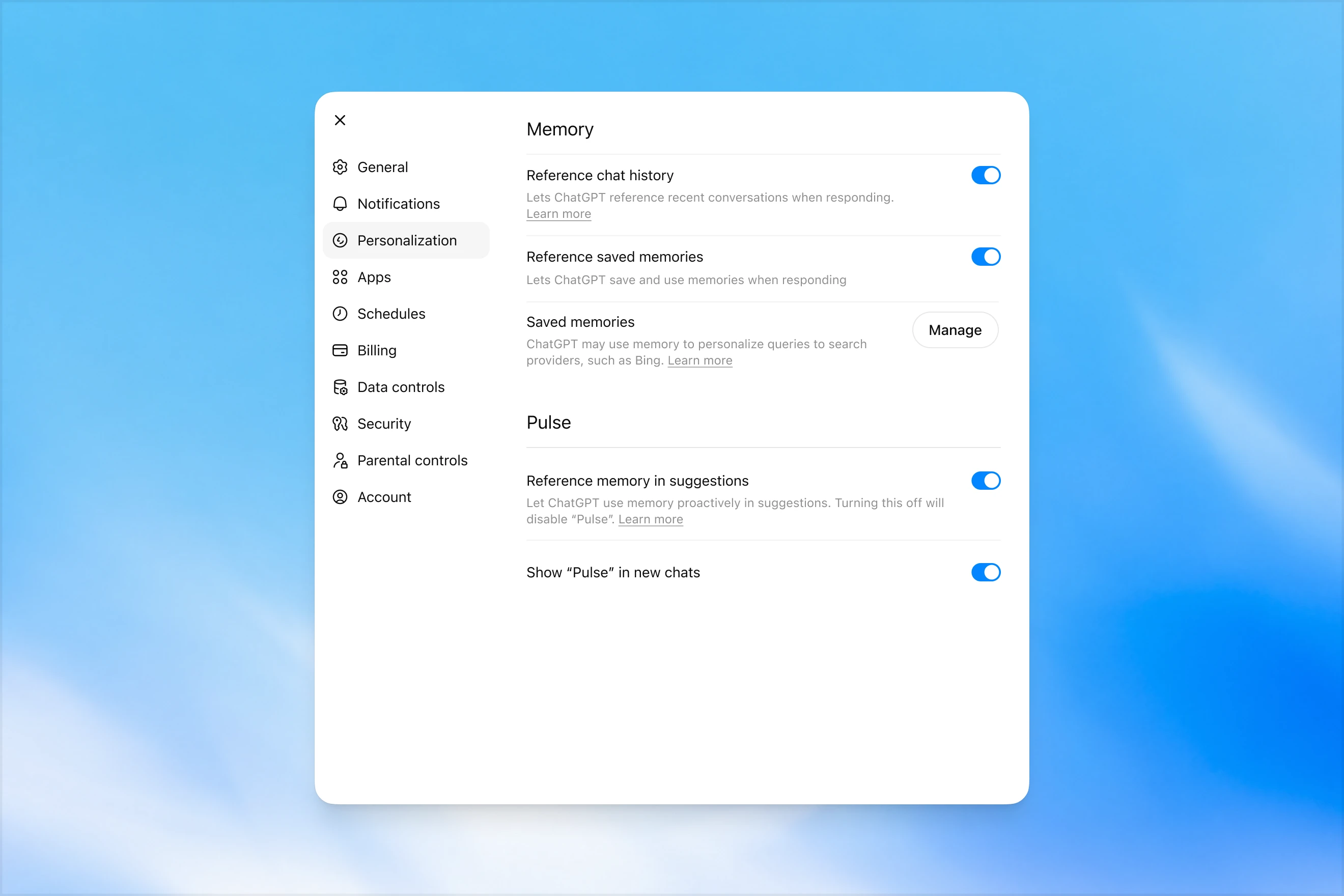
Memory settings page in ChatGPT showing options to reference chat history, use saved memories, manage saved memories, and enable Pulse memory suggestions.

Dreaming แตกต่างจากความจำที่บันทึกไว้แบบเดิมตรงที่มันจะทำงานอยู่เบื้องหลังตลอดเวลา ทำให้ ChatGPT สามารถเรียนรู้จากการสนทนาที่หลากหลาย พร้อมทั้งสังเคราะห์สถานะความจำ เพื่อให้สามารถมอบบริบทที่สดใหม่และตรงประเด็นที่สุดสำหรับการสนทนาของคุณอยู่เสมอ Dreaming ยังช่วยให้ระบบความจำสามารถรวบรวมบริบทที่เกิดขึ้นอย่างเป็นธรรมชาติในระหว่างการสนทนาได้ง่ายยิ่งขึ้น โดยไม่ต้องพึ่งพาคำสั่งตรงจากผู้ใช้ในการบันทึกข้อมูล

ในช่วงปีที่ผ่านมา Dreaming ได้เข้ามาเสริมการทำงานของระบบความจำที่บันทึกไว้ ส่งผลให้ความสามารถของ ChatGPT ในการปรับแต่งการตอบกลับพัฒนาขึ้นอย่างก้าวกระโดด พร้อมทั้งช่วยลดปัญหาความล้าสมัยของข้อมูลในระบบความจำแบบเดิม อย่างไรก็ตามในอดีตระบบดังกล่าวยังไม่เพียงพอที่จะนำมาใช้เป็นระบบความจำแบบเอกเทศได้

ในวันนี้เราได้เปิดตัวสถาปัตยกรรมระบบความจำที่มีประสิทธิภาพสูงขึ้นมาก และประมวลผลได้อย่างประหยัดทรัพยากรยิ่งขึ้น โดยระบบนี้พัฒนาต่อยอดขึ้นมาจาก Dreaming

ความจำที่ถูกสังเคราะห์ขึ้นโดย Dreaming นั้น สามารถตรวจสอบย้อนหลังได้ผ่านบทสรุปความจำ ซึ่งจะแสดงผลให้เห็นอย่างชัดเจนในหน้าเพจสรุปความจำ จากหน้าสรุปความจำ คุณสามารถจับใจความสำคัญเกี่ยวกับสิ่งที่ ChatGPT เรียนรู้เกี่ยวกับตัวคุณได้อย่างรวดเร็ว อีกทั้งยังสามารถเพิ่มหรืออัปเดตข้อมูลส่วนตัว รวมถึงกำหนดคำสั่งได้ว่า ChatGPT ควรจะยกหัวข้อใดขึ้นมาพูดคุยและในเวลาใด หากคุณต้องการเจาะลึกข้อมูลในส่วนไหนเพิ่มเติม สามารถพิมพ์พูดคุยกับโมเดลได้เลย
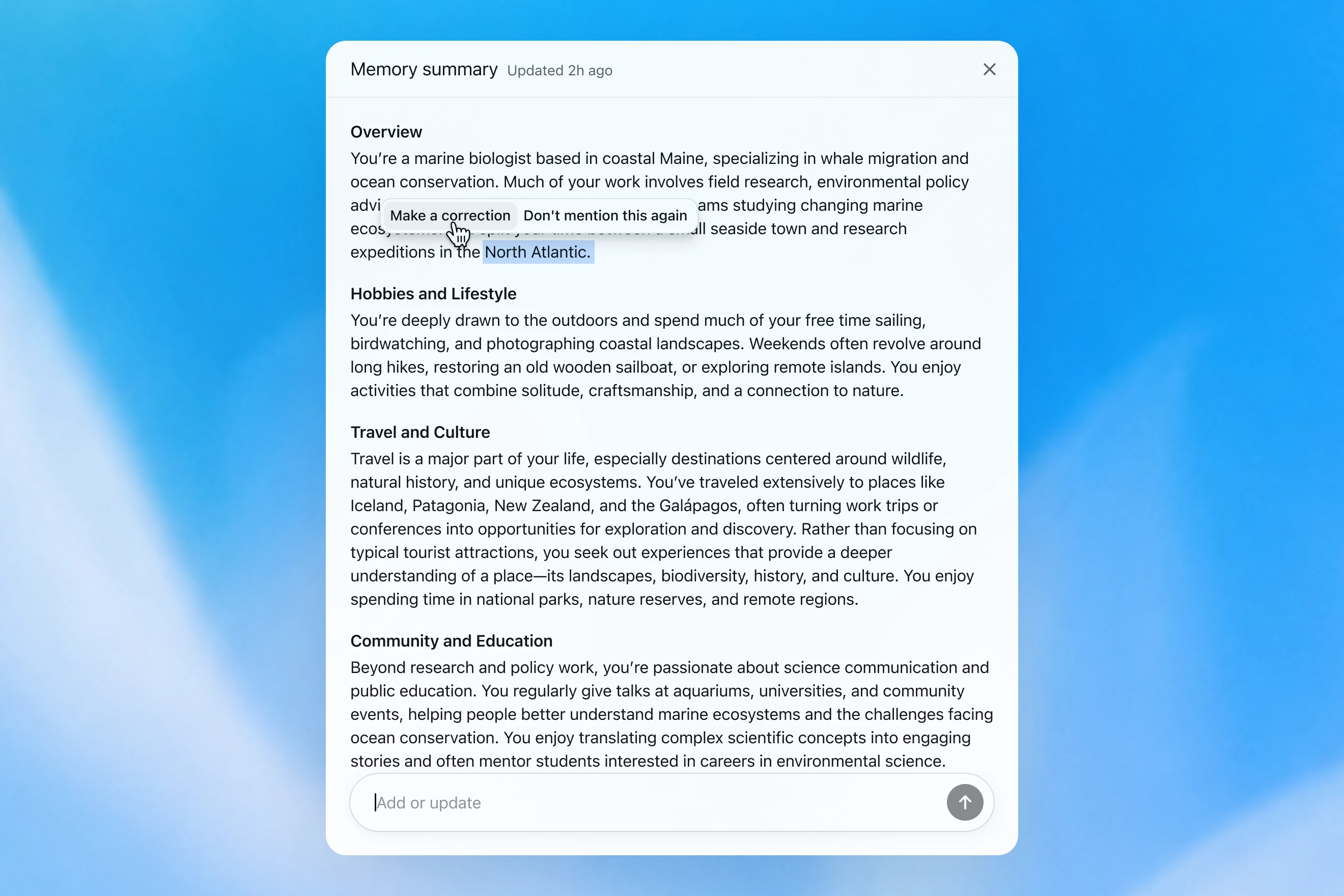
Memory summary modal showing a personalized overview of a user’s work, hobbies, travel interests, and community involvement, with options to correct or dismiss specific details.

เราประเมินความจำอย่างไร

เมื่อเราพิจารณาว่า "ความจำที่ดี" ใน ChatGPT ควรเป็นอย่างไร เรานึกถึงปัจจัยสำคัญสองสามประการดังนี้

  1. ถ่ายทอดบริบทที่มีประโยชน์: คุณบอกอะไรกับ ChatGPT ครั้งหนึ่ง แล้วมันจะจดจำข้อมูลนั้นไว้ในการสนทนาครั้งต่อๆ ไปของคุณ
  2. ปฏิบัติตามความต้องการและข้อจำกัด: หากคุณระบุความต้องการ (เช่น คุณเป็นมังสวิรัติ) ChatGPT ควรดำเนินการที่สอดคล้องกับความต้องการนั้นต่อไป
  3. การปรับเปลี่ยนตามกาลเวลา: ระบบความจำควรคำนึงถึงช่วงเวลาที่ผ่านไป ลองนึกภาพว่า "ผู้ใช้กำลังวางแผนจัดงานวันเกิดในวันเสาร์หน้า" แต่สุดท้ายวันอาทิตย์ก็มาถึง

เราสามารถประเมินผลการพัฒนาของระบบความจำใน ChatGPT Plus และ Pro ที่ผ่านพ้นมาตามช่วงเวลา โดยอ้างอิงจากวัตถุประสงค์หลักทั้งสามประการของระบบความจำที่ระบุไว้ข้างต้น เราได้ดำเนินการดังต่อไปนี้:

  1. 2567: ระบบความจำที่บันทึกไว้
  2. 2568: ระบบความจำที่บันทึกไว้ + Dreaming V0
  3. 2569: Dreaming V3

การถ่ายทอดบริบท

เมื่อคุณเริ่มแชตใหม่กับ ChatGPT คุณไม่จำเป็นต้องแนะนำตัวเองตั้งแต่ต้น ChatGPT สามารถช่วยประหยัดเวลาและ ต่อยอดจากบริบทที่มีอยู่ก่อนหน้าได้ โดยเฉพาะอย่างยิ่งสำหรับโปรเจกต์ที่ซับซ้อนและใช้เวลานาน

ตัวอย่างเช่น ลองจินตนาการว่าคุณกำลังใช้งาน ChatGPT เพื่อเลือกซื้ออุปกรณ์กล้องถ่ายภาพชิ้นใหม่ที่มีความเข้ากันได้กับกล้องตัวเดิมที่คุณมีอยู่ หากคุณเคยพูดคุยเกี่ยวกับการตั้งค่ากล้องของคุณกับ ChatGPT มาก่อน คุณสามารถขอผลิตภัณฑ์ที่เข้ากันได้กับ "การตั้งค่าการถ่ายภาพของคุณ" และรับคำแนะนำที่ปรับให้เหมาะสมกับความต้องการของคุณได้

GPT-5.2 Instant

What would I need to buy to use TTL for my underwater photography setup?

To use TTL flash underwater, you need a compatible chain from camera → housing/trigger → cable → strobe. What you buy depends mostly on whether your setup uses fiber-optic TTL or electrical TTL.

Basic shopping checklist

  • TTL-capable underwater strobe
    Look for strobes that support your TTL type, such as Inon S-TTL, Sea & Sea DS-TTL, Ikelite DS TTL, or compatible Backscatter/Nauticam systems. TTL has to be supported by the strobe, not just the camera.
  • TTL trigger or TTL converter
    This is the key piece. It translates your camera’s flash metering into something the underwater strobe can understand. Examples include Nauticam optical TTL converters, Sea & Sea TTL converters, Backscatter Smart Control optical TTL triggers, or Ikelite DS Link TTL converters, depending on housing and camera brand. Backscatter notes that Nauticam optical TTL converters can work with fiber-optic-connected Inon and Sea & Sea TTL strobes, while Ikelite’s DS Link converters are made around Ikelite DS strobes and electrical sync setups. (Backscatter.com(เปิดในหน้าต่างใหม่))
  • Connection cable
    For fiber optic TTL, buy one fiber optic cable per strobe. Ikelite’s fiber-optic guide says each strobe needs its own light path, converter/adapter, and cord. (Ikelite(เปิดในหน้าต่างใหม่))
    For
    electrical TTL, buy the correct sync cord, such as Ikelite-style, Nikonos 5-pin, or housing-specific bulkhead cable.
  • Housing compatibility parts
    You may need a hot-shoe adapter, bulkhead, fiber optic window/adapter, or housing-specific TTL board. Many TTL triggers mount inside the housing on the camera hot shoe.
  • Strobe arms, clamps, tray, and mounting hardware
    TTL controls exposure, but you still need to physically mount and aim the strobes.
  • Batteries and spares
    Bring strobe batteries, trigger batteries if required, spare fiber optic cables or sync cord O-rings, and silicone grease for serviceable O-rings.

Which route should you choose?

Fiber optic TTL is usually easiest if your housing has optical ports or can use the camera’s pop-up flash/LED trigger. It is common with compact, mirrorless, Nauticam, Sea & Sea, AOI, and Olympus/OM TG-style setups.

Electrical TTL is often best if you use Ikelite DS strobes or an Ikelite-style housing/bulkhead. Ikelite says its DS Link TTL converters are faster and more reliable than fiber-optic TTL triggers, and they do not require batteries. (Backscatter.com(เปิดในหน้าต่างใหม่))

The compatibility rule

You need all three to match:

camera brand/protocol + housing/trigger type + strobe TTL system

For example:

  • Sony camera + Nauticam housing + optical TTL trigger + Inon/Sea & Sea-compatible fiber optic strobe
  • Nikon/Canon/Sony camera + Ikelite housing/bulkhead + Ikelite DS Link TTL converter + Ikelite DS strobe
  • Compact camera with built-in flash + fiber optic cable + S-TTL/DS-TTL-capable strobe

So the practical answer is: buy a TTL-compatible strobe, the correct TTL trigger/converter for your camera and housing, and the right fiber optic or electrical sync cable. The exact part numbers depend on your camera, housing, and strobe model.

โมเดลนี้สร้างการตอบสนองแบบทั่วไป ซึ่งทำให้ผู้ใช้ต้องทำการตรวจสอบความเข้ากันได้ที่ซับซ้อนด้วยตนเอง

GPT-5.3 Instant

What would I need to buy to use TTL for my underwater photography setup?

I’ll verify this against your actual setup: Sony A1 II in Nauticam NA-A1II, with Backscatter Mini Flash 3 and Inon Z-330 strobes. The key question is whether you want TTL with the Mini Flash 3, the Z-330s, or both.

For your setupSony A1 II + Nauticam NA-A1II + Backscatter Mini Flash 3 + Inon Z-330 — there are two different TTL paths:

Best buy for Mini Flash 3 TTL

Buy:

Backscatter Smart Control TTL LED Nauticam Flash Trigger for Sony
SKU: BS-TR-SN2

Backscatter lists it as custom-designed for Nauticam full-frame Sony housings, TTL-compatible with Mini Flash 3, and the NA-A1II housing page offers it as the “Backscatter Smart Control TTL Flash Trigger” option. (Backscatter.com(เปิดในหน้าต่างใหม่))

You’d use normal optical fiber cables from the housing to the Mini Flash 3. On the MF-3, you’d use SC or SC Macro mode; Backscatter says SC / SC Macro are the TTL modes for Mini Flash 3, with SC Macro specifically tuned for close macro work. (Backscatter.com(เปิดในหน้าต่างใหม่))

For Inon Z-330 TTL

For the Inon Z-330, the relevant unit is:

UW Technics 11075-HSS TTL Converter for Sony / Nauticam

UW Technics explicitly lists Inon Z-330 as a compatible TTL strobe and supports optical TTL output. (UWTechnics(เปิดในหน้าต่างใหม่))

But I would not buy this for Mini Flash 3 TTL. Backscatter’s own UW Technics listing says Backscatter strobes are manual / HSS only on that converter, while the Backscatter Smart Control trigger is the one listed for Sony TTL with the Mini Flash 3. (Backscatter.com(เปิดในหน้าต่างใหม่))

Practical recommendation

Since you shoot macro and have the Mini Flash 3, I’d buy the Backscatter Smart Control TTL LED Nauticam Flash Trigger for Sony — BS-TR-SN2.

The catch: there probably is no single trigger that gives true TTL for both the Mini Flash 3 and Inon Z-330 at the same time. The Backscatter trigger is the right TTL solution for the MF-3; the UW Technics converter is the right TTL solution for the Z-330. So choose based on which strobe you actually want TTL for.

For your use case, I’d prioritize Mini Flash 3 TTL / SC Macro and treat the Z-330s as manual when needed.

โมเดลนี้จะจดจำการตั้งค่ากล้องของผู้ใช้และแนะนำผลิตภัณฑ์ที่เหมาะสม

GPT‑5.2 Instant ตอบคำถามได้ในที่สุด แต่มีการเกริ่นเรื่องความปลอดภัยที่เยิ่นเย้อเกินความจำเป็นเกี่ยวกับสิ่งที่ไม่สามารถ ช่วยได้ ส่วน GPT‑5.3 Instant นั้นตอบได้ตรงประเด็นและเริ่มเข้าเรื่องได้ทันทีโดยไม่ต้องอ้อมค้อม

เราสามารถสร้างชุดการประเมินผลจากตัวอย่างในลักษณะนี้ได้ โดยกำหนดให้โมเดลตอบกลับพรอมต์ที่จำเป็นต้องมีการระลึกข้อมูลเชิงข้อเท็จจริงเกี่ยวกับตัวผู้ใช้ จากนั้นโมเดลจะได้รับรางวัลหากตอบสนองในลักษณะที่ใช้บริบทที่เกี่ยวข้องได้อย่างถูกต้อง จากการประเมินนี้ ระบบใหม่ที่อิงตามระบบ Dreaming ช่วยเพิ่มความสามารถของแบบจำลองในการจดจำข้อเท็จจริงที่เกี่ยวข้องได้ดียิ่งขึ้น

ปฏิบัติตามความต้องการ

ระบบความจำยังช่วยให้ ChatGPT ตอบสนองได้อย่างเหมาะสมยิ่งขึ้นกับความต้องการและข้อจำกัดของคุณ

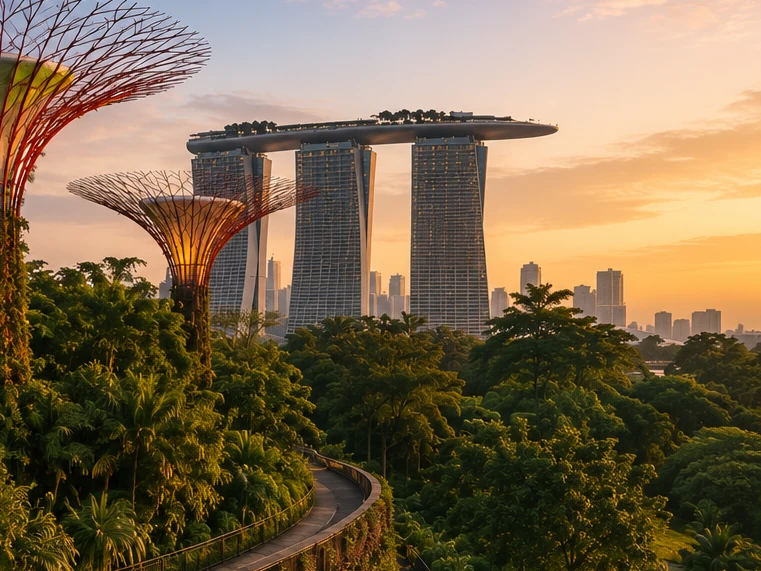
ลองนึกภาพว่าคุณกำลังวางแผนเดินทางไปสิงคโปร์ สองเดือนก่อนการเดินทาง คุณขอให้ ChatGPT ช่วยวางแผนการเดินทาง ChatGPT เรียนรู้จากประสบการณ์การวางแผนการเดินทางครั้งก่อนๆ ว่าคุณชื่นชอบการถ่ายภาพสัตว์ป่า ชอบโรงแรมที่มีเครื่องปรับอากาศเย็นฉ่ำ และชอบรับประทานอาหารค่ำในบรรยากาศเงียบสงบมากกว่าบาร์ที่แออัด

GPT-5.2 Instant
Help me plan a trip to Singapore. I'm going to be there for a work trip in July and will have a few days free at the end.

Great add-on city for a work trip: Singapore is compact, safe, excellent for solo exploring, and easy to do in 2–4 free days. July is hot and humid; expect daytime highs around 31–33°C / 88–91°F, warm nights, and sudden rain, so plan outdoor time early morning or after 5 p.m. and keep midday for museums, malls, cafés, or hotel downtime. Singapore’s official weather service notes typical daily highs of 31–33°C and lows of 23–25°C. (Singapore Weather Service(เปิดในหน้าต่างใหม่))

memory-preferences-without

A strong 3-day plan

Day 1: Marina Bay, Gardens, and skyline

Start late afternoon at Marina Bay and walk the waterfront: Merlion Park, Helix Bridge, ArtScience Museum exterior, then into Gardens by the Bay. Book Cloud Forest, Flower Dome, and either the OCBC Skyway or Supertree Observatory if views matter to you. Gardens by the Bay lists Cloud Forest and Flower Dome as open daily 9 a.m.–9 p.m.; Supertree Observatory is also listed as 9 a.m.–9 p.m. with last admission at 8:30 p.m., but check maintenance closures before booking. (Gardens by the Bay(เปิดในหน้าต่างใหม่))

Evening: stay for the Supertree light show area, then dinner at Lau Pa Sat for an easy first-night hawker experience near the CBD. It has 80+ stalls and local staples like satay, laksa, nasi lemak, bak kut teh, kaya toast, and char kway teow. (Laupasat(เปิดในหน้าต่างใหม่))

Day 2: Culture neighborhoods and food

Morning: Chinatown. Visit Buddha Tooth Relic Temple, walk the shophouse streets, and eat at Maxwell Food Centre or Chinatown Complex Food Centre. Visit Singapore lists Maxwell, Chinatown Complex, Old Airport Road, Tiong Bahru Market, Newton, and others among popular hawker centres. (Visit Singapore(เปิดในหน้าต่างใหม่))

Afternoon: Kampong Glam and Haji Lane for Sultan Mosque, murals, boutiques, and cafés. Then head to Little India around golden hour for temples, flower garlands, Tekka Centre, and dinner.

Evening: either cocktails around Ann Siang / Club Street, or keep it low-key with a night walk along the Singapore River: Boat Quay to Clarke Quay to Robertson Quay.

Day 3: Nature or beach day

Pick one based on your energy.

For nature: do Singapore Botanic Gardens early, then the National Orchid Garden, followed by lunch in Dempsey Hill or Tiong Bahru. This is the best “green Singapore” day without leaving the city.

For beach/resort mode: go to Sentosa. Choose the southern beaches, Fort Siloso Skywalk, or a beach club. I would skip trying to do every Sentosa attraction unless you love theme parks.

For local food focus: do Tiong Bahru Market for breakfast, National Gallery Singapore midday, then Old Airport Road Food Centre for dinner. The official events page also shows exhibitions and cultural events, so it is worth checking once your exact July dates are fixed. (Visit Singapore(เปิดในหน้าต่างใหม่))

Best places to stay after the work part

Marina Bay / CBD is easiest if you want polished, walkable, skyline-heavy Singapore and minimal transit.

Chinatown / Telok Ayer / Tanjong Pagar is my top pick for a few free days: great food, MRT access, heritage streets, cocktail bars, and close to work districts.

Bugis / Kampong Glam is better if you want boutique hotels, cafés, street art, and a slightly more relaxed neighborhood feel.

Orchard is convenient for shopping and rainy-day malls, but less atmospheric.

What to book ahead

Book Gardens by the Bay conservatories/Skyway, any special restaurants, and possibly a cocktail bar. For hawker centres, do not over-plan; just go hungry, carry tissues or wet wipes, and be ready to share tables.

July packing notes

Bring breathable work clothes, comfortable walking shoes, a small umbrella, and a light layer for aggressive air-conditioning. I would also plan one “rain-flexible” indoor block each day, because showers can arrive suddenly even when the forecast looks fine.

My suggested balance: Day 1 Marina Bay/Gardens, Day 2 Chinatown–Kampong Glam–Little India, Day 3 Botanic Gardens or Sentosa. That gives you the Singapore highlights without turning your post-work break into another work project.

โมเดลให้คำตอบแบบทั่วไปที่เน้นการท่องเที่ยวมากกว่า ไม่ช่วยเรื่องการจองโรงแรม และส่วนใหญ่ละเลยความสนใจของผู้ใช้

GPT-5.3 Instant
Help me plan a trip to Singapore. I'm going to be there for a work trip in July and will have a few days free at the end.

I’ll build this around your known constraints: a few free days after work, hot/humid July weather, wildlife/photography/nature bias, strong AC needs for sleep, and good but not overly social dining. I’ll verify current July logistics and then give a practical short itinerary rather than a generic Singapore list.

memory-preferences-with

Here’s how I’d structure it: 2–3 free days, mostly nature / wildlife / photography, with heat-managed mornings and AC breaks. July is hot and humid: Singapore’s July long-term stats are about 31.4°C / 88.5°F average daily max, 25.4°C / 77.7°F min, 146.6 mm rain, and 14 rain days, so outdoor plans should be early morning or evening, not midday. (National Environment Agency(เปิดในหน้าต่างใหม่))

Best plan for 3 free days

Day 1 — Gardens by the Bay + Marina Bay, low-friction

Morning: Cloud Forest + Flower Dome. This is the obvious “touristy” pick, but it fits you well because it’s visually interesting, good for photography, and climate-controlled. Gardens by the Bay lists Cloud Forest and Flower Dome-type attractions running 9:00am–9:00pm, and Cloud Forest currently has the Jurassic World experience listed as ongoing. (Gardens by the Bay(เปิดในหน้าต่างใหม่))

Late afternoon / evening: Supertree Grove + Borealis / light show. Gardens currently lists Borealis every Sat, Sun & Mon, 8:00–8:30pm at Supertree Grove, so try to align this with one of those nights. (Gardens by the Bay(เปิดในหน้าต่างใหม่))

Dinner: do something easy nearby: Marina Bay / Tanjong Pagar / Telok Ayer. For you, I’d prioritize reservation-based restaurants with real tables over hawker centers on the first night, because you dislike cramped solo seating.

Day 2 — Mandai wildlife day

Morning to afternoon: Bird Paradise + River Wonders. Bird Paradise is probably the best fit photographically; River Wonders is less “wildlife photography” and more controlled exhibits, but it pairs well logistically. River Wonders is listed as daily 9:00am–6:00pm, last entry 5:00pm. (Mandai Wildlife Reserve(เปิดในหน้าต่างใหม่))

Evening: Night Safari. This is the rare Singapore attraction that is genuinely better at night and avoids the worst heat. Night Safari is listed as daily 6:00pm–12:00am, last entry 11:15pm, with tram plus walking trails and over 900 nocturnal animals. (Mandai Wildlife Reserve(เปิดในหน้าต่างใหม่))

This is a full day. I would not add Singapore Zoo unless you have 4 free days; Mandai can become exhausting fast.

Day 3 — Nature reserve / macro-ish walking + food

Early morning: Singapore Botanic Gardens or MacRitchie / Windsor Nature Park. For a few free days, Botanic Gardens is the safer pick: easier transport, less sweaty, better bailout options, and more consistent casual photography. MacRitchie / Windsor is better if you want more actual forest, but it is hotter, sweatier, and less predictable.

Midday: AC break.

Late afternoon: Joo Chiat / Katong or Chinatown / Telok Ayer for walking, architecture, coffee, and dinner. This gives you a different texture from Marina Bay without turning the day into a logistics project.

My ranking for you

  1. Cloud Forest / Gardens by the Bay — best combination of photogenic, iconic, heat-managed.
  2. Bird Paradise + Night Safari — best wildlife-focused day.
  3. Botanic Gardens early morning — best low-stress outdoor nature.
  4. Joo Chiat / Katong — best neighborhood walk.
  5. Hawker centers — worth doing, but not ideal for your seating preferences unless timed off-peak.

What I’d avoid or deprioritize

I would skip Sentosa unless you specifically want beach/resort stuff. I would also skip a packed “greatest hits” day of Merlion / Orchard / Little India / Chinatown / Clarke Quay; it’s inefficient and hot. For you, the trip will be better if each day has one strong anchor plus one easy evening plan.

Hotel / sleep note

Since this is a work trip, your hotel may be fixed. If you can choose or extend at the same hotel, the hard gate is still AC. Singapore hotels are generally AC-heavy, but your requirement is unusually strict.

One thing I need to make this concrete

Send the exact free dates and whether your work hotel is fixed. Then I’d turn this into a day-by-day plan with restaurant targets and a hotel/AC callout.

โมเดลนี้สร้างการตอบสนองที่ปรับให้เข้ากับความสนใจของผู้ใช้ในด้านการถ่ายภาพสัตว์ป่า การรับประทานอาหารค่ำอย่างเงียบสงบ และลำดับความสำคัญเมื่อจองโรงแรม

GPT‑5.2 Instant ตอบคำถามได้ในที่สุด แต่มีการเกริ่นเรื่องความปลอดภัยที่เยิ่นเย้อเกินความจำเป็นเกี่ยวกับสิ่งที่ไม่สามารถ ช่วยได้ ส่วน GPT‑5.3 Instant นั้นตอบได้ตรงประเด็นและเริ่มเข้าเรื่องได้ทันทีโดยไม่ต้องอ้อมค้อม

ความต้องการหรือความชอบของผู้ใช้นั้นสามารถแสดงออกได้ในหลายรูปแบบ ดังนี้:

  1. คำแนะนำสำหรับวิธีที่ ChatGPT ควรตอบกลับ ("อย่าพูดถึง Stan อีก")
  2. ความชอบหรือข้อจำกัดส่วนตัวของคุณ ("ฉันเป็นมังสวิรัติ")
  3. ความชอบโดยนัยที่กำหนดว่าอะไรคือสิ่งที่เกี่ยวข้องกับคุณ ("ฉันอาศัยอยู่ใกล้ซานฟรานซิสโก" → ตัวเลือกในท้องถิ่นควรปรับให้เหมาะสมกับพื้นที่นี้)

ในการพัฒนาระบบความจำใหม่ เราได้ปรับปรุงความสามารถของ ChatGPT ในการนำการตั้งค่าที่เกี่ยวข้องจากบทสนทนาในอดีตมาใช้ให้ดียิ่งขึ้น จากตัวอย่าง "ฉันเป็นมังสวิรัติ" ข้างต้น เราสามารถประเมินได้ว่าโมเดลใช้ประโยชน์จากหน่วยความจำได้อย่างถูกต้องหรือไม่ เพื่อสร้างตัวเลือกอาหารที่เหมาะสำหรับผู้ทานมังสวิรัติ เมื่อผู้ใช้ที่เป็นมังสวิรัติขอคำแนะนำเกี่ยวกับการเตรียมอาหาร

ก้าวทันทุกช่วงเวลาโดยไม่ล้าสมัย

เวลาไม่ได้หยุดลงเมื่อการสนทนาของคุณจบลง

ระบบความจำแบบดั้งเดิมอาจล้าสมัยได้ ตัวอย่างเช่น คุณบอกกับ ChatGPT ว่า "ฉันอยู่ที่สิงคโปร์และต้องการคำแนะนำร้านอาหารเย็นสำหรับคืนนี้" เมื่อเวลาผ่านไปการเดินทางของคุณสิ้นสุดลง และคุณสงสัยว่าทำไม ChatGPT ยังคิดว่าคุณยังอยู่ในสิงคโปร์อยู่

เมื่อใช้งานระบบ Dreaming ข้อมูลความจำจะได้รับการอัปเดตโดยอัตโนมัติเมื่อเวลาผ่านไป ซึ่งช่วยให้ ChatGPT สามารถปรับปรุงความจำจาก "คุณกำลังจะเดินทางไปสิงคโปร์ในเดือนกรกฎาคม" เป็น "คุณได้เดินทางไปสิงคโปร์มาแล้วในเดือนกรกฎาคม 2569" เมื่อการเดินทางดังกล่าวสิ้นสุดลง จากนั้นเมื่อคุณกลับถึงบ้าน ChatGPT จะสามารถให้คำแนะนำที่ปรับให้เหมาะสมกับสถานที่ตั้งและเขตเวลาของคุณได้อีกครั้ง

GPT-5.2 Instant

Help me find something for take-out tonight that's still open.

It’s about 5:19 AM Sunday in Singapore, so your safest take-out/delivery bets are 24-hour places.

Best bets right now:

  1. McDelivery / McDonald’s Singapore — easiest islandwide option; McDonald’s says McDelivery is available 24 hours, 7 days a week. Breakfast menu should be on now. (McDonald's Singapore(เปิดในหน้าต่างใหม่))
  2. Srisun Express — good for prata, Indian Muslim food, local comfort food; their site says they’re halal-certified and open 24/7. (Sri Sun Express(เปิดในหน้าต่างใหม่))
  3. 89.7 Supper Club — good if you’re near Changi Village or Geylang East; their outlets page says both locations are open 24 hours, 7 days a week. (89.7 Supper Club(เปิดในหน้าต่างใหม่))
  4. 126 Dim Sum Wen Dao Shi — worth checking on GrabFood/foodpanda if you’re in the East; a 2025 guide says it runs till 5:30 AM on weekdays and round-the-clock on weekends. Since it’s Sunday morning, it may still be available. (Eatbook(เปิดในหน้าต่างใหม่))
  5. Prata around Geylang / Serangoon / Bedok / Jalan Kayu — look in GrabFood or Google Maps for “prata open now”; guides list multiple 24-hour prata/supper spots, including Mufiz Prata Corner and RK Eating House. (Eatbook(เปิดในหน้าต่างใหม่))

For the fastest path: open GrabFood / foodpanda / Deliveroo, set filter to Open now, then search “prata,” “McDonald’s,” “Srisun,” “89.7,” “dim sum,” or “nasi lemak.” If you tell me your neighborhood or nearest MRT, I’ll narrow it to specific nearby places.

โมเดลคิดว่าผู้ใช้ยังคงอยู่ในสิงคโปร์

GPT-5.3 Instant

Help me find something for take-out tonight that's still open.

I’ll use Portola Valley / Ladera as the starting point and prioritize places that are plausibly open for takeout tonight, then narrow to low-friction options rather than a huge list.

For tonight, Saturday May 30, near Ladera / Portola Valley, I’d start here:

  1. Alpine Inn — safest casual pickup option. Open Saturday until 9:30 pm and has Order Takeout on its site. Good for burgers / tavern food. (Rossotti's Alpine Inn(เปิดในหน้าต่างใหม่))
  2. Taverna Portola Valley — nearby at Ladera Country Shopper; open daily, Saturday dinner until 9:00 pm. Better if you want Greek / Mediterranean. (TAVERNA Portola Valley(เปิดในหน้าต่างใหม่))
  3. Portola Bistro — also nearby; Saturday dinner until 9:30 pm. Good option for Italian / Mediterranean / pizza-ish dinner. (Portola Bistro -(เปิดในหน้าต่างใหม่))
  4. Amigos Grill — Mexican, very close in Ladera Country Shopper. Official site says call to order at 650-851-3997; DoorDash / order.online lists pickup/delivery ordering until 8:40 pm. (Amigos Grill(เปิดในหน้าต่างใหม่))
  5. State of Mind Slice House, Palo Alto — best fallback if you want pizza and can drive farther; Friday–Saturday hours are 11 am–10 pm. (State of Mind Slice House(เปิดในหน้าต่างใหม่))

My pick: Alpine Inn for easiest local takeout, Taverna if you want something less heavy, State of Mind if it’s later and you want the most reliable post-9 pm option.

โมเดลนี้ให้คำตอบที่เกี่ยวข้องกับที่ตั้งบ้านของผู้ใช้

GPT‑5.2 Instant ตอบคำถามได้ในที่สุด แต่มีการเกริ่นเรื่องความปลอดภัยที่เยิ่นเย้อเกินความจำเป็นเกี่ยวกับสิ่งที่ไม่สามารถ ช่วยได้ ส่วน GPT‑5.3 Instant นั้นตอบได้ตรงประเด็นและเริ่มเข้าเรื่องได้ทันทีโดยไม่ต้องอ้อมค้อม

ในการประเมินระบบความจำของเรา เราจะวัดว่า ChatGPT สามารถตอบสนองต่อคำถามได้อย่างถูกต้องหรือไม่ โดยที่ระยะเวลาที่ผ่านไปส่งผลกระทบอย่างมากต่อคำตอบหรือคำแนะนำที่ถูกต้อง Dreaming ช่วยเพิ่มประสิทธิภาพในด้านนี้ได้อย่างมาก:

รากฐานที่รองรับการขยายตัวได้อย่างมีประสิทธิภาพยิ่งขึ้นเพื่ออนาคต

ที่ OpenAI พันธกิจของเราคือการทำให้มั่นใจว่าปัญญาประดิษฐ์ทั่วไปจะเป็นประโยชน์ต่อมวลมนุษยชาติ

แม้ว่าระบบความจำที่อิงจาก Dreaming จะมีให้บริการแก่ผู้ใช้ Plus และ Pro มาสักระยะแล้ว แต่เราเพิ่งจะสามารถนำเสนอเวอร์ชันที่ตรงตามมาตรฐานคุณภาพของเราและใช้งานได้จริงในวงกว้างแก่ผู้ใช้เวอร์ชัน Free ได้ในขณะนี้ การปรับปรุงล่าสุดช่วยลดทรัพยากรการประมวลผลที่จำเป็นสำหรับการให้บริการ Dreaming แก่ผู้ใช้เวอร์ชันฟรีลงประมาณ 5 เท่า ทำให้สามารถเริ่มเปิดใช้งาน Dreaming ให้กับผู้ใช้เวอร์ชันฟรีได้ในอีกไม่กี่สัปดาห์ข้างหน้า และเพิ่มความจุระบบความจำสำหรับผู้ใช้เวอร์ชัน Plus และ Pro ได้อีกด้วย

เมื่อมองไปในอนาคตตอนนี้ระบบ Dreaming ได้กลายมาเป็นรากฐานระบบความจำส่วนกลางที่ผู้ใช้งานทุกคนจะได้ใช้ร่วมกันแล้ว การอัปเดตครั้งนี้แสดงถึงระบบความจำที่มีประสิทธิภาพที่สุดเท่าที่เราเคยมีมา และเราจะพัฒนาให้ดียิ่งขึ้นต่อไป

หากต้องการเรียนรู้เพิ่มเติมเกี่ยวกับการอัปเดตครั้งนี้และการควบคุมการใช้งานระบบความจำ โปรดไปที่หน้าคำถามที่พบบ่อยเกี่ยวกับระบบความจำ(เปิดในหน้าต่างใหม่)


ผู้เขียน

OpenAI