Codex ਦੀ ਪੇਸ਼ਕਸ਼
ਇੱਕ ਕਲਾਊਡ-ਆਧਾਰਿਤ software engineering ਏਜੰਟ ਜੋ codex-1 ਨਾਲ ਸੰਚਾਲਿਤ ਹੋ ਕੇ ਇਕੱਠੇ ਕਈ ਟਾਸਕਾਂ ‘ਤੇ ਕੰਮ ਕਰ ਸਕਦਾ ਹੈ। ਅੱਜ ChatGPT Pro, Business ਅਤੇ Enterprise ਯੂਜ਼ਰਾਂ ਲਈ ਉਪਲਬਧ ਹੈ, ਅਤੇ ਜਲਦੀ ਹੀ Plus ਯੂਜ਼ਰਾਂ ਲਈ ਵੀ।
This launch post is outdated.
3 ਜੂਨ, 2025 ਬਾਰੇ ਅੱਪਡੇਟ: Codex ਹੁਣ ChatGPT Plus ਯੂਜ਼ਰਾਂ ਲਈ ਉਪਲਬਧ ਹੈ। ਅਸੀਂ ਯੂਜ਼ਰਾਂ ਨੂੰ ਟਾਸਕ ਚਲਾਉਣ ਦੌਰਾਨ Codex ਨੂੰ ਇੰਟਰਨੈੱਟ ਪਹੁੰਚ ਦੇਣ ਦੀ ਸੁਵਿਧਾ ਵੀ ਦੇ ਰਹੇ ਹਾਂ। ਹੋਰ ਵੇਰਵਿਆਂ ਲਈ ਕਿਰਪਾ ਕਰਕੇ changelog(ਨਵੀਂ ਵਿੰਡੋ ਵਿੱਚ ਖੁੱਲ੍ਹਦਾ ਹੈ) ਅਤੇ docs(ਨਵੀਂ ਵਿੰਡੋ ਵਿੱਚ ਖੁੱਲ੍ਹਦਾ ਹੈ) ਵੇਖੋ।
ਅੱਜ ਅਸੀਂ Codex ਦਾ ਇੱਕ research preview ਲਾਂਚ ਕਰ ਰਹੇ ਹਾਂ: ਇੱਕ ਕਲਾਊਡ-ਆਧਾਰਿਤ software engineering ਏਜੰਟ ਜੋ ਇਕੱਠੇ ਕਈ ਟਾਸਕਾਂ ‘ਤੇ ਕੰਮ ਕਰ ਸਕਦਾ ਹੈ। Codex ਤੁਹਾਡੇ ਲਈ features ਲਿਖਣਾ, ਤੁਹਾਡੇ codebase ਬਾਰੇ ਸਵਾਲਾਂ ਦੇ ਜਵਾਬ ਦੇਣਾ, bugs ਠੀਕ ਕਰਨਾ ਅਤੇ review ਲਈ ਪੁੱਲ ਰਿਕਵੈਸਟ ਸੁਝਾਉਣਾ ਵਰਗੇ ਟਾਸਕ ਕਰ ਸਕਦਾ ਹੈ; ਹਰ ਟਾਸਕ ਤੁਹਾਡੀ ਰਿਪੋਜ਼ਟਰੀ ਨਾਲ ਪਹਿਲਾਂ ਤੋਂ ਲੋਡ ਆਪਣੇ ਵੱਖਰੇ cloud sandbox environment ਵਿੱਚ ਚਲਦਾ ਹੈ।
Codex ਨੂੰ codex-1 ਤਾਕਤ ਦਿੰਦਾ ਹੈ, ਜੋ software engineering ਲਈ ਅਨੁਕੂਲਿਤ OpenAI o3 ਦਾ ਇੱਕ ਸੰਸਕਰਣ ਹੈ। ਇਸਨੂੰ ਵੱਖ-ਵੱਖ environments ਵਿੱਚ ਅਸਲ ਦੁਨੀਆ ਦੇ coding ਟਾਸਕਾਂ ‘ਤੇ ਰੀਇਨਫੋਰਸਮੈਂਟ ਲਰਨਿੰਗ ਦੀ ਵਰਤੋਂ ਕਰਕੇ ਟ੍ਰੇਨ ਕੀਤਾ ਗਿਆ ਸੀ ਤਾਂ ਜੋ ਉਹ ਕੋਡ ਤਿਆਰ ਕਰੇ ਜੋ ਮਨੁੱਖੀ ਸ਼ੈਲੀ ਅਤੇ PR preferences ਨੂੰ ਨਜ਼ਦੀਕੀ ਤੌਰ ‘ਤੇ ਦਰਸਾਵੇ, ਹਦਾਇਤਾਂ ਦੀ ਸਹੀ ਪਾਲਣਾ ਕਰੇ, ਅਤੇ passing result ਮਿਲਣ ਤੱਕ ਵਾਰ-ਵਾਰ tests ਚਲਾ ਸਕੇ। ਅਸੀਂ ਅੱਜ Codex ਨੂੰ ChatGPT Pro, Enterprise ਅਤੇ Business ਯੂਜ਼ਰਾਂ ਲਈ ਜਾਰੀ ਕਰਨਾ ਸ਼ੁਰੂ ਕਰ ਰਹੇ ਹਾਂ, ਜਦਕਿ Plus ਅਤੇ Edu ਲਈ ਸਮਰਥਨ ਜਲਦੀ ਆਵੇਗਾ।
This launch post is outdated.
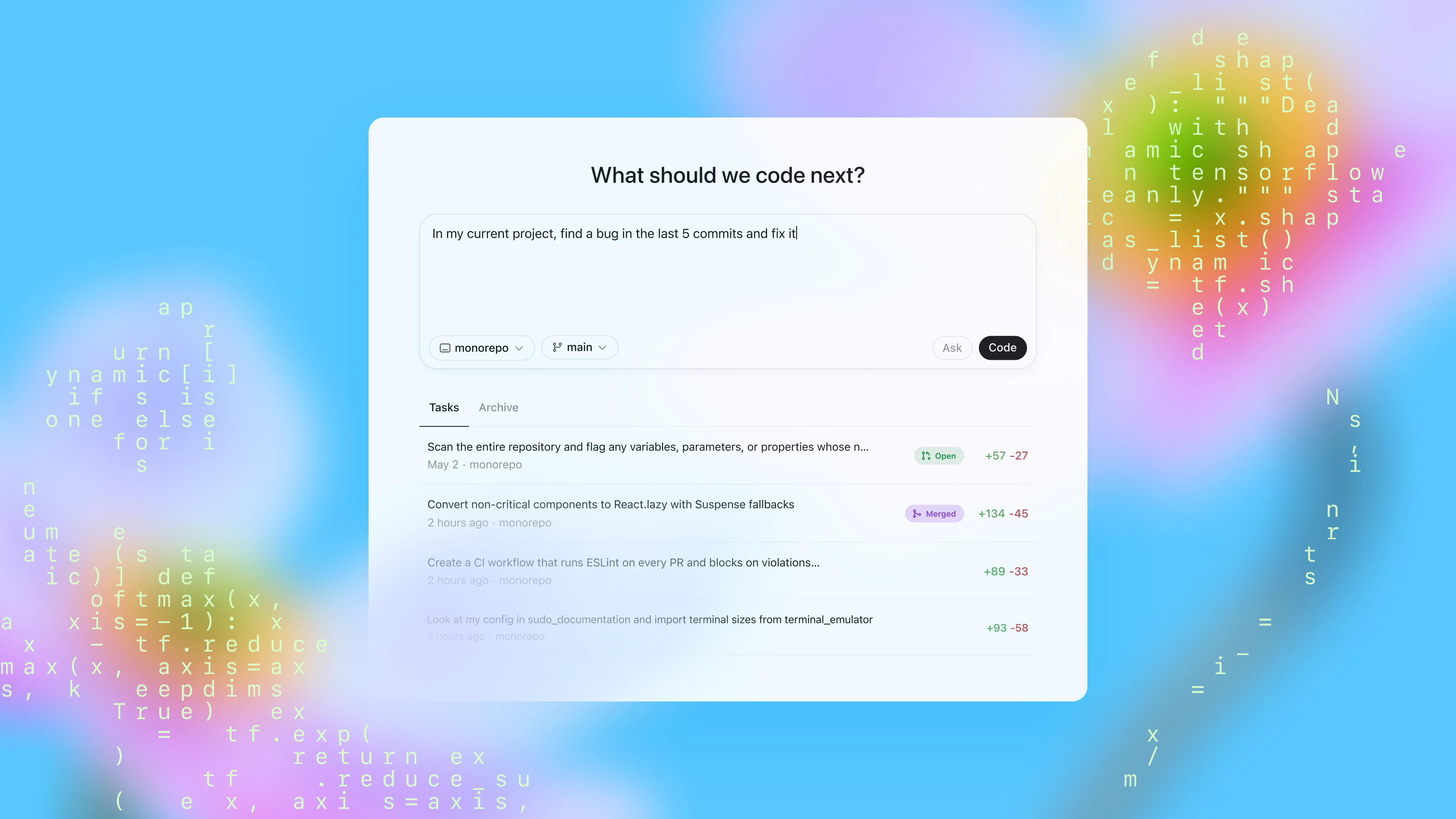
ਅੱਜ ਤੁਸੀਂ ChatGPT ਵਿੱਚ sidebar ਰਾਹੀਂ Codex ਤੱਕ ਪਹੁੰਚ ਸਕਦੇ ਹੋ ਅਤੇ ਪ੍ਰੌੰਪਟ ਟਾਈਪ ਕਰਕੇ ਅਤੇ “ਕੋਡ” ‘ਤੇ ਕਲਿੱਕ ਕਰਕੇ ਇਸਨੂੰ ਨਵੇਂ coding ਟਾਸਕ ਸੌਂਪ ਸਕਦੇ ਹੋ। ਜੇ ਤੁਸੀਂ ਆਪਣੇ codebase ਬਾਰੇ Codex ਨੂੰ ਕੋਈ ਸਵਾਲ ਪੁੱਛਣਾ ਚਾਹੁੰਦੇ ਹੋ, ਤਾਂ “ਪੁੱਛੋ” ‘ਤੇ ਕਲਿੱਕ ਕਰੋ। ਹਰ ਟਾਸਕ ਨੂੰ ਤੁਹਾਡੇ codebase ਨਾਲ ਪਹਿਲਾਂ ਹੀ ਲੋਡ ਕੀਤੇ ਹੋਏ ਵੱਖਰੇ, ਅਲੱਗ environment ਵਿੱਚ ਸੁਤੰਤਰ ਤੌਰ ‘ਤੇ ਪ੍ਰਕਿਰਿਆ ਕੀਤਾ ਜਾਂਦਾ ਹੈ। Codex files ਪੜ੍ਹ ਅਤੇ edit ਕਰ ਸਕਦਾ ਹੈ, ਨਾਲ ਹੀ test harnesses, linters ਅਤੇ type checkers ਸਮੇਤ commands ਵੀ ਚਲਾ ਸਕਦਾ ਹੈ। ਟਾਸਕ ਪੂਰਾ ਹੋਣ ਵਿੱਚ ਆਮ ਤੌਰ ‘ਤੇ 1 ਤੋਂ 30 ਮਿੰਟ ਲੱਗਦੇ ਹਨ, ਜੋ ਜਟਿਲਤਾ ‘ਤੇ ਨਿਰਭਰ ਕਰਦਾ ਹੈ, ਅਤੇ ਤੁਸੀਂ Codex ਦੀ ਪ੍ਰਗਤੀ ਨੂੰ real time ਵਿੱਚ ਦੇਖ ਸਕਦੇ ਹੋ।
ਜਦੋਂ Codex ਕੋਈ ਟਾਸਕ ਪੂਰਾ ਕਰ ਲੈਂਦਾ ਹੈ, ਤਾਂ ਉਹ ਆਪਣੇ environment ਵਿੱਚ ਆਪਣੇ changes commit ਕਰਦਾ ਹੈ। Codex terminal logs ਅਤੇ test outputs ਦੇ ਹਵਾਲਿਆਂ ਰਾਹੀਂ ਆਪਣੀਆਂ ਕਾਰਵਾਈਆਂ ਦੇ ਤਸਦੀਕਯੋਗ ਸਬੂਤ ਦਿੰਦਾ ਹੈ, ਜਿਸ ਨਾਲ ਤੁਸੀਂ ਟਾਸਕ ਪੂਰਾ ਹੋਣ ਦੌਰਾਨ ਲਏ ਹਰ ਕਦਮ ਦਾ ਪਤਾ ਲਗਾ ਸਕਦੇ ਹੋ। ਫਿਰ ਤੁਸੀਂ ਨਤੀਜਿਆਂ ਦੀ ਸਮੀਖਿਆ ਕਰ ਸਕਦੇ ਹੋ, ਹੋਰ ਸੋਧਾਂ ਦੀ ਬੇਨਤੀ ਕਰ ਸਕਦੇ ਹੋ, ਇੱਕ GitHub ਪੁੱਲ ਰਿਕਵੈਸਟ ਖੋਲ੍ਹ ਸਕਦੇ ਹੋ, ਜਾਂ ਬਦਲਾਅ ਨੂੰ ਸਿੱਧੇ ਆਪਣੇ ਲੋਕਲ environment ਵਿੱਚ ਸ਼ਾਮਲ ਕਰ ਸਕਦੇ ਹੋ। ਉਤਪਾਦ ਵਿੱਚ, ਤੁਸੀਂ Codex environment ਨੂੰ ਆਪਣੇ ਅਸਲ development environment ਨਾਲ ਜਿੰਨਾ ਸੰਭਵ ਹੋ ਸਕੇ ਉਤਨਾ ਮਿਲਦਾ-ਜੁਲਦਾ ਬਣਾਉਣ ਲਈ ਸੰਰਚਿਤ ਕਰ ਸਕਦੇ ਹੋ।
Codex ਨੂੰ ਤੁਹਾਡੀ ਰਿਪੋਜ਼ਟਰੀ ਵਿੱਚ ਰੱਖੀਆਂ AGENTS.md ਫਾਈਲਾਂ ਰਾਹੀਂ ਮਾਰਗਦਰਸ਼ਿਤ ਕੀਤਾ ਜਾ ਸਕਦਾ ਹੈ। ਇਹ ਟੈਕਸਟ ਫਾਈਲਾਂ ਹਨ, README.md ਵਰਗੀਆਂ, ਜਿੱਥੇ ਤੁਸੀਂ Codex ਨੂੰ ਦੱਸ ਸਕਦੇ ਹੋ ਕਿ ਤੁਹਾਡੇ codebase ਵਿੱਚ ਕਿਵੇਂ ਨੇਵੀਗੇਟ ਕਰਨਾ ਹੈ, testing ਲਈ ਕਿਹੜੀਆਂ commands ਚਲਾਉਣੀਆਂ ਹਨ, ਅਤੇ ਤੁਹਾਡੇ project ਦੀਆਂ ਮਿਆਰੀ ਪ੍ਰਥਾਵਾਂ ਦੀ ਸਭ ਤੋਂ ਵਧੀਆ ਪਾਲਣਾ ਕਿਵੇਂ ਕਰਨੀ ਹੈ। ਮਨੁੱਖੀ ਡਿਵੈਲਪਰਾਂ ਵਾਂਗ, Codex ਏਜੰਟ ਸਭ ਤੋਂ ਵਧੀਆ ਤਦੋਂ ਕੰਮ ਕਰਦੇ ਹਨ ਜਦੋਂ ਉਨ੍ਹਾਂ ਨੂੰ configured dev environments, ਭਰੋਸੇਯੋਗ testing setups ਅਤੇ ਸਪਸ਼ਟ documentation ਦਿੱਤੀ ਜਾਂਦੀ ਹੈ.
ਕੋਡਿੰਗ evaluations ਅਤੇ ਅੰਦਰੂਨੀ benchmarks ‘ਤੇ, codex-1 AGENTS.md ਫਾਈਲਾਂ ਜਾਂ custom scaffolding ਤੋਂ ਬਿਨਾਂ ਵੀ ਮਜ਼ਬੂਤ ਪ੍ਰਦਰਸ਼ਨ ਦਿਖਾਉਂਦਾ ਹੈ.
23 SWE-Bench Verified ਨਮੂਨੇ ਜੋ ਸਾਡੇ ਅੰਦਰੂਨੀ infrastructure ‘ਤੇ ਚਲਣਯੋਗ ਨਹੀਂ ਸਨ, ਉਹਨਾਂ ਨੂੰ ਬਾਹਰ ਰੱਖਿਆ ਗਿਆ। codex-1 ਨੂੰ ਵੱਧ ਤੋਂ ਵੱਧ 192k ਟੋਕਨ context length ਅਤੇ ਮੱਧਮ ‘reasoning effort’ ‘ਤੇ ਟੈਸਟ ਕੀਤਾ ਗਿਆ, ਜੋ ਅੱਜ ਉਤਪਾਦ ਵਿੱਚ ਉਪਲਬਧ ਸੈਟਿੰਗ ਹੋਵੇਗੀ। o3 ਮੁਲਾਂਕਣਾਂ ਦੇ ਵੇਰਵਿਆਂ ਲਈ ਇੱਥੇ ਵੇਖੋ.
ਸਾਡਾ ਅੰਦਰੂਨੀ SWE ਟਾਸਕ benchmark OpenAI ਵਿੱਚ ਅਸਲ ਦੁਨੀਆ ਦੇ ਅੰਦਰੂਨੀ SWE ਟਾਸਕਾਂ ਦਾ ਇੱਕ ਚੁਣਿਆ ਹੋਇਆ ਸੈੱਟ ਹੈ.
ਅਸੀਂ ਆਪਣੀ iterative deployment strategy ਦੇ ਅਨੁਸਾਰ Codex ਨੂੰ ਇੱਕ research preview ਵਜੋਂ ਜਾਰੀ ਕਰ ਰਹੇ ਹਾਂ। Codex ਡਿਜ਼ਾਇਨ ਕਰਦੇ ਸਮੇਂ ਅਸੀਂ ਸੁਰੱਖਿਆ ਅਤੇ ਪਾਰਦਰਸ਼ਤਾ ਨੂੰ ਤਰਜੀਹ ਦਿੱਤੀ ਤਾਂ ਜੋ ਯੂਜ਼ਰ ਇਸਦੇ outputs ਦੀ ਤਸਦੀਕ ਕਰ ਸਕਣ - ਇਹ ਇੱਕ ਅਜਿਹਾ ਸੁਰੱਖਿਆ ਉਪਾਇ ਹੈ ਜੋ ਇਸ ਵੇਲੇ ਹੋਰ ਮਹੱਤਵਪੂਰਨ ਹੁੰਦਾ ਜਾ ਰਿਹਾ ਹੈ ਜਦੋਂ AI ਮਾਡਲ ਹੋਰ ਜਟਿਲ coding ਟਾਸਕਾਂ ਨੂੰ ਸੁਤੰਤਰ ਤੌਰ ‘ਤੇ ਸੰਭਾਲਦੇ ਹਨ ਅਤੇ ਸੁਰੱਖਿਆ ਸੰਬੰਧੀ ਵਿਚਾਰ ਵਿਕਸਿਤ ਹੋ ਰਹੇ ਹਨ। ਯੂਜ਼ਰ citations, terminal logs ਅਤੇ test results ਰਾਹੀਂ Codex ਦੇ ਕੰਮ ਦੀ ਜਾਂਚ ਕਰ ਸਕਦੇ ਹਨ। ਜਦੋਂ ਅਣਸ਼ਚਿਤਤਾ ਹੋਵੇ ਜਾਂ test failures ਸਾਹਮਣੇ ਆਉਣ, Codex ਏਜੰਟ ਇਨ੍ਹਾਂ ਸਮੱਸਿਆਵਾਂ ਨੂੰ ਸਪਸ਼ਟ ਤੌਰ ‘ਤੇ ਦੱਸਦਾ ਹੈ, ਜਿਸ ਨਾਲ ਯੂਜ਼ਰ ਅੱਗੇ ਕਿਵੇਂ ਵੱਧਣਾ ਹੈ ਇਸ ਬਾਰੇ ਸੋਚ-ਵਿਚਾਰ ਨਾਲ ਫ਼ੈਸਲੇ ਲੈ ਸਕਦੇ ਹਨ। ਫਿਰ ਵੀ integration ਅਤੇ execution ਤੋਂ ਪਹਿਲਾਂ ਯੂਜ਼ਰਾਂ ਲਈ ਸਾਰੇ agent-generated code ਦੀ ਹੱਥੋਂ ਸਮੀਖਿਆ ਅਤੇ ਤਸਦੀਕ ਕਰਨੀ ਲਾਜ਼ਮੀ ਰਹਿੰਦੀ ਹੈ।
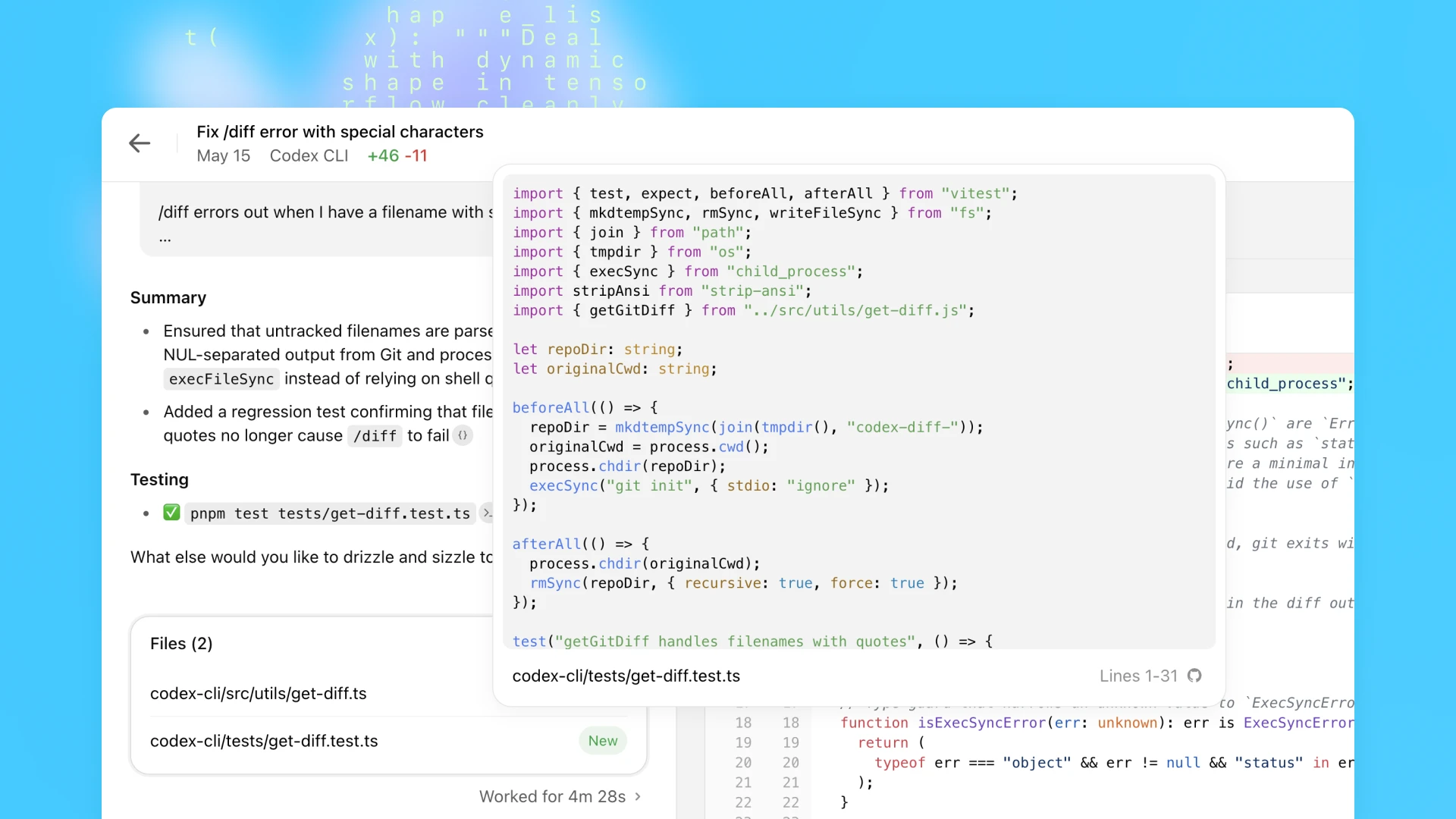
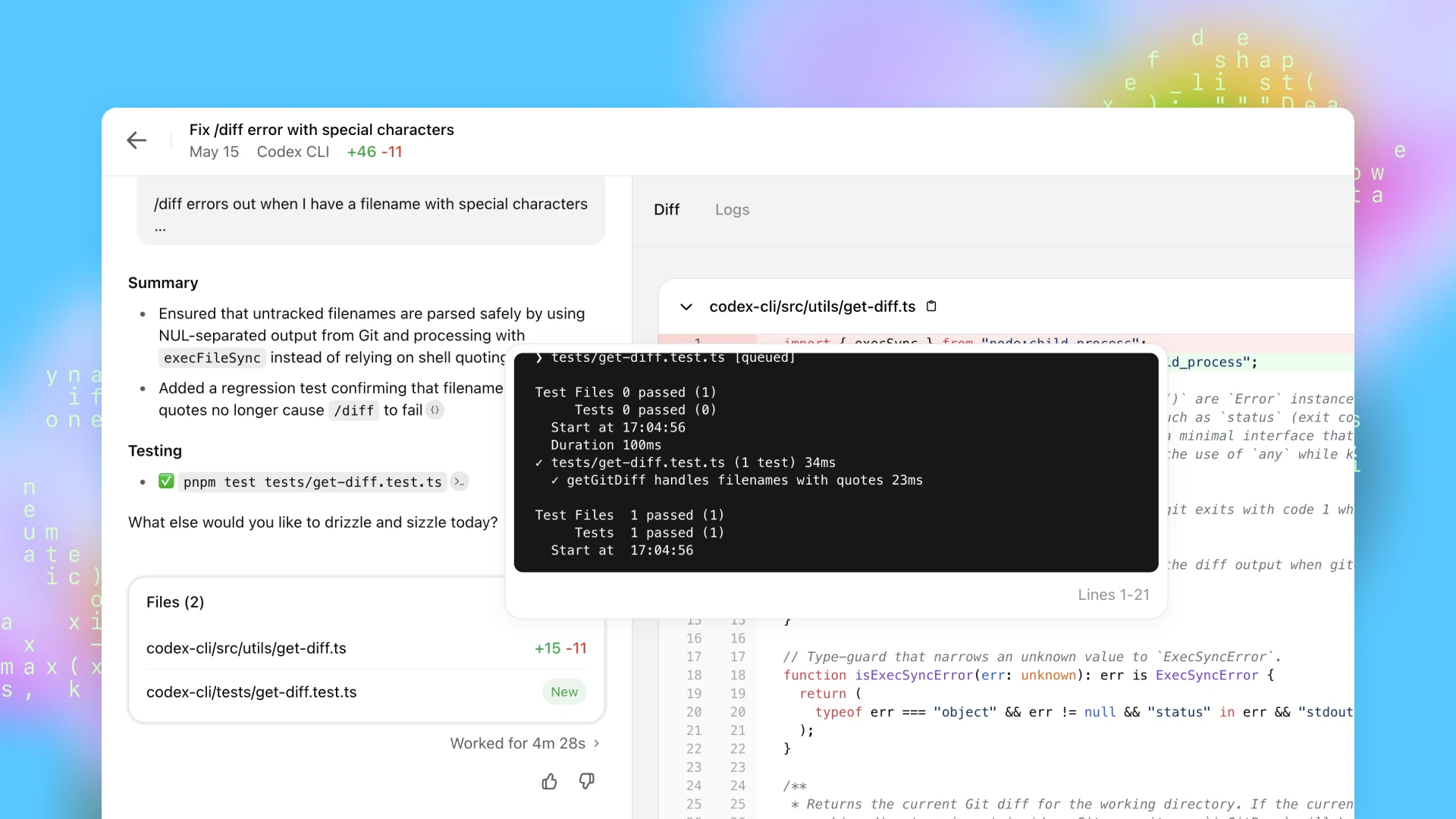
codex-1 ਨੂੰ ਟ੍ਰੇਨ ਕਰਦੇ ਸਮੇਂ ਇੱਕ ਮੁੱਖ ਲਕਸ਼ ਇਹ ਸੀ ਕਿ outputs ਨੂੰ ਮਨੁੱਖੀ coding preferences ਅਤੇ standards ਨਾਲ ਨਜ਼ਦੀਕੀ ਤੌਰ ‘ਤੇ ਮਿਲਾਇਆ ਜਾਵੇ। OpenAI o3 ਨਾਲ ਤੁਲਨਾ ਵਿੱਚ, codex-1 ਲਗਾਤਾਰ ਹੋਰ ਸਾਫ਼ patches ਤਿਆਰ ਕਰਦਾ ਹੈ ਜੋ ਤੁਰੰਤ ਮਨੁੱਖੀ review ਅਤੇ ਮਿਆਰੀ workflows ਵਿੱਚ integration ਲਈ ਤਿਆਰ ਹੁੰਦੇ ਹਨ।
AI-ਚਲਿਤ software engineering ਦੇ ਦੁਰਪਯੋਗੀ ਉਪਯੋਗਾਂ, ਜਿਵੇਂ malware development, ਤੋਂ ਸੁਰੱਖਿਆ ਕਰਨਾ ਦਿਨੋਂਦਿਨ ਹੋਰ ਮਹੱਤਵਪੂਰਨ ਬਣ ਰਿਹਾ ਹੈ। ਇਸੇ ਵੇਲੇ, ਇਹ ਵੀ ਜ਼ਰੂਰੀ ਹੈ ਕਿ ਸੁਰੱਖਿਆ ਉਪਾਇ ਵੈਧ ਅਤੇ ਲਾਭਕਾਰੀ ਉਪਯੋਗਾਂ ਨੂੰ ਬੇਵਜ੍ਹਾ ਨਾ ਰੋਕਣ, ਜਿਨ੍ਹਾਂ ਵਿੱਚ ਕਈ ਵਾਰ ਉਹ ਤਕਨੀਕਾਂ ਵੀ ਸ਼ਾਮਲ ਹੋ ਸਕਦੀਆਂ ਹਨ ਜੋ malware development ਵਿੱਚ ਵੀ ਵਰਤੀਆਂ ਜਾਂਦੀਆਂ ਹਨ, ਜਿਵੇਂ low level kernel engineering।
ਸੁਰੱਖਿਆ ਅਤੇ ਉਪਯੋਗਤਾ ਵਿੱਚ ਸੰਤੁਲਨ ਬਣਾਉਣ ਲਈ, Codex ਨੂੰ ਇਸ ਤਰ੍ਹਾਂ ਟ੍ਰੇਨ ਕੀਤਾ ਗਿਆ ਕਿ ਉਹ ਦੁਰਪਯੋਗੀ software ਦੇ ਵਿਕਾਸ ਵੱਲ ਨਿਸ਼ਾਨਾ ਬਣੀਆਂ ਬੇਨਤੀਆਂ ਨੂੰ ਪਛਾਣ ਸਕੇ ਅਤੇ ਸਹੀ ਢੰਗ ਨਾਲ ਅਸਵੀਕਾਰ ਕਰੇ, ਜਦਕਿ ਵੈਧ ਟਾਸਕਾਂ ਨੂੰ ਸਪਸ਼ਟ ਤੌਰ ‘ਤੇ ਵੱਖ ਕਰਕੇ ਸਮਰਥਨ ਦੇਵੇ। ਅਸੀਂ ਆਪਣੇ policy frameworks ਨੂੰ ਵੀ ਮਜ਼ਬੂਤ ਕੀਤਾ ਹੈ ਅਤੇ ਇਨ੍ਹਾਂ ਹੱਦਾਂ ਨੂੰ ਪ੍ਰਭਾਵਸ਼ਾਲੀ ਤਰੀਕੇ ਨਾਲ ਕਾਇਮ ਰੱਖਣ ਲਈ ਕੜੇ ਸੁਰੱਖਿਆ ਮੁਲਾਂਕਣ ਸ਼ਾਮਲ ਕੀਤੇ ਹਨ। ਅਸੀਂ ਇਹਨਾਂ ਮੁਲਾਂਕਣਾਂ ਨੂੰ ਦਰਸਾਉਣ ਲਈ o3 ਸਿਸਟਮ ਕਾਰਡ ਲਈ ਇੱਕ ਪਰਿਸ਼ਿਸ਼ਟ ਪ੍ਰਕਾਸ਼ਿਤ ਕੀਤਾ ਹੈ।
Codex ਏਜੰਟ ਕਲਾਊਡ ਵਿੱਚ ਇੱਕ ਸੁਰੱਖਿਅਤ, ਅਲੱਗ ਕੰਟੇਨਰ ਦੇ ਅੰਦਰ ਪੂਰੀ ਤਰ੍ਹਾਂ ਕੰਮ ਕਰਦਾ ਹੈ. ਟਾਸਕ ਐਗਜ਼ੀਕਿਊਟ ਕਰਨ ਦੌਰਾਨ, ਇੰਟਰਨੈੱਟ ਪਹੁੰਚ ਅਯੋਗ ਹੁੰਦੀ ਹੈ, ਜਿਸ ਨਾਲ ਏਜੰਟ ਦੀ ਇੰਟਰੈਕਸ਼ਨ ਸਿਰਫ਼ GitHub ਰਿਪੋਜ਼ਟਰੀਆਂ ਰਾਹੀਂ ਸਪੱਸ਼ਟ ਤੌਰ 'ਤੇ ਦਿੱਤੇ ਗਏ ਕੋਡ ਅਤੇ ਸੈੱਟਅੱਪ ਸਕ੍ਰਿਪਟ ਰਾਹੀਂ ਵਰਤੋਂਕਾਰ ਦੁਆਰਾ ਕੌਂਫਿਗਰ ਕੀਤੀਆਂ ਪਹਿਲਾਂ ਤੋਂ ਇੰਸਟਾਲ ਡਿਪੈਂਡੈਂਸੀਆਂ ਤੱਕ ਸੀਮਿਤ ਰਹਿੰਦੀ ਹੈ. ਏਜੰਟ ਬਾਹਰੀ ਵੈੱਬਸਾਈਟਾਂ, APIs ਜਾਂ ਹੋਰ ਸੇਵਾਵਾਂ ਤੱਕ ਪਹੁੰਚ ਨਹੀਂ ਕਰ ਸਕਦਾ. ਨੋਟ: ਇਹ ਲਾਂਚ ਕੌਂਫਿਗਰੇਸ਼ਨ ਦਾ ਵਰਣਨ ਕਰਦਾ ਹੈ. ਮੌਜੂਦਾ ਸੈੱਟਅੱਪ-ਪੜਾਅ ਅਤੇ ਏਜੰਟ-ਪੜਾਅ ਦੇ ਨੈੱਟਵਰਕਿੰਗ ਵਿਕਲਪਾਂ ਲਈ, ਵੇਖੋ ਏਜੰਟ ਇੰਟਰਨੈੱਟ ਪਹੁੰਚ(ਨਵੀਂ ਵਿੰਡੋ ਵਿੱਚ ਖੁੱਲ੍ਹਦਾ ਹੈ).
OpenAI ਦੀਆਂ technical ਟੀਮਾਂ ਨੇ ਆਪਣੀ ਰੋਜ਼ਾਨਾ toolkit ਦੇ ਹਿੱਸੇ ਵਜੋਂ Codex ਦੀ ਵਰਤੋਂ ਸ਼ੁਰੂ ਕਰ ਦਿੱਤੀ ਹੈ। ਇਸਨੂੰ OpenAI engineers ਵੱਲੋਂ ਸਭ ਤੋਂ ਵੱਧ ਦੁਹਰਾਏ ਜਾਣ ਵਾਲੇ, ਸਪਸ਼ਟ-ਸੀਮਿਤ ਟਾਸਕ, ਜਿਵੇਂ refactoring, renaming ਅਤੇ tests ਲਿਖਣ, ਨੂੰ offload ਕਰਨ ਲਈ ਵਰਤਿਆ ਜਾਂਦਾ ਹੈ, ਜੋ ਨਹੀਂ ਤਾਂ ਧਿਆਨ ਤੋੜ ਦਿੰਦੇ। ਇਹ ਨਵੀਆਂ features ਲਈ scaffolding, components ਨੂੰ ਜੋੜਣ, bugs ਠੀਕ ਕਰਨ ਅਤੇ documentation ਦਾ ਮਸੌਦਾ ਤਿਆਰ ਕਰਨ ਲਈ ਵੀ ਉਤਨਾ ਹੀ ਲਾਭਕਾਰੀ ਹੈ। ਟੀਮਾਂ ਇਸਦੇ ਆਲੇ-ਦੁਆਲੇ ਨਵੀਆਂ ਆਦਤਾਂ ਬਣਾਈਆਂ ਜਾ ਰਹੀਆਂ ਹਨ: on-call issues ਦੀ triage ਕਰਨਾ, ਦਿਨ ਦੀ ਸ਼ੁਰੂਆਤ ‘ਤੇ ਟਾਸਕ ਯੋਜਨਾ ਬਣਾਉਣਾ, ਅਤੇ ਅੱਗੇ ਵੱਧਦੇ ਰਹਿਣ ਲਈ background ਕੰਮ offload ਕਰਨਾ। Context-switching ਘਟਾ ਕੇ ਅਤੇ ਭੁੱਲੇ ਹੋਏ to-dos ਸਾਹਮਣੇ ਲਿਆ ਕੇ, Codex engineers ਨੂੰ ਤੇਜ਼ੀ ਨਾਲ ship ਕਰਨ ਅਤੇ ਸਭ ਤੋਂ ਮਹੱਤਵਪੂਰਨ ਕੰਮ ‘ਤੇ ਕੇਂਦਰਿਤ ਰਹਿਣ ਵਿੱਚ ਮਦਦ ਕਰਦਾ ਹੈ।
ਰਿਲੀਜ਼ ਤੋਂ ਪਹਿਲਾਂ ਦੇ ਸਮੇਂ ਵਿੱਚ, ਅਸੀਂ ਬਾਹਰੀ ਟੈਸਟਰਾਂ ਦੇ ਇੱਕ ਛੋਟੇ ਸਮੂਹ ਨਾਲ ਵੀ ਕੰਮ ਕਰ ਰਹੇ ਹਾਂ ਤਾਂ ਜੋ ਵੱਖ-ਵੱਖ codebases, development processes ਅਤੇ ਟੀਮਾਂ ਵਿੱਚ Codex ਦੀ ਕਾਰਗੁਜ਼ਾਰੀ ਨੂੰ ਹੋਰ ਚੰਗੀ ਤਰ੍ਹਾਂ ਸਮਝ ਸਕੀਏ।
Cisco(ਨਵੀਂ ਵਿੰਡੋ ਵਿੱਚ ਖੁੱਲ੍ਹਦਾ ਹੈ) ਵੇਖ ਰਹੀ ਹੈ ਕਿ Codex ਉਨ੍ਹਾਂ ਦੀਆਂ engineering ਟੀਮਾਂ ਨੂੰ ਮਹੱਤਵਾਕਾਂਛੀ ਵਿਚਾਰਾਂ ਨੂੰ ਹੋਰ ਤੇਜ਼ੀ ਨਾਲ ਹਕੀਕਤ ਬਣਾਉਣ ਵਿੱਚ ਕਿਵੇਂ ਮਦਦ ਕਰ ਸਕਦਾ ਹੈ। ਸ਼ੁਰੂਆਤੀ design partners ਵਜੋਂ, Cisco ਆਪਣੇ product portfolio ਵਿੱਚ ਅਸਲ ਵਰਤੋਂ ਦੇ ਮਾਮਲਿਆਂ ਲਈ ਇਸ ਦਾ ਮੁਲਾਂਕਣ ਕਰਕੇ ਅਤੇ OpenAI ਟੀਮ ਨੂੰ ਫੀਡਬੈਕ ਦੇ ਕੇ Codex ਦਾ ਭਵਿੱਖ ਗੜ੍ਹਣ ਵਿੱਚ ਮਦਦ ਕਰ ਰਹੀ ਹੈ।
Temporal(ਨਵੀਂ ਵਿੰਡੋ ਵਿੱਚ ਖੁੱਲ੍ਹਦਾ ਹੈ) feature development ਨੂੰ ਤੇਜ਼ ਕਰਨ, issues debug ਕਰਨ, ਟੈਸਟ ਲਿਖਣ ਅਤੇ ਚਲਾਉਣ, ਅਤੇ ਵੱਡੇ codebases ਨੂੰ refactor ਕਰਨ ਲਈ Codex ਵਰਤਦੀ ਹੈ। ਇਹ ਉਨ੍ਹਾਂ ਨੂੰ ਧਿਆਨ ਕੇਂਦਰਿਤ ਰੱਖਣ ਵਿੱਚ ਵੀ ਮਦਦ ਕਰਦਾ ਹੈ, ਕਿਉਂਕਿ ਇਹ ਜਟਿਲ ਟਾਸਕ ਪਿੱਛੇ ਚਲਾ ਦਿੰਦਾ ਹੈ, ਜਿਸ ਨਾਲ engineers flow ਵਿੱਚ ਰਹਿੰਦੇ ਹਨ ਅਤੇ iteration ਤੇਜ਼ ਹੁੰਦੀ ਹੈ।
Superhuman(ਨਵੀਂ ਵਿੰਡੋ ਵਿੱਚ ਖੁੱਲ੍ਹਦਾ ਹੈ) Codex ਦਾ ਇਸਤੇਮਾਲ ਛੋਟੇ ਪਰ ਦੁਹਰਾਏ ਜਾਣ ਵਾਲੇ ਟਾਸਕਾਂ, ਜਿਵੇਂ test coverage ਸੁਧਾਰਣਾ ਅਤੇ integration failures ਠੀਕ ਕਰਨਾ, ਨੂੰ ਤੇਜ਼ ਕਰਨ ਲਈ ਕਰਦੀ ਹੈ। ਇਹ ਉਨ੍ਹਾਂ ਨੂੰ ਹੋਰ ਤੇਜ਼ ship ਕਰਨ ਵਿੱਚ ਵੀ ਮਦਦ ਕਰਦਾ ਹੈ ਕਿਉਂਕਿ ਇਸ ਨਾਲ product managers code review ਤੋਂ ਇਲਾਵਾ engineer ਨੂੰ ਜੋੜੇ ਬਿਨਾਂ ਹਲਕੇ ਕੋਡ ਬਦਲਾਅ ਵਿੱਚ ਯੋਗਦਾਨ ਪਾ ਸਕਦੇ ਹਨ।
Kodiak(ਨਵੀਂ ਵਿੰਡੋ ਵਿੱਚ ਖੁੱਲ੍ਹਦਾ ਹੈ) debugging tools ਲਿਖਣ, test coverage ਸੁਧਾਰਣ ਅਤੇ ਕੋਡ refactor ਕਰਨ ਵਿੱਚ ਮਦਦ ਲਈ Codex ਵਰਤ ਰਹੀ ਹੈ, ਜਿਸ ਨਾਲ ਉਨ੍ਹਾਂ ਦੀ autonomous driving technology, Kodiak Driver, ਦੇ ਵਿਕਾਸ ਨੂੰ ਗਤੀ ਮਿਲ ਰਹੀ ਹੈ। Codex ਇੱਕ ਕੀਮਤੀ reference tool ਵੀ ਬਣ ਗਿਆ ਹੈ, ਜੋ engineers ਨੂੰ stack ਦੇ ਅਣਜਾਣ ਹਿੱਸਿਆਂ ਨੂੰ ਸਮਝਣ ਵਿੱਚ ਮਦਦ ਕਰਦਾ ਹੈ ਕਿਉਂਕਿ ਇਹ ਸਬੰਧਿਤ context ਅਤੇ ਪਿਛਲੇ ਬਦਲਾਅ ਸਾਹਮਣੇ ਲਿਆਉਂਦਾ ਹੈ।
ਸ਼ੁਰੂਆਤੀ ਟੈਸਟਰਾਂ ਤੋਂ ਮਿਲੀਆਂ ਸਿੱਖਿਆਵਾਂ ਦੇ ਆਧਾਰ ‘ਤੇ, ਅਸੀਂ ਸਿਫ਼ਾਰਸ਼ ਕਰਦੇ ਹਾਂ ਕਿ ਇੱਕੋ ਸਮੇਂ ਕਈ ਏਜੰਟਾਂ ਨੂੰ ਸਪਸ਼ਟ-ਸੀਮਿਤ ਟਾਸਕ ਦਿੱਤੇ ਜਾਣ, ਅਤੇ ਮਾਡਲ ਦੀਆਂ ਸਮਰੱਥਾਵਾਂ ਨੂੰ ਪ੍ਰਭਾਵਸ਼ਾਲੀ ਤਰੀਕੇ ਨਾਲ ਸਮਝਣ ਲਈ ਵੱਖ-ਵੱਖ ਕਿਸਮ ਦੇ ਟਾਸਕਾਂ ਅਤੇ ਪ੍ਰੌੰਪਟਾਂ ਨਾਲ ਪ੍ਰਯੋਗ ਕੀਤਾ ਜਾਵੇ।
ਪਿਛਲੇ ਮਹੀਨੇ, ਅਸੀਂ Codex CLI ਲਾਂਚ ਕੀਤਾ ਸੀ, ਇੱਕ ਹਲਕਾ open-source ਕੋਡਿੰਗ ਏਜੰਟ ਜੋ ਤੁਹਾਡੇ terminal ਵਿੱਚ ਚਲਦਾ ਹੈ। ਇਹ o3 ਅਤੇ o4-mini ਵਰਗੇ ਮਾਡਲਾਂ ਦੀ ਤਾਕਤ ਤੁਹਾਡੇ ਲੋਕਲ ਵਰਕਫਲੋ ਵਿੱਚ ਲਿਆਉਂਦਾ ਹੈ, ਜਿਸ ਨਾਲ ਉਨ੍ਹਾਂ ਨਾਲ ਜੋੜੀ ਬਣਾਕੇ ਟਾਸਕ ਤੇਜ਼ੀ ਨਾਲ ਪੂਰੇ ਕਰਨਾ ਆਸਾਨ ਹੋ ਜਾਂਦਾ ਹੈ.
ਅੱਜ, ਅਸੀਂ codex-1 ਦਾ ਇੱਕ ਛੋਟਾ ਸੰਸਕਰਣ ਵੀ ਜਾਰੀ ਕਰ ਰਹੇ ਹਾਂ, ਜੋ o4-mini ਦਾ ਉਹ ਸੰਸਕਰਣ ਹੈ ਜੋ ਖਾਸ ਤੌਰ ‘ਤੇ Codex CLI ਵਿੱਚ ਵਰਤੋਂ ਲਈ ਡਿਜ਼ਾਇਨ ਕੀਤਾ ਗਿਆ ਹੈ। ਇਹ ਨਵਾਂ ਮਾਡਲ CLI ਵਿੱਚ ਤੇਜ਼ ਵਰਕਫਲੋ ਦਾ ਸਮਰਥਨ ਕਰਦਾ ਹੈ ਅਤੇ ਘੱਟ-ਲੇਟੈਂਸੀ ਕੋਡ Q&A ਅਤੇ ਸੰਪਾਦਨ ਲਈ ਅਨੁਕੂਲਿਤ ਹੈ, ਜਦਕਿ ਹਦਾਇਤਾਂ ਦੀ ਪਾਲਣਾ ਅਤੇ ਸ਼ੈਲੀ ਵਿੱਚ ਉਹੀ ਮਜ਼ਬੂਤੀਆਂ ਬਣਾਈ ਰੱਖਦਾ ਹੈ। ਇਹ ਹੁਣ Codex CLI ਵਿੱਚ ਡਿਫਾਲਟ ਮਾਡਲ ਵਜੋਂ ਅਤੇ API ਵਿੱਚ codex-mini-latest ਵਜੋਂ ਉਪਲਬਧ ਹੈ। ਜਿਵੇਂ ਜਿਵੇਂ ਅਸੀਂ Codex-mini ਮਾਡਲ ਨੂੰ ਸੁਧਾਰਦੇ ਰਹਾਂਗੇ, ਅਧਾਰਭੂਤ snapshot ਨਿਯਮਿਤ ਤੌਰ ‘ਤੇ ਅੱਪਡੇਟ ਹੁੰਦਾ ਰਹੇਗਾ।
ਅਸੀਂ ਤੁਹਾਡੇ developer account ਨੂੰ Codex CLI ਨਾਲ ਜੋੜਨਾ ਵੀ ਕਾਫ਼ੀ ਆਸਾਨ ਬਣਾ ਰਹੇ ਹਾਂ। API token ਨੂੰ ਹੱਥੋਂ ਬਣਾਉਣ ਅਤੇ ਸੰਰਚਿਤ ਕਰਨ ਦੀ ਬਜਾਇ, ਹੁਣ ਤੁਸੀਂ ਆਪਣੇ ChatGPT account ਨਾਲ sign in ਕਰ ਸਕਦੇ ਹੋ ਅਤੇ ਉਹ API organization ਚੁਣ ਸਕਦੇ ਹੋ ਜੋ ਤੁਸੀਂ ਵਰਤਣਾ ਚਾਹੁੰਦੇ ਹੋ। ਅਸੀਂ ਤੁਹਾਡੇ ਲਈ API key ਆਪੇ ਹੀ ਬਣਾਵਾਂਗੇ ਅਤੇ ਸੰਰਚਿਤ ਕਰਾਂਗੇ। ਨਾਲ ਹੀ, ਉਹ Plus ਅਤੇ Pro ਯੂਜ਼ਰ ਜੋ ChatGPT ਨਾਲ Codex CLI ਵਿੱਚ sign in ਕਰਦੇ ਹਨ, ਅੱਜ ਦਿਨ ਦੇ ਬਾਅਦ ਅਗਲੇ 30 ਦਿਨਾਂ ਲਈ ਕ੍ਰਮਵਾਰ $5 ਅਤੇ $50 ਦੇ ਮੁਫ਼ਤ API credits ਵੀ ਰੀਡੀਮ ਕਰਨਾ ਸ਼ੁਰੂ ਕਰ ਸਕਣਗੇ.
ਅੱਜ ਤੋਂ, ਅਸੀਂ Codex ਨੂੰ ਦੁਨੀਆ ਭਰ ਦੇ ChatGPT Pro, Enterprise ਅਤੇ Business ਯੂਜ਼ਰਾਂ ਲਈ ਜਾਰੀ ਕਰ ਰਹੇ ਹਾਂ, ਅਤੇ Plus ਅਤੇ Edu ਲਈ ਸਮਰਥਨ ਜਲਦੀ ਆ ਰਿਹਾ ਹੈ। ਆਉਣ ਵਾਲਿਆਂ ਹਫ਼ਤਿਆਂ ਲਈ ਯੂਜ਼ਰਾਂ ਨੂੰ ਬਿਨਾਂ ਕਿਸੇ ਵਾਧੂ ਲਾਗਤ ਦੇ ਖੁੱਲ੍ਹੀ ਪਹੁੰਚ ਮਿਲੇਗੀ ਤਾਂ ਜੋ ਤੁਸੀਂ ਵੇਖ ਸਕੋ ਕਿ Codex ਕੀ ਕਰ ਸਕਦਾ ਹੈ, ਇਸ ਤੋਂ ਬਾਅਦ ਅਸੀਂ rate-limited ਪਹੁੰਚ ਅਤੇ ਲਚਕੀਲੇ pricing options ਲਿਆਵਾਂਗੇ ਜੋ ਤੁਹਾਨੂੰ ਮੰਗ ਅਨੁਸਾਰ ਵਾਧੂ ਵਰਤੋਂ ਖਰੀਦਣ ਦੀ ਆਗਿਆ ਦੇਣਗੇ। ਅਸੀਂ ਜਲਦੀ ਹੀ Plus ਅਤੇ Edu ਯੂਜ਼ਰਾਂ ਲਈ ਪਹੁੰਚ ਵਧਾਉਣ ਦੀ ਯੋਜਨਾ ਬਣਾਈ ਹੈ।
ਉਹ ਡਿਵੈਲਪਰ ਜੋ codex-mini-latest ਨਾਲ ਬਣਾਉਂਦੇ ਹਨ, ਉਨ੍ਹਾਂ ਲਈ ਮਾਡਲ Responses API ‘ਤੇ ਉਪਲਬਧ ਹੈ ਅਤੇ ਇਸ ਦੀ ਕੀਮਤ 1M input tokens ਲਈ $1.50 ਅਤੇ 1M output tokens ਲਈ $6 ਹੈ, ਨਾਲ 75% ਪ੍ਰੌੰਪਟ caching ਛੂਟ ਹੈ।
Codex ਦਾ ਵਿਕਾਸ ਅਜੇ ਸ਼ੁਰੂਆਤੀ ਪੜਾਅ ਵਿੱਚ ਹੈ। ਇੱਕ research preview ਵਜੋਂ, ਇਸ ਵਿੱਚ ਇਸ ਵੇਲੇ frontend ਕੰਮ ਲਈ image inputs ਅਤੇ ਏਜੰਟ ਦੇ ਕੰਮ ਕਰਦੇ ਸਮੇਂ course-correct ਕਰਨ ਦੀ ਸਮਰੱਥਾ ਵਰਗੀਆਂ ਵਿਸ਼ੇਸ਼ਤਾਵਾਂ ਦੀ ਘਾਟ ਹੈ। ਇਸ ਤੋਂ ਇਲਾਵਾ, ਕਿਸੇ remote ਏਜੰਟ ਨੂੰ ਟਾਸਕ ਸੌਂਪਣ ਵਿੱਚ interactive editing ਨਾਲੋਂ ਵੱਧ ਸਮਾਂ ਲੱਗਦਾ ਹੈ, ਜਿਸ ਨਾਲ ਅਨੁਕੂਲ ਹੋਣ ਵਿੱਚ ਥੋੜਾ ਸਮਾਂ ਲੱਗ ਸਕਦਾ ਹੈ। ਸਮੇਂ ਦੇ ਨਾਲ, Codex ਏਜੰਟਾਂ ਨਾਲ ਅੰਤਰਕਿਰਿਆ increasingly ਸਹਿਕਰਮੀਆਂ ਨਾਲ asynchronous collaboration ਵਰਗੀ ਲੱਗੇਗੀ। ਜਿਵੇਂ ਜਿਵੇਂ ਮਾਡਲ ਸਮਰੱਥਾਵਾਂ ਅੱਗੇ ਵਧਦੀਆਂ ਹਨ, ਅਸੀਂ ਉਮੀਦ ਕਰਦੇ ਹਾਂ ਕਿ ਏਜੰਟ ਲੰਬੇ ਸਮੇਂ ਤੱਕ ਹੋਰ ਜਟਿਲ ਟਾਸਕ ਸੰਭਾਲਣਗੇ।
ਅਸੀਂ ਇੱਕ ਅਜਿਹੇ ਭਵਿੱਖ ਦੀ ਕਲਪਨਾ ਕਰਦੇ ਹਾਂ ਜਿੱਥੇ ਡਿਵੈਲਪਰ ਉਹ ਕੰਮ ਆਪਣੇ ਹੱਥ ਵਿੱਚ ਰੱਖਣ ਜੋ ਉਹ ਖੁਦ ਕਰਨਾ ਚਾਹੁੰਦੇ ਹਨ ਅਤੇ ਬਾਕੀ ਏਜੰਟਾਂ ਨੂੰ ਸੌਂਪ ਦੇਣ, ਜਿਸ ਨਾਲ AI ਦੇ ਨਾਲ ਹੋਰ ਤੇਜ਼ ਅਤੇ ਹੋਰ ਉਤਪਾਦਕ ਬਣਿਆ ਜਾ ਸਕੇ। ਇਸ ਨੂੰ ਹਾਸਲ ਕਰਨ ਲਈ, ਅਸੀਂ Codex tools ਦਾ ਇੱਕ suite ਤਿਆਰ ਕਰ ਰਹੇ ਹਾਂ ਜੋ real-time collaboration ਅਤੇ asynchronous delegation ਦੋਵਾਂ ਦਾ ਸਮਰਥਨ ਕਰਦਾ ਹੈ.
Codex CLI ਅਤੇ ਹੋਰ AI tools ਨਾਲ ਜੋੜੀ ਬਣਾਕੇ ਕੰਮ ਕਰਨਾ ਤੇਜ਼ੀ ਨਾਲ ਉਦਯੋਗਕ ਮਿਆਰ ਬਣ ਗਿਆ ਹੈ, ਜੋ ਡਿਵੈਲਪਰਾਂ ਨੂੰ ਕੋਡ ਲਿਖਦੇ ਸਮੇਂ ਹੋਰ ਤੇਜ਼ੀ ਨਾਲ ਅੱਗੇ ਵੱਧਣ ਵਿੱਚ ਮਦਦ ਕਰਦਾ ਹੈ। ਪਰ ਅਸੀਂ ਮੰਨਦੇ ਹਾਂ ਕਿ ChatGPT ਵਿੱਚ Codex ਦੁਆਰਾ ਪੇਸ਼ ਕੀਤਾ asynchronous, multi-agent workflow ਉਹ de facto ਤਰੀਕਾ ਬਣੇਗਾ ਜਿਸ ਨਾਲ engineers ਉੱਚ-ਗੁਣਵੱਤਾ ਵਾਲਾ ਕੋਡ ਤਿਆਰ ਕਰਨਗੇ।
ਅਖੀਰਕਾਰ, ਅਸੀਂ ਇਨ੍ਹਾਂ ਦੋ interaction modes, real-time pairing ਅਤੇ task delegation, ਨੂੰ ਇਕੱਠੇ ਹੁੰਦੇ ਵੇਖਦੇ ਹਾਂ। ਡਿਵੈਲਪਰ ਆਪਣੇ IDEs ਅਤੇ ਰੋਜ਼ਾਨਾ ਵਰਤੇ ਜਾਣ ਵਾਲੇ tools ਵਿੱਚ AI ਏਜੰਟਾਂ ਨਾਲ ਮਿਲ ਕੇ ਸਵਾਲ ਪੁੱਛਣ, ਸੁਝਾਅ ਲੈਣ ਅਤੇ ਲੰਬੇ ਟਾਸਕ offload ਕਰਨ ਲਈ ਕੰਮ ਕਰਨਗੇ, ਅਤੇ ਇਹ ਸਭ ਇੱਕ ਇਕਸਾਰ workflow ਵਿੱਚ ਹੋਵੇਗਾ।
ਅੱਗੇ ਵੇਖਦਿਆਂ, ਅਸੀਂ ਹੋਰ interactive ਅਤੇ flexible agent workflows ਲਿਆਉਣ ਦੀ ਯੋਜਨਾ ਬਣਾਈ ਹੈ। ਜਲਦੀ ਹੀ ਡਿਵੈਲਪਰ ਟਾਸਕ ਦੇ ਦਰਮਿਆਨ ਦਿਸ਼ਾ-ਨਿਰਦੇਸ਼ ਦੇ ਸਕਣਗੇ, implementation strategies ‘ਤੇ ਸਹਿਯੋਗ ਕਰ ਸਕਣਗੇ ਅਤੇ proactive progress updates ਪ੍ਰਾਪਤ ਕਰ ਸਕਣਗੇ। ਅਸੀਂ ਤੁਹਾਡੇ ਪਹਿਲਾਂ ਤੋਂ ਵਰਤੇ ਜਾਂਦੇ tools ਵਿੱਚ ਹੋਰ ਡੂੰਘੀਆਂ integrations ਦੀ ਵੀ ਕਲਪਨਾ ਕਰਦੇ ਹਾਂ: ਅੱਜ Codex GitHub ਨਾਲ ਜੁੜਦਾ ਹੈ, ਅਤੇ ਜਲਦੀ ਹੀ ਤੁਸੀਂ Codex CLI, ChatGPT Desktop, ਜਾਂ ਆਪਣੇ issue tracker ਜਾਂ CI system ਵਰਗੇ tools ਤੋਂ ਵੀ ਟਾਸਕ ਸੌਂਪ ਸਕੋਗੇ।
Software engineering ਉਹਨਾਂ ਪਹਿਲੇ ਉਦਯੋਗਾਂ ਵਿੱਚੋਂ ਇੱਕ ਹੈ ਜਿੱਥੇ AI-ਚਲਿਤ ਉਤਪਾਦਕਤਾ ਵਿੱਚ ਮਹੱਤਵਪੂਰਨ ਵਾਧੇ ਦਾ ਅਨੁਭਵ ਹੋ ਰਿਹਾ ਹੈ, ਜੋ ਵਿਅਕਤੀਆਂ ਅਤੇ ਛੋਟੀਆਂ ਟੀਮਾਂ ਲਈ ਨਵੀਆਂ ਸੰਭਾਵਨਾਵਾਂ ਖੋਲ੍ਹਦਾ ਹੈ। ਹਾਲਾਂਕਿ ਅਸੀਂ ਇਨ੍ਹਾਂ ਲਾਭਾਂ ਨੂੰ ਲੈ ਕੇ ਆਸ਼ਾਵਾਨ ਹਾਂ, ਅਸੀਂ ਸਾਥੀਆਂ ਨਾਲ ਮਿਲ ਕੇ ਇਹ ਸਮਝਣ ਲਈ ਵੀ ਕੰਮ ਕਰ ਰਹੇ ਹਾਂ ਕਿ ਵਿਆਪਕ ਏਜੰਟ ਅਪਨਾਉਣ ਦੇ developer workflows, ਲੋਕਾਂ ਵਿੱਚ skill development, skill levels ਅਤੇ geographies ‘ਤੇ ਕੀ ਪ੍ਰਭਾਵ ਹੋਣਗੇ.
ਇਹ ਸਿਰਫ਼ ਸ਼ੁਰੂਆਤ ਹੈ, ਅਤੇ ਅਸੀਂ ਇਹ ਦੇਖਣ ਲਈ ਉਤਸ਼ਾਹਿਤ ਹਾਂ ਕਿ ਤੁਸੀਂ Codex ਨਾਲ ਕੀ ਬਣਾਉਂਦੇ ਹੋ.
ਸਿਸਟਮ ਸੁਨੇਹਾ
ਅਸੀਂ codex-1 ਦਾ ਸਿਸਟਮ ਸੁਨੇਹਾ ਸਾਂਝਾ ਕਰ ਰਹੇ ਹਾਂ ਤਾਂ ਜੋ ਡਿਵੈਲਪਰ ਮਾਡਲ ਦੇ ਡਿਫਾਲਟ ਵਿਵਹਾਰ ਨੂੰ ਸਮਝ ਸਕਣ ਅਤੇ ਕਸਟਮ ਵਰਕਫਲੋ ਵਿੱਚ Codex ਨੂੰ ਪ੍ਰਭਾਵਸ਼ਾਲੀ ਤਰੀਕੇ ਨਾਲ ਕੰਮ ਕਰਨ ਲਈ ਅਨੁਕੂਲਿਤ ਕਰ ਸਕਣ। ਉਦਾਹਰਨ ਵਜੋਂ, codex-1 ਦਾ ਸਿਸਟਮ ਸੁਨੇਹਾ Codex ਨੂੰ AGENTS.md ਫਾਈਲ ਵਿੱਚ ਉਲੇਖਿਤ ਸਾਰੇ ਟੈਸਟ ਚਲਾਉਣ ਲਈ ਉਤਸ਼ਾਹਿਤ ਕਰਦਾ ਹੈ, ਪਰ ਜੇ ਤੁਹਾਡੇ ਕੋਲ ਸਮਾਂ ਘੱਟ ਹੈ, ਤਾਂ ਤੁਸੀਂ Codex ਨੂੰ ਇਹ ਟੈਸਟ ਛੱਡਣ ਲਈ ਕਹਿ ਸਕਦੇ ਹੋ।