Ipinakikilala ang mga workspace agent sa ChatGPT
Mga agent na pinapagana ng Codex para sa mga team.
Workspace agents are now generally available in ChatGPT Business, Enterprise, and Edu, helping teams turn their knowledge, best practices, and repeatable workflows into shared agents that can move work forward across your tools.
For the current experience:
Ngayon, ipinakikilala namin ang mga workspace agent sa ChatGPT. Maaari nang gumawa ang mga team ng mga nakabahaging agent na kayang humawak ng mga komplikadong gawain at pangmatagalang daloy ng trabaho, habang gumagana sa loob ng mga pahintulot at kontrol na itinakda ng kanilang organisasyon.
Ang mga workspace agent ay ebolusyon ng mga GPT. Pinapagana ng Codex, kaya nilang gawin ang marami sa mga gawaing ginagawa na ng mga tao sa trabaho—mula sa paghahanda ng mga ulat, pagsusulat ng code, hanggang sa pagtugon sa mga mensahe. Tumatakbo sila sa cloud, kaya maaari silang magpatuloy sa pagtatrabaho kahit hindi ka aktibo. Dinisenyo rin ang mga ito upang maibahagi sa loob ng isang organisasyon, upang makabuo ang mga team ng agent nang isang beses, gamitin ito nang sama-sama sa ChatGPT o Slack, at paghusayin ito sa paglipas ng panahon.
Nakatulong na ang AI sa mga tao para mas mabilis silang makapagtrabaho nang mag-isa. Ngunit marami sa pinakamahahalagang daloy ng trabaho sa loob ng isang organisasyon ang nakadepende sa ibinahaging konteksto, mga handoff, at mga desisyong ginagawa sa iba’t ibang team. Dinisenyo ang mga workspace agent para sa ganitong uri ng trabaho: kaya nilang mangalap ng konteksto mula sa mga tamang sistema, sumunod sa mga proseso ng team, humingi ng pag-apruba kapag kailangan, at panatilihing tuloy-tuloy ang trabaho sa iba’t ibang tool. Halimbawa, ang aming sales team sa OpenAI ay gumagamit ng agent para pagsama-samahin ang mga detalye mula sa mga tala ng tawag at pananaliksik sa account, uriin ang mga bagong lead, at mag-draft ng mga follow-up email mismo sa inbox ng sales rep. Tinutulungan nito ang mga account team na gumugol ng mas kaunting oras sa pagdurugtong ang mga detalye at mas maraming oras kasama ang mga customer.
Ang mga agent ng workspace ay available sa preview ng pananaliksik sa mga plan na ChatGPT Business, Enterprise, Edu, at Teachers. Magsimula sa pamamagitan ng paglalarawan ng daloy ng trabaho na madalas gawin ng iyong team, at tutulungan kayo ng ChatGPT na gawin itong isang agent mula simula hanggang katapusan.
Paalala ng editor: Mananatiling available ang mga GPT habang sinusubok ng mga koponan ang mga workspace agent sa kanilang mga daloy ng trabaho. Sa lalong madaling panahon, gagawin naming madali ang kombersyon ng mga GPT para maging mga workspace agent.
Pagbuo ng workspace agent para sa pagsusuri ng software
Pagbuo ng workspace agent para sa pagruruta ng puna sa produkto
Pagbuo ng workspace agent para sa pagsusuri ng mga sukatan
Pagbuo ng workspace agent para sa pakikipag-ugnayan sa mga lead
Pagbuo ng workspacea agent para sa pamamahala ng panganib ng third-party
Ilarawan ang trabahong gusto mong ipagawa o mag-drop lang ng file. Tumutulong ang ChatGPT na gawin itong isang agent: pagtukoy sa mga hakbang, pagkonekta sa mga tamang tool, pagdaragdag ng mga kakayahan, at pagsubok dito hanggang sa gumana ito ayon sa inaasahan mo.
Narito ang ilang team ng mga agent na binuo ng OpenAI—at maaari ring buuin ng iyong team:
Tagasuri ng Software: Sinusuri ang mga kahilingan ng empleyado para sa software, tinitiyak na naaayon ang mga ito sa mga aprubadong tool at patakaran, nagrerekomenda ng mga susunod na hakbang, at gumagawa ng mga IT ticket kapag kinakailangan.
Router ng Feedback sa Produkto: Sinusubaybayan ang Slack, mga channel ng suporta, at mga pampublikong forum, pagkatapos ay ginagawang mga ticket na may priyoridad at mga lingguhang buod ng produkto ang feedback.
Lingguhang Reporter ng mga Sukatan: Kinukuha ang data tuwing Biyernes, gumagawa ng mga tsart, sinusulat ang buod, at binabahagi ang ulat sa team.
Lead Outreach Agent: Nagsasaliksik ng mga inbound lead, binibigyan ng marka ang mga ito batay sa iyong rubric ng kwalipikasyon, nagda-draft ng mga naka-personalize na follow-up email, at ina-update ang iyong CRM.
Tagapamahala ng Panganib ng Third-Party: Nagsasaliksik ng mga vendor, sinusuri ang mga senyales tulad ng pagkakalantad sa mga paghihigpit, pinansyal na kalusugan, at panganib sa reputasyon, at gumagawa ng nakaayos na ulat.
Maaari ka ring mabilis na magsimula gamit ang mga template(magbubukas sa bagong window) para sa pinansya, pagbebenta, marketing, at iba pa. Ang bawat isa ay may kasamang mga panloob na kakayahan at mga minungkahing tool upang mabilis mong maitatag ang agent at maiangkop ito mula roon.
Alamin kung paano bumuo ng mga workspace agent sa OpenAI Academy, at makakita ng mas marami pang detalye sa Help Center(magbubukas sa bagong window).
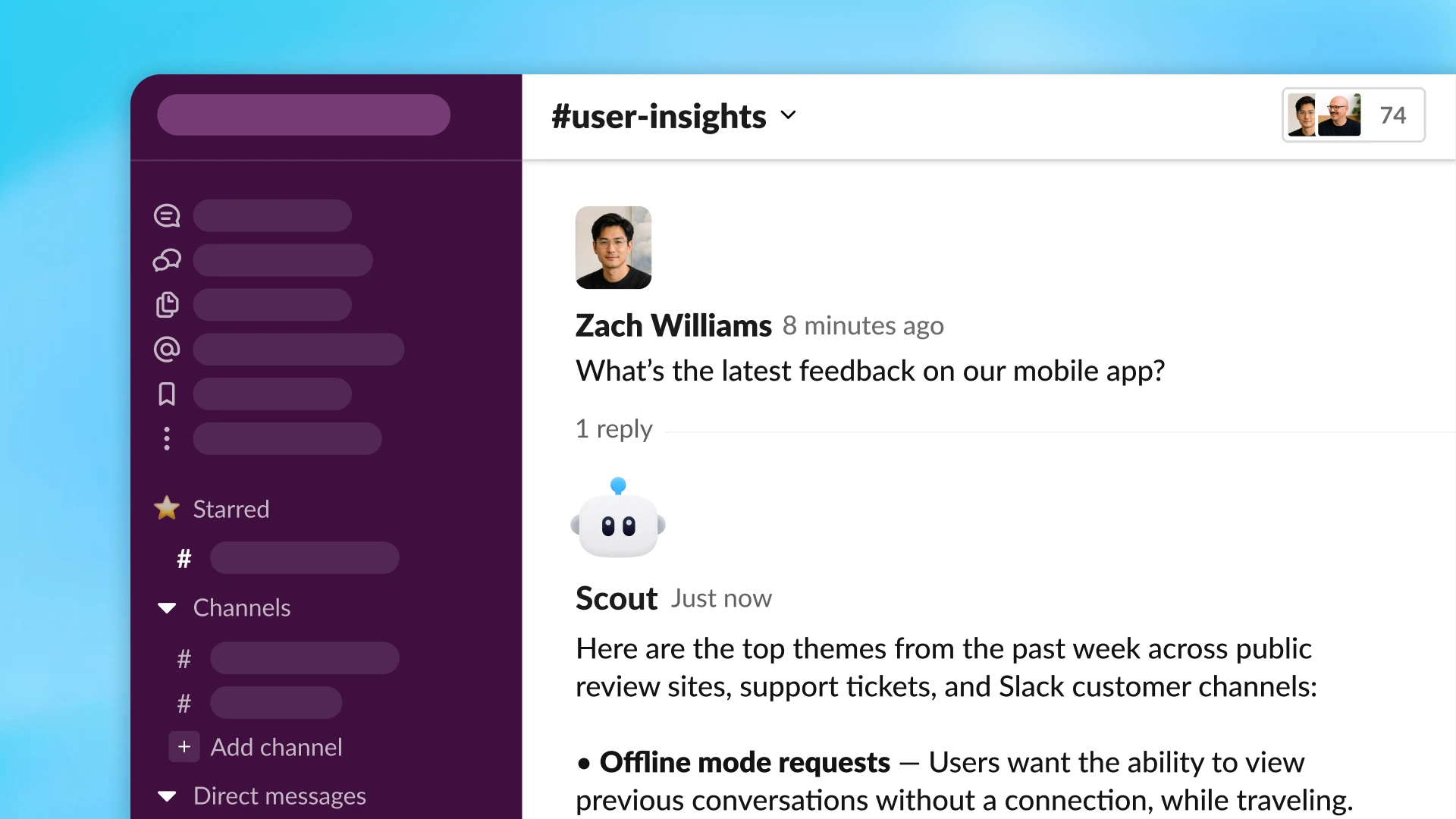
Ang mga workspace agent ay maaaring mangalap ng konteksto at kumilos sa dose-dosenang tool.
Ang mga agent ay pinapagana ng Codex sa cloud, kaya may access sila sa isang workspace para sa mga file, code, tool, at memory. Higit pa kaysa sa pagsagot sa prompt ang nagagawa ng mga agent: maaari silang magsulat o magpatakbo ng code, gumamit ng mga nakakonektang app, tandaan ang kanilang natutunan, at ipagpatuloy ang trabaho sa maramihang hakbang.
Maaaring magpatuloy sa pagtatrabaho ang mga workspace agent kahit wala ka. Maaaring i-set ang mga ito na tumakbo ayon sa iskedyul, o i-deploy ang mga ito sa Slack upang makuha ang mga request habang dumarating ang mga ito. Halimbawa, gumawa ang aming team ng produkto ng agent na aktibong sumasagot sa mga tanong ng mga empleyado sa mga Slack channel. Ang agent ay tumutugon nang may malinaw na sagot, nagli-link ng kaugnay na dokumentasyon, at maaaring magsumite ng ticket kapag nakakatuklas ito ng bagong isyu. Tinutulungan ng agent na ito ang mga team na mas mabilis na maalisan ng mga hadlang habang natitiyak na hindi napapalampas ang mahahalagang follow-up.
Sa ngayon, maaaring makipag-ugnayan ang mga team sa mga agent sa ChatGPT at Slack, at malapit nang dumating ang iba pang mga platform. Maaaring sumali ang mga agent sa mga pag-uusap at daloy ng trabaho kung saan nagaganap na ang trabaho, na tumutulong sa mga team na mapausad ang trabaho nang hindi gaanong nangangailangan ng koordinasyon.
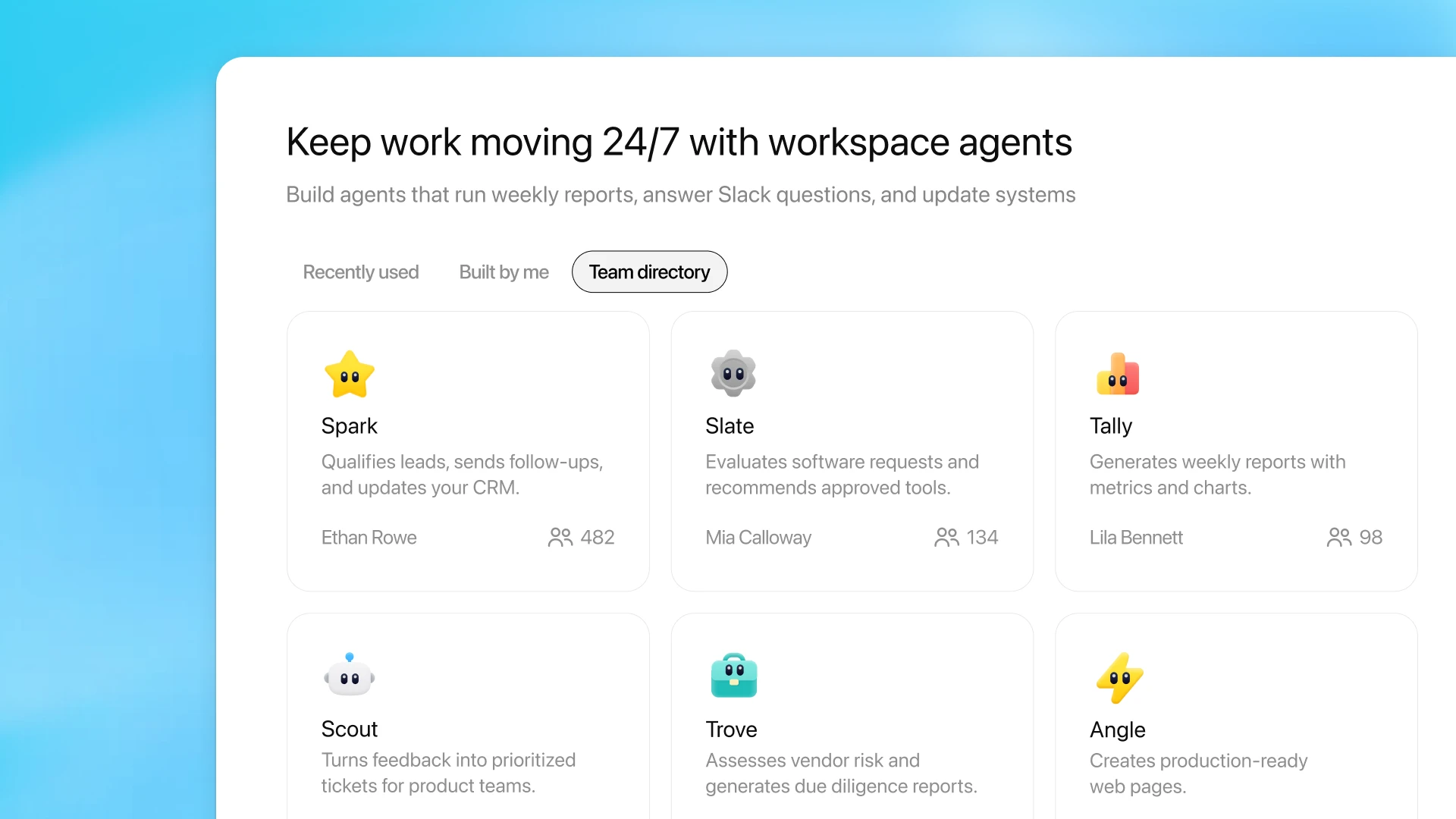
Pamahalaan ang pagbabahagi at tuklasin ang mga workspace agent na ibinahagi ng iyong team mula sa tab na Agents sa sidebar ng ChatGPT.
Ang kaalaman ay madalas na nakakalat sa mga tao at mga sistema. Binibigyan ng mga workspace agent ang mga team ng paraan upang gawing magagamit muli na daloy ng trabaho ang kaalamang iyon: na sumusunod sa tamang proseso, gumagamit ng tamang mga tool, at maaaring ibahagi sa buong organisasyon.
Halimbawa, ang aming team ng accounting ay bumuo ng agent na naghahanda ng mahahalagang bahagi ng pagsasara sa katapusan ng buwan, mula sa mga tala sa talaarawan hanggang sa mga pagtutugma ng balance sheet hanggang sa pagsusuri ng mga pagkakaiba. Kinukumpleto nito ang trabaho sa loob ng ilang minuto, bumubuo ng mga workpaper na may mga pinagbabatayang kabuuan ng input at kontrol na kailangan para sa pagsusuri, at sumusunod sa mga panloob na patakaran. Available ang agent sa ChatGPT para magamit ng sinuman sa team, o idagdag sa mga Slack channel para makapagtanong dito ang team at makipagtulungan batay sa mga resulta nito.
Dahil may memorya ang mga agent at maaaring gabayan at iwasto sa pag-uusap, mas humuhusay ang mga ito habang ginagamit sila ng mga team. Sa paglipas ng panahon, nagiging praktikal na paraan ang mga agent upang mapanatiling napapanahon ang kaalaman ng team: buuin nang isang beses, paghusayin sa pamamagitan ng paggamit, pagkatapos ay ibahagi o kopyahin para sa mga bagong daloy ng trabaho.
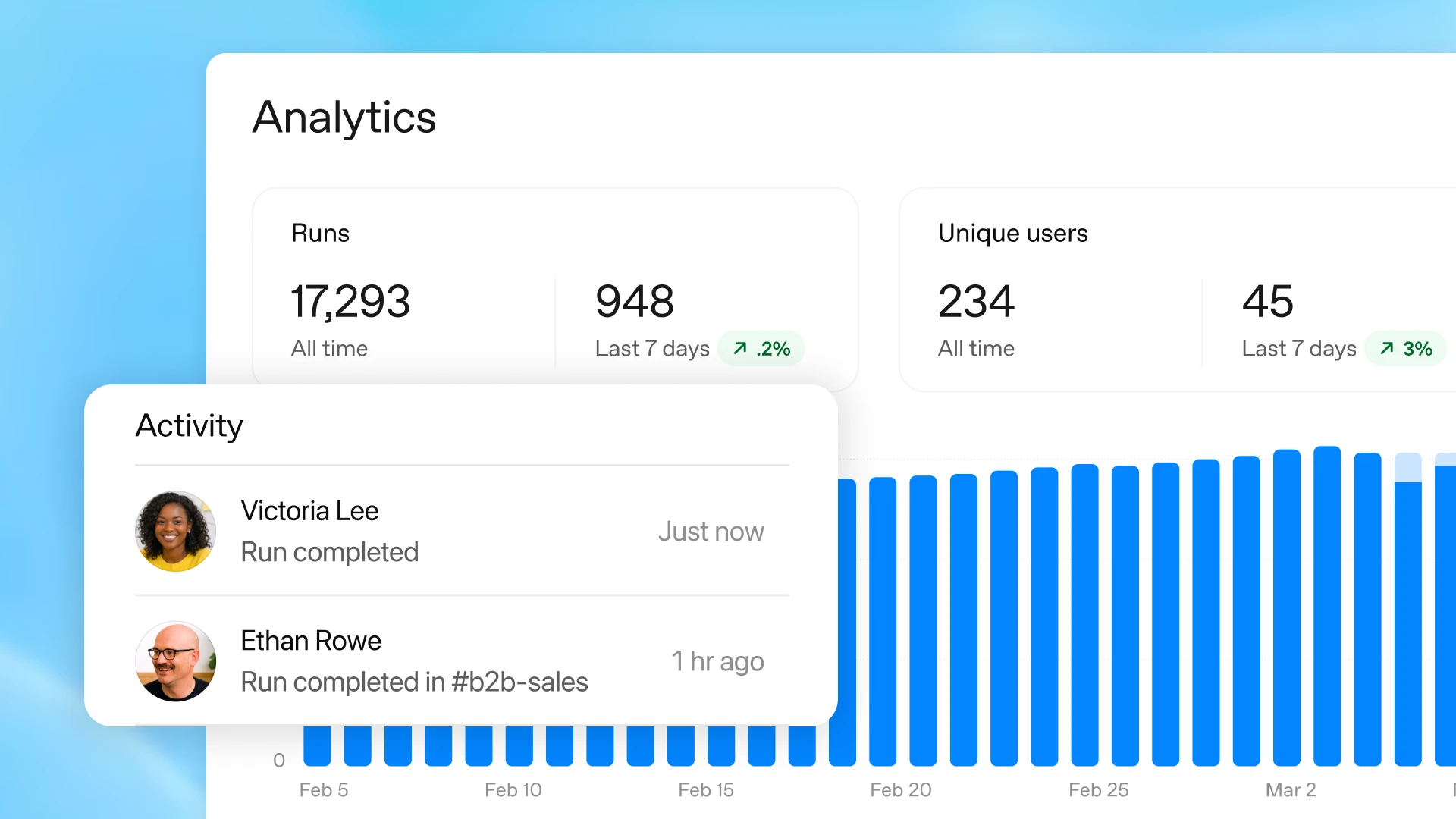
Tingnan ang analytics para sa iyong mga live na workspace agent mula sa menu sa editor.
Kapag nagtalaga ka ng trabaho sa isang agent, mananatili kang may kontrol. Ikaw ang magpapasya kung anong mga tool at data ang maaaring gamitin nito, anong mga aksyon ang maaaring gawin nito, at kung kailan nito kailangan ng pag-apruba. Para sa mga sensitibong hakbang, tulad ng pag-edit ng spreadsheet, pagpapadala ng email, o pagdaragdag ng event sa kalendaryo, maaari mong iatas sa agent na humingi muna ng pahintulot bago magpatuloy.
Pagkatapos mong magbahagi ng isang agent, tinutulungan ka ng analytics na makita kung paano ito ginagamit, kabilang na kung ilang pagpapatakbo ang nakumpleto nito at kung ilang tao ang gumagamit nito.
May kasamang pagsubaybay at mga kontrol sa antas ng enterprise ang mga workspace agent, kaya mapoprotektahan ng mga admin ang sensitibong data habang binibigyan ang mga team ng ligtas na paraan upang mas mapabilis ang trabaho gamit ang AI. Makokontrol ng mga admin ng ChatGPT Enterprise at Edu kung aling mga nakakonektang tool at aksyon ang maaaring ma-access ng mga grupo ng user. Maaari ring pamahalaan ng mga Admin kung sino ang may access upang gumamit, bumuo, at magbahagi ng mga agent. Ang mga naka-built-in na pananggalang ay tumutulong sa mga agent na manatiling nakaayon sa iyong mga tagubilin kapag nakakatagpo sila ng mapanlinlang na panlabas na content, kabilang ang mga pag-atake ng prompt injection.
Ang Compliance API(magbubukas sa bagong window) ay nagbibigay sa mga admin ng bisibiliad sa kompigurasyon, mga update, at mga run ng bawat agent upang masubaybayan at makontrol nila kung paano binubuo at ginagamit ang mga agent. Maaari ding suspindihin ng mga admin ang mga agent kung kinakailangan.
Hindi magtatagal makikita rin ng mga admin ang bawat agent na ginawa sa kanilang buong organisasyon sa console ng admin, kabilang ang mga pattern ng paggamit at mga nakakonektang pinagmumulan ng data.
Napapansin na ng mga unang tagasubok ng mga workspace agent ang mas pare-parehong resulta at mas maraming oras para sa mas mahalagang trabaho.
Ang mga workspace agent ay available sa preview ng pananaliksik para sa mga plan na ChatGPT Business, Enterprise, Edu, at Teachers. Para sa mga plan na Enterprise at Edu, maaaring paganahin ng mga admin ang mga agent gamit ang mga kontrol na nakabatay sa tungkulin.
Libre ang mga workspace agent hanggang 05/06/2026, at magsisimula sa petsang iyon ang pagpepresyo batay sa kredito.
Patuloy kaming magdaragdag ng mas marami pang mahuhusay na bagay sa mga susunod na linggo upang matulungan ang mga team na makagawa nang mas marami nang may mas kaunting manu-manong pagsisikap. Kabilang dito ang mga bagong trigger na maaaring awtomatikong magsimula ng trabaho, mas mahusay na mga dashboard para maunawaan at mapahusay ang pagganap, mas marami pang paraan para makagawa ng aksyon ang mga agent sa iyong mga tool sa negosyo, at suporta para sa mga workspace agent sa Codex app.
Nagagawa ng mga team ang pinakamahusay nilang trabaho kapag mas madaling mahanap ang kaalaman, mas madaling sundan ang mga proseso, at makakakuha ang mga tao ng tulong habang nagtatrabaho. Ang mga workspace agent ay maagang hakbang tungo sa hinaharap na iyon: AI na gumagana kasabay ng mga tao sa mga tool at usapan kung saan nagaganap na ang trabaho, na tumutulong sa mga team na gumugol ng mas kaunting oras sa pag-uugnay ng trabaho at mas maraming oras sa paglikha, pagbuo, at paggawa ng mga desisyong nagpapasulong sa negosyo.