Dots sunt agenți remarcabil de capabili, mereu activi, creați pentru a gestiona totul. Reprezintă o modalitate complet nouă de a lucra cu inteligența artificială: una care ajunge să înțeleagă ce contează pentru tine, lucrează mereu în numele tău și îți ia din grija sarcinilor importante, astfel încât să primești înapoi mai mult timp și atenție.
Agenții dot reprezintă inteligența de vârf care îți este alături. Bazați pe GPT‑6 Astra, au propriul calculator dematerializat, învață din opinii și sugestii în timp și pot lucra pentru obiectivele tale 24/7. Prin ecosistemul nostru de extensii, se pot conecta cu ușurință la peste 4.000 de aplicații, oferindu-le instrumentele necesare pentru a te ajuta oriunde ai nevoie de aceștia.
Agentul tău dot este mereu la îndemână, fie prin ChatGPT, Slack sau Teams. Poți pune întrebări, explora idei și oferi opinii și sugestii pe parcurs sau poți pur și simplu să intri într-un apel vocal când ai nevoie să discuți ceva. Cu cât lucrați mai mult împreună, cu atât agentul tău dot îți învață mai bine preferințele, felul în care gândești și cum arată un rezultat bun pentru tine.
Magia agenților dot se dezvăluie când îți aduc munca făcută așa cum ai face-o tu, uneori înainte să te gândești măcar să ceri. Cu agenții dot alături, ideile și proiectele ambițioase pentru care nu ai avut timp sau sprijin să le urmezi încep să pară realizabile.
În cadrul OpenAI, începem să vedem cum arată munca atunci când inteligența lucrează mereu alături de tine. Apare o eroare în Slack, iar agenții dot încep imediat să investigheze. Sosește un concept nou, iar agenții dot îl transformă într-o aplicație funcțională, în timp ce echipa se concentrează pe părerile clienților. Începe un ciclu de planificare, iar agenții dot îi mențin pe toți sincronizați și în mișcare către termenul-limită. În afara OpenAI, agentul dot al unui tester timpuriu a observat că acesta uitase să factureze o publicație, a pregătit factura și a trimis-o după aprobarea lui.
Astăzi, poți începe cu agentul tău dot principal, îi poți da un nume și îl poți personaliza. În timp, ne imaginăm echipe de agenți dot care lucrează împreună în numele tău. Începem să lansăm treptat agenții dot pentru planurile Pro, Business Premium și Enterprise în piețele eligibile. Plănuim să extindem în curând disponibilitatea agenților dot pentru mai mulți utilizatori. De asemenea, oferim o previzualizare a agenților dot specializați, cu identitate proprie pentru gestionarea accesului, echipamente fizice furnizate de IT și compatibilitate pentru integrări aprofundate cu sistemele de evidență ale unei companii, pentru a le permite să preia responsabilități bine definite în cadrul organizațiilor.
Agenții dot pot face aproape orice folosind propriul calculator dematerializat, propriul navigator și aplicațiile pe care le-ai conectat.
Poți deschide oricând calculatorul agentului tău dot pentru a-i verifica activitatea. Pe lângă propriul calculator, agenții dot se pot conecta și la alte dispozitive, iar tu îi poți da agentului tău dot permisiunea de a se conecta la laptopul tău și de a-l folosi, unde îți poate fi util direct alături de tine.
Agentul tău dot poate prelua un proiect și îl poate duce mai departe, chiar și atunci când lucrează la alte câteva. Poți continua să-i dai sarcini și idei noi fără să trebuiască să jonglezi cu fire de discuție separate sau să coordonezi fiecare pas.
Cu un dot care îți cunoaște obiectivele și standardele, poți face mai multe fără să dirijezi fiecare pas. Iată cum arată acest lucru în practică
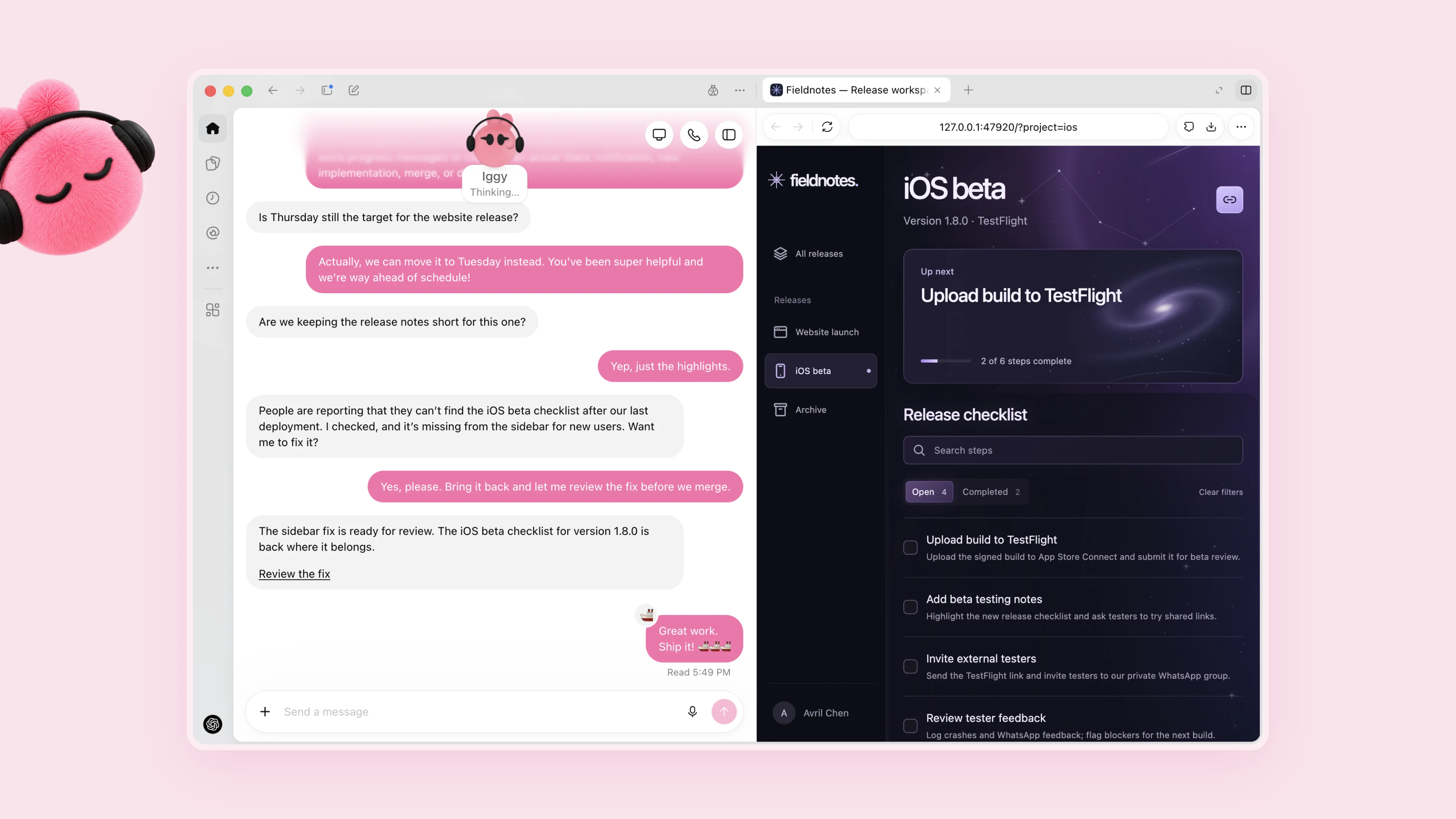
Transformă opiniile și sugestiile în soluții testate
Ești dezvoltator și lucrezi la o aplicație. Agentul tău dot urmărește părerile clienților pentru solicitări recurente, definește îmbunătățiri mai mici și remedieri de erori, le dezvoltă și le testează și îți aduce PR-uri complete pentru a le revizui, cu videoclipuri atașate care prezintă modificările. Poți continua să dezvolți următoarea funcție majoră în timp ce revizuiești remediile și îmbunătățirile pregătite de agentul tău dot.
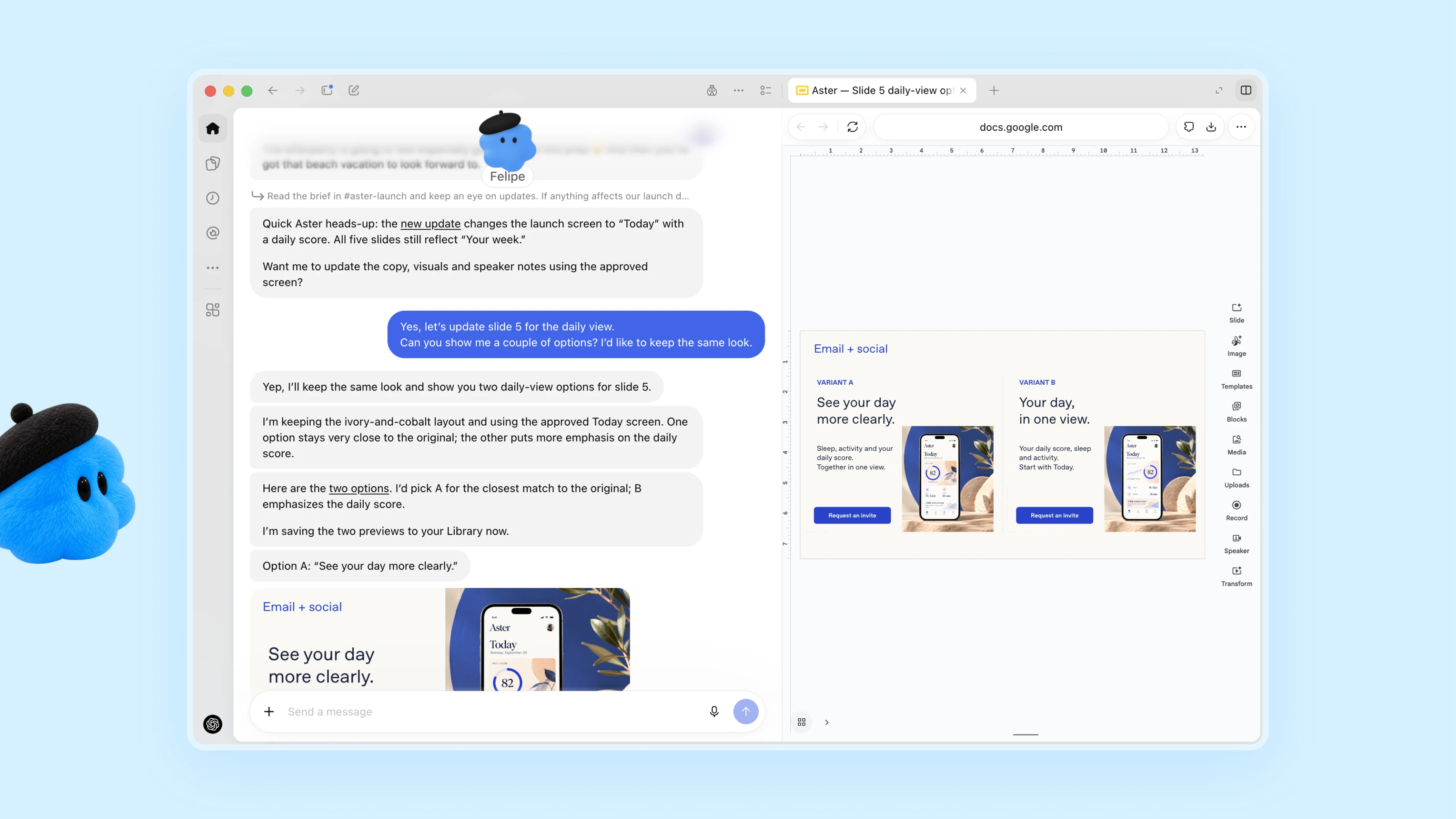
Revizuiește o lansare pe măsură ce se schimbă scopul proiectului
Conduci lansarea unui produs. Agentul tău dot îți învață publicul, poziționarea și standardele creative. Când domeniul de aplicare al produsului se schimbă, analizează ce înseamnă acest lucru pentru mesaj, revizuiește materialele de lansare și pregătește variante preliminare ale modificărilor pentru materiale și documente. Revii la un plan de lansare și la materiale creative modelate de direcția pe care ai stabilit-o, gata să fie revizuite de tine.
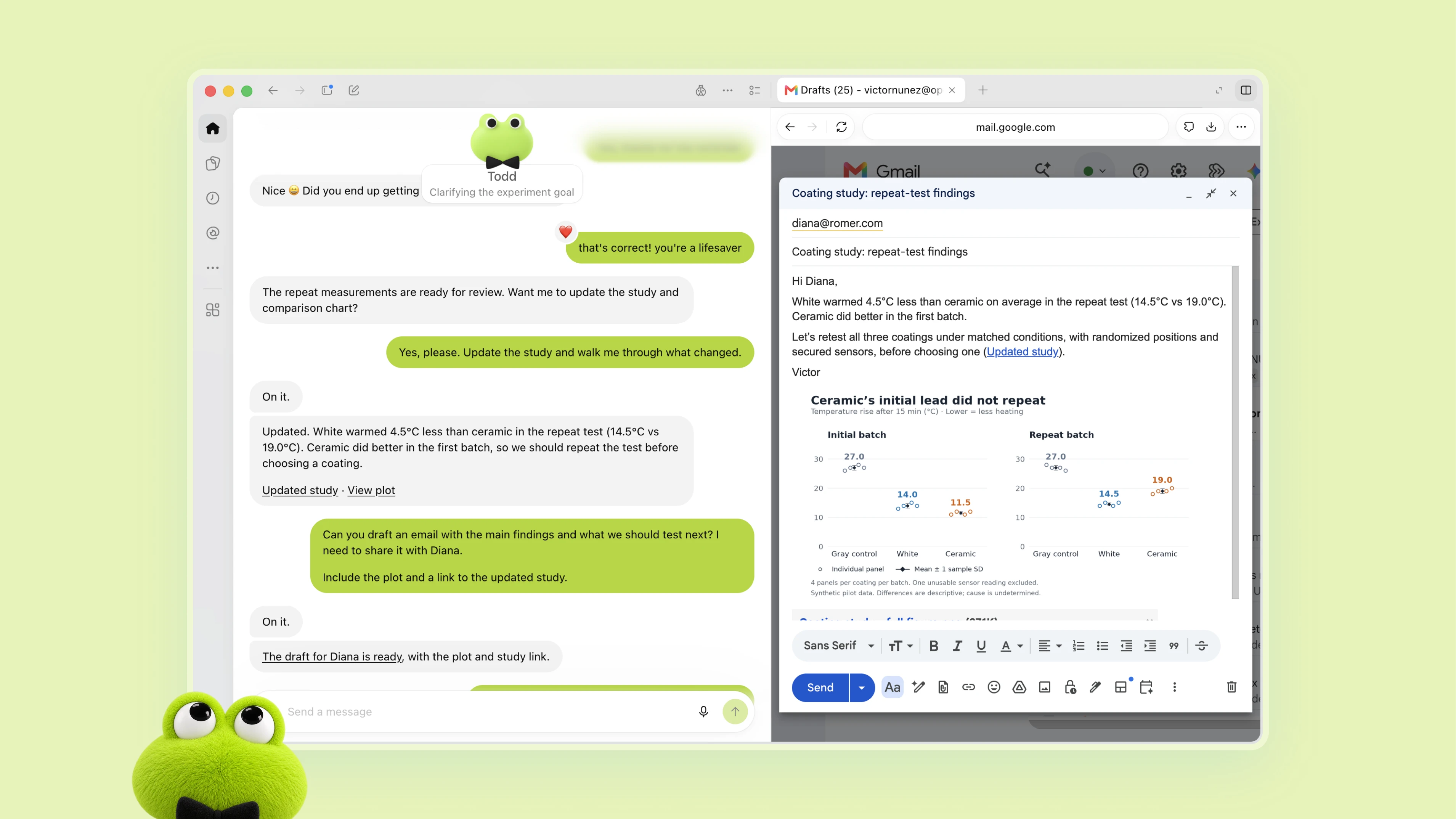
Actualizează analiza cu dovezi noi
Ești om de știință. Agentul tău dot învață care este întrebarea ta de cercetare și cum evaluezi dovezile. Pe măsură ce sosesc date noi, reface analizele, investighează rezultatele neașteptate și actualizează figurile pentru lucrarea ta. Când constatările se schimbă, revizuiește explicația aferentă și semnalează ce necesită verificarea ta. Te întorci din laborator la o activitate care reflectă cele mai recente dovezi.
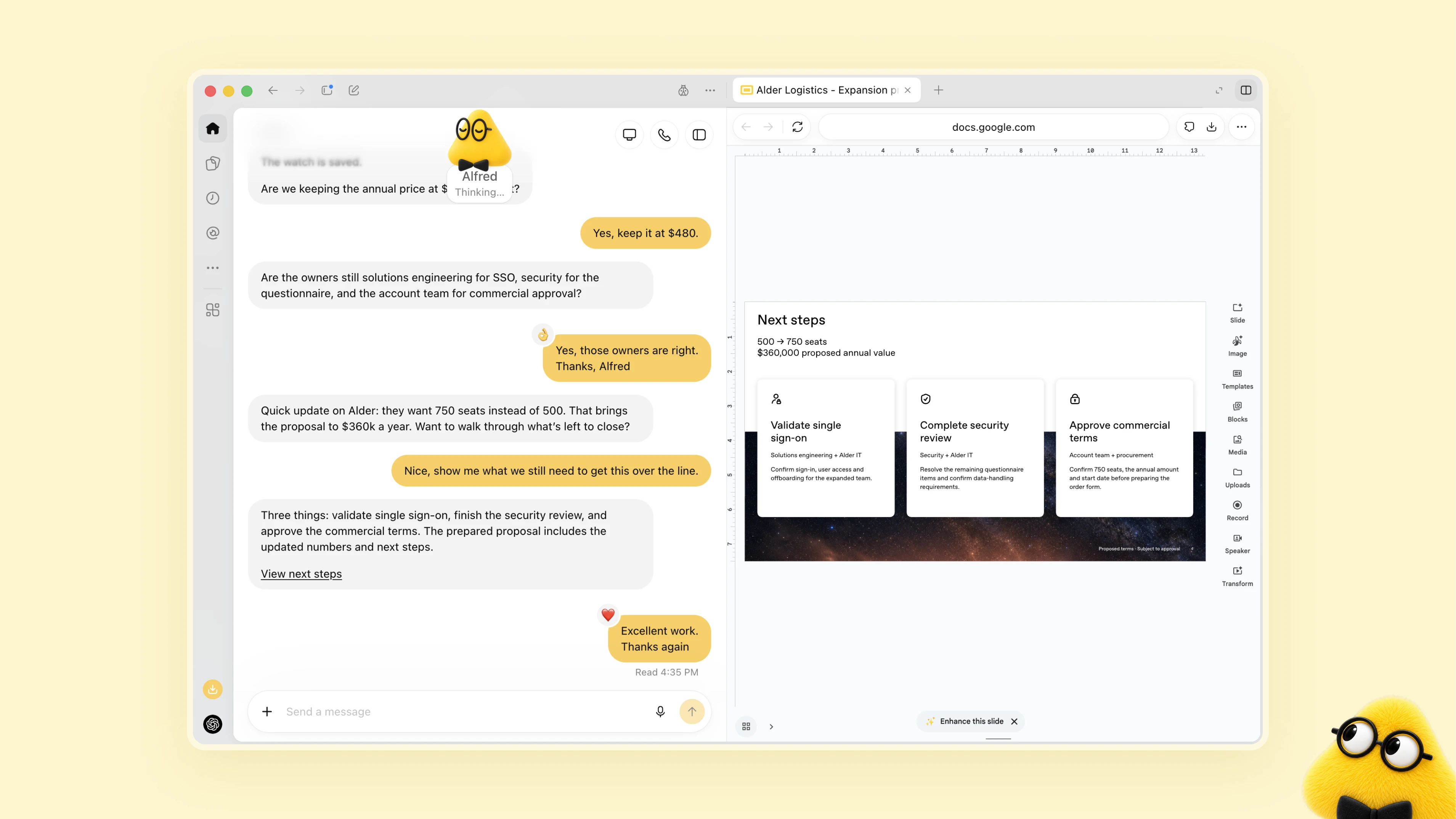
Actualizează o propunere pe măsură ce se schimbă cerințele
Ești un manager de vânzări care ghidează un contract cu o companie mare prin analiza tehnică. Agentul tău dot compară cerințele clienților și istoricul contului cu documentația produsului, identifică ce mai trebuie testat, creează un proiect demonstrativ pentru o integrare esențială și îți recomandă un inginer de soluții care s-a ocupat de un contract similar. Pe măsură ce cerințele și rezultatele testelor se schimbă, actualizează propunerea și planul de testare și semnalează aspectele rămase în suspensie. Tu și inginerul tău vă concentrați pe conversațiile cu clienții și aprobați angajamentele.
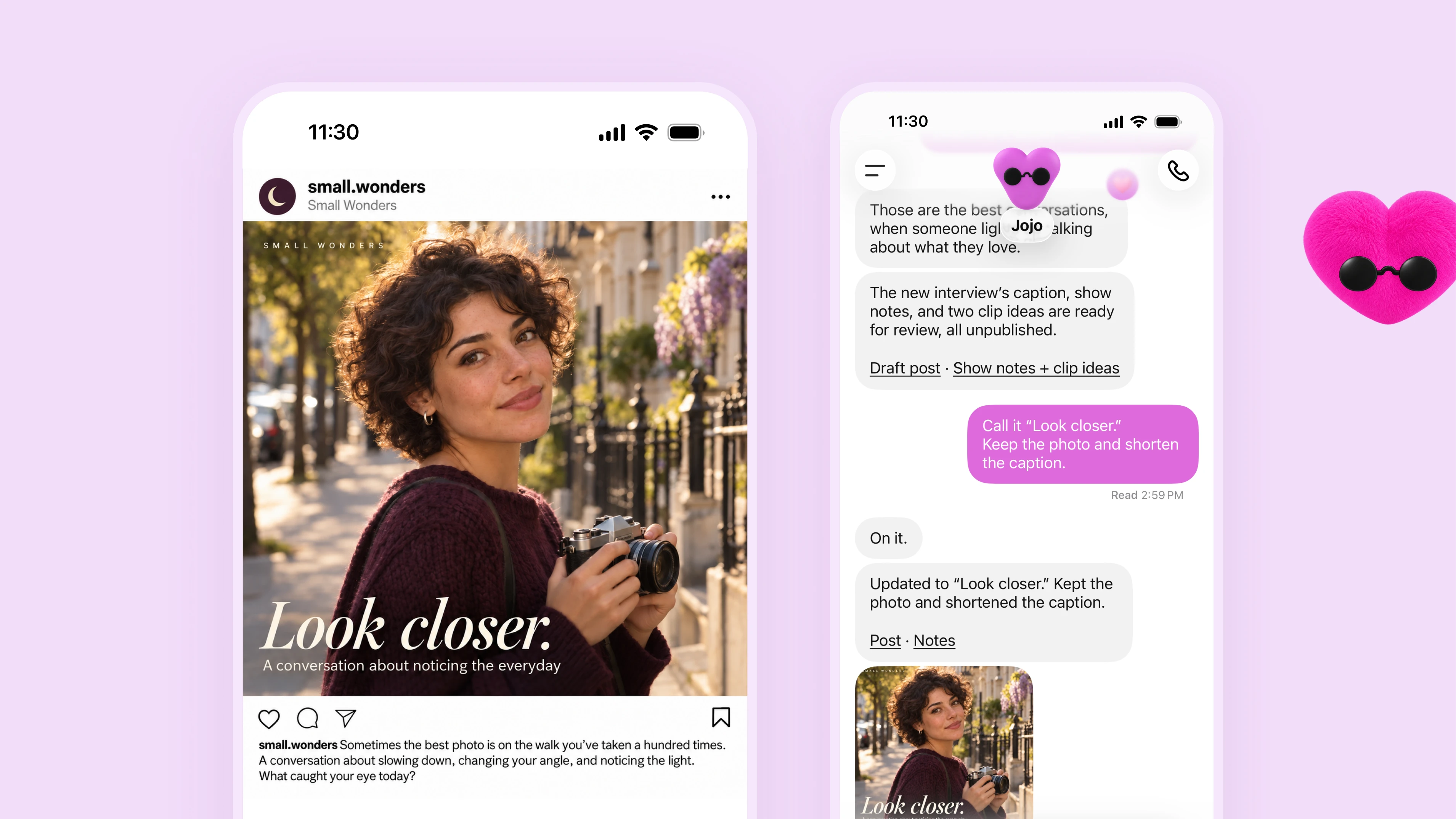
Automatizează activitatea de producție a conținutului
Ești creator de conținut. Agentul tău dot îți învață stilul și ce contează pentru publicul tău. Când sosește o nouă transcriere a unui interviu, identifică momente pentru clipuri, pregătește notițe de episod și redactează articole pentru rețelele sociale, pe care să le aprobi. Aplică modificările tale în toate materialele și învață ce prinde la public, oferindu-ți mai mult timp pentru a crea.
Să lucrezi cu agentul tău dot este la fel de simplu ca o conversație. Poți trimite mesaje agenților dot sau îi poți apela în ChatGPT pe desktop, web și mobil. De asemenea, îți pot trimite mesaje cu progrese, întrebări sau decizii care necesită implicarea ta.
Îi poți trimite mesaje agentului tău dot și în Slack și Teams, iar mesajele text vor fi disponibile în curând. Începe un proiect în ChatGPT, distribuie contextul echipei de lucru în Slack și lasă agentul tău dot să se ocupe de restul. Agenții dot păstrează contextul în toate canalele, astfel încât aceștia vor avea întregul context oriunde îi contactezi.
Agenții dot se bazează pe protecțiile ChatGPT, cu măsuri suplimentare de protecție a siguranței și confidențialității pentru activitățile pe care le pot desfășura. Poți stabili limite, urmări progresul și rămâne implicat în deciziile care necesită implicarea ta.
Fiecare agent dot lucrează pe propriul calculator dematerializat, iar calculatorul tău și conținutul acestuia rămân separate, cu excepția cazului în care alegi să îl conectezi. Pentru autentificarea pe site-urile acceptate, agenții dot pot folosi parolele salvate fără să le expună modelului.
Când nu lucrezi activ cu acesta, agentul tău dot caută modalități de a te ajuta în fundal. Numim acest lucru „cercetare proactivă”. Face acest lucru folosind aplicațiile pe care le-ai conectat deja, cu instrumente restricționate la acces doar pentru citire, ceea ce înseamnă că nu poate trimite mesaje, modifica conținutul aplicațiilor sau controla navigatorul ori calculatorul tău.
Măsurile de protecție integrate în agenții dot ajută la apărarea împotriva instrucțiunilor rău intenționate și la monitorizarea comportamentelor potențial dăunătoare. Dacă sistemul nostru de monitorizare detectează o problemă de siguranță, poate suspenda sau opri activitatea agentului dot.
Alegi ce aplicații pot accesa agenții dot și le poți gestiona permisiunile prin controalele existente ale aplicațiilor ChatGPT.
Agenții dot încep cu reguli integrate care stabilesc când pot acționa independent și când trebuie să solicite aprobare. Regulile personalizate îți oferă posibilitatea de a permite anumite acțiuni, de a solicita aprobarea sau de a le bloca. Cerințele de siguranță integrate se aplică întotdeauna, iar în Vizualizarea activității poți urmări progresul, inclusiv activitatea din fundal, și poți redirecționa agenții dot după cum este necesar.
În mod implicit, nu folosim conținutul din spațiile de lucru ChatGPT Business, Enterprise sau Edu pentru a ne îmbunătăți modelele. În planurile personale ChatGPT, poți controla dacă conversațiile și activitatea agenților dot sunt folosite pentru a ne îmbunătăți modelele(se deschide într-o fereastră nouă). Nu ne antrenăm direct pe cercetarea proactivă sau pe notele pe care agentul tău dot și le face. Informațiile din acestea pot fi folosite dacă contribuie la o conversație sau sarcină eligibilă, în funcție de setările tale.
Agenții dot folosesc Revizuirea automată(se deschide într-o fereastră nouă) pentru a verifica dacă acțiunile care ți-ar putea afecta conturile sau ar putea distribui informații respectă instrucțiunile tale, Regulile personalizate și cerințele de siguranță. Acest lucru ajută la stabilirea sarcinilor care pot continua, a celor care necesită aprobare și a celor pe care trebuie să le faci tu personal. Anumite sarcini sensibile, precum schimbarea unei parole, îți revin întotdeauna.
Poți afla mai multe despre abordarea noastră privind siguranța pentru dots în blogul nostru despre siguranța agenților dot, în Centrul nostru de asistență(se deschide într-o fereastră nouă) și în fișa noastră de sistem(se deschide într-o fereastră nouă). Agenții dot pot face în continuare greșeli, așa că verifică întotdeauna lucrările importante.
Agentul dot lucrează în numele tău; agenții dot specializați își asumă responsabilități dedicate în cadrul organizației tale. Compania ta configurează fiecare agent dot cu propria identitate, propriile date de autentificare, precum și acces la sistemele de care are nevoie pentru a-și îndeplini sarcinile. Pe măsură ce lucrează, agentul dot se adaptează la informații noi și se îmbunătățește pe baza opiniilor și sugestiilor echipei tale. Ne bazăm pe lecțiile învățate din testările timpurii desfășurate în cadrul OpenAI în domenii precum achizițiile, procesarea facturilor, marketingul prin poștă electronică, asistența pentru clienți și contractarea comercială.
Începem cu proiecte-pilot concentrate pentru companii. Echipele noastre de inginerie vor lucra direct cu organizațiile pentru a defini responsabilitățile fiecărui agent dot, instrumentele pe care le poate folosi și modul în care oamenii îi verifică și aprobă munca. Dacă ai vrea ca un agent dot specializat să preia anumite sarcini, ne-ar plăcea să aflăm de la tine.
De asemenea, colaborăm cu Microsoft pentru a integra agenți dot specializați cu controalele lor de guvernanță și securitate pentru întreprinderi în Agent 365. Scopul este să le permitem companiilor să gestioneze dots prin instrumentele Microsoft pe care le folosesc deja.
Agenții dot devin disponibili astăzi în ChatGPT pentru utilizatorii Pro și Business Premium din piețele eligibile(se deschide într-o fereastră nouă). Utilizatorii Enterprise (inclusiv Edu și Healthcare) pot încerca versiunea beta după ce administratorul spațiului de lucru le activează accesul.
Primul tău agent dot este inclus în abonamentul tău Pro sau Business Premium, fără costuri suplimentare. Este disponibil 24/7 pentru a discuta, a te ajuta să gândești și a rămâne la curent cu ceea ce contează pentru tine. Abonamentul tău include și o alocație pentru activități mai complexe, cu limite extinse în prima lună de la lansare. În viitor, vei putea adăuga mai mulți agenți dot și vei putea crește rezultatele fiecărui agent dot fie mărindu-i viteza, fie cantitatea totală de muncă pe care o poate prelua lunar.
Conversațiile cu agentul tău dot nu sunt luate în calcul pentru limitele tale de utilizare ChatGPT. Când îi ceri agentului tău dot să înceapă sau să gestioneze sarcini în Codex sau ChatGPT Work, acele sarcini sunt luate în calcul pentru limitele tale de utilizare, ca de obicei.
Pentru a începe, creează-ți primul agent dot în aplicația ChatGPT pentru desktop sau în navigatorul de pe calculator, conectează-ți aplicațiile și lasă-l să se prezinte. După configurarea inițială, îi vei putea trimite mesaje în aplicația mobilă ChatGPT.
Vom continua să îmbunătățim agenții dot pe măsură ce aflăm ce îi face utili zi de zi. Vom împărtăși ceea ce învățăm acolo unde putem și vom folosi aceste informații pentru a ne ghida în ceea ce vom construi în continuare.