Przejdź do treści głównej
OpenAI

4 czerwca 2026

BadaniaProduktWersja

Stabilniejsze fundamenty pamięci ChatGPT

Poprawiamy syntetyzacją pamięci w ChatGPT, aby zapewniać lepsze podpowiedzi oraz bardziej spójną ciągłość i trafność.

Ładowanie…

Dziś zaczynamy wdrażać bardziej zaawansowany i skalowalny system syntezy pamięci w odpowiedzi na problemy związane z dezaktualizacją, brakiem poprawności i kwestiami związanymi ze skalowaniem, które występują, gdy pamięć jest stosowana w ChatGPT dla setek milionów użytkowników i w perspektywie wielu lat.

Pamięć pomaga ChatGPT poznawać Twoje preferencje, projekty i ograniczenia, dzięki czemu kolejne rozmowy mogą zaczynać się z wykorzystaniem znanego kontekstu, a nie od zera.

W ciągu ostatnich dwóch lat pamięć stała się kluczową częścią korzystania z ChatGPT. Ułatwia ona zrozumienie Twojego kontekstu, przez co z czasem ChatGPT pomaga sprawniej realizować przekazywane mu zadania. Ta funkcja to klucz do zwiększania użyteczności ChatGPT: lepszego poznawania Cię, pomagania i wykonywania nowych zadań.

Niniejsza aktualizacja jest od dziś dostępna dla użytkowników planów Plus i Pro w USA, a w najbliższych tygodniach zostanie wdrożona w kolejnych krajach oraz dla użytkowników planów Free i Go.

Ewolucja pamięci

Funkcja pamięci została dodana w kwietniu 2024 r. (nazywana też była „zapisanymi wspomnieniami”). Pozwalała ona poprosić ChatGPT o zapamiętanie informacji i korzystanie z nich w kolejnych czatach.
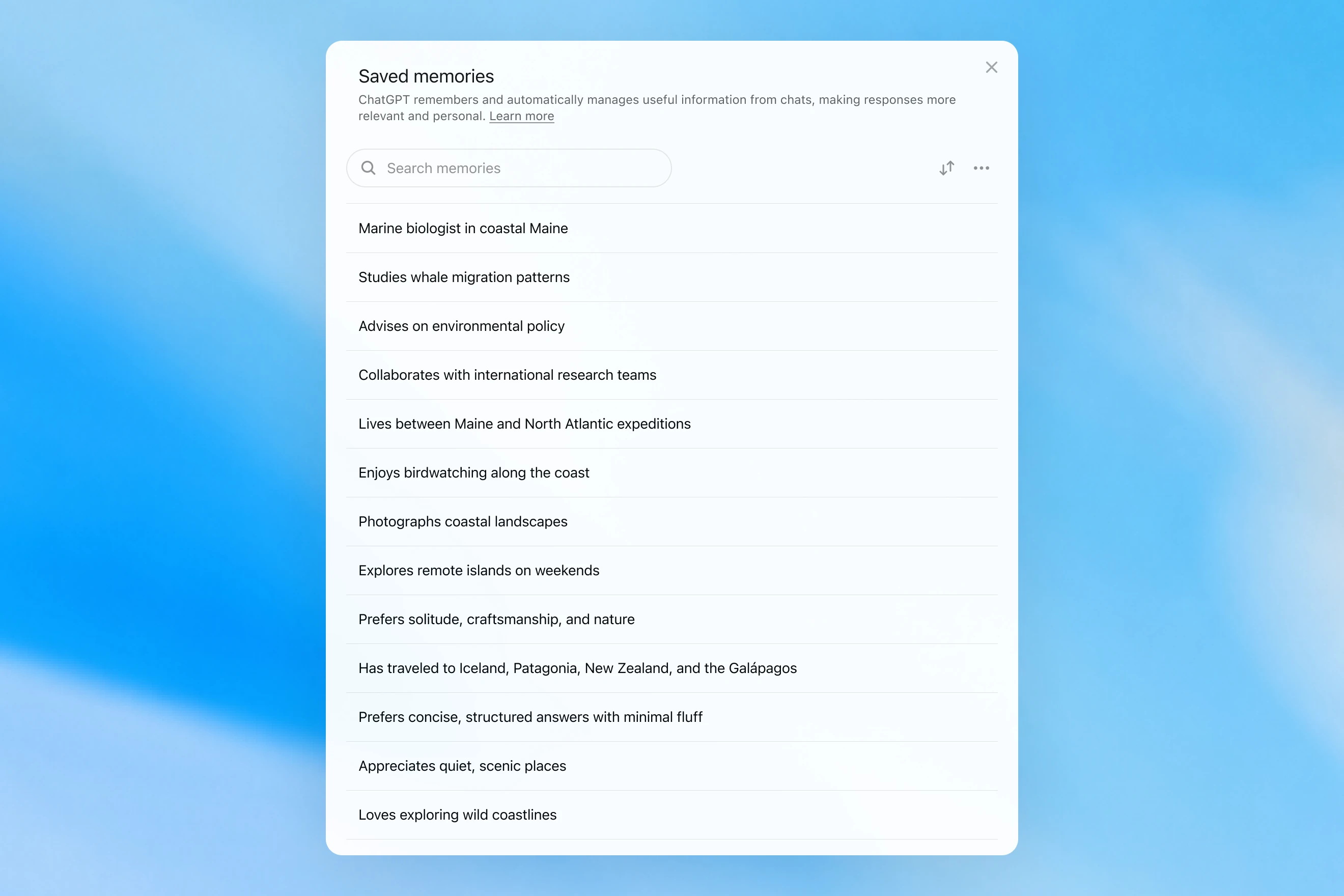
Saved memories modal showing a searchable list of personal details, including work, interests, travel, and response preferences.

Zapisane wspomnienia były tworzone tylko podczas rozmowy i wymagały wyraźnych poleceń do korzystania z nich, np. „pamiętaj, że w lipcu jadę do Singapuru”. W praktyce interakcja z tym systemem mogła przypominać rozmowę z osobą, która zanotowała kilka faktów, ale zapomniała wszystko inne. Zapisane wspomnienia dezaktualizowały się z czasem i w końcu stawały się błędne lub nieistotne.

W kwietniu 2025 r. zaktualizowaliśmy pamięć ChatGPT, dając modelowi możliwość odwoływania się do kontekstu czatu spoza listy zapisanych wspomnień. Osiągnęliśmy ten efekt, wprowadzając pierwszą wersję metody dreaming, dzięki której ChatGPT automatycznie porządkuje wspomnienia w tle, odwołując się do historii czatów.
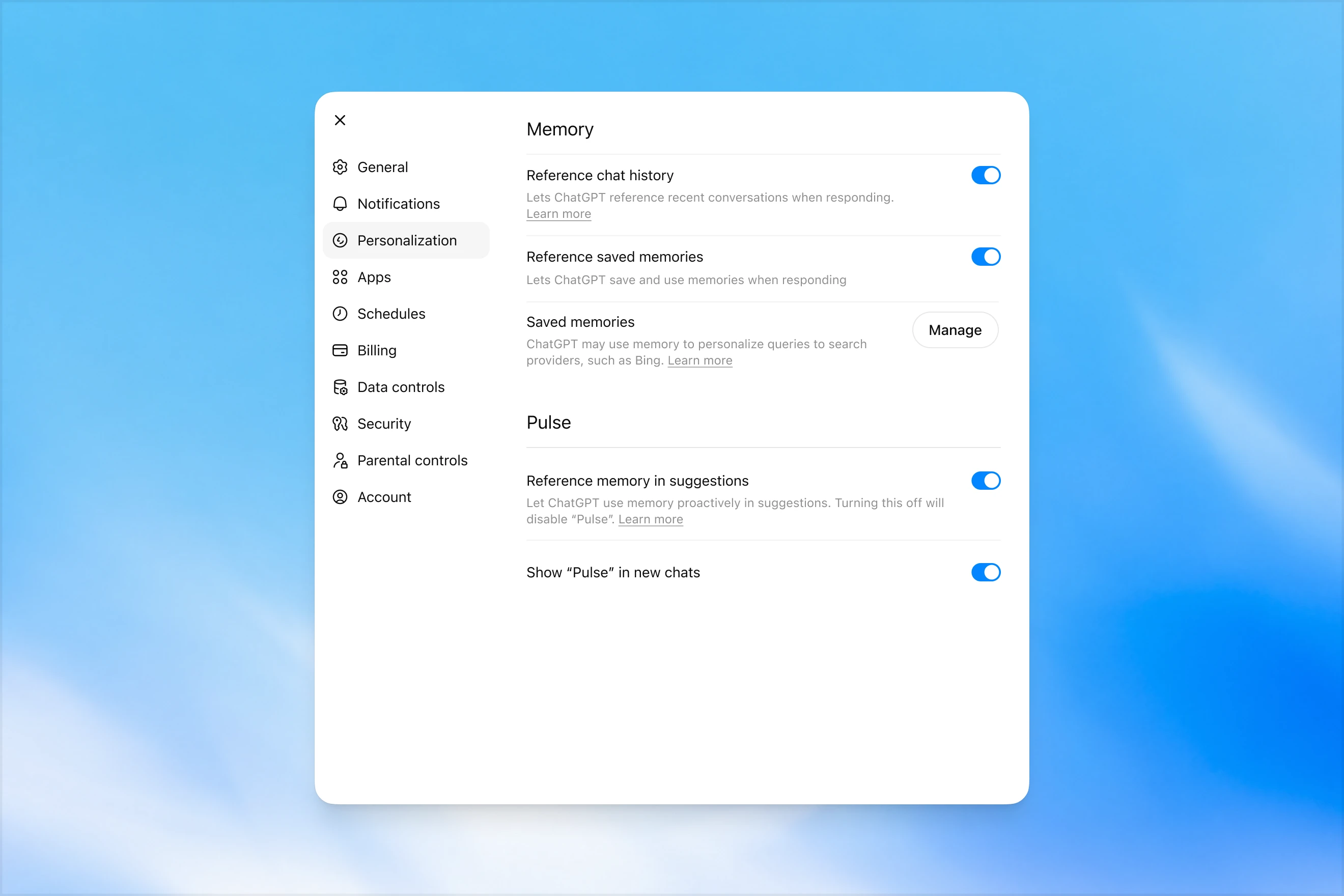
Memory settings page in ChatGPT showing options to reference chat history, use saved memories, manage saved memories, and enable Pulse memory suggestions.

W przeciwieństwie do zapisanych wspomnień dreaming wykorzystuje proces działający w tle, który pozwala ChatGPT uczyć się na podstawie wielu rozmów i syntetyzować stan pamięci ChatGPT, aby zawsze w rozmowach dysponować najnowszym i najbardziej trafnym kontekstem. Dreaming ułatwia też stosowanie w pamięci kontekstu, który pojawia się naturalnie w rozmowie, bez potrzeby używania wyraźnych poleceń o zapamiętanie danych informacji.

W ciągu ostatniego roku dreaming uzupełniał zapisane pamięci, zapewniając skokową poprawę zdolności ChatGPT w zakresie personalizowania odpowiedzi i ograniczając dezaktualizację zapisanych wspomnień. Historycznie jednak nigdy nie oferował pełni możliwości systemu samodzielnej pamięci.

Dziś uruchamiamy znacznie bardziej zaawansowaną i wydajną obliczeniowo architekturę pamięci opracowaną na bazie metody dreaming.

Pamięci syntetyzowane przez dreaming można przeglądać z poziomu ich podsumowania na stronie podsumowania pamięci. W podsumowaniu pamięci można szybko wyłapać najważniejsze informacje o tym, co ChatGPT wie o Tobie, dodać lub zaktualizować informacje o sobie oraz poinstruować ChatGPT, jakie tematy powinien poruszać i kiedy. Jeśli chcesz dowiedzieć się więcej o tych funkcjach, porozmawiaj z modelem.
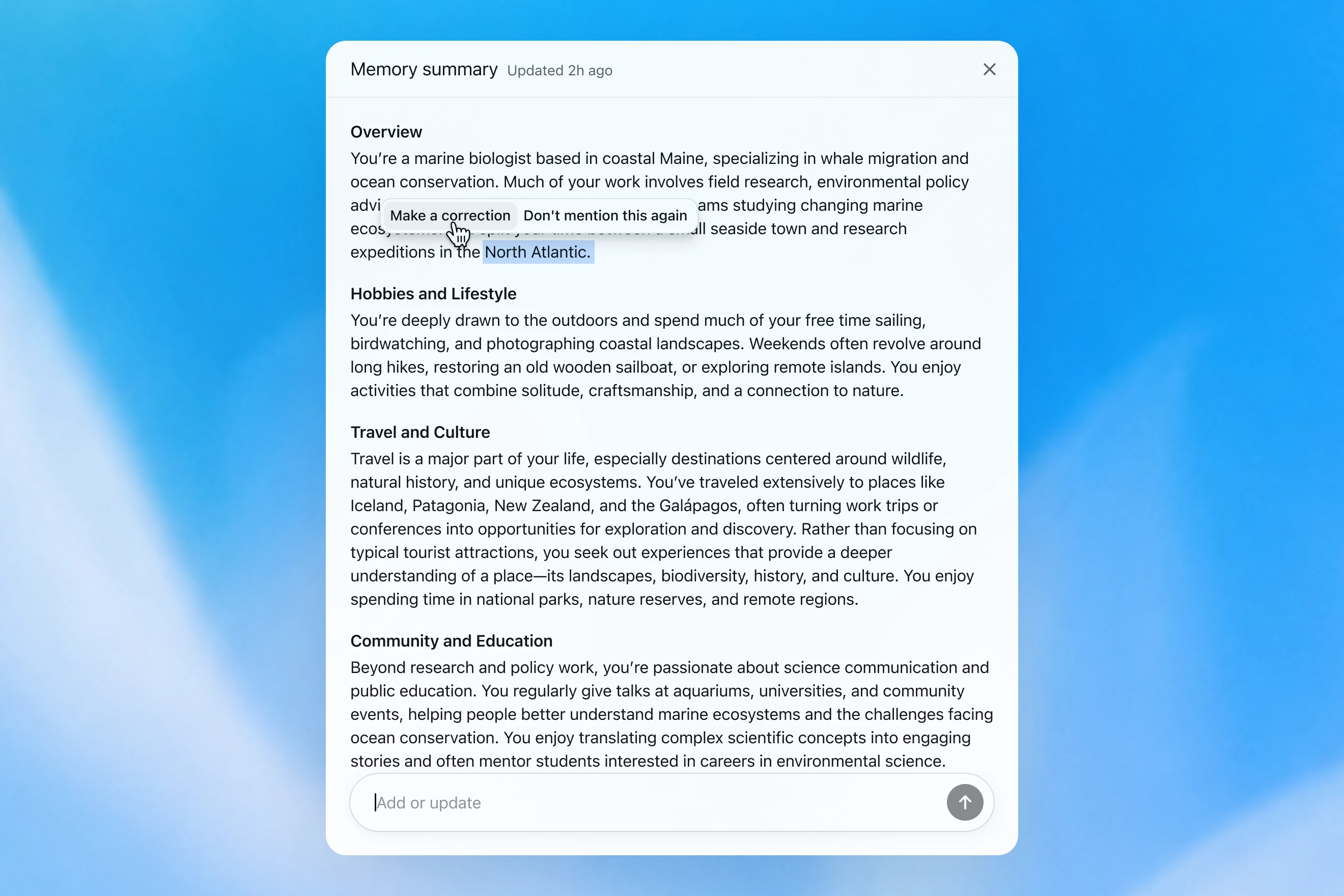
Memory summary modal showing a personalized overview of a user’s work, hobbies, travel interests, and community involvement, with options to correct or dismiss specific details.

Ocenianie pamięci

Definiując „dobrą pamięć” w ChatGPT, skupiamy się na kilku aspektach:

  1. Przenoszenie przydatnego kontekstu: Mówisz ChatGPT coś raz, a system pamięta tę informację w kolejnych czatach.
  2. Stosowanie się do preferencji i ograniczeń: Jeśli opiszesz preferencję (np. że jesteś wegetarianinem), ChatGPT powinien odtąd podejmować działania zgodne z tą preferencją.
  3. Aktualność w czasie: Pamięć powinna uwzględniać upływ czasu. Wyobraź sobie stwierdzenie: „Użytkownik planuje swoje przyjęcie urodzinowe na następną sobotę”; a w końcu nadchodzi niedziela.

Można ocenić usprawnienia działania pamięci ChatGPT Plus i Pro pojawiające się z czasem w odniesieniu do każdego z trzech powyższych celów. Robimy to dla każdego z poniższych elementów:

  1. 2024: zapisane wspomnienia
  2. 2025: zapisane wspomnienia + Dreaming V0
  3. 2026: Dreaming V3

Przenoszenie kontekstu

Gdy zaczynasz nowy czat z ChatGPT, nie musisz przedstawiać się i podawać wszystkich informacji o sobie. ChatGPT potrafi bazować na wcześniejszym kontekście, zwłaszcza jest to użyteczne w złożonych, długotrwałych projektach.

Przykładowo: używasz ChatGPT do szukania nowego wyposażenia fotograficznego do aktualnie posiadanego aparatu. Jeśli w przeszłości ChatGPT poznał Twoją konfigurację aparatu, możesz poprosić o produkty zgodne z „moim zestawem fotograficznym” i otrzymać rekomendacje dopasowane do Ciebie.

GPT-5.2 Instant

What would I need to buy to use TTL for my underwater photography setup?

To use TTL flash underwater, you need a compatible chain from camera → housing/trigger → cable → strobe. What you buy depends mostly on whether your setup uses fiber-optic TTL or electrical TTL.

Basic shopping checklist

  • TTL-capable underwater strobe
    Look for strobes that support your TTL type, such as Inon S-TTL, Sea & Sea DS-TTL, Ikelite DS TTL, or compatible Backscatter/Nauticam systems. TTL has to be supported by the strobe, not just the camera.
  • TTL trigger or TTL converter
    This is the key piece. It translates your camera’s flash metering into something the underwater strobe can understand. Examples include Nauticam optical TTL converters, Sea & Sea TTL converters, Backscatter Smart Control optical TTL triggers, or Ikelite DS Link TTL converters, depending on housing and camera brand. Backscatter notes that Nauticam optical TTL converters can work with fiber-optic-connected Inon and Sea & Sea TTL strobes, while Ikelite’s DS Link converters are made around Ikelite DS strobes and electrical sync setups. (Backscatter.com(otwiera nowe okno))
  • Connection cable
    For fiber optic TTL, buy one fiber optic cable per strobe. Ikelite’s fiber-optic guide says each strobe needs its own light path, converter/adapter, and cord. (Ikelite(otwiera nowe okno))
    For
    electrical TTL, buy the correct sync cord, such as Ikelite-style, Nikonos 5-pin, or housing-specific bulkhead cable.
  • Housing compatibility parts
    You may need a hot-shoe adapter, bulkhead, fiber optic window/adapter, or housing-specific TTL board. Many TTL triggers mount inside the housing on the camera hot shoe.
  • Strobe arms, clamps, tray, and mounting hardware
    TTL controls exposure, but you still need to physically mount and aim the strobes.
  • Batteries and spares
    Bring strobe batteries, trigger batteries if required, spare fiber optic cables or sync cord O-rings, and silicone grease for serviceable O-rings.

Which route should you choose?

Fiber optic TTL is usually easiest if your housing has optical ports or can use the camera’s pop-up flash/LED trigger. It is common with compact, mirrorless, Nauticam, Sea & Sea, AOI, and Olympus/OM TG-style setups.

Electrical TTL is often best if you use Ikelite DS strobes or an Ikelite-style housing/bulkhead. Ikelite says its DS Link TTL converters are faster and more reliable than fiber-optic TTL triggers, and they do not require batteries. (Backscatter.com(otwiera nowe okno))

The compatibility rule

You need all three to match:

camera brand/protocol + housing/trigger type + strobe TTL system

For example:

  • Sony camera + Nauticam housing + optical TTL trigger + Inon/Sea & Sea-compatible fiber optic strobe
  • Nikon/Canon/Sony camera + Ikelite housing/bulkhead + Ikelite DS Link TTL converter + Ikelite DS strobe
  • Compact camera with built-in flash + fiber optic cable + S-TTL/DS-TTL-capable strobe

So the practical answer is: buy a TTL-compatible strobe, the correct TTL trigger/converter for your camera and housing, and the right fiber optic or electrical sync cable. The exact part numbers depend on your camera, housing, and strobe model.

Model przekazuje ogólną odpowiedź, przez co użytkownik musi samodzielnie przeprowadzić skomplikowane weryfikacje.

GPT-5.3 Instant

What would I need to buy to use TTL for my underwater photography setup?

I’ll verify this against your actual setup: Sony A1 II in Nauticam NA-A1II, with Backscatter Mini Flash 3 and Inon Z-330 strobes. The key question is whether you want TTL with the Mini Flash 3, the Z-330s, or both.

For your setupSony A1 II + Nauticam NA-A1II + Backscatter Mini Flash 3 + Inon Z-330 — there are two different TTL paths:

Best buy for Mini Flash 3 TTL

Buy:

Backscatter Smart Control TTL LED Nauticam Flash Trigger for Sony
SKU: BS-TR-SN2

Backscatter lists it as custom-designed for Nauticam full-frame Sony housings, TTL-compatible with Mini Flash 3, and the NA-A1II housing page offers it as the “Backscatter Smart Control TTL Flash Trigger” option. (Backscatter.com(otwiera nowe okno))

You’d use normal optical fiber cables from the housing to the Mini Flash 3. On the MF-3, you’d use SC or SC Macro mode; Backscatter says SC / SC Macro are the TTL modes for Mini Flash 3, with SC Macro specifically tuned for close macro work. (Backscatter.com(otwiera nowe okno))

For Inon Z-330 TTL

For the Inon Z-330, the relevant unit is:

UW Technics 11075-HSS TTL Converter for Sony / Nauticam

UW Technics explicitly lists Inon Z-330 as a compatible TTL strobe and supports optical TTL output. (UWTechnics(otwiera nowe okno))

But I would not buy this for Mini Flash 3 TTL. Backscatter’s own UW Technics listing says Backscatter strobes are manual / HSS only on that converter, while the Backscatter Smart Control trigger is the one listed for Sony TTL with the Mini Flash 3. (Backscatter.com(otwiera nowe okno))

Practical recommendation

Since you shoot macro and have the Mini Flash 3, I’d buy the Backscatter Smart Control TTL LED Nauticam Flash Trigger for Sony — BS-TR-SN2.

The catch: there probably is no single trigger that gives true TTL for both the Mini Flash 3 and Inon Z-330 at the same time. The Backscatter trigger is the right TTL solution for the MF-3; the UW Technics converter is the right TTL solution for the Z-330. So choose based on which strobe you actually want TTL for.

For your use case, I’d prioritize Mini Flash 3 TTL / SC Macro and treat the Z-330s as manual when needed.

Model pamięta konfigurację aparatu użytkownika i poleca dopasowany produkt.

GPT‑5.2 Instant ostatecznie odpowiada na pytanie, ale próbując wyjaśnić swoje granice bezpieczeństwa, właściwą odpowiedź poprzedza długim wstępem dotyczącym tego, w czym nie może pomóc. Z kolei GPT‑5.3 Instant od razu przechodzi do odpowiedzi.

Możemy skonstruować ewaluację na podstawie podobnych przykładów, w których model ma odpowiedzieć na polecenie wymagające przywołania faktów o użytkowniku. Model jest następnie nagradzany, jeśli odpowiada w sposób, który poprawnie wykorzystuje odpowiedni kontekst. W tej ocenie nowy system oparty na metodzie dreaming usprawnia przypominanie sobie przez model istotnych faktów.

Stosowanie się do preferencji

Pamięć pomaga też ChatGPT odpowiadać w sposób lepiej dopasowany do Twoich preferencji i ograniczeń.

Przykładowo: planujesz podróż do Singapuru. Dwa miesiące przed wyjazdem prosisz ChatGPT o pomoc w przygotowaniu planu. ChatGPT już wie z wcześniejszego planowania podróży, że lubisz fotografować dziką przyrodę, wolisz hotele z mocną klimatyzacją i bardziej cenisz sobie spokojną kolację niż zatłoczony bar.

GPT-5.2 Instant
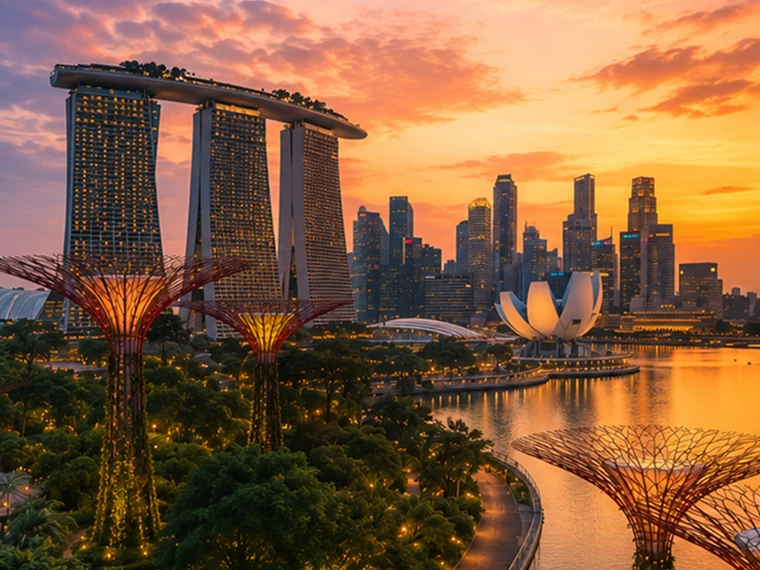
Help me plan a trip to Singapore. I'm going to be there for a work trip in July and will have a few days free at the end.

Great add-on city for a work trip: Singapore is compact, safe, excellent for solo exploring, and easy to do in 2–4 free days. July is hot and humid; expect daytime highs around 31–33°C / 88–91°F, warm nights, and sudden rain, so plan outdoor time early morning or after 5 p.m. and keep midday for museums, malls, cafés, or hotel downtime. Singapore’s official weather service notes typical daily highs of 31–33°C and lows of 23–25°C. (Singapore Weather Service(otwiera nowe okno))

memory-preferences-without

A strong 3-day plan

Day 1: Marina Bay, Gardens, and skyline

Start late afternoon at Marina Bay and walk the waterfront: Merlion Park, Helix Bridge, ArtScience Museum exterior, then into Gardens by the Bay. Book Cloud Forest, Flower Dome, and either the OCBC Skyway or Supertree Observatory if views matter to you. Gardens by the Bay lists Cloud Forest and Flower Dome as open daily 9 a.m.–9 p.m.; Supertree Observatory is also listed as 9 a.m.–9 p.m. with last admission at 8:30 p.m., but check maintenance closures before booking. (Gardens by the Bay(otwiera nowe okno))

Evening: stay for the Supertree light show area, then dinner at Lau Pa Sat for an easy first-night hawker experience near the CBD. It has 80+ stalls and local staples like satay, laksa, nasi lemak, bak kut teh, kaya toast, and char kway teow. (Laupasat(otwiera nowe okno))

Day 2: Culture neighborhoods and food

Morning: Chinatown. Visit Buddha Tooth Relic Temple, walk the shophouse streets, and eat at Maxwell Food Centre or Chinatown Complex Food Centre. Visit Singapore lists Maxwell, Chinatown Complex, Old Airport Road, Tiong Bahru Market, Newton, and others among popular hawker centres. (Visit Singapore(otwiera nowe okno))

Afternoon: Kampong Glam and Haji Lane for Sultan Mosque, murals, boutiques, and cafés. Then head to Little India around golden hour for temples, flower garlands, Tekka Centre, and dinner.

Evening: either cocktails around Ann Siang / Club Street, or keep it low-key with a night walk along the Singapore River: Boat Quay to Clarke Quay to Robertson Quay.

Day 3: Nature or beach day

Pick one based on your energy.

For nature: do Singapore Botanic Gardens early, then the National Orchid Garden, followed by lunch in Dempsey Hill or Tiong Bahru. This is the best “green Singapore” day without leaving the city.

For beach/resort mode: go to Sentosa. Choose the southern beaches, Fort Siloso Skywalk, or a beach club. I would skip trying to do every Sentosa attraction unless you love theme parks.

For local food focus: do Tiong Bahru Market for breakfast, National Gallery Singapore midday, then Old Airport Road Food Centre for dinner. The official events page also shows exhibitions and cultural events, so it is worth checking once your exact July dates are fixed. (Visit Singapore(otwiera nowe okno))

Best places to stay after the work part

Marina Bay / CBD is easiest if you want polished, walkable, skyline-heavy Singapore and minimal transit.

Chinatown / Telok Ayer / Tanjong Pagar is my top pick for a few free days: great food, MRT access, heritage streets, cocktail bars, and close to work districts.

Bugis / Kampong Glam is better if you want boutique hotels, cafés, street art, and a slightly more relaxed neighborhood feel.

Orchard is convenient for shopping and rainy-day malls, but less atmospheric.

What to book ahead

Book Gardens by the Bay conservatories/Skyway, any special restaurants, and possibly a cocktail bar. For hawker centres, do not over-plan; just go hungry, carry tissues or wet wipes, and be ready to share tables.

July packing notes

Bring breathable work clothes, comfortable walking shoes, a small umbrella, and a light layer for aggressive air-conditioning. I would also plan one “rain-flexible” indoor block each day, because showers can arrive suddenly even when the forecast looks fine.

My suggested balance: Day 1 Marina Bay/Gardens, Day 2 Chinatown–Kampong Glam–Little India, Day 3 Botanic Gardens or Sentosa. That gives you the Singapore highlights without turning your post-work break into another work project.

Model przekazuje ogólną odpowiedź, która jest bardziej turystyczna, nie pomaga w rezerwacji hotelu i w dużej mierze ignoruje zainteresowania użytkownika.

GPT-5.3 Instant
Help me plan a trip to Singapore. I'm going to be there for a work trip in July and will have a few days free at the end.

I’ll build this around your known constraints: a few free days after work, hot/humid July weather, wildlife/photography/nature bias, strong AC needs for sleep, and good but not overly social dining. I’ll verify current July logistics and then give a practical short itinerary rather than a generic Singapore list.

memory-preferences-with

Here’s how I’d structure it: 2–3 free days, mostly nature / wildlife / photography, with heat-managed mornings and AC breaks. July is hot and humid: Singapore’s July long-term stats are about 31.4°C / 88.5°F average daily max, 25.4°C / 77.7°F min, 146.6 mm rain, and 14 rain days, so outdoor plans should be early morning or evening, not midday. (National Environment Agency(otwiera nowe okno))

Best plan for 3 free days

Day 1 — Gardens by the Bay + Marina Bay, low-friction

Morning: Cloud Forest + Flower Dome. This is the obvious “touristy” pick, but it fits you well because it’s visually interesting, good for photography, and climate-controlled. Gardens by the Bay lists Cloud Forest and Flower Dome-type attractions running 9:00am–9:00pm, and Cloud Forest currently has the Jurassic World experience listed as ongoing. (Gardens by the Bay(otwiera nowe okno))

Late afternoon / evening: Supertree Grove + Borealis / light show. Gardens currently lists Borealis every Sat, Sun & Mon, 8:00–8:30pm at Supertree Grove, so try to align this with one of those nights. (Gardens by the Bay(otwiera nowe okno))

Dinner: do something easy nearby: Marina Bay / Tanjong Pagar / Telok Ayer. For you, I’d prioritize reservation-based restaurants with real tables over hawker centers on the first night, because you dislike cramped solo seating.

Day 2 — Mandai wildlife day

Morning to afternoon: Bird Paradise + River Wonders. Bird Paradise is probably the best fit photographically; River Wonders is less “wildlife photography” and more controlled exhibits, but it pairs well logistically. River Wonders is listed as daily 9:00am–6:00pm, last entry 5:00pm. (Mandai Wildlife Reserve(otwiera nowe okno))

Evening: Night Safari. This is the rare Singapore attraction that is genuinely better at night and avoids the worst heat. Night Safari is listed as daily 6:00pm–12:00am, last entry 11:15pm, with tram plus walking trails and over 900 nocturnal animals. (Mandai Wildlife Reserve(otwiera nowe okno))

This is a full day. I would not add Singapore Zoo unless you have 4 free days; Mandai can become exhausting fast.

Day 3 — Nature reserve / macro-ish walking + food

Early morning: Singapore Botanic Gardens or MacRitchie / Windsor Nature Park. For a few free days, Botanic Gardens is the safer pick: easier transport, less sweaty, better bailout options, and more consistent casual photography. MacRitchie / Windsor is better if you want more actual forest, but it is hotter, sweatier, and less predictable.

Midday: AC break.

Late afternoon: Joo Chiat / Katong or Chinatown / Telok Ayer for walking, architecture, coffee, and dinner. This gives you a different texture from Marina Bay without turning the day into a logistics project.

My ranking for you

  1. Cloud Forest / Gardens by the Bay — best combination of photogenic, iconic, heat-managed.
  2. Bird Paradise + Night Safari — best wildlife-focused day.
  3. Botanic Gardens early morning — best low-stress outdoor nature.
  4. Joo Chiat / Katong — best neighborhood walk.
  5. Hawker centers — worth doing, but not ideal for your seating preferences unless timed off-peak.

What I’d avoid or deprioritize

I would skip Sentosa unless you specifically want beach/resort stuff. I would also skip a packed “greatest hits” day of Merlion / Orchard / Little India / Chinatown / Clarke Quay; it’s inefficient and hot. For you, the trip will be better if each day has one strong anchor plus one easy evening plan.

Hotel / sleep note

Since this is a work trip, your hotel may be fixed. If you can choose or extend at the same hotel, the hard gate is still AC. Singapore hotels are generally AC-heavy, but your requirement is unusually strict.

One thing I need to make this concrete

Send the exact free dates and whether your work hotel is fixed. Then I’d turn this into a day-by-day plan with restaurant targets and a hotel/AC callout.

Model tworzy odpowiedź spersonalizowaną pod kątem zainteresowań użytkownika związanych z fotografią dzikiej przyrody, spokojnymi kolacjami oraz jego priorytetami przy rezerwacji hotelu.

GPT‑5.2 Instant ostatecznie odpowiada na pytanie, ale próbując wyjaśnić swoje granice bezpieczeństwa, właściwą odpowiedź poprzedza długim wstępem dotyczącym tego, w czym nie może pomóc. Z kolei GPT‑5.3 Instant od razu przechodzi do odpowiedzi.

Preferencje mogą być różnorodne:

  1. Instrukcje dotyczące tego, jak ChatGPT powinien odpowiadać („nie wspominaj już o Stefanie”).
  2. Twoje preferencje lub ograniczenia („jestem wegetarianinem”)
  3. Ukryte preferencje kształtujące to, co jest dla Ciebie istotne („mieszkam niedaleko San Francisco” → lokalne propozycje powinny być dopasowane do tego obszaru)

Podczas opracowywania nowego systemu pamięci poprawiliśmy funkcję ChatGPT pozwalającą na stosowanie istotnych preferencji z wcześniejszych rozmów. Nawiązując do powyższego przykładu „jestem wegetarianinem”, możemy ocenić, czy model poprawnie wykorzystuje pamięć do proponowania posiłków odpowiednich dla wegetarian, gdy użytkownik-wegetarianin prosi o sugestie przygotowania czegoś do jedzenia.

Zachowywanie aktualności w czasie

Czas nie zatrzymuje się, gdy kończy się czat.

Tradycyjne systemy pamięci mogą się dezaktualizować. Przykładowo wysyłasz do ChatGPT polecenie: „Jestem w Singapurze i potrzebuję polecenia restauracji na kolację dziś wieczorem”. Potem mija jakiś czas, wracasz do domu i podczas kolejnych czatów zastanawiasz się, dlaczego ChatGPT nadal proponuje Ci miejsca w Singapurze.

Dzięki dreaming wspomnienia są automatycznie aktualizowane wraz z upływem czasu, co pozwala ChatGPT zmienić zawartość swojej pamięci z „Jedziesz do Singapuru w lipcu” na „Byłeś w Singapurze w lipcu 2026 r.”, gdy wyjazd się skończy. Więc gdy wrócisz do domu, ChatGPT może znów podawać rekomendacje dopasowane do Twojej lokalizacji zamieszkania i właściwej strefy czasowej.

GPT-5.2 Instant

Help me find something for take-out tonight that's still open.

It’s about 5:19 AM Sunday in Singapore, so your safest take-out/delivery bets are 24-hour places.

Best bets right now:

  1. McDelivery / McDonald’s Singapore — easiest islandwide option; McDonald’s says McDelivery is available 24 hours, 7 days a week. Breakfast menu should be on now. (McDonald's Singapore(otwiera nowe okno))
  2. Srisun Express — good for prata, Indian Muslim food, local comfort food; their site says they’re halal-certified and open 24/7. (Sri Sun Express(otwiera nowe okno))
  3. 89.7 Supper Club — good if you’re near Changi Village or Geylang East; their outlets page says both locations are open 24 hours, 7 days a week. (89.7 Supper Club(otwiera nowe okno))
  4. 126 Dim Sum Wen Dao Shi — worth checking on GrabFood/foodpanda if you’re in the East; a 2025 guide says it runs till 5:30 AM on weekdays and round-the-clock on weekends. Since it’s Sunday morning, it may still be available. (Eatbook(otwiera nowe okno))
  5. Prata around Geylang / Serangoon / Bedok / Jalan Kayu — look in GrabFood or Google Maps for “prata open now”; guides list multiple 24-hour prata/supper spots, including Mufiz Prata Corner and RK Eating House. (Eatbook(otwiera nowe okno))

For the fastest path: open GrabFood / foodpanda / Deliveroo, set filter to Open now, then search “prata,” “McDonald’s,” “Srisun,” “89.7,” “dim sum,” or “nasi lemak.” If you tell me your neighborhood or nearest MRT, I’ll narrow it to specific nearby places.

Model uważa, że użytkownik nadal jest w Singapurze.

GPT-5.3 Instant

Help me find something for take-out tonight that's still open.

I’ll use Portola Valley / Ladera as the starting point and prioritize places that are plausibly open for takeout tonight, then narrow to low-friction options rather than a huge list.

For tonight, Saturday May 30, near Ladera / Portola Valley, I’d start here:

  1. Alpine Inn — safest casual pickup option. Open Saturday until 9:30 pm and has Order Takeout on its site. Good for burgers / tavern food. (Rossotti's Alpine Inn(otwiera nowe okno))
  2. Taverna Portola Valley — nearby at Ladera Country Shopper; open daily, Saturday dinner until 9:00 pm. Better if you want Greek / Mediterranean. (TAVERNA Portola Valley(otwiera nowe okno))
  3. Portola Bistro — also nearby; Saturday dinner until 9:30 pm. Good option for Italian / Mediterranean / pizza-ish dinner. (Portola Bistro -(otwiera nowe okno))
  4. Amigos Grill — Mexican, very close in Ladera Country Shopper. Official site says call to order at 650-851-3997; DoorDash / order.online lists pickup/delivery ordering until 8:40 pm. (Amigos Grill(otwiera nowe okno))
  5. State of Mind Slice House, Palo Alto — best fallback if you want pizza and can drive farther; Friday–Saturday hours are 11 am–10 pm. (State of Mind Slice House(otwiera nowe okno))

My pick: Alpine Inn for easiest local takeout, Taverna if you want something less heavy, State of Mind if it’s later and you want the most reliable post-9 pm option.

Model podaje odpowiedzi istotne dla miejsca zamieszkania użytkownika.

GPT‑5.2 Instant ostatecznie odpowiada na pytanie, ale próbując wyjaśnić swoje granice bezpieczeństwa, właściwą odpowiedź poprzedza długim wstępem dotyczącym tego, w czym nie może pomóc. Z kolei GPT‑5.3 Instant od razu przechodzi do odpowiedzi.

W naszych ocenach pamięci mierzymy, czy ChatGPT potrafi poprawnie odpowiadać na polecenia, w których upływ czasu istotnie wpływa na poprawność odpowiedzi lub rekomendacji. Metoda dreaming zapewnia w tych kwestiach znaczną poprawę:

Fundament z bardziej przyszłościowymi możliwościami

Misją OpenAI jest zapewnienie, aby ogólna sztuczna inteligencja przynosiła korzyści całej ludzkości.

Pamięć oparta na metodzie dreaming była od pewnego czasu dostępna dla użytkowników Plus i Pro, jednak dopiero teraz możemy zaoferować użytkownikom planów Free wersję, która spełnia nasze kryteria jakości i można z niej wygodnie korzystać w poważnych zastosowaniach. Ostatnie ulepszenia pozwoliły obniżyć poziom mocy obliczeniowej potrzebnej do udostępniania dreaming użytkownikom Free około pięciokrotnie, dzięki czemu będziemy mogli zacząć wdrażać tę metodę dla użytkowników planów Free w najbliższych tygodniach oraz zwiększyć pojemność pamięci dla użytkowników planów Plus i Pro.

Metoda dreaming zapewnia nam teraz wspólny fundament pamięci dla wszystkich użytkowników. Niniejsza aktualizacja wprowadza nasz najbardziej zaawansowany jak do tej pory system pamięci, który będziemy nadal ulepszać.

Aby dowiedzieć się więcej o tej wersji i mechanizmach kontroli pamięci dostępnych dla użytkownika, odwiedź naszą sekcję Częstych pytań dotyczących pamięci(otwiera nowe okno).


Autor

OpenAI