Esittelyssä ChatGPT:n työtila-agentit
Codexin tukemat agentit tiimeille.
Workspace agents are now generally available in ChatGPT Business, Enterprise, and Edu, helping teams turn their knowledge, best practices, and repeatable workflows into shared agents that can move work forward across your tools.
For the current experience:
Tänään esittelemme ChatGPT:n työtila-agentit. Tiimit voivat nyt luoda jaettuja agentteja, jotka voivat käsitellä monimutkaisia tehtäviä ja pitkäkestoisia työnkulkuja samalla kun ne toimivat organisaation määrittämien käyttöoikeuksien ja hallinta-asetusten puitteissa.
Työtila-agentit ovat GPT:ien kehitysaskel. Codexin tukemana ne voivat hoitaa monia sellaisia työtehtäviä, joita ihmiset jo tekevät – raporttien laatimisesta koodin kirjoittamiseen ja viesteihin vastaamiseen. Ne toimivat pilvessä, joten ne voivat jatkaa työskentelyä silloinkin, kun itse et ole enää töissä. Ne on myös suunniteltu jaettaviksi organisaation sisällä, joten tiimit voivat rakentaa agentin kerran, käyttää sitä yhdessä ChatGPT:ssä tai Slackissa ja kehittää sitä ajan myötä.
Tekoäly on jo auttanut ihmisiä työskentelemään nopeammin itsenäisesti. Mutta monet organisaation sisäisistä tärkeimmistä työnkuluista riippuvat jaetusta kontekstista, tehtävien siirroista ja tiimien välisistä päätöksistä. Työtila-agentit on suunniteltu juuri tällaiseen työhön: ne voivat kerätä kontekstia oikeista järjestelmistä, noudattaa tiimin prosesseja, pyytää hyväksyntää tarvittaessa ja pitää työn liikkeessä eri työkalujen välillä. Esimerkiksi OpenAI:n myyntitiimi käyttää agenttia kokoamaan yhteen tietoja puhelumuistiinpanoista ja asiakastutkimuksesta, arvioimaan uusia liidejä ja laatimaan seurantasähköpostiluonnoksia suoraan myyntiedustajan sähköpostilaatikossa. Se auttaa asiakastiimejä käyttämään vähemmän aikaa yksityiskohtien kokoamiseen ja enemmän aikaa asiakkaiden kanssa.
Työtila-agentit ovat saatavilla tutkimusesiversiona ChatGPT Business-, Enterprise-, Edu- ja Teachers-tilauksissa. Aloita kuvailemalla työnkulku, jonka tiimisi tekee usein, niin ChatGPT auttaa sinua muuttamaan sen agentiksi alusta loppuun.
Toimittajan huomautus: GPT:t ovat käytettävissä edelleen, kun tiimit testaavat työtila-agentteja työnkuluissaan. Pian teemme GPT:iden muuntamisesta työtila-agenteiksi helppoa.
A software review agent that triages software requests, enforces policy, routes approvals, and opens IT tickets with clear next steps.
A product feedback routing agent that captures feedback from Slack, support, and public channels, prioritizes what matters, and turns signals into weekly product action.
A weekly metrics reporting agent that auto-pulls Friday data, generates charts, drafts the narrative, and delivers a business report.
A lead outreach agent that qualifies inbound leads, drafts tailored follow-ups, and updates the CRM.
A third-party risk management agent that screens vendors for sanctions, financial, and reputational risk, then delivers reports.
Kuvaile työ, jonka haluat tehtävän, tai liitä tiedosto. ChatGPT auttaa muuttamaan sen agentiksi: määrittelemällä vaiheet, yhdistämällä oikeat työkalut, lisäämällä taitoja ja testaamalla sitä, kunnes se toimii odotetulla tavalla.
Tässä on muutamia agentteja, joita OpenAI:n tiimit ovat rakentaneet – ja joita myös sinun tiimisi voi rakentaa:
Ohjelmistojen tarkastaja: Tarkastaa työntekijöiden ohjelmistopyynnöt, vertaa niitä hyväksyttyihin työkaluihin ja käytäntöihin, suosittelee seuraavia vaiheita ja laatii tarvittaessa IT-tukipyyntöjä.
Tuotepalautteen reititin: Valvoo Slackia, tukikanavia ja julkisia keskustelufoorumeita ja muuntaa palautteen priorisoiduiksi tukipyynnöiksi ja viikoittaisiksi tuoteyhteenvedoiksi.
Viikoittainen tilastoraportoija: Hakee tiedot joka perjantai, luo kaavioita, kirjoittaa yhteenvedon ja jakaa raportin tiimin kanssa.
Liidien yhteydenottoagentti: Tutkii saapuvia liidejä, pisteyttää ne kriteeriesi perusteella, laatii personoituja seurantasähköposteja ja päivittää asiakkuudenhallintajärjestelmääsi.
Kolmannen osapuolen riskienhallintavastaava: Tutkii toimittajia, arvioi esimerkiksi pakotealtistusta, taloudellista tilaa ja maineriskiä kuvaavia signaaleja sekä laatii jäsennellyn raportin.
Voit myös aloittaa nopeasti talous-, myynti-, markkinointi- ja muiden alojen mallien(avautuu uudessa ikkunassa) avulla. Jokaisessa on integroidut taidot ja suositellut työkalut, joten voit ottaa agentin nopeasti käyttöön ja mukauttaa sitä edelleen.
Selvitä, miten työtila-agentteja rakennetaan OpenAI Academyssa. Löydät lisätietoja ohjekeskuksesta(avautuu uudessa ikkunassa).
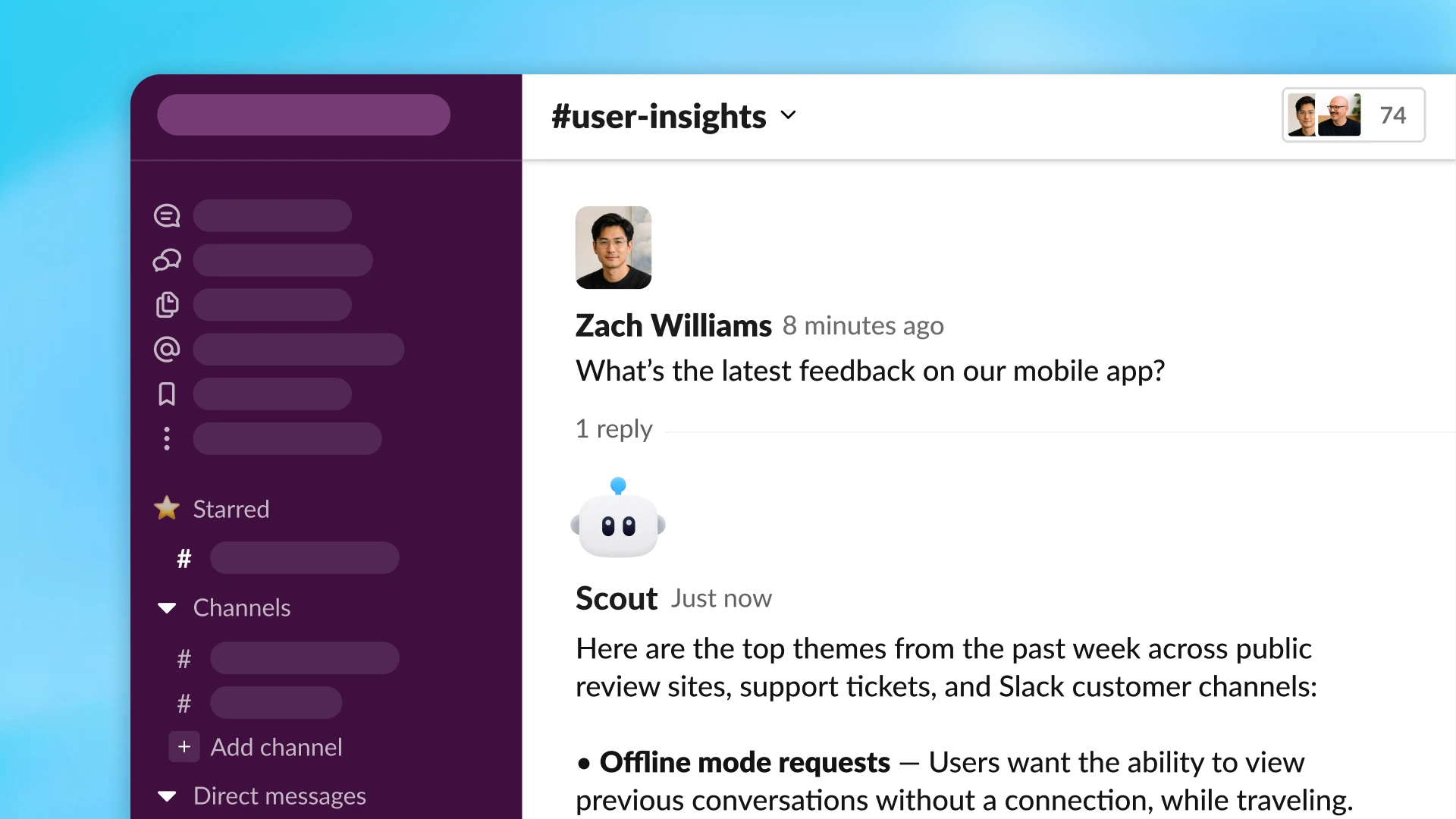
Työtila-agentit voivat kerätä kontekstia ja suorittaa toimenpiteitä kymmenissä työkaluissa.
Agentit toimivat pilvessä Codexin avulla, jolloin niillä on käytössään työtila tiedostoja, koodia, työkaluja ja muistia varten. Agentit tekevät muutakin kuin vastaavat kehotteeseen: ne voivat kirjoittaa tai suorittaa koodia, käyttää yhdistettyjä sovelluksia, muistaa oppimansa ja jatkaa työskentelyä useiden vaiheiden läpi.
Työtila-agentit voivat jatkaa työskentelyä, vaikka olisit poissa. Voit määrittää ne toimimaan aikataulun mukaan tai ottaa ne käyttöön Slackissa, jotta ne voivat käsitellä pyyntöjä niiden saapuessa. Esimerkiksi tuotetiimimme loi agentin, joka vastaa ennakoivasti työntekijöiden kysymyksiin Slack-kanavilla. Agentti vastaa selkeästi, liittää asiaankuuluvat ohjeet ja voi tehdä tukipyynnön, jos se havaitsee uuden ongelman. Tämä agentti auttaa tiimejä poistamaan esteitä nopeasti ja varmistaa, että tärkeät jatkotoimet eivät jää huomaamatta.
Tänä päivänä tiimit voivat käyttää agentteja ChatGPT:ssä ja Slackissa, ja lisää käyttöpintoja on tulossa pian. Agentit voivat liittyä keskusteluihin ja työnkulkuihin siellä, missä työ jo tapahtuu, mikä auttaa tiimejä viemään työtä eteenpäin vähemmällä koordinoinnilla.
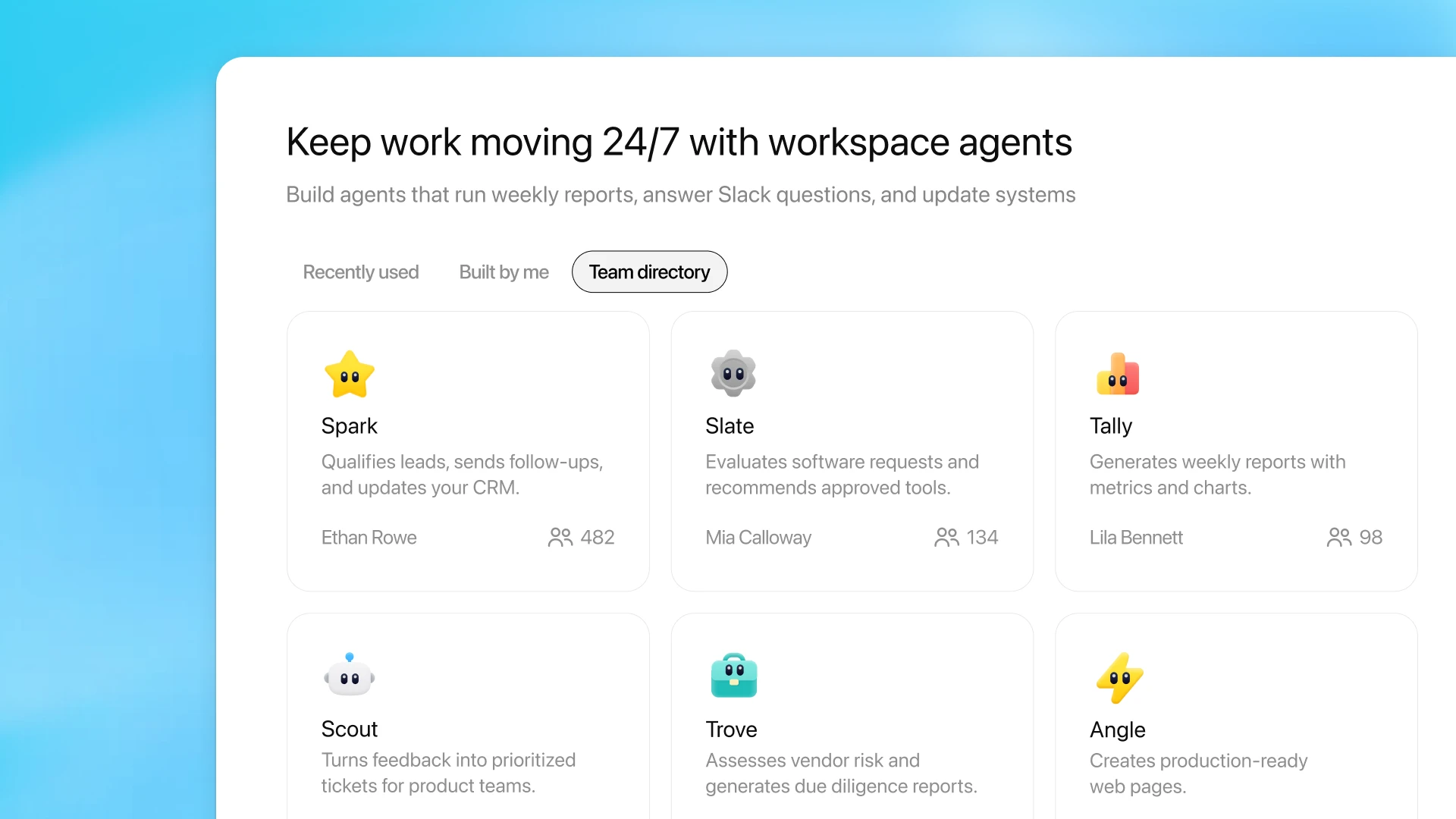
Hallitse jakamista ja tutustu tiimisi jakamiin työtila-agentteihin ChatGPT:n sivupalkin Agentit-välilehdellä.
Tieto on usein hajallaan ihmisten ja järjestelmien välillä. Työtila-agentit tarjoavat tiimeille keinon muuttaa tieto uudelleenkäytettäväksi työnkuluksi: sellaiseksi, joka noudattaa oikeaa prosessia, käyttää oikeita työkaluja ja voidaan jakaa koko organisaatiossa.
Esimerkiksi kirjanpitotiimimme rakensi agentin, joka valmistelee kuukauden lopun keskeiset osat, aina kirjanpitomerkinnöistä taseen täsmäytyksiin ja varianssianalyysiin. Se suorittaa työn minuuteissa, luo työpaperit, jotka sisältävät pohjana olevat syötteet ja tarkastusta varten tarvittavat kontrollisummat, ja noudattaa sisäisiä käytäntöjä. Agentti on kaikkien tiimin jäsenten käytettävissä ChatGPT:ssä, tai se on lisätty Slack-kanaville, jotta tiimi voi esittää sille kysymyksiä ja tehdä yhteistyötä sen tuotosten pohjalta.
Koska agenteilla on muisti ja niitä voidaan ohjata ja korjata keskustelussa, ne kehittyvät sitä mukaa, kun tiimit käyttävät niitä. Ajan myötä agenteista muodostuu käytännöllinen tapa pitää tiimin tieto ajan tasalla: luo kerran, kehitä käytön myötä ja jaa tai monista sitten uusiin työnkulkuihin.
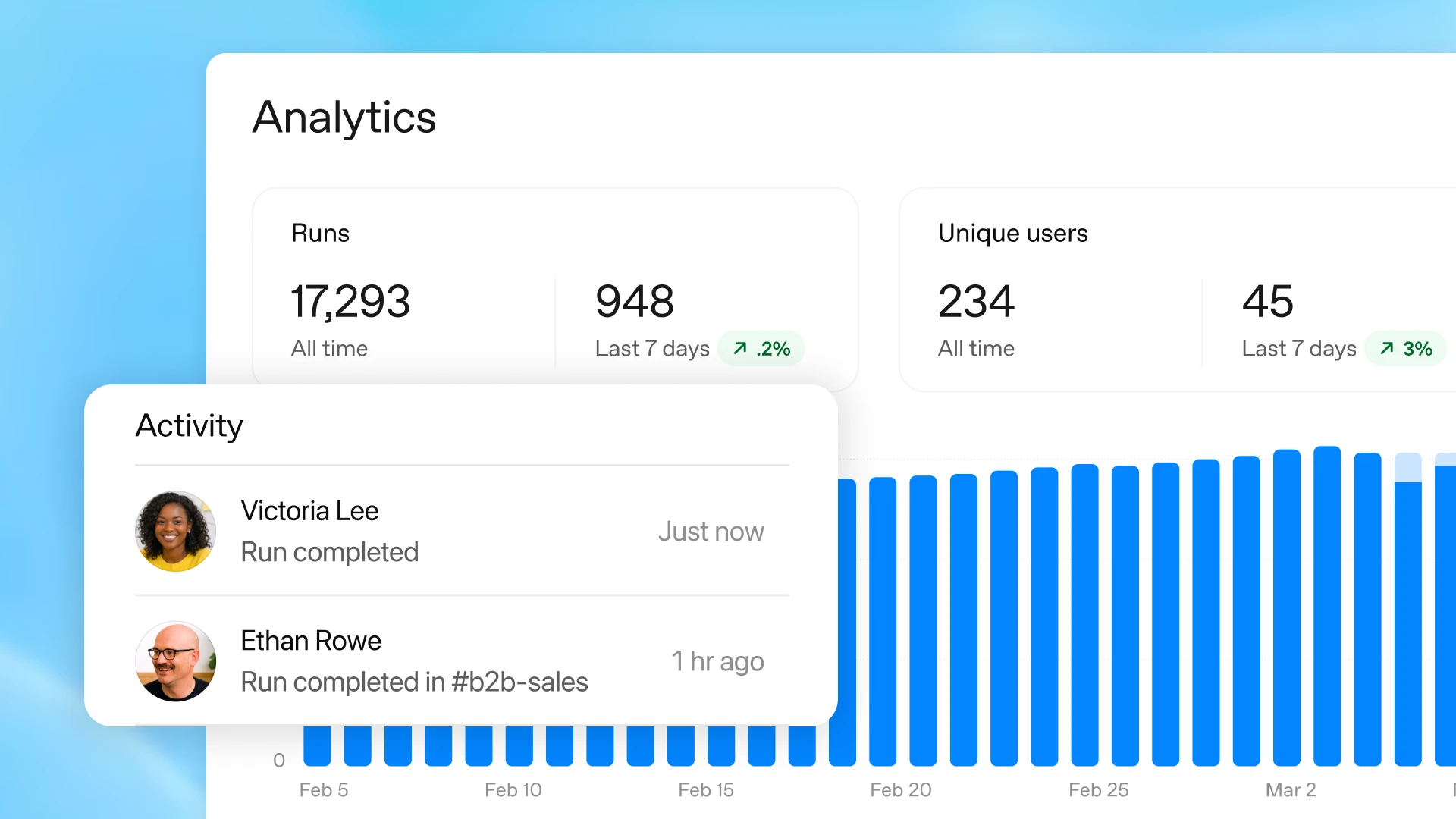
Näet reaaliaikaisen työtila-agenttien analytiikan editorin valikosta.
Kun delegoit työn agentille, säilytät hallinnan. Sinä päätät, mitä työkaluja ja tietoja se voi käyttää, mitä toimintoja se voi suorittaa ja milloin se tarvitsee hyväksynnän. Arkaluonteisissa vaiheissa, kuten laskentataulukon muokkaamisessa, sähköpostin lähettämisessä tai kalenteritapahtuman lisäämisessä, voit vaatia, että agentti pyytää lupaa ennen etenemistä.
Kun olet jakanut agentin, analytiikka auttaa sinua näkemään, miten sitä käytetään, mukaan lukien kuinka monta suorituskertaa se on tehnyt ja kuinka moni käyttää sitä.
Työtila-agentit sisältävät yritystason valvonta- ja hallintatoiminnot, joiden avulla ylläpitäjät voivat suojata arkaluonteisia tietoja ja tarjota samalla tiimeille turvallisen tavan nopeuttaa työskentelyä tekoälyn avulla. ChatGPT Enterprise- ja Edu-ylläpitäjät voivat hallita, mitä yhdistettyjä työkaluja ja toimintoja käyttäjäryhmät voivat käyttää. Ylläpitäjät voivat hallita, kenellä on oikeus käyttää, rakentaa ja jakaa agentteja. Sisäänrakennetut suojatoimet auttavat agentteja noudattamaan ohjeitasi, kun ne kohtaavat harhaanjohtavaa ulkoista sisältöä, kuten kehoteinjektiohyökkäyksiä.
Compliance API(avautuu uudessa ikkunassa) antaa ylläpitäjille näkyvyyden kaikkien agenttien määrityksiin, päivityksiin ja suorituksiin, jotta he voivat valvoa ja hallita sitä, miten agentteja rakennetaan ja käytetään. Ylläpitäjät voivat myös tarvittaessa jäädyttää agentteja.
Pian ylläpitäjät voivat myös tarkastella hallintakonsolissa kaikkia omassa organisaatiossa luotuja agentteja, mukaan lukien käyttömallit ja yhdistetyt tietolähteet.
Työtila-agenttien varhaiset testaajat ovat jo havainneet johdonmukaisempia tuloksia ja lisääntynyttä aikaa arvokkaampaan työhön.
Työtila-agentit ovat saatavilla tutkimusesiversiona ChatGPT Business-, Enterprise-, Edu- ja Teachers-tilauksissa. Enterprise- ja Edu-tilauksissa ylläpitäjät voivat ottaa agentit käyttöön roolipohjaisten käyttöoikeuksien avulla.
Työtila-agentit ovat ilmaisia 6.5.2026 asti, ja krediittipohjainen hinnoittelu alkaa kyseisestä päivämäärästä.
Lisäämme edelleen tulevien viikkojen aikana uusia hienoja ominaisuuksia auttamaan tiimejä saamaan enemmän aikaan vähemmällä manuaalisella työllä. Tämä sisältää uusia käynnistimiä, jotka voivat käynnistää työn automaattisesti, parempia koontinäyttöjä suorituskyvyn ymmärtämiseen ja parantamiseen, enemmän tapoja, joilla agentit voivat suorittaa toimenpiteitä eri yritystyökaluissa, sekä tuen työtila-agenteille Codex-sovelluksessa.
Tiimit toimivat parhaiten, kun tieto on helpommin löydettävissä, prosesseja on helpompi noudattaa ja ihmiset voivat saada apua työn lomassa. Työtila-agentit ovat varhainen askel kohti tätä tulevaisuutta: tekoälyä, joka toimii ihmisten rinnalla niissä työkaluissa ja keskusteluissa, joissa työ jo tapahtuu. Tämä auttaa tiimejä käyttämään vähemmän aikaa työn koordinointiin ja enemmän aikaa luomiseen, rakentamiseen ja liiketoimintaa eteenpäin vievien päätösten tekemiseen.